Video streaming

Prime Video-style Streaming Hub — Custom-Built for Your Market

Subscription video library with rentals, purchases, and channel entitlements. Planned for media groups aggregating owned and licensed film and television catalogs with role-specific workflows, operator controls, integrations, and a handover boundary defined for the selected market.

See product screens and demo access

Custom workflows

Brand-safe product strategy

Admin and operations tooling

Reference walkthrough by arrangement

Plan a Prime Video-style catalogue, entitlement and viewing experience.

Use this illustrative settings reference to plan an OTT product with a browsable catalogue, subscription tiers, rentals or purchases, profiles and support operations. A buyer walkthrough should trace a title from rights and metadata review through entitlement, playback hand-off and account support. Confirm the current demo, licensed providers and delivery responsibilities before selecting the build.

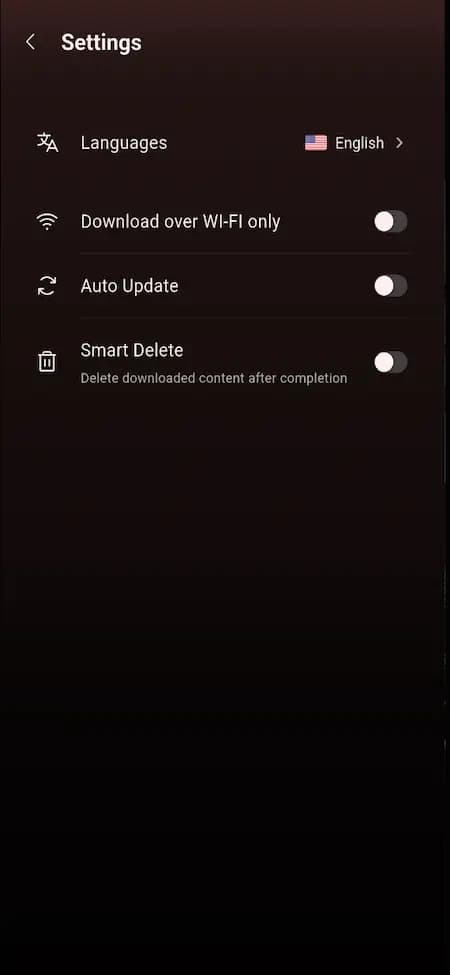
Illustrative OTT viewer settings reference with language and download preferences

Illustrative OTT viewer settings reference with language and download preferences

Illustrative viewer-settings reference showing language, Wi-Fi-only downloads, automatic updates and smart-delete controls. It is a planning aid, not an Amazon Prime Video interface, playback or commerce proof, working feature claim or affiliation statement. Sample imagery does not provide a content licence, DRM entitlement or rights clearance for a client catalogue.

What to check in the walkthrough

  • How should a viewer move between subscription access, a rental, a purchase and a title that is unavailable in their territory? Ask to test entitlement checks, payment failure, refunds, expiry and an account with no active plan; verify which billing and tax providers are included.
  • What is the publishing path for a film or series with artwork, trailers, captions, audio tracks, age ratings, territory windows and parental controls? Ask to follow draft, review, scheduled, published and takedown states while recording the roles and audit events an operator can inspect.
  • How should playback hand off across mobile, web and connected-TV surfaces? Ask to test resume position, concurrent sessions, language selection, quality changes, downloads and a failed token, then confirm the player, CDN, DRM and offline components that are actually in scope rather than assumed from the reference image.
Open full-size reference

Solution reference register

01 / Reference and IP

This page references third-party product names only to describe familiar product models and planning references. App Clone Labs is not affiliated with or endorsed by those brands. Build decisions require independent legal, regulatory, and operational review for your market.

02 / Artifact status

Boards, diagrams, screens and workflow descriptions on this page are illustrative planning artifacts, not evidence of a deployed client product.

03 / Regulatory caveat

Maintain content moderation and viewer-reporting paths · Track licenses, territories, windows, and IP takedowns · Apply age ratings, parental controls, and minor-safety design · Review captioning, classification, and local audiovisual obligations

04 / Rights and handover

Source access, licensing, repositories, environments, documentation, acceptance and handover are defined by the signed contract and accepted scope.

Scope

Operating model defined

Roles, workflows, dependencies, exclusions, and assumptions are made reviewable.

Evidence: illustrative

System

Applications connected

Experience, operations, services, data, integrations, and release controls are planned together.

Evidence: illustrative

Handover

Rights stated in writing

Access, assignment, licensing, dependencies, documentation, and support follow the signed agreement.

Evidence: illustrative

Artifact register

Product screens and planning references.

Reference screens illustrate workflows, not a contracted feature list. Sample prices, data, and responses are demonstration content; confirm the current scope during a walkthrough.

Prime Video-style Streaming Hub connected product workflow planning visual
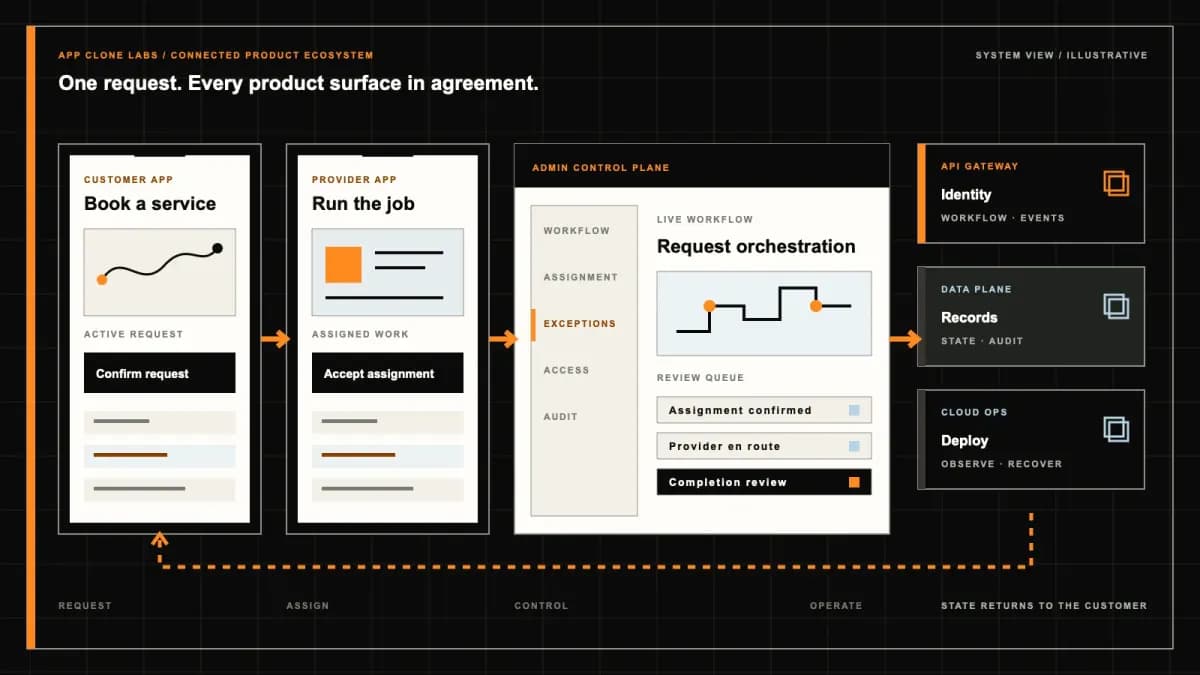
Connected customer, operations, and data workflowEvidence: illustrativeOpen full-size reference
Prime Video-style Streaming Hub product engineering ecosystem visual
Product engineering ecosystem and handover boundaryEvidence: illustrativeOpen full-size reference

A subscription does not unlock every title

A member opens a film that appears beside an included series. The film requires a rental, its offer is unavailable in the viewer’s territory, and a previous purchase exists on another account. One prominent Play button cannot explain those conditions. The storefront needs to distinguish an available offer from an entitlement the signed-in account can actually use.

Prime Video-style development means an independently branded streaming hub combining a subscription catalog with selected rental, purchase or partner-channel offers. The brief must connect licensed availability, payment evidence and playback authorization. It includes no Amazon affiliation, Prime benefits, proprietary catalog access or permission to distribute a film.

Choose the offer model before arranging the catalog

Decide which titles are included in membership, which need a separate transaction and whether partner packages belong in the first release. Display those distinctions in search results and title details, with the chosen version and price confirmed before payment. An account can hold several access routes to the same film; canceling one route should not automatically erase another valid entitlement.

The Prime Video rental and purchase help describes additional title purchases and different rental and purchase availability conditions. It is a reference for explaining distinct offers, not a policy your service inherits. Define your own reviewed terms and title-specific conditions; do not copy a viewing deadline into every rental.

If the first release only needs an included membership library, compare the Netflix-style streaming scope before committing to transactional offers and partner reconciliation.

Make territory and rights windows publishing inputs

For each film or episode, associate the licensed asset with permitted territories, languages, offer types and availability start and end times. Specify the timezone and approval owner. A title can have subscription rights in one territory and rental rights elsewhere, with different windows; a single available flag cannot express that agreement.

Have the rights owner review the launch rules and travel scenarios. Define withdrawal, corrected metadata and what happens to existing purchases if a distribution agreement changes. Recheck authorization when playback begins, and agree how an in-progress session is treated at expiry. Catalog caching and a scheduled homepage row must not extend an expired offer.

Keep payment evidence separate from viewing entitlement

A completed browser checkout is not sufficient evidence to unlock a film. Validate provider events or store receipts on the server, associate the transaction with the correct account and selected offer, and make repeated events safe to process. Preserve pending and failed states when the provider cannot confirm payment.

Record why access exists: an active subscription, a rental grant, a purchase or a channel package. Give each route its own conditions and history. A refund decision, completed refund and revoked access are separate events; reconcile them against the reviewed policy. Support should be able to explain an authorization result without inventing a payment outcome.

Start the rental clock at an agreed event

A rental may have one deadline to begin watching and another after viewing starts. Define the precise qualifying playback event and the authoritative time source, then show the remaining period consistently across devices. A failed player initialization should not silently consume a viewing window unless that is the agreed, clearly disclosed rule.

Test a viewer who starts on a phone, resumes on a television and reaches expiry during an interruption. Specify retries, session continuation and refund escalation. Purchase access needs its own reviewed availability terms; a purchase label must not promise permanent availability independently of the rights agreement.

Authorize the account, device and playback session

Treat an account, household profile, registered device and active playback session as different records. A child profile can have classification restrictions without a separate payment account. Specify concurrent-session limits, purchase authorization, device removal and the evidence used to release a stale session after a disconnected television.

Check rights and entitlement before issuing a bounded session, and define renewal and revocation behavior. Repeated Play taps should not consume every session slot. Give viewers a clear next action when their device is unsupported or the limit is reached. Retain enough session evidence for support while limiting access to viewing history and device information.

Confirm encoding, CDN and DRM dependencies

Start with masters you have permission to process, then confirm the encoding ladder, packaging formats, storage, CDN delivery and player combinations. These are separate vendor and engineering responsibilities. A working catalog screen proves none of them, and a stream that plays on one desktop browser does not establish television compatibility.

The AWS MediaPackage encryption documentation explains that a DRM provider supplies encryption keys through SPEKE and licenses to supported players. Confirm provider setup and compatibility for the selected stack. DRM and signed delivery requests are controls with operating dependencies; neither guarantees that copying or unauthorized viewing can never occur.

Test unavailable license services, expired session credentials and broken renditions. Define when to retry, when to show a useful error and who owns the incident. Estimate encoding, storage, CDN traffic and license requests from representative viewing sessions rather than promising a fixed infrastructure cost per subscriber.
Publish captions as tested viewing assets

Associate caption and audio-description tracks with the correct title version, language and timing. Include caption quality and synchronization in publication review; the presence of a file does not establish usable captions. Check selection persistence when a viewer resumes on another supported device and confirm how missing tracks are disclosed.

Test keyboard navigation, visible focus, readable controls, screen-reader labels and remote-control interaction on the agreed device matrix. Have the responsible advisers review captioning, classification and accessibility obligations for the launch markets. A configurable player is a starting point for verification, not evidence that every interface meets those obligations.

Recover billing without guessing access status

A failed renewal can leave a customer with a valid purchased film and an inactive subscription. Define grace periods and notices for membership access without disabling unrelated grants. When payment confirmation arrives late, recover the same transaction and entitlement rather than charging the customer again.

Test duplicate callbacks, delayed store receipts, cancellation, chargebacks and a refund whose completion is unknown. Support needs the account’s offer, payment source, access decision and next owner in one case. Restrict manual credits or access extensions, record their reasons and expiry, and reconcile provider records before describing a refund as complete.

Give content operations a release and withdrawal desk

Separate ingest, asset review, rights approval, scheduled release and publication. Content staff need to see incomplete captions, failed encodes, missing classification and conflicting windows before a title appears in the storefront. Use stable title and episode identifiers so artwork corrections do not create duplicate purchases or reset watch history.

A rights correction needs an accountable withdrawal path across discovery, offer display and new playback authorization. Preserve the decision and alert support about affected viewers. Limit master downloads, rights changes and publication approval to the appropriate roles; confirm backup and recovery of catalog, grant and decision records during handover.

Ask the walkthrough to prove access failures and recovery

Request a connected viewer, content-operations and support demonstration. Identify which streams are authorized test assets, which providers are sandboxes and which screens are illustrative concepts. Reference artwork and catalog cards do not establish licensed film supply, working billing, device coverage or deployed DRM.

For buyer acceptance, show a subscription title, a rental and a purchase in one account. Expire a rights window, refuse an unsupported territory and attempt a second session at the agreed limit. Then interrupt a license request, replay a payment event and refund a rental. Check captions on representative devices and recover an interrupted publication. Every refusal or recovery needs a visible reason, retained evidence and an owner.

Bring a rights matrix and a supported-device shortlist

Bring a redacted rights matrix, sample masters and caption tracks, proposed offers and real billing exceptions. Name the rights approver, content publisher, support lead and vendor incident owners. Choose one bounded catalog and territory set, then agree which entitlement types and devices belong in the first release.

Use a streaming scope discussion to distinguish available capabilities, configuration, custom engineering and licensed dependencies. Confirm source ownership, provider access, recurring delivery costs, support and acceptance evidence before agreeing delivery dates.

Review the delivery process to set checkpoints around rights approval, playback authorization, device testing and operational handover.

Product flow

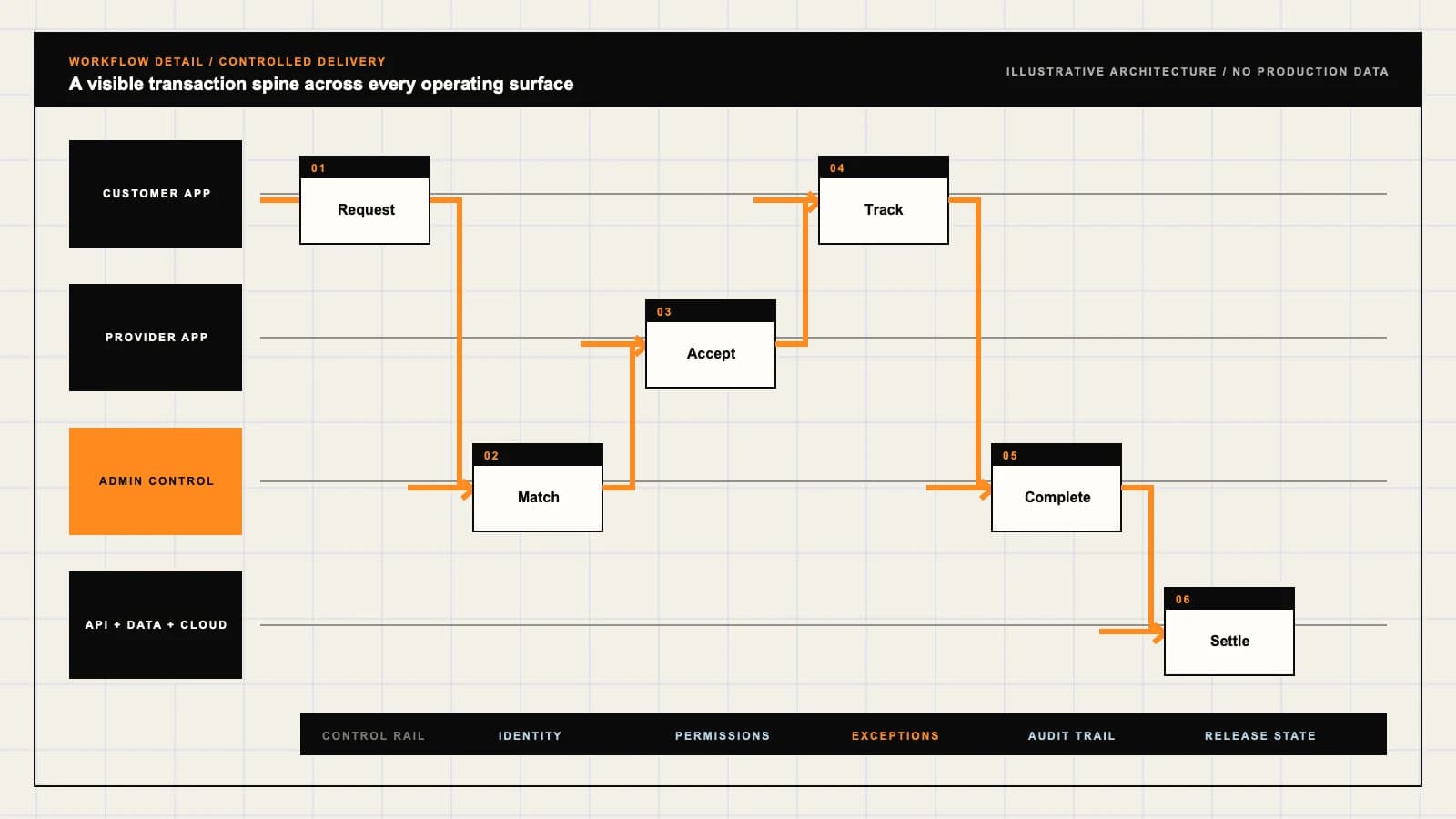
Role-workflow flow diagram.

A visual map of how each role interacts with each workflow stage, with operator controls and integration boundaries.

Deployable Product Architecture

Prime Video-style Streaming Hub

RELEASE A TITLE W…RESOLVE THE VIEWE…OBSERVE THE SESSI…Know what access …Prepare a license…Resolve access an…INTEGRATIONS: Encoding, packaging, CDN and DRM providers with confirmed accounts, player …OPERATOR CONTROLS: Version availability and withdrawal decisions · Enforce entitlement and ses…
Illustrative validation artifact — role-workflow flow diagram; final surfaces, boundaries, and integration topology are confirmed during discovery.

User roles

Prime Video-style Streaming Hub roles and workflows.

Clone-inspired platforms usually need several coordinated interfaces, not just a customer app.

Viewer

01

Know what access a title requires

Browse available offers, use an eligible subscription or choose a rental or purchase. Manage profiles, registered devices, viewing sessions and support requests.

Content operations

02

Prepare a licensed title for publication

Maintain rights windows, territory offers, metadata, classification and caption assets. Review encoded playback versions and schedule release or withdrawal.

Service operations

03

Resolve access and playback exceptions

Inspect payment evidence, entitlement decisions and playback sessions with scoped permissions. Reconcile refunds and manage provider incidents without exposing account credentials.

Workflow

Prime Video-style Streaming Hub workflow stages.

Each workflow stage is mapped to a role, screen, API, notification, admin control, and measurable launch outcome.

Publish

01

Release a title within its licensed window

Approve masters, captions, ratings and artwork alongside territory and offer rights. Schedule catalog visibility only after the required asset and playback checks pass.

Authorize

02

Resolve the viewer’s offer and access conditions

Confirm subscription, rental, purchase or channel access against territory, window and device rules. Record the reason for refusal and reconcile pending payments before granting new access.

Play and support

03

Observe the session and handle recovery

Start playback through the configured video and DRM providers. Track interruption evidence, session expiry and caption availability; give support an accountable next action.

Deployable Product Architecture

Workflow / system register

Revision EPlanning surface

Content platform

Prime Video-style Streaming Hub workflow stages.

Publishing is only the start of the system

Content platform: Prime Video-style Streaming Hub workflow stages.Publishing is only the start of the system. Entitlements, discovery, delivery quality, and governance work together.
01

Release a title within its licensed window

02

Resolve the viewer’s offer and access conditions

03

Observe the session and handle recovery

Control note

Entitlements, discovery, delivery quality, and governance work together.

Illustrative architecture register; validate against the accepted scope.

Operator controls

Prime Video-style Streaming Hub admin and operator controls.

The control center is scoped as a first-class product surface, not an afterthought.

Rights authority

01

Version availability and withdrawal decisions

Keep contract references, title identifiers, territories, offer types and start and end times attributable. Escalate conflicting rights rather than publishing an ambiguous offer.

Access decisions

02

Enforce entitlement and session boundaries

Evaluate playback on the server, with device and concurrent-session policy. Limit support overrides and preserve the reason, approver and expiry of any exception.

Operational evidence

03

Separate delivery failures from account failures

Distinguish unavailable assets, denied licenses, expired rentals and uncertain billing. Retain useful incident evidence with bounded access and retention.

Monetization

Prime Video-style Streaming Hub monetization models.

We model monetization early so payments, admin controls, and reporting support the business.

Sell a defined subscription catalog

Describe included titles, renewal conditions and territory availability. Define cancellation, grace periods and recovery after a failed renewal before enabling recurring billing.

Price rentals and purchases separately

Show the selected offer, quality, viewing conditions and total before payment. Reconcile payment and access events, with a reviewed policy for refunds and withdrawn titles.

Agree package access and reporting

Confirm partner rights, subscriber eligibility, settlement evidence and cancellation responsibilities. A channel subscription must not silently unlock unrelated storefront purchases.

Integrations

Prime Video-style Streaming Hub integration surface.

External systems that determine launch readiness, data flow, and operational continuity.

Integration

01

Integration 1

Encoding, packaging, CDN and DRM providers with confirmed accounts, player compatibility, license policies, delivery costs and outage ownership

Integration

02

Integration 2

Payment and subscription providers with confirmed territories, receipt validation, renewal events, refunds and entitlement reconciliation

Integration

03

Integration 3

Rights, metadata, classification and caption systems with permitted asset access, consistent title identifiers, release approvals and correction ownership

Scope drivers

Prime Video-style Streaming Hub scope drivers.

The variables that most influence build effort, cost, and launch readiness.

Rights model

01

Choose the launch catalog and territories

Confirm licensed assets, offer types, availability windows and withdrawal obligations. Reference branding supplies neither films nor distribution permission.

Playback coverage

02

Bound the supported device matrix

Choose browsers, mobile platforms and television devices explicitly. Measure start time, buffering, caption behavior and license failures on representative hardware and networks.

Operating model

03

Assign publication, billing and incident owners

Agree catalog review capacity, customer support access and vendor escalation. Estimate encoding, storage, CDN traffic and license costs for realistic viewing patterns.

Deployable Product Architecture

Scope drivers / system register

Revision BPlanning surface

Content platform

Prime Video-style Streaming Hub scope drivers.

Publishing is only the start of the system

Content platform: Prime Video-style Streaming Hub scope drivers.Publishing is only the start of the system. Entitlements, discovery, delivery quality, and governance work together.
01

Choose the launch catalog and territories

02

Bound the supported device matrix

03

Assign publication, billing and incident owners

Control note

Entitlements, discovery, delivery quality, and governance work together.

Illustrative architecture register; validate against the accepted scope.

V1 scope

Prime Video-style Streaming Hub V1 foundation.

Launch the smallest complete operating loop first, then scale the product with confidence.

Viewer storefront

01

Browse and understand the launch offers

Provide title details, clear subscription or transactional labels, account access and watch history. Confirm supported profiles, caption tracks and devices in the acceptance brief.

Playback authorization

02

Connect an eligible account to a tested stream

Evaluate rights and entitlement before session creation. Include selected provider integration, concurrency rules and visible recovery when authorization or playback fails.

Content and support desk

03

Publish carefully and explain access failures

Review assets and rights before release, withdraw expired offers and inspect billing and session evidence. Limit operational changes to authorized staff.

Later phases

Prime Video-style Streaming Hub post-launch expansion.

Capabilities that should usually wait until real usage proves the core loop.

Channel aggregation

01

Add partner packages with distinct access

Expand after confirming partner contracts, title mapping, subscriber reconciliation and revenue reporting. Keep package cancellation distinct from the base membership.

Offline viewing

02

Scope downloads as another licensed workflow

Confirm offline rights, DRM support, device storage, expiry and revocation behavior. Test renewal and travel scenarios on each supported platform.

Discovery and television

03

Expand after playback evidence is stable

Add recommendations or additional television apps once catalog data, device support and incident handling are reliable. Validate navigation and remote-control accessibility separately.

Deployable Product Architecture

Later phases / system register

Revision CPlanning surface

Content platform

Prime Video-style Streaming Hub post-launch expansion.

Publishing is only the start of the system

Content platform: Prime Video-style Streaming Hub post-launch expansion.Publishing is only the start of the system. Entitlements, discovery, delivery quality, and governance work together.
01

Add partner packages with distinct access

02

Scope downloads as another licensed workflow

03

Expand after playback evidence is stable

Control note

Entitlements, discovery, delivery quality, and governance work together.

Illustrative architecture register; validate against the accepted scope.

Regulatory review

Prime Video-style Streaming Hub regulatory and compliance flags.

Each flag must be reviewed by qualified counsel for your target market before build or launch.

Flag 1

Maintain content moderation and viewer-reporting paths

Flag 2

Track licenses, territories, windows, and IP takedowns

Flag 3

Apply age ratings, parental controls, and minor-safety design

Flag 4

Review captioning, classification, and local audiovisual obligations

Reference walkthrough

Request a Prime Video-style Streaming Hub reference walkthrough.

Ask us to confirm which reference surfaces are currently available for this product model. Rather than publishing shared demo credentials, we schedule a private guided walkthrough for qualified buyers.

Reference surface

01

Viewer: Know what access a title requires

Request a role-specific demonstration and confirm which capabilities are currently available. Review the proposed responsibility: Browse available offers, use an eligible subscription or choose a rental or purchase. Manage profiles, registered devices, viewing sessions and support requests.

Reference surface

02

Content operations: Prepare a licensed title for publication

Request a role-specific demonstration and confirm which capabilities are currently available. Review the proposed responsibility: Maintain rights windows, territory offers, metadata, classification and caption assets. Review encoded playback versions and schedule release or withdrawal.

Reference surface

03

Service operations: Resolve access and playback exceptions

Request a role-specific demonstration and confirm which capabilities are currently available. Review the proposed responsibility: Inspect payment evidence, entitlement decisions and playback sessions with scoped permissions. Reconcile refunds and manage provider incidents without exposing account credentials.

Next step

04

Book a walkthrough

Request a live, private walkthrough of the reference implementation. We will confirm scope and discuss configured deployment versus custom build for your market.

Open register

Deployable Product Architecture

Reference walkthrough / system register

Revision DPlanning surface

Content platform

Request a Prime Video-style Streaming Hub reference walkthrough.

Publishing is only the start of the system

Content platform: Request a Prime Video-style Streaming Hub reference walkthrough.Publishing is only the start of the system. Entitlements, discovery, delivery quality, and governance work together.
01

Viewer: Know what access a title requires

02

Content operations: Prepare a licensed title for publication

03

Service operations: Resolve access and playback exceptions

04

Book a walkthrough

Control note

Entitlements, discovery, delivery quality, and governance work together.

Illustrative architecture register; validate against the accepted scope.

Process

A traceable path from decision to acceptance.

  1. 01

    Model teardown

    We map the reference business model, user roles, monetization path, regulatory needs, and launch constraints.

    Artifact: Product teardown, risk map, role matrix

  2. 02

    Market-fit blueprint

    We reshape the model around your market, operations, pricing, workflows, and first release priorities.

    Artifact: Feature scope, flows, technical plan

  3. 03

    Design and build

    Product, design, engineering, QA, and cloud delivery move in weekly demo cycles with visible progress.

    Artifact: Working releases, QA notes, sprint demos

  4. 04

    Launch and operate

    We support production release, monitoring, handoff, roadmap decisions, and post-launch improvement.

    Artifact: Launch checklist, docs, growth backlog

FAQ

Questions to resolve before the build.

01Does the build include Amazon or Prime Video content rights?

No. Prime Video is a product-model reference. Affiliation, Prime benefits, proprietary software and film distribution rights are not included. Supply authorized assets and confirm the territories, languages, offers and windows your agreements permit.

02Can subscription, rental and purchase offers coexist?

They can be scoped as distinct access routes with clear storefront labels and independently recorded entitlements. Confirm the launch offer types, pricing, cancellation and refund rules; canceling membership should not automatically erase a valid purchase grant.

03How are territory restrictions and rights windows handled?

Record approved territory, language, offer type and start and end times for each title. Recheck eligibility at playback authorization and define withdrawal, travel and in-progress session behavior with the rights owner.

04What starts a rental viewing period?

Agree the qualifying playback event and authoritative clock before implementation. Distinguish the deadline to begin watching from the window after viewing starts, and test failed starts, device changes, interruptions and expiry.

05Does purchasing a title promise permanent availability?

Do not promise permanent access independently of the reviewed distribution and customer terms. Define withdrawal, restoration and support responsibilities for purchased titles, and keep the original transaction and grant evidence retrievable.

06How do profiles, devices and concurrent sessions differ?

Profiles organize viewing preferences and restrictions; devices identify supported registrations; playback sessions represent current use. Define concurrency, stale-session release, device removal and purchase authorization separately from account billing.

07Does DRM guarantee that content cannot be copied?

No. DRM requires compatible packaging, a configured license provider and supported players. Confirm those dependencies and test failure recovery; encryption and access controls do not guarantee prevention of every unauthorized use.

08Which devices and video providers are included?

The proposal must name supported browsers, mobile platforms and television devices along with encoding, packaging, CDN and DRM providers. Confirm accounts, recurring costs, compatibility and incident ownership rather than assuming universal playback.

09How are captions and accessibility verified?

Review caption language, timing and title-version mapping, then test selection, synchronization and player controls on representative devices. Include keyboard, focus, screen-reader and remote-control checks, with market-specific obligations reviewed by the responsible advisers.

10What happens after failed renewals or delayed payment events?

Apply the agreed membership grace period and preserve unrelated valid grants. Validate provider evidence, reconcile delayed or repeated events and avoid duplicate charges. Keep pending refunds or payment outcomes visible until confirmation arrives.

11Can content staff schedule releases and withdraw titles?

Scope a permissioned desk for asset review, rights approval, scheduled publication and withdrawal. Record approvers and corrections, and verify that an expired or withdrawn offer stops new authorization as well as disappearing from discovery.

12What should the walkthrough and handover prove?

Verify subscription, rental and purchase access alongside territory refusal, rights expiry, session limits, caption playback, license outages and payment recovery. Identify sandbox and illustrative surfaces, then confirm provider access, support ownership and recovery of catalog and entitlement records.

Primary sources

References behind this page

Dated official documentation, standards, and research that support the factual claims on this page.

  1. 01
  2. 02

Citation readiness

How to interpret this page

Published by App Clone Labs Editorial Team

Commercial claims
Scope, cost, and timeline claims are planning guidance and require validation in a current proposal.
Evidence status
Diagrams, boards, examples, and estimates are illustrative planning artifacts unless explicitly identified with a source and measured evidence status.

Next decision

Turn the brief into an accepted product scope.

Define outcomes, constraints, evidence, rights and handover before delivery begins.

Commercial rights, repositories, environments, documentation, acceptance and handover remain contract-defined.

Scope Prime Video-style Streaming Hub

Independent from Prime Video

App Clone Labs is an independent software development studio. We are not affiliated with, connected to, sponsored by, or endorsed by Prime Video.

Why this name appears

Prime Video is referenced descriptively to identify familiar product mechanics and common search terminology. “Clone” describes a planning reference, not a replica.

Original delivery

Any product delivered by App Clone Labs is independently designed and developed for the accepted scope. It does not contain proprietary code, branding, copy, interface assets, or confidential material from Prime Video.

Trademark ownership

Prime Video and associated names, logos, and marks remain the property of their respective owners. Their use identifies a reference category and does not imply authorization or endorsement.