Grocery and essentials

Blinkit-style Rapid Essentials — Custom-Built for Your Market

Dark-store convenience commerce with rapid local dispatch. Planned for operators running dense micro-fulfillment networks for essentials with role-specific workflows, operator controls, integrations, and a handover boundary defined for the selected market.

See product screens and demo access

Custom workflows

Brand-safe product strategy

Admin and operations tooling

Reference walkthrough by arrangement

Review rapid-essentials discovery, dark-store fulfilment and local dispatch decisions.

Use this grocery-commerce reference to shape a Blinkit-style rapid-essentials product around nearby inventory, service-zone capacity and picker-to-courier handoff. It is illustrative planning media, not Blinkit UI, proof of delivery speed or evidence of affiliation. Ask for a guided demo using your own store zones, catalogue rules and operating hours.

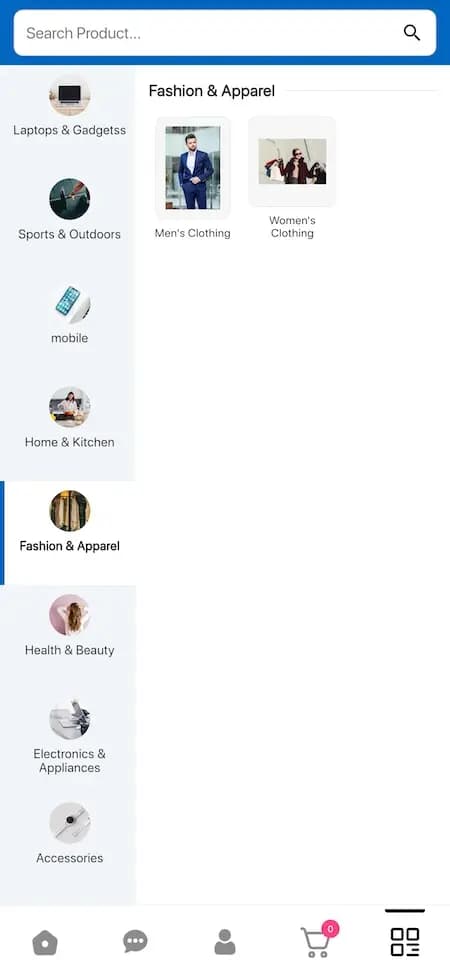
Grocery marketplace category reference showing household and everyday shopping departments

Grocery marketplace category reference showing household and everyday shopping departments

Category-discovery reference with sample departments and demonstration content. It frames a rapid-grocery browsing journey; live inventory, dark-store assignment, promised delivery windows, substitutions and courier tracking are not demonstrated by this screen.

What to check in the walkthrough

  • Ask to search a nearby store zone, add an item that is low in stock and confirm how availability, pack size, substitutions and the delivery promise are shown before checkout.
  • When an order contains items from one or more fulfilment locations, how does the system allocate the order, reserve stock and handle a picker reporting an unavailable item?
  • Who can pause a store zone, change the delivery radius or throttle new orders during a demand spike, and what do customers with an active basket or paid order see?
Open full-size reference

Solution reference register

01 / Reference and IP

This page references third-party product names only to describe familiar product models and planning references. App Clone Labs is not affiliated with or endorsed by those brands. Build decisions require independent legal, regulatory, and operational review for your market.

02 / Artifact status

Boards, diagrams, screens and workflow descriptions on this page are illustrative planning artifacts, not evidence of a deployed client product.

03 / Regulatory caveat

Food handling review required · Courier classification and safety rules vary by market

04 / Rights and handover

Source access, licensing, repositories, environments, documentation, acceptance and handover are defined by the signed contract and accepted scope.

Scope

Operating model defined

Roles, workflows, dependencies, exclusions, and assumptions are made reviewable.

Evidence: illustrative

System

Applications connected

Experience, operations, services, data, integrations, and release controls are planned together.

Evidence: illustrative

Handover

Rights stated in writing

Access, assignment, licensing, dependencies, documentation, and support follow the signed agreement.

Evidence: illustrative

Artifact register

Product screens and planning references.

Reference screens illustrate workflows, not a contracted feature list. Sample prices, data, and responses are demonstration content; confirm the current scope during a walkthrough.

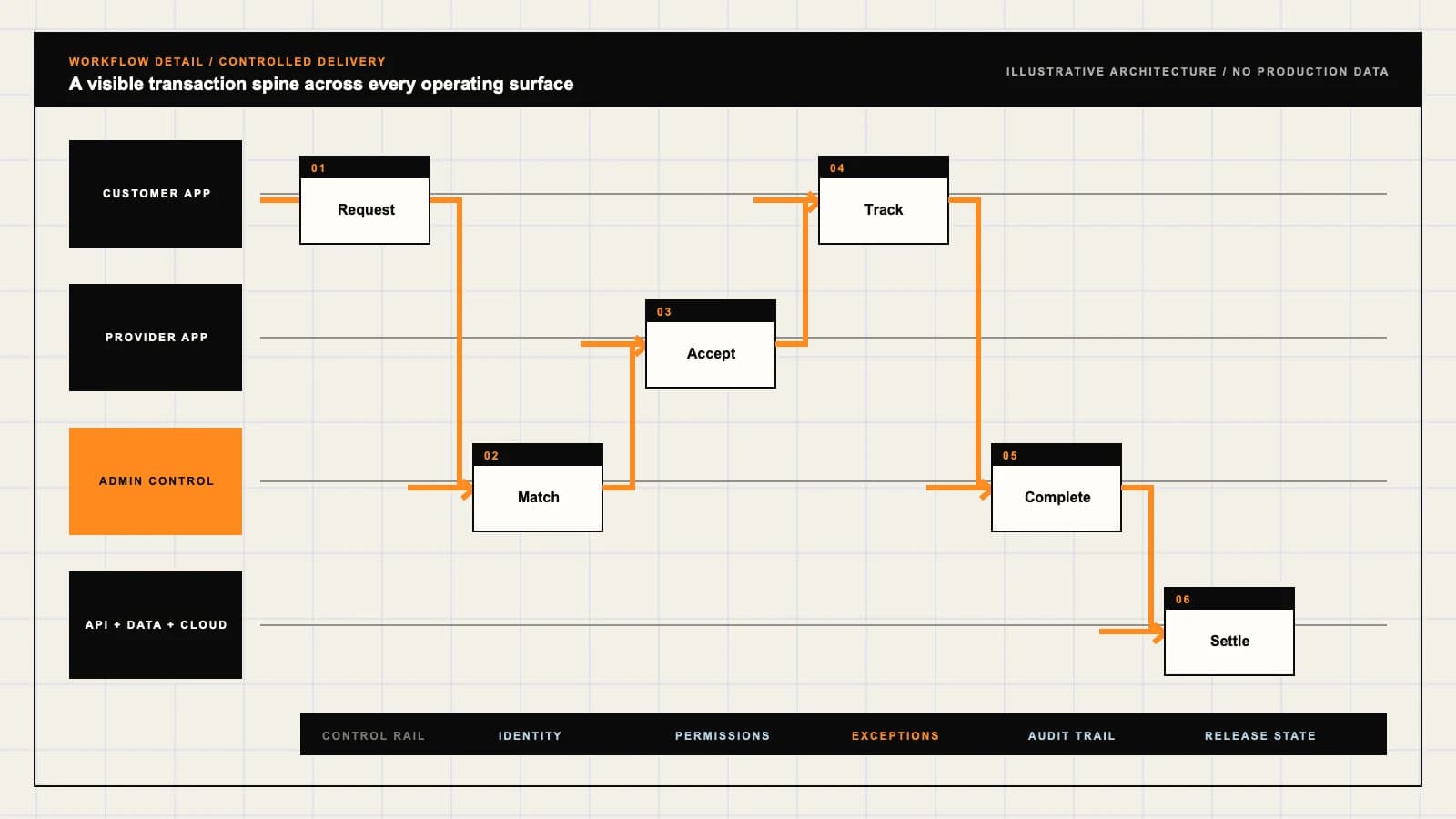
Blinkit-style Rapid Essentials connected product workflow planning visual
Connected customer, operations, and data workflowEvidence: illustrativeOpen full-size reference
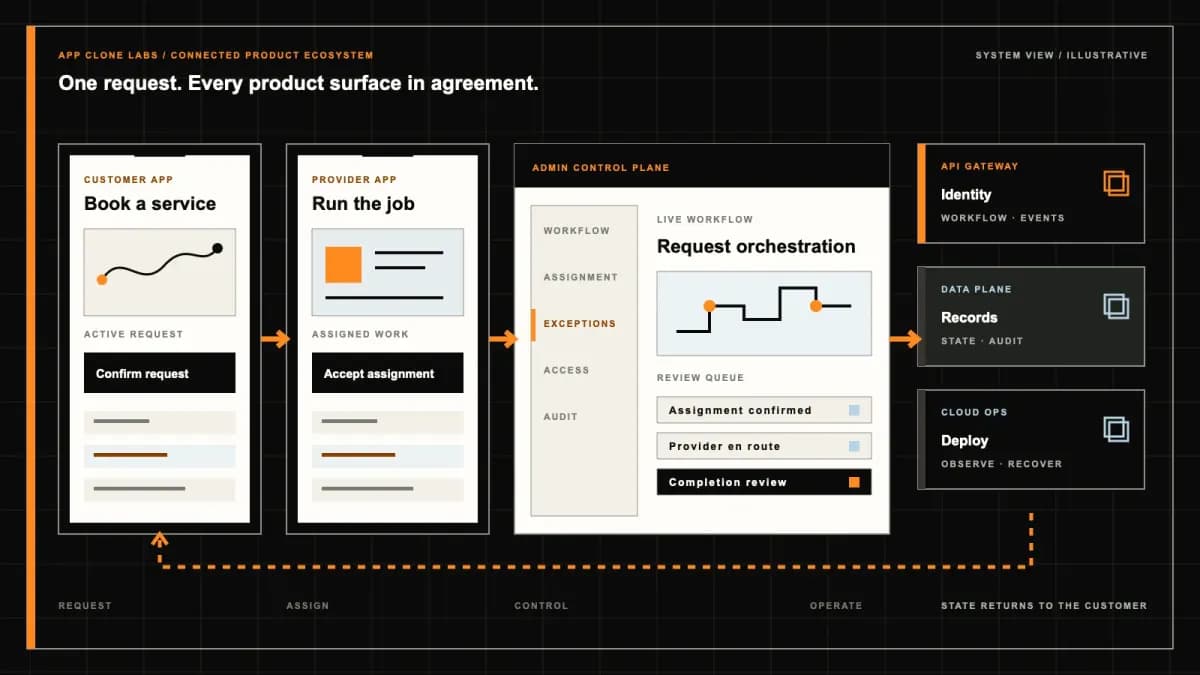
Blinkit-style Rapid Essentials product engineering ecosystem visual
Product engineering ecosystem and handover boundaryEvidence: illustrativeOpen full-size reference

Two customers reach checkout for the last carton

Two customers at nearby addresses add the last carton of milk from the same dark store. One pays while the other is still confirming an address. Meanwhile, a picker discovers that the carton is damaged. The product needs to decide which order owns the reservation, stop selling the damaged unit and explain the resulting payment or refund state. A fast-looking catalogue cannot resolve that conflict by itself.

A Blinkit-style build is an independently branded rapid essentials operation connecting local shoppers, dark-store teams, dispatch and support. It requires a bounded service area and accurate local availability before an order can become a delivery job. The reference describes a category; it does not include Blinkit affiliation, proprietary software, operating stores, stock, couriers or access to its systems. Delivery estimates depend on the actual operation and are not guaranteed.

Define the local operating model before the storefront

Start with one store, the addresses it can serve and the essentials it can handle. Name who owns stock, accepts payment, picks orders and resolves customer complaints. Decide whether the launch serves a single operator or several store owners, because stock visibility and support authority change with that choice. Record the handoffs in one complete order example before expanding catalogue screens or promotional surfaces.

Compare the BigBasket-style grocery brief when the core problem is a planned household basket and scheduled fulfillment. This page focuses on immediate local allocation, short picking queues and courier handoff from a dark store. Those responsibilities need their own acceptance evidence even when both products sell the same groceries.

Check service-zone eligibility at the order boundary

An address pin near a zone boundary can point to the wrong street or an inaccessible entrance. Define the accepted address details, map precision and review route for ambiguous locations. A city name or postal code alone may be too broad for a local store. Match the customer to an eligible operating zone before displaying purchasable stock, and check again when the delivery address changes or checkout resumes after a delay.

Specify overlap rules when two stores could serve the address. A customer should understand which store catalogue the basket uses and whether changing the store alters availability, prices or fees. Do not silently merge stock from different locations into a basket that the selected store cannot pick. Retain the eligibility decision and provide a visible unavailable state when no operating store qualifies.

Admit orders against dark-store capacity

A store can have stock and still lack the capacity to prepare another order. Model the picking backlog, available team, packing station constraints and courier coverage that affect admission. Give an authorized operator a store pause with a recorded reason and an explicit effect on new orders. Existing paid orders need an owner and recovery route when a store closes unexpectedly; disappearing the store from search does not settle those orders.

The Blinkit FAQ describes locality-dependent operating hours and checkout delivery charges. Treat those as useful reference questions for the scope brief, rather than adopting the vendor’s coverage or policies. Your operation needs its own rules for opening hours, capacity changes and fee disclosure, verified against the actual stores.

Reserve real-time inventory without overselling

Choose the authoritative stock record and define how receiving, sales, damage and reservations update it. Available-to-sell units should exclude held, expired and quarantined stock. At checkout, reserve the required quantity using a concurrency-safe decision so two customers cannot both acquire the last sellable unit. A cached catalogue can help browsing, but the acceptance boundary must consult the current reservation authority. State how stale updates are detected and who reconciles discrepancies.

Reservations need expiry and ownership. If payment is abandoned, release the units through an auditable transition. If a payment acknowledgement is missing, inspect the provider outcome before either freeing stock or charging again. Deduplicate callbacks by the agreed provider and order identifiers. Preserve an unresolved state for review when stock allocation and payment evidence disagree, rather than marking the order successful because the customer returned from a payment screen.

Let picking confirm what actually exists

Give the picker a store-specific list with item identity, quantity and location information where available. Scan or otherwise confirm picked units, and record a short pick when the shelf contradicts the stock record. Distinguish an unavailable product from a damaged product because the inventory correction and complaint evidence differ. The customer order should show fulfilled quantities rather than copying the original basket after the picker reports a shortage.

Agree whether substitutions are allowed, require explicit customer approval or remain outside the first release. A similar package can have different ingredients, allergens, quantity and price. Record approval and the final charge before packing an alternative. If approval cannot be obtained within the operating process, remove the item through a documented adjustment and refund route. A picker should not need to invent customer consent to clear a queue.

Track the package through pick, pack and handoff

Packing should establish the final item list, package identifier and any handling separation, such as keeping household chemicals away from food. Record who completed the package and when it became ready. Ready for collection, courier assignment and physical collection are separate states. A dispatch notification alone does not establish that the courier has custody, and a picker completing a task does not establish doorstep delivery.

Use a package scan or scoped acknowledgement at collection, with an operator route for damaged packaging or mismatched order identity. Restrict a courier’s access to the assigned job and the customer information needed for that delivery. Record reassignment without losing the custody history. If the dispatch integration fails, keep the package visible to store operations instead of showing a delivery job that nobody has accepted.
Revise estimates without unsafe ETA pressure

An estimate should answer to preparation progress, courier availability and current travel conditions. Explain when it was calculated and update the customer when the inputs change. Agree how uncertainty is displayed when a courier has not accepted the job or traffic information is missing. Avoid countdowns that suggest a contractual deadline when the application can only provide a changing operational estimate. A late order is an exception to manage, not an instruction to ride faster.

Review incentives, dispatch messages and supervisor controls alongside the customer screen. Couriers need a safe route to report hazards, vehicle trouble or inability to proceed. Reduce admission, reassign when appropriate and communicate a revised estimate rather than asking the courier to recover preparation delays on the road. The operator must review courier classification, working arrangements and safety responsibilities for its market; implementing dispatch screens does not establish those permissions.

Give courier exceptions a recovery owner

An unreachable customer, restricted building entrance or courier breakdown needs a reason code, timestamp and responsible team. Define how contact attempts are recorded, when reassignment is possible and when the package returns for review. Do not assume a returned chilled package becomes sellable again; its handling history may require quarantine or disposal. A failed delivery must retain custody evidence and a customer-facing resolution state even when the courier app loses connectivity.

Delivery acknowledgements should tolerate delayed network events without accepting arbitrary completion claims. Agree the evidence required for the chosen delivery method and limit sensitive photographs or location retention. When store, courier and customer accounts disagree, support should see the relevant history and decide the next action with recorded authority. Keep customer notification, payment resolution and inventory disposition separate so one successful callback cannot falsely close all three.

Resolve product freshness and line-item refunds

Freshness begins with receiving, storage and removal from sale, not the complaint form. Decide which categories need batch, expiry, temperature or handling records and who reviews them. Support should distinguish a missing item, damaged seal, wrong product and suspected freshness issue. Collect only evidence needed for the complaint and route possible safety incidents to the responsible operator instead of treating every report as a discount request.

The Blinkit terms and conditions distinguish product-specific return policies and describe evidence for certain damaged, defective, expired or incorrect-item claims. These are reference policy structures, not terms supplied for your business. Agree your own category rules, customer disclosures and applicable review, then implement a line-item resolution with approval, provider refund status and reconciliation evidence.

Prove failures in the buyer walkthrough

Ask for a connected walkthrough using redacted order data and clearly identified sandbox services. Illustrative screens do not prove live inventory, courier coverage or payment-provider access. Buyer acceptance should attempt two concurrent reservations for the last unit, expire an abandoned checkout and delay a payment callback. Inspect allocated quantities, duplicate-event handling and the recovery state before considering the happy path complete.

Then pause a store after payment, force a short pick, delay courier acceptance and report a breakdown after collection. Submit a freshness complaint for one item and inspect the refund through provider confirmation. Check zone boundaries, restricted access and lost connectivity. Agree the load and freshness of the data used for testing; these scenarios establish configured behavior under stated conditions, not guaranteed production delivery times or business results.

Bring one zone and its exception brief to scoping

Bring a service-zone map, representative stock records, the receiving and picking process, courier arrangements and a redacted complaint example. Name the stock owner, store pause authority, dispatch supervisor and refund approver. Agree the provider accounts and data access that already exist, the work that requires separate access and the operational exclusions. Price scope against the complete local order loop rather than a count of customer screens.

Use a rapid essentials scope discussion to define the first store network and observable acceptance checks. Handover should cover source ownership, third-party licenses, deployment access, stock recovery, support responsibilities and the evidence needed to investigate an unresolved order.

Review the delivery process for checkpoints around operating rules, integration verification, failure walkthroughs and team handover. Add zones and categories after the initial operation can explain its stock, custody and refund outcomes.

Product flow

Role-workflow flow diagram.

A visual map of how each role interacts with each workflow stage, with operator controls and integration boundaries.

Deployable Product Architecture

Blinkit-style Rapid Essentials

EVALUATE THE ADDR…TURN A BASKET INT…TRACK CUSTODY THR…Order essentials …Reserve, pick and…Resolve courier a…INTEGRATIONS: Store inventory or warehouse systems with confirmed access, scoped credenti…OPERATOR CONTROLS: Pause orders when a store cannot fulfill them safely · Keep sellable units …
Illustrative validation artifact — role-workflow flow diagram; final surfaces, boundaries, and integration topology are confirmed during discovery.

User roles

Blinkit-style Rapid Essentials roles and workflows.

Clone-inspired platforms usually need several coordinated interfaces, not just a customer app.

Customer

01

Order essentials available to this address

Check local availability, review the basket and fees, receive changing fulfillment updates and report missing or damaged items against an order line.

Dark-store team

02

Reserve, pick and pack accountable inventory

Review order allocation, scan picked items, resolve stock discrepancies and record a sealed package handoff. Control receiving, expiry and unavailable stock with named permissions.

Dispatch and support

03

Resolve courier and customer exceptions

Assign eligible couriers, acknowledge collection and handle breakdowns, unreachable customers and freshness complaints. Keep recovery ownership and payment outcomes visible.

Workflow

Blinkit-style Rapid Essentials workflow stages.

Each workflow stage is mapped to a role, screen, API, notification, admin control, and measurable launch outcome.

Check eligibility

01

Evaluate the address and local capacity

Match the address to an operating service zone and store. Check inventory, picking backlog and courier coverage again before accepting an order.

Reserve and prepare

02

Turn a basket into a traceable package

Reserve available stock with expiry, reconcile payment outcomes, scan picked quantities and record substitutions or short picks before sealing the package.

Handoff and resolve

03

Track custody through delivery and recovery

Record courier acceptance and collection separately, publish revised estimates and resolve delivery failures or item complaints through an accountable support queue.

Deployable Product Architecture

Workflow / system register

Revision EPlanning surface

Product delivery loop

Blinkit-style Rapid Essentials workflow stages.

A focused release proves one complete workflow

Product delivery loop: Blinkit-style Rapid Essentials workflow stages.A focused release proves one complete workflow. Scope the customer action and the operator response as one system.
01

Evaluate the address and local capacity

02

Turn a basket into a traceable package

03

Track custody through delivery and recovery

Control note

Scope the customer action and the operator response as one system.

Illustrative architecture register; validate against the accepted scope.

Operator controls

Blinkit-style Rapid Essentials admin and operator controls.

The control center is scoped as a first-class product surface, not an afterthought.

Admission control

01

Pause orders when a store cannot fulfill them safely

Restrict service-zone overrides and store closures. Use measured backlog, staffing and courier availability to reduce intake instead of pressuring couriers to recover a missed estimate.

Stock and freshness

02

Keep sellable units separate from physical units

Exclude expired, damaged, quarantined and reserved inventory. Track batch or expiry evidence where needed, review adjustments and record the reason for each short pick.

Custody and refunds

03

Make exceptions inspectable without exposing private data

Restrict customer addresses and courier location to the relevant job. Retain package handoff, complaint evidence, refund approval and provider reconciliation with role-based access.

Monetization

Blinkit-style Rapid Essentials monetization models.

We model monetization early so payments, admin controls, and reporting support the business.

Understand contribution after local fulfillment

Report product revenue against acquisition, picking, packing, courier cost, wastage and refunds by store and category. Order volume alone does not prove a viable zone.

Show the full charge before payment

Define delivery, handling and other applicable fees with the operator. Explain cancellation and partial-refund treatment without hiding mandatory charges behind a headline item price.

Identify paid placement in the local catalogue

Label sponsored positions, retain campaign approval and separate advertising reporting from inventory ranking. A paid item still needs eligible stock and handling capacity.

Integrations

Blinkit-style Rapid Essentials integration surface.

External systems that determine launch readiness, data flow, and operational continuity.

Integration

01

Integration 1

Store inventory or warehouse systems with confirmed access, scoped credentials, unit identifiers, stock update contracts and reconciliation ownership

Integration

02

Integration 2

Payment services with verified account eligibility, order-scoped identifiers, authenticated callbacks and payment, cancellation and refund reconciliation

Integration

03

Integration 3

Maps, courier dispatch and notifications with agreed coverage, address validation, location permissions, custody events and delivery-failure recovery

Scope drivers

Blinkit-style Rapid Essentials scope drivers.

The variables that most influence build effort, cost, and launch readiness.

Local network

01

Define store ownership and service-zone rules

Agree which store serves each address, opening hours, boundary handling, pause authority and the measured capacity that limits admission.

Inventory contract

02

Specify reservations and freshness responsibilities

Identify the stock authority, update lag, reservation expiry, barcode coverage and quarantine rules. Choose how shortages and payment uncertainty affect allocated units.

Exception coverage

03

Name recovery owners before taking orders

Agree courier operating arrangements, category handling requirements, customer support coverage, refund authority and provider access for the launch market.

Deployable Product Architecture

Scope drivers / system register

Revision DPlanning surface

Product delivery loop

Blinkit-style Rapid Essentials scope drivers.

A focused release proves one complete workflow

Product delivery loop: Blinkit-style Rapid Essentials scope drivers.A focused release proves one complete workflow. Scope the customer action and the operator response as one system.
01

Define store ownership and service-zone rules

02

Specify reservations and freshness responsibilities

03

Name recovery owners before taking orders

Control note

Scope the customer action and the operator response as one system.

Illustrative architecture register; validate against the accepted scope.

V1 scope

Blinkit-style Rapid Essentials V1 foundation.

Launch the smallest complete operating loop first, then scale the product with confidence.

Local shopping

01

Browse one bounded operating network

Include address eligibility, store-specific availability, clear fees, payment status and estimates that can change when operational conditions change.

Store fulfillment

02

Complete reservation through package handoff

Support concurrent stock reservation, pick confirmation, shortage handling, freshness checks and courier collection acknowledgement with an inspectable order history.

Recovery desk

03

Close failed delivery and item complaints

Provide store pauses, courier exception ownership, line-item complaint evidence and reconciled refunds. Test recovery as part of the first complete operating loop.

Later phases

Blinkit-style Rapid Essentials post-launch expansion.

Capabilities that should usually wait until real usage proves the core loop.

More zones

01

Expand after stock and recovery evidence holds

Add stores and revised routing after measuring capacity, stock discrepancies, exception rates and support coverage in the initial network.

More categories

02

Add handling rules before adding assortment

Introduce chilled, fragile or other specialist products only after approving storage, packing, labeling, custody and complaint requirements.

Network optimization

03

Improve replenishment using recorded demand

Add replenishment planning and allocation suggestions after stock histories and wastage reasons are reliable. Keep operator overrides visible and evaluate suggestions against real store outcomes.

Deployable Product Architecture

Later phases / system register

Revision EPlanning surface

Product delivery loop

Blinkit-style Rapid Essentials post-launch expansion.

A focused release proves one complete workflow

Product delivery loop: Blinkit-style Rapid Essentials post-launch expansion.A focused release proves one complete workflow. Scope the customer action and the operator response as one system.
01

Expand after stock and recovery evidence holds

02

Add handling rules before adding assortment

03

Improve replenishment using recorded demand

Control note

Scope the customer action and the operator response as one system.

Illustrative architecture register; validate against the accepted scope.

Regulatory review

Blinkit-style Rapid Essentials regulatory and compliance flags.

Each flag must be reviewed by qualified counsel for your target market before build or launch.

Flag 1

Food handling review required

Flag 2

Courier classification and safety rules vary by market

Reference walkthrough

Request a Blinkit-style Rapid Essentials reference walkthrough.

Ask us to confirm which reference surfaces are currently available for this product model. Rather than publishing shared demo credentials, we schedule a private guided walkthrough for qualified buyers.

Reference surface

01

Customer: Order essentials available to this address

Request a role-specific demonstration and confirm which capabilities are currently available. Review the proposed responsibility: Check local availability, review the basket and fees, receive changing fulfillment updates and report missing or damaged items against an order line.

Reference surface

02

Dark-store team: Reserve, pick and pack accountable inventory

Request a role-specific demonstration and confirm which capabilities are currently available. Review the proposed responsibility: Review order allocation, scan picked items, resolve stock discrepancies and record a sealed package handoff. Control receiving, expiry and unavailable stock with named permissions.

Reference surface

03

Dispatch and support: Resolve courier and customer exceptions

Request a role-specific demonstration and confirm which capabilities are currently available. Review the proposed responsibility: Assign eligible couriers, acknowledge collection and handle breakdowns, unreachable customers and freshness complaints. Keep recovery ownership and payment outcomes visible.

Next step

04

Book a walkthrough

Request a live, private walkthrough of the reference implementation. We will confirm scope and discuss configured deployment versus custom build for your market.

Open register

Deployable Product Architecture

Reference walkthrough / system register

Revision DPlanning surface

Product delivery loop

Request a Blinkit-style Rapid Essentials reference walkthrough.

A focused release proves one complete workflow

Product delivery loop: Request a Blinkit-style Rapid Essentials reference walkthrough.A focused release proves one complete workflow. Scope the customer action and the operator response as one system.
01

Customer: Order essentials available to this address

02

Dark-store team: Reserve, pick and pack accountable inventory

03

Dispatch and support: Resolve courier and customer exceptions

04

Book a walkthrough

Control note

Scope the customer action and the operator response as one system.

Illustrative architecture register; validate against the accepted scope.

Process

A traceable path from decision to acceptance.

  1. 01

    Model teardown

    We map the reference business model, user roles, monetization path, regulatory needs, and launch constraints.

    Artifact: Product teardown, risk map, role matrix

  2. 02

    Market-fit blueprint

    We reshape the model around your market, operations, pricing, workflows, and first release priorities.

    Artifact: Feature scope, flows, technical plan

  3. 03

    Design and build

    Product, design, engineering, QA, and cloud delivery move in weekly demo cycles with visible progress.

    Artifact: Working releases, QA notes, sprint demos

  4. 04

    Launch and operate

    We support production release, monitoring, handoff, roadmap decisions, and post-launch improvement.

    Artifact: Launch checklist, docs, growth backlog

FAQ

Questions to resolve before the build.

01Does a Blinkit-style build include Blinkit stores or system access?

No. The reference describes an independently branded rapid essentials product. Blinkit affiliation, software, stock, couriers and provider access are not included. Confirm store ownership, data rights and third-party accounts in the scope brief.

02How is this different from planned online grocery shopping?

The core loop uses a local dark-store catalogue, current capacity, stock reservation and immediate pick-pack dispatch. Planned large-basket grocery can center on scheduled slots and different fulfillment constraints. Choose scope from the actual operating model.

03How should service-zone eligibility work?

Match a verified delivery address to an operating store and zone, with rules for overlapping areas and ambiguous locations. Check again after address changes and before order acceptance. A city or postal code may be too broad for local coverage.

04Can a stocked store stop accepting new orders?

Yes. Define admission rules using picking backlog, staff, packing constraints and courier coverage. Authorized operators need a recorded pause. Existing paid orders remain visible and require a recovery owner when a store closes.

05How do two checkouts avoid reserving the last unit twice?

Make a concurrency-safe reservation against authoritative available stock. Exclude held, damaged, expired and quarantined units, and define reservation ownership and expiry. Test concurrent requests rather than treating a cached catalogue count as allocation evidence.

06What happens when payment confirmation arrives late?

Retain a pending or unresolved state and reconcile the provider outcome before charging again or freeing allocated stock. Deduplicate callbacks with scoped identifiers and record how payment and reservation discrepancies were resolved.

07Can pickers substitute unavailable products?

Only through the agreed substitution policy. Record required customer approval, item differences and final pricing. If approval cannot be obtained, use a documented short-pick and adjustment route. Similar packaging does not establish equivalent ingredients or customer consent.

08What proves that the courier collected a package?

Use a scoped collection acknowledgement or package scan tied to the final packed order. Keep ready, assigned and collected states separate. Record mismatches, rejected packages and reassignments so dispatch messages do not substitute for custody evidence.

09Does the software guarantee an arrival time?

No. Estimates depend on preparation, courier availability and travel conditions. Update customers when those inputs change and define safe hazard and breakdown reporting. Store admission and exception handling should absorb pressure from missed estimates.

10How are failed delivery and freshness complaints resolved?

Assign an owner, preserve custody and relevant handling evidence, and use reason-specific recovery. Returned perishables may require quarantine. Resolve freshness, damage or missing-item complaints at line level with approved policy and reconciled payment outcomes.

11Which integrations need verification before launch?

Verify inventory ownership and update contracts, payment eligibility and callbacks, maps coverage, dispatch access and notification behavior. Agree credentials, permissions and reconciliation owners. Reference screens and listed providers do not demonstrate live access.

12What should buyer acceptance demonstrate?

Exercise concurrent last-unit reservations, abandoned checkout, late payment, store pause, short pick and failed courier acceptance. Add breakdown after collection, a freshness complaint, partial refund and restricted access. Inspect evidence with sandbox limitations clearly stated.

Primary sources

References behind this page

Dated official documentation, standards, and research that support the factual claims on this page.

  1. 01
  2. 02

Citation readiness

How to interpret this page

Published by App Clone Labs Editorial Team

Commercial claims
Scope, cost, and timeline claims are planning guidance and require validation in a current proposal.
Evidence status
Diagrams, boards, examples, and estimates are illustrative planning artifacts unless explicitly identified with a source and measured evidence status.

Next decision

Turn the brief into an accepted product scope.

Define outcomes, constraints, evidence, rights and handover before delivery begins.

Commercial rights, repositories, environments, documentation, acceptance and handover remain contract-defined.

Scope Blinkit-style Rapid Essentials

Independent from Blinkit

App Clone Labs is an independent software development studio. We are not affiliated with, connected to, sponsored by, or endorsed by Blinkit.

Why this name appears

Blinkit is referenced descriptively to identify familiar product mechanics and common search terminology. “Clone” describes a planning reference, not a replica.

Original delivery

Any product delivered by App Clone Labs is independently designed and developed for the accepted scope. It does not contain proprietary code, branding, copy, interface assets, or confidential material from Blinkit.

Trademark ownership

Blinkit and associated names, logos, and marks remain the property of their respective owners. Their use identifies a reference category and does not imply authorization or endorsement.