Property technology

Blueground-style Furnished Rentals — Custom-Built for Your Market

Managed furnished-home rental and guest operations platform. Planned for housing operators managing furnished stays across urban portfolios with role-specific workflows, operator controls, integrations, and a handover boundary defined for the selected market.

See product screens and demo access

Custom workflows

Brand-safe product strategy

Admin and operations tooling

Reference walkthrough by arrangement

Review furnished-home discovery and the move-in handoff.

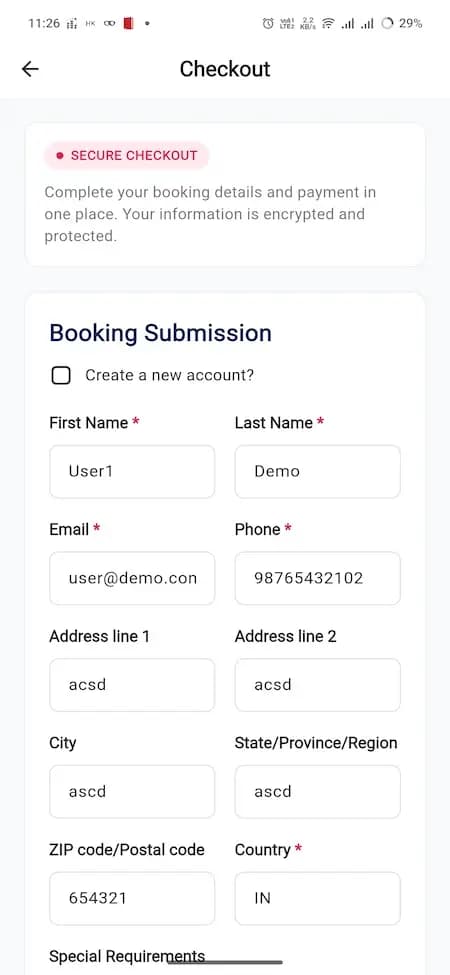
Use this rental checkout reference to discuss a managed furnished-home journey: selecting a home, confirming dates and terms, collecting required information and coordinating move-in. It is an illustrative category reference, not Blueground UI, affiliation or proof of an available home. Ask for a guided demo of lease intake, service operations and local occupancy rules.

Accommodation checkout reference showing guest contact details and a move-in booking submission form with sample data

Accommodation checkout reference showing guest contact details and a move-in booking submission form with sample data

Illustrative furnished-rental checkout reference with demo contact entries. It does not establish home availability, lease acceptance, payment protection, smart access or move-in completion. Confirm the operator’s real inventory, eligibility rules, terms and service handoff in an authenticated demo.

What to check in the walkthrough

  • Which dates, occupancy, lease terms, deposits, fees and eligibility checks must be confirmed before a furnished home can be offered or held?
  • Ask to follow a submitted request through review, payment or signing outcome, cancellation, move-in instructions and a failed provider event without claiming the sample form completed a lease.
  • Who can update inventory, property standards, access instructions and resident service tasks, and how are local tenancy, accessibility and privacy requirements reviewed?
Open full-size reference

Solution reference register

01 / Reference and IP

This page references third-party product names only to describe familiar product models and planning references. App Clone Labs is not affiliated with or endorsed by those brands. Build decisions require independent legal, regulatory, and operational review for your market.

02 / Artifact status

Boards, diagrams, screens and workflow descriptions on this page are illustrative planning artifacts, not evidence of a deployed client product.

03 / Regulatory caveat

Qualified accommodation concept · Local tenancy and lodging classification review required · Housing accessibility obligations may apply

04 / Rights and handover

Source access, licensing, repositories, environments, documentation, acceptance and handover are defined by the signed contract and accepted scope.

Scope

Operating model defined

Roles, workflows, dependencies, exclusions, and assumptions are made reviewable.

Evidence: illustrative

System

Applications connected

Experience, operations, services, data, integrations, and release controls are planned together.

Evidence: illustrative

Handover

Rights stated in writing

Access, assignment, licensing, dependencies, documentation, and support follow the signed agreement.

Evidence: illustrative

Artifact register

Product screens and planning references.

Reference screens illustrate workflows, not a contracted feature list. Sample prices, data, and responses are demonstration content; confirm the current scope during a walkthrough.

Blueground-style Furnished Rentals connected product workflow planning visual
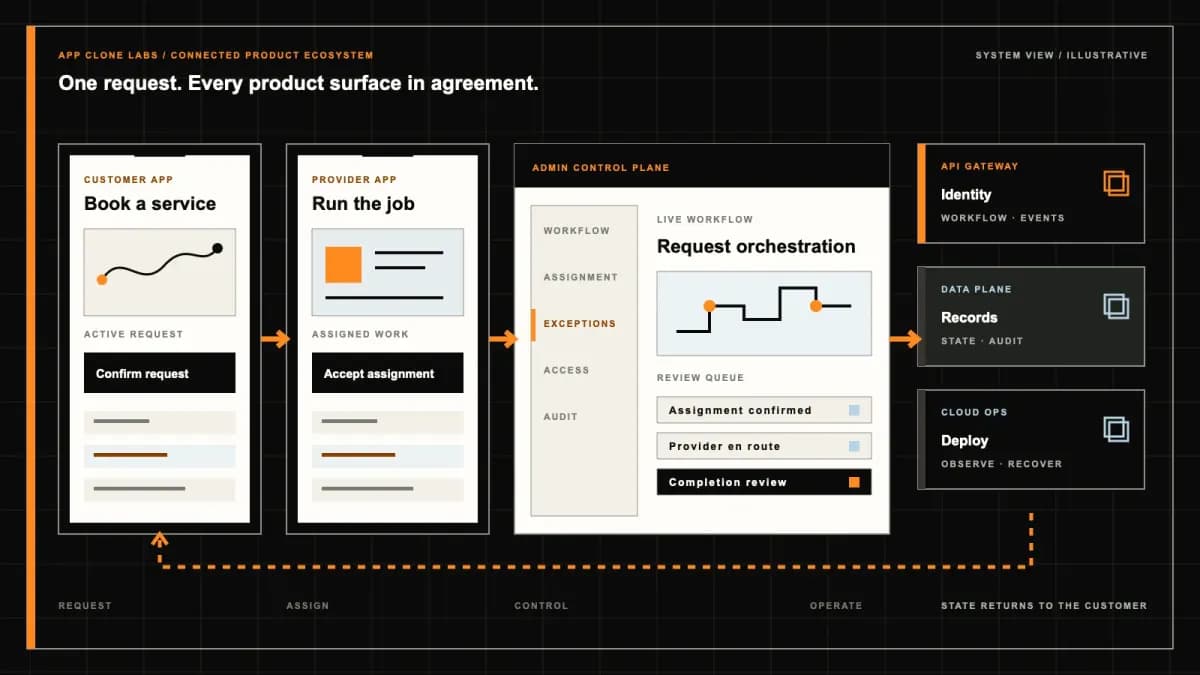
Connected customer, operations, and data workflowEvidence: illustrativeOpen full-size reference
Blueground-style Furnished Rentals product engineering ecosystem visual
Product engineering ecosystem and handover boundaryEvidence: illustrativeOpen full-size reference

The apartment must be ready, not merely available

A resident has an accepted move-in date, but the previous occupant leaves late and an inspection finds a broken appliance. A furnished-rental platform must connect that commercial commitment to cleaning, maintenance and arrival readiness. Showing the home as available on a search page does not resolve the person arriving at its door.

A Blueground-style software brief describes managed furnished accommodation: an operator controls a portfolio and coordinates the resident experience from selection through departure. App Clone Labs plans an independently branded implementation of that operating model. The reference name does not supply Blueground inventory, code, property agreements or an affiliation.

Use this page to assess the unit catalogue, resident journey, local work queues and portfolio controls together. A proposed system should make responsibilities visible when a home cannot be delivered as agreed, rather than presenting another generic booking marketplace.

Establish who controls the portfolio

Owned homes, leased inventory and management contracts create different system responsibilities. Identify who can offer a unit, set the rate, approve an occupant, authorise maintenance and resolve an unavailable-home incident. Record the relevant property relationship without treating a software field as evidence of legal ownership or permission.

Keep this model distinct from a peer-host marketplace. Residents should not need to infer which independent host might accept their stay when the operator is selling a managed experience. If third-party hosts are part of the business, explicitly scope their authority and support obligations instead of quietly mixing inventory models.

Model each home and its readiness states

A unit record should identify the specific accommodation, capacity, furnishings, included services and access arrangements. Separate published listing information from private operational details. Photos should represent the offered home or be clearly labelled as an example; a portfolio image must not imply that every unit has the same facilities.

Keep commercial availability, occupancy and readiness separate. A unit may be unoccupied but blocked for repairs, or reserved for a future resident while awaiting inspection. Specify which readiness checks must pass before move-in and who may release a block. Record exceptions and the decision rather than erasing a failed inspection to make a dashboard green.

Make the quote understandable before intake

Display the accommodation charge, billing period, included utilities, required fees and optional services for the requested dates. Clarify what is payable now and which amounts follow later. Deposits, authorisations, damage adjustments and recurring billing require their own provider and agreement decisions; they are not assumed capabilities of a furnished-rental page.

Retain the accepted quote and agreement version. If dates or inclusions change, show the revised terms and record renewed acceptance where required. An internal rate update should not silently change a resident’s existing commitment. The product must also explain pending, accepted, rejected and expired intake without presenting every submitted form as a confirmed stay.

Treat resident intake as a defined review process

Specify the information needed for the selected operating model, the reviewer and the response to missing information. Do not collect sensitive documents simply because another property app displays an upload field. Housing eligibility and agreement terms require qualified review in the intended market; software does not establish a universal screening policy.

For the interface itself, W3C’s guidance on labels and instructions supports clear explanations of required input. Apply that principle to stay dates, contact details and document requests. Accessible labels are one part of the implementation and testing plan, not a claim that the entire product meets every accessibility requirement.

Connect move-in to local preparation

Create attributable preparation tasks for cleaning, condition inspection, essential utilities and access. Each task needs an owner and a result, with escalation when an accepted move-in is at risk. The resident should receive a reviewed arrival plan, not an automatic message that assumes the unit is ready because a payment succeeded.

Determine when arrival instructions or access credentials are released and how they are revoked. Test an unreachable access service, a wrong code and an out-of-hours arrival. A manual key handoff needs a named local contact and recovery route. Smart access can assist that process; it does not replace the people responsible for admitting the resident.

Give maintenance a complete operating loop

A resident reports a leaking tap and uploads a photo. The system should preserve the request, priority assessment, assigned team, visit arrangement and closure evidence. Separate ordinary service requests from incidents requiring an urgent response. Published response commitments must reflect a staffed operation and agreed service terms, not a decorative timer.

Specify what contractors may see and what requires resident permission, including entry scheduling and private images. Allow a request to be reopened if the problem remains. A technician marking work complete is not necessarily the same event as resident acknowledgement, invoice approval or a financial adjustment.
Extensions and transfers are new availability decisions

A resident asking for another month can conflict with the next accepted arrival. Check the authoritative unit dates, preparation buffer and rate before approving the extension. Preserve the original end date and pending request until the authorised change is accepted. Do not overwrite the calendar first and discover the conflict later.

A transfer to another home also affects preparation, instructions, price and account records. Show which unit and dates are accepted, why the change occurred and who approved it. If a unit becomes unavailable, any relocation or compensation obligation must come from the operator’s reviewed policy—not a software promise that replacement housing always exists.

Restrict portfolio access and financial changes

Local staff, leasing agents, maintenance contractors and finance teams need different records. Restrict access across portfolios and resident accounts, including exported files and uploaded documents. A hidden menu is not a sufficient boundary if the underlying request still returns another resident’s information.

The OWASP authorization guidance recommends least privilege, denial by default and permission checks on every request. Use those principles in the acceptance plan for unit, resident, document and adjustment access. Citing the guidance does not establish that a proposed or demonstrated implementation has been audited.

Keep billing, receipts and unresolved adjustments distinguishable. Agree who may approve credits, refunds or charges, which evidence supports the action and how the provider result is reconciled. The software should retain uncertain outcomes for review rather than automatically retrying a consequential action without checking its status.

Start with one supported portfolio loop

The first release can cover one operating area and a defined managed-unit model. Include unit intake, availability, quotes, agreed stays, preparation, resident support, extensions and departure reconciliation. Manual approval can be appropriate where the staff owner, queue and resident expectations are clear.

Corporate housing, owner statements, multiple cities and connected-building integrations add distinct permissions and commercial relationships. Keep them as separate scope decisions unless required at launch. A later-phase option should not be read as evidence of an already working feature or guaranteed future delivery.

Review a failed move-in as well as the happy path

Ask for a walkthrough linking the resident view to local preparation and the portfolio console. Confirm which flows work in the available environment and which are proposed engineering. Concept artwork illustrates a layout; it does not prove available homes, completed inspections, access integration or a real resident operation.

Test a failed inspection before arrival, an extension conflicting with the next stay, an incomplete intake and a maintenance request that reopens. Review a duplicated provider result and a pending financial adjustment. Check who owns the next action, what the resident sees and whether the original accepted records remain available.

Include permission tests: a contractor should not access unrelated documents, one portfolio should not expose another’s residents, and a listing editor should not approve restricted credits. Request exports, restoration and account-handover checks under the agreed deployment plan. Demonstrating successful screens alone is insufficient acceptance evidence.

Bring a portfolio brief that can be estimated

Prepare sample unit records, property relationships, the launch market, rate and inclusion rules, intake requirements, preparation checklist and service responsibilities. Include a normal stay, a failed move-in and an extension conflict. These examples establish the interfaces and exception work that determine the build, rather than counting feature names.

Compare the separate peer-hosted home-stay brief if independent hosts control supply and request acceptance. The two models share travel vocabulary but differ in inventory authority and local operating responsibility.

Use the delivery process to agree milestones and acceptance. Estimates should identify configured foundations, new engineering, integration access and operational dependencies. Source rights, reusable components, accounts, documentation and support remain governed by the signed agreement.

When the portfolio inputs are ready, request a furnished-rental scope review. Confirm current reference availability and the boundary between existing capabilities and proposed work. No unconditional delivery window, occupancy outcome or market permission is promised by this page.

Product flow

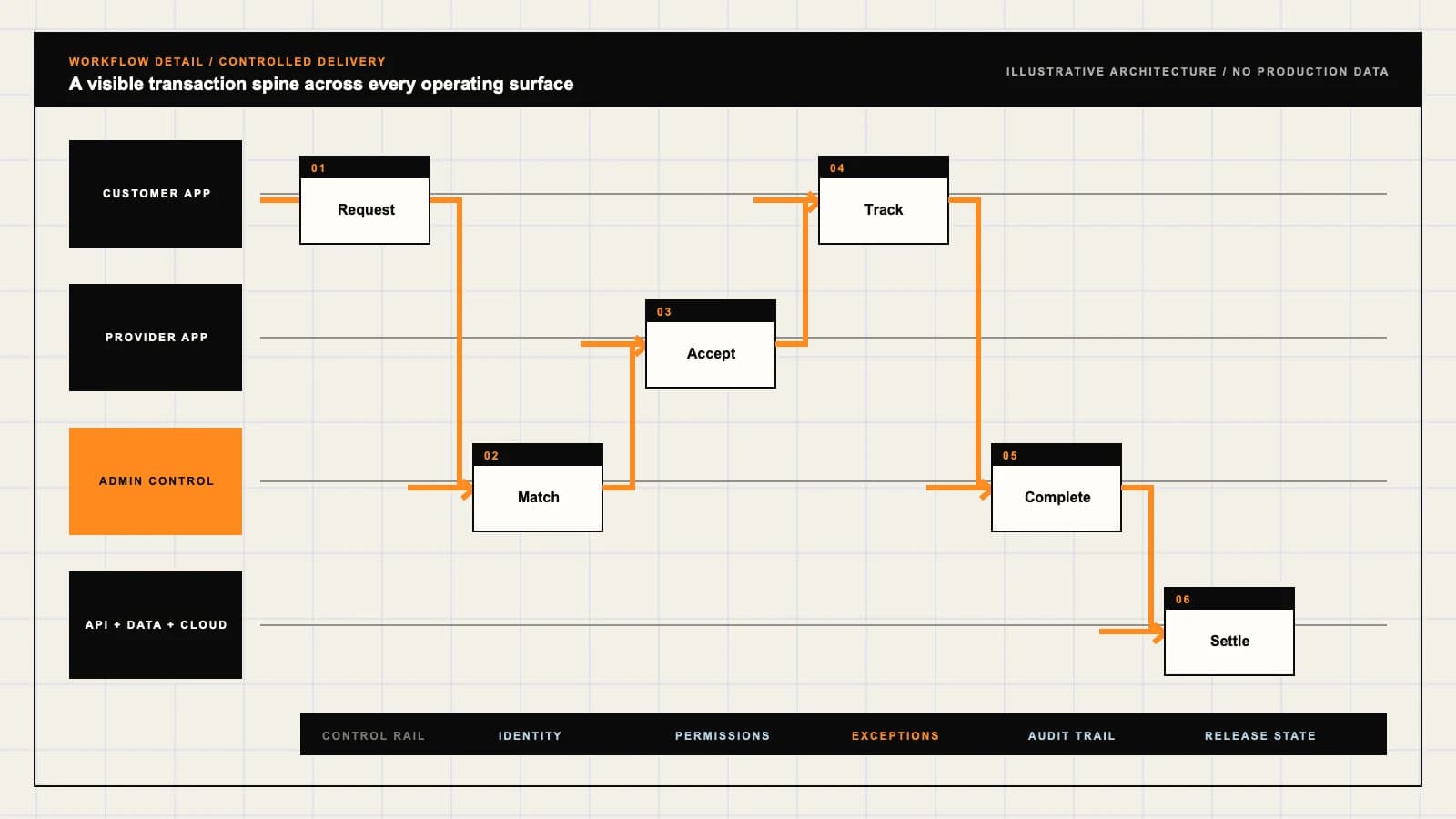
Role-workflow flow diagram.

A visual map of how each role interacts with each workflow stage, with operator controls and integration boundaries.

Deployable Product Architecture

Blueground-style Furnished Rentals

QUOTE ONE HOME FO…APPROVE THE STAY …SUPPORT THE RESID…Choose a home and…Connect accepted …Control exception…INTEGRATIONS: Property and agreement records with unit identifiers, availability authorit…OPERATOR CONTROLS: Block homes that cannot accept a resident · Give local teams only the recor…
Illustrative validation artifact — role-workflow flow diagram; final surfaces, boundaries, and integration topology are confirmed during discovery.

User roles

Blueground-style Furnished Rentals roles and workflows.

Clone-inspired platforms usually need several coordinated interfaces, not just a customer app.

Resident

01

Choose a home and manage the agreed stay

Review the unit, dates, complete quote and agreement status. Retrieve move-in instructions, report maintenance and request changes without assuming they are automatically approved.

Leasing and local operations

02

Connect accepted dates to a ready unit

Maintain availability, review intake, coordinate cleaning and inspections, and prepare arrival. A saleable listing and a move-in-ready apartment are different states.

Portfolio operator

03

Control exceptions and commercial authority

Review unavailable units, extensions, maintenance escalation and account reconciliation. Restrict agreement changes and financial approvals to the named staff.

Workflow

Blueground-style Furnished Rentals workflow stages.

Each workflow stage is mapped to a role, screen, API, notification, admin control, and measurable launch outcome.

Select

01

Quote one home for defined dates

Use a unit-level record, applicable occupancy rules, disclosed inclusions and a complete price breakdown. An enquiry does not reserve the apartment.

Prepare

02

Approve the stay and verify readiness

Complete the required agreement and payment checks, then track cleaning, inspection, utilities and arrival responsibilities before releasing access.

Operate

03

Support the resident through departure

Route work orders, review extensions and close the stay with documented condition and outstanding account items. Departure does not imply every adjustment is settled.

Deployable Product Architecture

Workflow / system register

Revision APlanning surface

Product delivery loop

Blueground-style Furnished Rentals workflow stages.

A focused release proves one complete workflow

Product delivery loop: Blueground-style Furnished Rentals workflow stages.A focused release proves one complete workflow. Scope the customer action and the operator response as one system.
01

Quote one home for defined dates

02

Approve the stay and verify readiness

03

Support the resident through departure

Control note

Scope the customer action and the operator response as one system.

Illustrative architecture register; validate against the accepted scope.

Operator controls

Blueground-style Furnished Rentals admin and operator controls.

The control center is scoped as a first-class product surface, not an afterthought.

Unit readiness

01

Block homes that cannot accept a resident

Keep maintenance blocks and failed inspections separate from commercial availability. Escalate a readiness failure affecting an accepted move-in.

Record access

02

Give local teams only the records they need

Scope access by portfolio, assigned unit, task and time. Contractors should not receive unrestricted resident documents, balances or access credentials.

Agreement authority

03

Record approval for stay changes

Retain the accepted terms, revised dates, adjustment basis and decision history. A support conversation alone must not rewrite the commercial agreement.

Monetization

Blueground-style Furnished Rentals monetization models.

We model monetization early so payments, admin controls, and reporting support the business.

Rate and inclusions by agreed stay

Disclose what rent or accommodation charges cover, which utilities are included and whether additional fees apply. The operating agreement determines the revenue model.

Owner or portfolio administration

Define services, reporting and responsibility under the operator’s property arrangements. Software does not establish ownership or permission to sublet.

Clearly scoped additional services

Offer eligible cleaning or other add-ons with explicit price, availability and cancellation rules. Optional services must not conceal required charges.

Integrations

Blueground-style Furnished Rentals integration surface.

External systems that determine launch readiness, data flow, and operational continuity.

Integration

01

Integration 1

Property and agreement records with unit identifiers, availability authority and traceable imports

Integration

02

Integration 2

Approved payment and accounting services for billing, receipts, adjustments and reconciliation

Integration

03

Integration 3

Local maintenance, cleaning and arrival notifications; smart access only with revocation and manual recovery procedures

Scope drivers

Blueground-style Furnished Rentals scope drivers.

The variables that most influence build effort, cost, and launch readiness.

Portfolio responsibility

01

Owned, leased and managed units differ

Confirm the operator’s control over inventory, pricing, maintenance, resident agreements and owner reporting before selecting the system boundary.

Stay changes

02

Extensions affect the next arrival

Specify request deadlines, competing dates, revised pricing, agreement acceptance and the authorised decision-maker.

Local delivery

03

A city launch needs more than listings

Identify the teams covering preparation, keys, utility failures, maintenance and unavailable-unit escalation in each supported area.

Deployable Product Architecture

Scope drivers / system register

Revision BPlanning surface

Product delivery loop

Blueground-style Furnished Rentals scope drivers.

A focused release proves one complete workflow

Product delivery loop: Blueground-style Furnished Rentals scope drivers.A focused release proves one complete workflow. Scope the customer action and the operator response as one system.
01

Owned, leased and managed units differ

02

Extensions affect the next arrival

03

A city launch needs more than listings

Control note

Scope the customer action and the operator response as one system.

Illustrative architecture register; validate against the accepted scope.

V1 scope

Blueground-style Furnished Rentals V1 foundation.

Launch the smallest complete operating loop first, then scale the product with confidence.

Resident journey

01

Quote, accepted stay and support

Include truthful unit details, dated availability, accepted terms, arrival instructions, work-order status and departure guidance.

Local workspace

02

Preparation and service queues

Support cleaning, inspections, access readiness and assigned maintenance jobs with accountable owners and visible exceptions.

Portfolio console

03

Availability and account reconciliation

Review unit blocks, move-in risks, approved changes, payment exceptions and audit history across the launch portfolio.

Later phases

Blueground-style Furnished Rentals post-launch expansion.

Capabilities that should usually wait until real usage proves the core loop.

Corporate housing

01

Employer and relocation coordination

Add purchase authority, invoicing, resident consent and company visibility rules as a separately accepted workstream.

Portfolio growth

02

Additional cities and owner reports

Extend local teams, currencies and property relationships only after clarifying their distinct permissions and operations.

Automation

03

Readiness reminders and controlled suggestions

Start with overdue-task alerts and review assignment. Automated rate or extension suggestions must not bypass inventory and approval rules.

Deployable Product Architecture

Later phases / system register

Revision APlanning surface

Product delivery loop

Blueground-style Furnished Rentals post-launch expansion.

A focused release proves one complete workflow

Product delivery loop: Blueground-style Furnished Rentals post-launch expansion.A focused release proves one complete workflow. Scope the customer action and the operator response as one system.
01

Employer and relocation coordination

02

Additional cities and owner reports

03

Readiness reminders and controlled suggestions

Control note

Scope the customer action and the operator response as one system.

Illustrative architecture register; validate against the accepted scope.

Regulatory review

Blueground-style Furnished Rentals regulatory and compliance flags.

Each flag must be reviewed by qualified counsel for your target market before build or launch.

Flag 1

Qualified accommodation concept

Flag 2

Local tenancy and lodging classification review required

Flag 3

Housing accessibility obligations may apply

Reference walkthrough

Request a Blueground-style Furnished Rentals reference walkthrough.

Ask us to confirm which reference surfaces are currently available for this product model. Rather than publishing shared demo credentials, we schedule a private guided walkthrough for qualified buyers.

Reference surface

01

Resident: Choose a home and manage the agreed stay

Request a role-specific demonstration and confirm which capabilities are currently available. Review the proposed responsibility: Review the unit, dates, complete quote and agreement status. Retrieve move-in instructions, report maintenance and request changes without assuming they are automatically approved.

Reference surface

02

Leasing and local operations: Connect accepted dates to a ready unit

Request a role-specific demonstration and confirm which capabilities are currently available. Review the proposed responsibility: Maintain availability, review intake, coordinate cleaning and inspections, and prepare arrival. A saleable listing and a move-in-ready apartment are different states.

Reference surface

03

Portfolio operator: Control exceptions and commercial authority

Request a role-specific demonstration and confirm which capabilities are currently available. Review the proposed responsibility: Review unavailable units, extensions, maintenance escalation and account reconciliation. Restrict agreement changes and financial approvals to the named staff.

Next step

04

Book a walkthrough

Request a live, private walkthrough of the reference implementation. We will confirm scope and discuss configured deployment versus custom build for your market.

Open register

Deployable Product Architecture

Reference walkthrough / system register

Revision DPlanning surface

Product delivery loop

Request a Blueground-style Furnished Rentals reference walkthrough.

A focused release proves one complete workflow

Product delivery loop: Request a Blueground-style Furnished Rentals reference walkthrough.A focused release proves one complete workflow. Scope the customer action and the operator response as one system.
01

Resident: Choose a home and manage the agreed stay

02

Leasing and local operations: Connect accepted dates to a ready unit

03

Portfolio operator: Control exceptions and commercial authority

04

Book a walkthrough

Control note

Scope the customer action and the operator response as one system.

Illustrative architecture register; validate against the accepted scope.

Process

A traceable path from decision to acceptance.

  1. 01

    Model teardown

    We map the reference business model, user roles, monetization path, regulatory needs, and launch constraints.

    Artifact: Product teardown, risk map, role matrix

  2. 02

    Market-fit blueprint

    We reshape the model around your market, operations, pricing, workflows, and first release priorities.

    Artifact: Feature scope, flows, technical plan

  3. 03

    Design and build

    Product, design, engineering, QA, and cloud delivery move in weekly demo cycles with visible progress.

    Artifact: Working releases, QA notes, sprint demos

  4. 04

    Launch and operate

    We support production release, monitoring, handoff, roadmap decisions, and post-launch improvement.

    Artifact: Launch checklist, docs, growth backlog

FAQ

Questions to resolve before the build.

01What does Blueground-style furnished-rental development mean?

It describes independently branded software for managed furnished homes, resident stays and local operations. App Clone Labs is not affiliated with Blueground and does not supply its code, properties or commercial agreements.

02How does this differ from a peer-host booking marketplace?

A managed operator coordinates its portfolio, accepted stays and local preparation. Independent-host marketplaces have different supply authority and request decisions. Establish who controls inventory and support before selecting a foundation.

03Is an available apartment necessarily ready for move-in?

No. Occupancy, commercial availability and readiness should be separate states. Agree cleaning, inspection, utilities and access checks, plus who handles a failed check affecting an accepted move-in.

04Can the product manage leased and owned units?

Only within the agreed inventory and responsibility model. Record property relationships, pricing authority and maintenance duties. A software record does not establish ownership or permission to offer accommodation.

05How should a stay extension work?

Check the revised interval against the next accepted stay and preparation buffer, then review the rate and agreement change. Keep the request pending until authorised; do not overwrite existing dates before checking conflicts.

06What happens if the resident cannot enter the home?

Provide a visible support route and named local recovery owner. Arrival credentials, service failures and out-of-hours access need tested handling. Replacement accommodation or compensation follows the operator’s reviewed policy, not an implied software guarantee.

07What should maintenance staff be able to see?

Only the assigned task and information needed to perform it, under the agreed access and entry policy. Unrelated resident documents, financial records and access credentials should not be available simply because someone has a contractor account.

08Does this include legal screening or accommodation approval?

No approval or universal eligibility policy is implied. Qualified review is needed for the intended housing model, agreements, privacy and market requirements. Software development does not confer permission to operate.

09Can I see the resident portal and operations demo?

Request a guided walkthrough and confirm which working interfaces are currently available. Concept images are illustrative, not proof of real inventory, completed inspections, payment execution or connected access.

10What belongs in the initial release?

Agree unit intake, dated availability, quote and stay acceptance, preparation tasks, arrival instructions, maintenance, extensions and departure reconciliation for one supported model. Additional cities, owner reporting and corporate housing are separate decisions.

11What changes the estimate and schedule?

Inventory authority, agreement changes, resident and staff interfaces, local work queues and integration access determine complexity. A proposal should name assumptions, exclusions and reviewable milestones; no unconditional launch window is promised.

12What should we bring to the first scope review?

Bring sample units, property relationships, the market, rate inclusions, intake policy, preparation and maintenance responsibilities, provider status and representative exceptions. Agree source rights, licences, accounts and handover in writing.

Primary sources

References behind this page

Dated official documentation, standards, and research that support the factual claims on this page.

  1. 01
  2. 02

Citation readiness

How to interpret this page

Published by App Clone Labs Editorial Team

Commercial claims
Scope, cost, and timeline claims are planning guidance and require validation in a current proposal.
Evidence status
Diagrams, boards, examples, and estimates are illustrative planning artifacts unless explicitly identified with a source and measured evidence status.

Next decision

Turn the brief into an accepted product scope.

Define outcomes, constraints, evidence, rights and handover before delivery begins.

Commercial rights, repositories, environments, documentation, acceptance and handover remain contract-defined.

Scope Blueground-style Furnished Rentals

Independent from Blueground

App Clone Labs is an independent software development studio. We are not affiliated with, connected to, sponsored by, or endorsed by Blueground.

Why this name appears

Blueground is referenced descriptively to identify familiar product mechanics and common search terminology. “Clone” describes a planning reference, not a replica.

Original delivery

Any product delivered by App Clone Labs is independently designed and developed for the accepted scope. It does not contain proprietary code, branding, copy, interface assets, or confidential material from Blueground.

Trademark ownership

Blueground and associated names, logos, and marks remain the property of their respective owners. Their use identifies a reference category and does not imply authorization or endorsement.