Grocery and essentials

OneCart-style Multi-store Shopping — Custom-Built for Your Market

Personal shopper marketplace spanning grocery and retail stores. Planned for retail marketplace operators consolidating baskets across local stores with role-specific workflows, operator controls, integrations, and a handover boundary defined for the selected market.

See product screens and demo access

Custom workflows

Brand-safe product strategy

Admin and operations tooling

Reference walkthrough by arrangement

Review a multi-store basket through substitutions, handoff and receipt reconciliation.

A OneCart-style personal-shopping marketplace coordinates store-specific baskets and a consolidated delivery. These original illustrative concepts support review of shopper decisions and handoff; they are not OneCart UI, a multi-store demo or evidence of retailer catalogue access, shopper capacity, consolidated delivery or fee reconciliation.

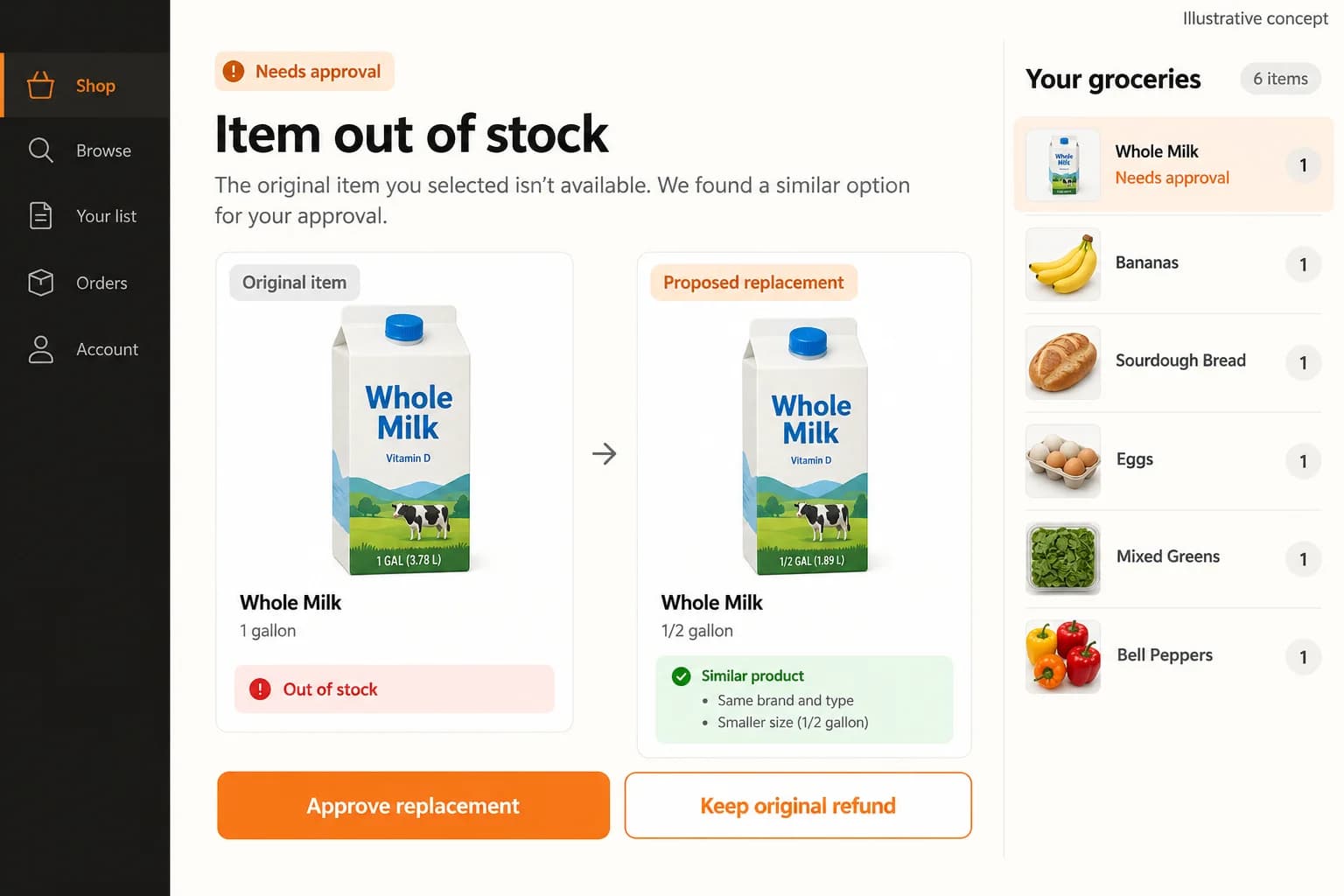
Original illustrative grocery substitution concept showing unavailable milk, a smaller proposed replacement and customer approval or refund actions

Original illustrative grocery substitution concept showing unavailable milk, a smaller proposed replacement and customer approval or refund actions

Original App Clone Labs illustrative concept for one item’s replacement decision. Store attribution, split baskets, retailer prices and shopping fees are not shown. The sample controls do not establish a working OneCart-style multi-store consent or payment flow.

What to check in the walkthrough

  • Build a basket from two stores and make one item unavailable at its assigned store. Show store-specific stock, the affected suborder and whether moving the item to another store requires customer approval of the new price and fees.
  • Ask a shopper to propose a different pack size in one store while another store is already picking. Follow customer acceptance, rejection and no response, with each decision attached to the correct item and store.
  • Reconcile both retailer receipts after a substitution changes a price. Demonstrate item totals, shopping and delivery fees, payment adjustment and a disputed receipt, including recovery when the refund fails.
Open full-size reference
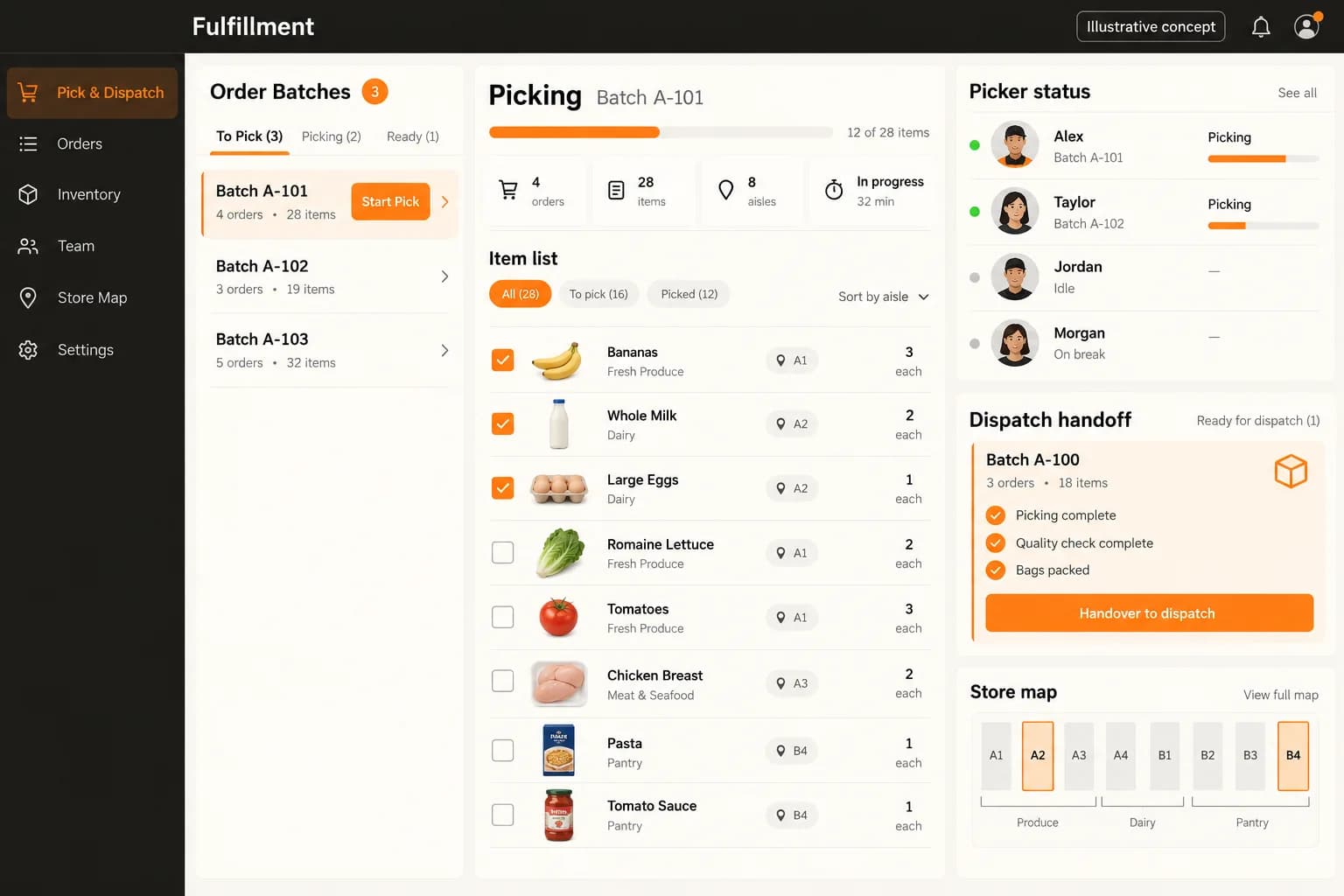
Original illustrative fulfilment concept with order batches, an aisle-based item list, picker status and a dispatch handoff checklist

Original illustrative fulfilment concept with order batches, an aisle-based item list, picker status and a dispatch handoff checklist

Original App Clone Labs illustrative concept for picking and dispatch. This artwork shows a generic fulfilment workspace, not multiple retailer suborders or a consolidated route. Shopper allocation, store receipts and a combined delivery require a separate demonstration.

What to check in the walkthrough

  • Assign a two-store order to a personal shopper, then exceed the shopper’s capacity. Show how work is reassigned and how each store’s picking status remains visible to operations and the customer.
  • Delay one store after the other basket is packed. Demonstrate the agreed holding limits for fresh items, the choice to split or reschedule delivery and customer approval of any changed fees.
  • Follow both store bags into one handoff, then simulate a missing bag at delivery. Show bag-to-suborder evidence, partial completion, support ownership and item and fee reconciliation on the final customer receipt.
Open full-size reference

Solution reference register

01 / Reference and IP

This page references third-party product names only to describe familiar product models and planning references. App Clone Labs is not affiliated with or endorsed by those brands. Build decisions require independent legal, regulatory, and operational review for your market.

02 / Artifact status

Boards, diagrams, screens and workflow descriptions on this page are illustrative planning artifacts, not evidence of a deployed client product.

03 / Regulatory caveat

Food and restricted-item controls may apply · Pricing transparency and shopper privacy review required

04 / Rights and handover

Source access, licensing, repositories, environments, documentation, acceptance and handover are defined by the signed contract and accepted scope.

Scope

Operating model defined

Roles, workflows, dependencies, exclusions, and assumptions are made reviewable.

Evidence: illustrative

System

Applications connected

Experience, operations, services, data, integrations, and release controls are planned together.

Evidence: illustrative

Handover

Rights stated in writing

Access, assignment, licensing, dependencies, documentation, and support follow the signed agreement.

Evidence: illustrative

Artifact register

Product screens and planning references.

Reference screens illustrate workflows, not a contracted feature list. Sample prices, data, and responses are demonstration content; confirm the current scope during a walkthrough.

OneCart-style Multi-store Shopping connected product workflow planning visual
Connected customer, operations, and data workflowEvidence: illustrativeOpen full-size reference
OneCart-style Multi-store Shopping product engineering ecosystem visual
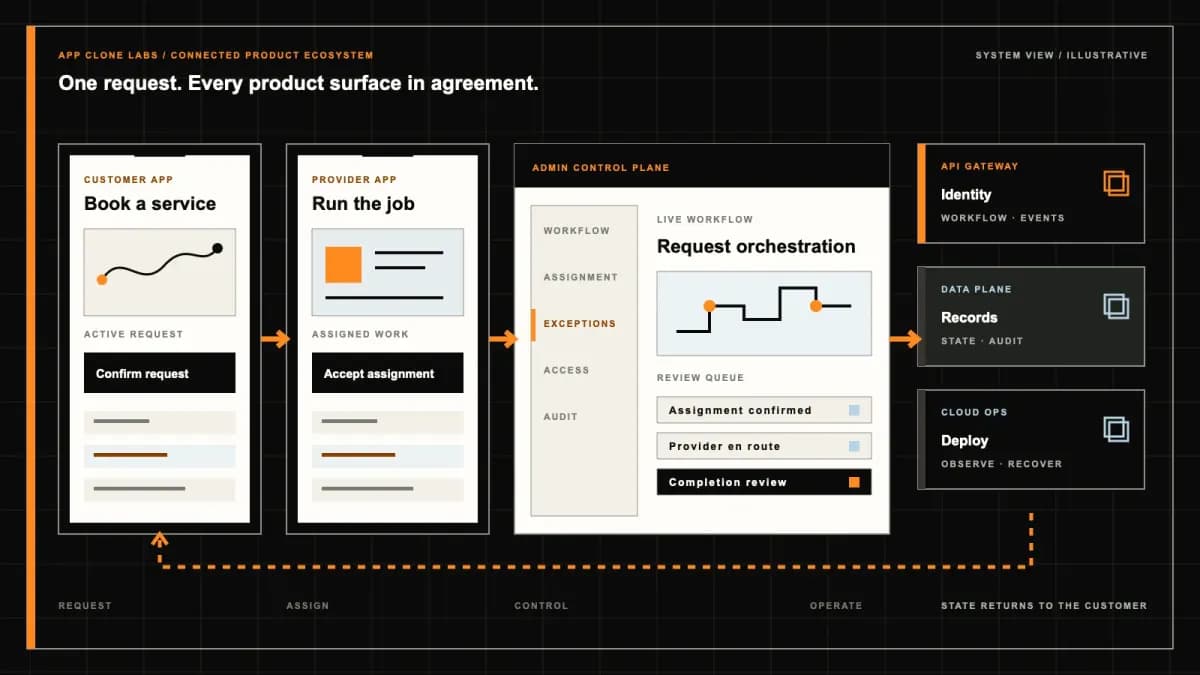
Product engineering ecosystem and handover boundaryEvidence: illustrativeOpen full-size reference

The milk is purchased, but the second store has closed

A household checks out groceries from one store and toiletries from another. The shopper buys the milk, then reaches a closed second branch. Cancelling the parent order would erase a real purchase; waiting indefinitely can compromise perishables. The product needs separate store commitments inside one understandable basket. It must show what has been bought, what cannot be supplied, who holds the bags and which customer decisions are still possible.

A OneCart-style platform combines shopping across local retailers while coordinating substitutions, receipts and delivery. This is independently branded software, not access to OneCart’s shoppers, retailer agreements or proprietary operations. Its distinctive challenge is consolidation: a convenient checkout must still preserve different sellers, prices, shopping states and delivery obligations. Buyers should evaluate the failed second store before assuming that adding more retailer logos makes the proposition more useful.

One checkout does not automatically mean one physical delivery

The official OneCart delivery-charge guidance distinguishes delivery grouping by mall and separate treatment for specialty stores. That is a useful reference for the difference between a combined purchase experience and physical fulfillment. Its location-specific fees and terms are not promises for your product; decide your own grouping model and disclose it before payment.

Define the parent basket, store orders and delivery groups as related but separate records. Several branches might be compatible with one collection run, while a distant specialty store needs another trip. Show each group’s charge, estimated timing and partial-delivery terms clearly. If the address changes, recheck branch coverage and grouping rather than carrying the earlier promise forward. Customers should not discover an extra delivery obligation only after the first bags have already arrived.

Keep branch and pack identity attached to every line

Two search results can share a product name while differing in pack size, seller or branch price. Preserve those differences through basket composition, shopping and the final summary. A catalogue should identify its source and the limits of shelf availability; a refreshed listing does not reserve physical stock. Review catalogue permissions and update methods independently rather than treating public retail pages as an authorized production inventory feed.

Comparisons need meaningful units and disclosed charges, not only a headline item price. A cheaper pack at another store may add a shopping trip or change delivery grouping. Do not move a selected item between retailers silently to improve an apparent basket saving. Rehearse a pack-size mismatch, a branch-specific promotion and an expired price. The shopper, customer and controller should all recover the original choice and any authorized change from the same line history.

Sequence store visits around perishables and real access

The shortest route on a map may be a poor shopping plan if frozen goods are collected first and the next checkout has a long queue. Define collection sequence using opening hours, access, preparation and handling requirements. Food storage and transport controls require appropriate operational review, including equipment and staff responsibilities. Avoid converting a route estimate into a food-safety assurance or a guaranteed delivery duration.

Let the shopper report an inaccessible store or changed queue condition without losing the current basket. Operations can then review reordering, splitting or declining the affected group against agreed customer terms. Do not let an automatic optimizer add an unapproved detour while purchased goods remain in custody. Demonstrate a store closing early and a delayed second checkout, including who decides whether the remaining run can continue responsibly and what the customer is told.

Substitution approval belongs to one store line and one current proposal

A replacement for washing powder at one retailer is not permission to change the groceries bought elsewhere. Each proposal needs the originating line, proposed pack, quantity, price consequence and response deadline. Apply customer preferences within explicit limits rather than treating a general shopping note as unlimited purchasing authority. Allergens, dietary needs and restricted products need appropriate category-specific handling; shopper judgement should not be presented as clinical advice.

Version proposals when the shopper changes the suggested replacement. An old notification reply must not authorize the newer, more expensive item. Where the customer cannot respond, follow the previously agreed fallback rather than inventing consent. Preserve declined, expired, purchased and unavailable outcomes separately. Buyers should test two simultaneous store substitutions, a delayed response and a budget breach with both screens open to confirm that each decision affects only the intended line.

A retailer receipt and a customer summary serve different purposes

The official OneCart receipt guidance describes a summary identifying supplied items, substitutions and unavailable products together with shopping adjustments. This supports the need for a readable final outcome, not an instruction to copy its wallet or debit model. Your receipt, tax and refund responsibilities depend on the commercial structure and operating market.

Keep retailer purchase evidence attached to the correct store group and connect each purchased line to the customer-facing summary. A consolidated display must not conceal who sold the goods or invent a tax invoice issuer. Record discrepancies such as a different quantity, weighted item or unreadable receipt for review. Restrict receipt uploads because they can contain payment fragments, staff details or information unrelated to the household order being fulfilled.

Final totals must explain changes across the whole basket

A missing item reduces one group while an approved replacement increases another. Present the net result with its component changes so the customer can understand the difference from checkout. Distinguish product adjustments from delivery fees, promotions and tips where supported. An amount displayed as an estimate should remain identifiable as an estimate until the defined purchase and reconciliation steps establish the final payable total.

Choose payment authorization and additional-charge rules with the provider and appropriate reviewers. A substitution preference is not blanket authority for a new debit. Keep retries idempotent and reconcile ambiguous provider results before attempting another collection. If a discount depends on basket composition, define its treatment when one store fails. Rehearse a reduced basket, a permitted increase and a missing payment callback without forcing an agent to rewrite the original checkout amount.
Partial failure should preserve successful store purchases

When one group cannot be shopped, keep completed purchases and outstanding work visible independently. The customer needs a clear choice within the agreed terms: continue with available goods, accept a proposed alternative or cancel eligible unpurchased items. Do not imply that products already bought can always be returned immediately. The retailer’s applicable returns arrangements and the operator’s commercial responsibilities need to be understood before offering a reversal button.

Assign an owner to every unresolved group and explain how partial completion changes delivery, charges and communication. A parent order should not show uncomplicated success while a second group remains abandoned in a shopper queue. Keep support decisions traceable to actors and reasons. Test cancellation during the second store visit and a shopper reassignment after the first purchase; the replacement should inherit only the work and information they legitimately need.

Consolidation needs bag identity and a controlled custody handoff

Putting several store bags into one vehicle does not establish that the complete basket is present. Identify purchased groups, package quantities and relevant storage requirements at collection and transfer. Decide whether one shopper delivers or a separate courier receives the goods. A transfer needs an acknowledgement of what changed hands, including shortages and visible condition, rather than a single button that declares every group ready.

At the household handoff, distinguish delivered, refused and missing groups. Use appropriate proof and restrict access to recipient details. A photograph cannot demonstrate the contents of sealed bags or guarantee product condition. Rehearse a missing bag during transfer, a wrong household label and partial recipient acceptance. The controller must be able to locate outstanding custody without exposing other customers’ addresses or marking disputed goods complete merely to close a delivery task.

Refunds and warranties need the correct store and responsible party

A damaged household item from one store should not generate a refund against an unrelated grocery receipt. Tie the issue to the supplied line, retailer group, purchase evidence and applicable seller responsibilities. Distinguish order-support credits, purchase refunds and product warranty claims. A platform support gesture does not automatically satisfy a manufacturer warranty or change the legal seller; appropriate commercial and consumer-protection review should define the boundaries.

Show the approved refund amount, destination and pending status clearly. Do not introduce a stored-value wallet simply because the reference platform uses one; assess payment-provider support and applicable rules first. Keep duplicate claims and delayed callbacks from producing repeated refunds. Operators need a queue for unresolved amounts and a history of permitted corrections. Rehearse a partial refund after one group is delivered and another remains unpurchased, preserving both physical outcomes.

Choose consolidation only when it solves a household buying problem

Compare an Instacart-style personal shopping workflow when the launch operation should first prove retailer selection, substitutions and shopper execution without coordinating a consolidated shopping run across several branches. The distinction is the operating scope you choose, not a claim that another platform is incapable of multi-store experiences.

Start with compatible stores, a supervised service area and categories the team can handle responsibly. Pharmacy, alcohol, bulky goods and temperature-sensitive products may need separate eligibility, storage or delivery arrangements. Review retailer permissions, shopper working arrangements, privacy and consumer disclosures before expanding the catalogue. More stores can increase customer choice while also increasing failure points; launch coverage should follow accountable operations rather than the visual size of a retail directory.

Validate the closed second store before approving the marketplace

Illustrative media explains proposed customer and shopper screens; it is not proof of live retailer access or an available delivery network. Request a controlled walkthrough with sample store groups and sandbox payments. Close a branch after the first purchase, delay a substitution reply, lose a receipt upload and remove one bag at handoff. Verify that each failure has an owner and that the customer can still understand the remaining basket.

Buyer acceptance should cover price freshness, group charges, perishables, duplicate requests, unauthorized adjustments and pending refunds. Inspect readable mobile store comparisons, keyboard access and restricted receipt exports. Agree which components are configured, newly engineered or dependent on external permissions, and document handover access. The evidence should show recoverable multi-store decisions and reconciled purchases rather than only a long aisle list and a single checkout animation.

Bring a representative household basket and one partial-failure example to a multi-store shopping scope discussion. Record ownership, retailer access and commercial responsibilities in the applicable agreement.

Use the delivery process to set checkpoints for store-group identity, substitution consent, custody and financial reconciliation before launch.

Product flow

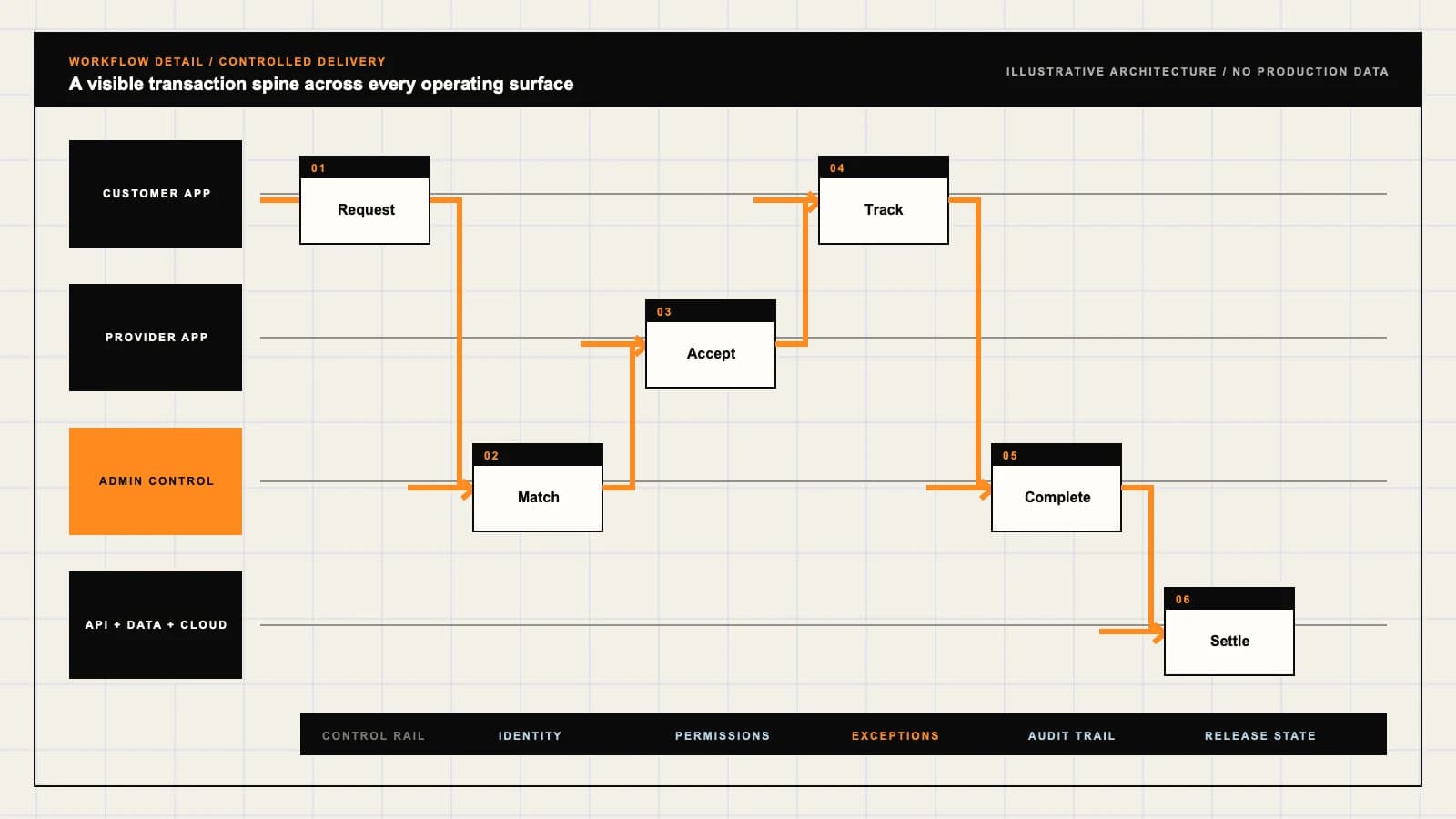
Role-workflow flow diagram.

A visual map of how each role interacts with each workflow stage, with operator controls and integration boundaries.

Deployable Product Architecture

OneCart-style Multi-store Shopping

GROUP THE BASKET …RECORD SUBSTITUTI…MATCH EVERY PURCH…Understand the wh…Keep purchases an…Resolve one faili…INTEGRATIONS: Retail catalogue and branch systems with approved access, pack identifiers,…OPERATOR CONTROLS: Prevent a shared product label from hiding different offers · Apply custome…
Illustrative validation artifact — role-workflow flow diagram; final surfaces, boundaries, and integration topology are confirmed during discovery.

User roles

OneCart-style Multi-store Shopping roles and workflows.

Clone-inspired platforms usually need several coordinated interfaces, not just a customer app.

Household customer

01

Understand the whole basket and each store commitment

Compare store-specific items, charges and fulfillment groups. Approve substitutions against their originating store and see partial outcomes without losing the consolidated order.

Multi-store shopper

02

Keep purchases and custody separated during collection

Work through an agreed store sequence with item-level decisions and retailer receipts. Identify which bags belong to which store group before delivery handoff.

Consolidation controller

03

Resolve one failing store without obscuring the others

Review branch availability, shopper capacity, delivery groups and payment adjustments. Preserve successful purchases while assigning the remaining basket a clear next action.

Workflow

OneCart-style Multi-store Shopping workflow stages.

Each workflow stage is mapped to a role, screen, API, notification, admin control, and measurable launch outcome.

Compose

01

Group the basket by actual store branch

Validate area, item source, price version and fulfillment compatibility. Explain when one checkout creates separate shopping tasks or deliveries.

Shop and reconcile

02

Record substitutions and receipts within each group

Sequence stores against access and perishable handling constraints. Keep accepted replacements, unavailable lines and actual purchase totals traceable to their originating store.

Consolidate and deliver

03

Match every purchased bag to an accountable handoff

Confirm group readiness, identify partial failures and record delivery quantities. Resolve charges and refunds without rewriting successful store purchases.

Deployable Product Architecture

Workflow / system register

Revision APlanning surface

Marketplace loop

OneCart-style Multi-store Shopping workflow stages.

Demand and supply meet through governed transactions

Marketplace loop: OneCart-style Multi-store Shopping workflow stages.Demand and supply meet through governed transactions. Trust, payments, support, and operator controls close the commercial loop.
01

Group the basket by actual store branch

02

Record substitutions and receipts within each group

03

Match every purchased bag to an accountable handoff

Control note

Trust, payments, support, and operator controls close the commercial loop.

Illustrative architecture register; validate against the accepted scope.

Operator controls

OneCart-style Multi-store Shopping admin and operator controls.

The control center is scoped as a first-class product surface, not an afterthought.

Store identity

01

Prevent a shared product label from hiding different offers

Keep branch, seller, pack size, price source and update time attached to each line. Do not replace one store’s offer with another without informed approval.

Basket changes

02

Apply customer consent to the correct store and amount

Version substitution proposals and budget consequences. Expired or repeated replies must not purchase extra items or authorize unrelated changes elsewhere in the basket.

Consolidation safety

03

Keep custody and restricted goods visible across groups

Track bags, quantities and storage requirements through shopper handoff. Review food safety, age-restricted products and recipient authority under local operating rules.

Monetization

OneCart-style Multi-store Shopping monetization models.

We model monetization early so payments, admin controls, and reporting support the business.

Disclose what each fulfillment group costs

Separate shopping fees, group delivery charges and permitted extras. A single checkout should not conceal additional trips or an altered fee after a store fails.

Define commercial terms for the actual relationship

Scope commissions, catalogue access and settlement only with appropriate retailer permissions. A listed store is not evidence of a signed partnership or guaranteed inventory.

Keep sponsorship distinct from basket suitability

Disclose paid placement and preserve comparable pack information. Advertising revenue must not silently change a selected store, substitution or promised delivery group.

Integrations

OneCart-style Multi-store Shopping integration surface.

External systems that determine launch readiness, data flow, and operational continuity.

Integration

01

Integration 1

Retail catalogue and branch systems with approved access, pack identifiers, price freshness, area eligibility and explicitly uncertain shelf availability

Integration

02

Integration 2

Shopper assignment, messaging and receipt tools with store-group identifiers, versioned consent, restricted customer details and interrupted-upload recovery

Integration

03

Integration 3

Payment and delivery systems with parent-order and group references, authorized adjustments, bag-level handoff and unresolved refund reconciliation

Scope drivers

OneCart-style Multi-store Shopping scope drivers.

The variables that most influence build effort, cost, and launch readiness.

Retail coverage

01

Choose a small set of operationally compatible branches

Review opening hours, purchasing permissions, store access and item exclusions. Do not promise every visible retailer can serve every address.

Consolidation model

02

Decide when one checkout can become one delivery

Define collection geography, shopper capacity, transfer points and storage arrangements. Different malls or specialist stores may need separate delivery groups.

Money model

03

Agree how estimates become final payable amounts

Review substitution limits, weighted goods, receipt evidence and refund destinations. Stored-value balances and additional debits need provider and regulatory assessment.

Deployable Product Architecture

Scope drivers / system register

Revision FPlanning surface

Marketplace loop

OneCart-style Multi-store Shopping scope drivers.

Demand and supply meet through governed transactions

Marketplace loop: OneCart-style Multi-store Shopping scope drivers.Demand and supply meet through governed transactions. Trust, payments, support, and operator controls close the commercial loop.
01

Choose a small set of operationally compatible branches

02

Decide when one checkout can become one delivery

03

Agree how estimates become final payable amounts

Control note

Trust, payments, support, and operator controls close the commercial loop.

Illustrative architecture register; validate against the accepted scope.

V1 scope

OneCart-style Multi-store Shopping V1 foundation.

Launch the smallest complete operating loop first, then scale the product with confidence.

Bounded multi-store basket

01

Prove group identity from search to final receipt

Launch reviewed branches and compatible product categories. Preserve seller attribution, group charges and meaningful availability warnings throughout checkout.

Controlled shopping

02

Recover from one store closing during the run

Support sequenced store tasks, line substitutions and partial completion. Make customer decisions and shopper custody visible without resetting the whole basket.

Accountable handoff

03

Connect purchases, bags and adjustments

Rehearse retailer receipts, consolidated summaries, delivery proof and group-level refunds. Keep disputed and pending amounts visible to permitted operations staff.

Later phases

OneCart-style Multi-store Shopping post-launch expansion.

Capabilities that should usually wait until real usage proves the core loop.

More retail categories

01

Add category rules before broadening the aisle list

Review pharmacy, alcohol, bulky goods and warranties separately. A shared cart does not make all products suitable for the same shopper or delivery method.

Recurring household orders

02

Reconfirm every repeat basket against current conditions

Add templates, schedules and budget preferences without copying stale prices, expired consent or old branch availability into a new commitment.

Multi-shopper consolidation

03

Introduce transfers only with accountable custody

Scope controlled handover points, storage and group readiness. Evaluate delay and cold-chain consequences before combining independent shopping runs.

Deployable Product Architecture

Later phases / system register

Revision CPlanning surface

Marketplace loop

OneCart-style Multi-store Shopping post-launch expansion.

Demand and supply meet through governed transactions

Marketplace loop: OneCart-style Multi-store Shopping post-launch expansion.Demand and supply meet through governed transactions. Trust, payments, support, and operator controls close the commercial loop.
01

Add category rules before broadening the aisle list

02

Reconfirm every repeat basket against current conditions

03

Introduce transfers only with accountable custody

Control note

Trust, payments, support, and operator controls close the commercial loop.

Illustrative architecture register; validate against the accepted scope.

Regulatory review

OneCart-style Multi-store Shopping regulatory and compliance flags.

Each flag must be reviewed by qualified counsel for your target market before build or launch.

Flag 1

Food and restricted-item controls may apply

Flag 2

Pricing transparency and shopper privacy review required

Reference walkthrough

Request a OneCart-style Multi-store Shopping reference walkthrough.

Ask us to confirm which reference surfaces are currently available for this product model. Rather than publishing shared demo credentials, we schedule a private guided walkthrough for qualified buyers.

Reference surface

01

Household customer: Understand the whole basket and each store commitment

Request a role-specific demonstration and confirm which capabilities are currently available. Review the proposed responsibility: Compare store-specific items, charges and fulfillment groups. Approve substitutions against their originating store and see partial outcomes without losing the consolidated order.

Reference surface

02

Multi-store shopper: Keep purchases and custody separated during collection

Request a role-specific demonstration and confirm which capabilities are currently available. Review the proposed responsibility: Work through an agreed store sequence with item-level decisions and retailer receipts. Identify which bags belong to which store group before delivery handoff.

Reference surface

03

Consolidation controller: Resolve one failing store without obscuring the others

Request a role-specific demonstration and confirm which capabilities are currently available. Review the proposed responsibility: Review branch availability, shopper capacity, delivery groups and payment adjustments. Preserve successful purchases while assigning the remaining basket a clear next action.

Next step

04

Book a walkthrough

Request a live, private walkthrough of the reference implementation. We will confirm scope and discuss configured deployment versus custom build for your market.

Open register

Deployable Product Architecture

Reference walkthrough / system register

Revision DPlanning surface

Marketplace loop

Request a OneCart-style Multi-store Shopping reference walkthrough.

Demand and supply meet through governed transactions

Marketplace loop: Request a OneCart-style Multi-store Shopping reference walkthrough.Demand and supply meet through governed transactions. Trust, payments, support, and operator controls close the commercial loop.
01

Household customer: Understand the whole basket and each store commitment

02

Multi-store shopper: Keep purchases and custody separated during collection

03

Consolidation controller: Resolve one failing store without obscuring the others

04

Book a walkthrough

Control note

Trust, payments, support, and operator controls close the commercial loop.

Illustrative architecture register; validate against the accepted scope.

Process

A traceable path from decision to acceptance.

  1. 01

    Model teardown

    We map the reference business model, user roles, monetization path, regulatory needs, and launch constraints.

    Artifact: Product teardown, risk map, role matrix

  2. 02

    Market-fit blueprint

    We reshape the model around your market, operations, pricing, workflows, and first release priorities.

    Artifact: Feature scope, flows, technical plan

  3. 03

    Design and build

    Product, design, engineering, QA, and cloud delivery move in weekly demo cycles with visible progress.

    Artifact: Working releases, QA notes, sprint demos

  4. 04

    Launch and operate

    We support production release, monitoring, handoff, roadmap decisions, and post-launch improvement.

    Artifact: Launch checklist, docs, growth backlog

FAQ

Questions to resolve before the build.

01Does this include OneCart’s retailers or shopper network?

No. This is independently branded software for an agreed multi-store shopping operation. Proprietary code, retailer agreements, shopper access, brand rights and another company’s commercial terms are not included.

02Does one checkout always produce one delivery?

No. Store location, capacity, handling requirements and access may require separate fulfillment groups. Show their charges, timing and partial-completion terms before payment rather than promising consolidation automatically.

03How are items from different stores kept distinct?

Preserve retailer and branch identity, pack size, price version and fulfillment group on each line. Keep those references through substitutions, receipt capture, delivery and any later refund.

04Can the app always show live shelf stock?

Only to the extent supported by authorized, dependable data and the operating model. Explain freshness and uncertainty. A visible catalogue item does not itself reserve physical stock or establish retailer integration rights.

05How should the shopper choose the store visit sequence?

Use reviewed opening hours, access, queues and handling requirements alongside route considerations. Perishable goods may make the shortest route unsuitable. Define an exception process for delays and inaccessible branches.

06Does substitution approval apply to every store?

No. Tie approval to the current proposal, original store line, pack and price consequence. Expired replies and general preferences must not silently authorize unrelated purchases or additional debits.

07Why keep retailer receipts as well as a consolidated summary?

Retailer evidence supports store-level purchase and issue review; the summary explains supplied items, substitutions, omissions and charges to the customer. Seller and tax-invoice responsibilities depend on the reviewed commercial structure.

08What happens if the second store closes after the first purchase?

Preserve the completed purchase and identify the unavailable group separately. Apply agreed customer choices and charge rules, with an accountable operations owner. Do not assume purchased goods can always be returned immediately.

09How is a shopper-to-courier transfer controlled?

Record store-group bags, quantities, relevant handling requirements and exceptions at handoff. Keep an accountable custodian for missing goods and restrict access to customer information.

10Are refunds automatically paid to an app wallet?

No. Choose refund destinations and provider arrangements deliberately. Stored-value wallets need appropriate assessment. Show approved, pending and unresolved amounts without retrying ambiguous payments blindly.

11Can pharmacy, alcohol and bulky products share the same run?

Not by default. Review eligibility, retailer permissions, shopper authority, storage, vehicle suitability and recipient checks for each category. A shared basket does not remove separate product obligations.

12What should a buyer inspect in the demo?

Test branch closure, simultaneous substitutions, perishable delays, receipt interruption, missing bags, partial delivery and pending refunds. Use controlled sample data and sandbox payments; illustrative screens do not demonstrate live retailer or shopper access.

Primary sources

References behind this page

Dated official documentation, standards, and research that support the factual claims on this page.

  1. 01
  2. 02

Citation readiness

How to interpret this page

Published by App Clone Labs Editorial Team

Commercial claims
Scope, cost, and timeline claims are planning guidance and require validation in a current proposal.
Evidence status
Diagrams, boards, examples, and estimates are illustrative planning artifacts unless explicitly identified with a source and measured evidence status.

Next decision

Turn the brief into an accepted product scope.

Define outcomes, constraints, evidence, rights and handover before delivery begins.

Commercial rights, repositories, environments, documentation, acceptance and handover remain contract-defined.

Scope OneCart-style Multi-store Shopping

Independent from OneCart

App Clone Labs is an independent software development studio. We are not affiliated with, connected to, sponsored by, or endorsed by OneCart.

Why this name appears

OneCart is referenced descriptively to identify familiar product mechanics and common search terminology. “Clone” describes a planning reference, not a replica.

Original delivery

Any product delivered by App Clone Labs is independently designed and developed for the accepted scope. It does not contain proprietary code, branding, copy, interface assets, or confidential material from OneCart.

Trademark ownership

OneCart and associated names, logos, and marks remain the property of their respective owners. Their use identifies a reference category and does not imply authorization or endorsement.