Marketing automation

ActiveCampaign-style Customer Automation — Custom-Built for Your Market

Behavior-led messaging and sales automation workspace. Planned for growth teams coordinating lifecycle messages across customer touchpoints with role-specific workflows, operator controls, integrations, and a handover boundary defined for the selected market.

See product screens and demo access

Custom workflows

Brand-safe product strategy

Admin and operations tooling

Reference walkthrough by arrangement

Review consented journeys, message approvals and delivery logs before choosing a customer-automation build.

Use this original workflow concept to scope segmentation, journey governance and channel delivery. It is not ActiveCampaign UI or proof of contacts, deliverability, consent, attribution or provider performance.

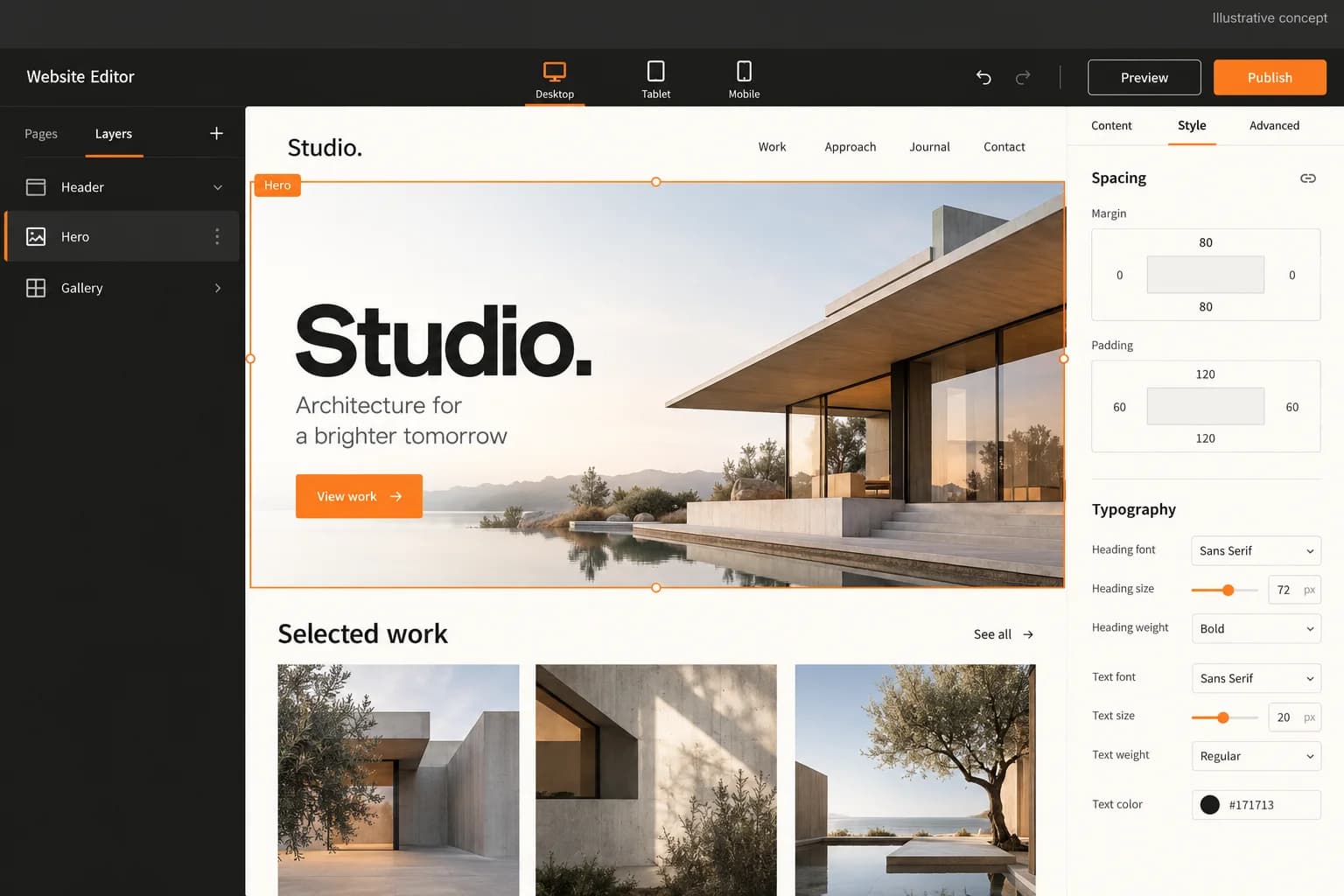
Original illustrative automation workspace with journey rules and approval controls

Original illustrative automation workspace with journey rules and approval controls

Original App Clone Labs automation concept at 1536×1024. Sample rules and statuses are illustrative and do not prove consent, delivery, attribution, audience scale or platform affiliation.

What to check in the walkthrough

  • Audience governance: Which consent, suppression and frequency rules must be checked before a journey can activate?
  • Approval workflow: How are message revisions, reviewer decisions and rollback states recorded?
  • Delivery evidence: Which provider events, failures and attribution boundaries must be retained for a supportable campaign record?
Open full-size reference

Solution reference register

01 / Reference and IP

This page references third-party product names only to describe familiar product models and planning references. App Clone Labs is not affiliated with or endorsed by those brands. Build decisions require independent legal, regulatory, and operational review for your market.

02 / Artifact status

Boards, diagrams, screens and workflow descriptions on this page are illustrative planning artifacts, not evidence of a deployed client product.

03 / Regulatory caveat

Document consent source, purpose, and withdrawal · Apply sender authentication, suppression, and deliverability controls · Review privacy, electronic-message, and data-retention rules by market · Document lawful audience imports and behavioral profiling choices

04 / Rights and handover

Source access, licensing, repositories, environments, documentation, acceptance and handover are defined by the signed contract and accepted scope.

Scope

Operating model defined

Roles, workflows, dependencies, exclusions, and assumptions are made reviewable.

Evidence: illustrative

System

Applications connected

Experience, operations, services, data, integrations, and release controls are planned together.

Evidence: illustrative

Handover

Rights stated in writing

Access, assignment, licensing, dependencies, documentation, and support follow the signed agreement.

Evidence: illustrative

Artifact register

Product screens and planning references.

Reference screens illustrate workflows, not a contracted feature list. Sample prices, data, and responses are demonstration content; confirm the current scope during a walkthrough.

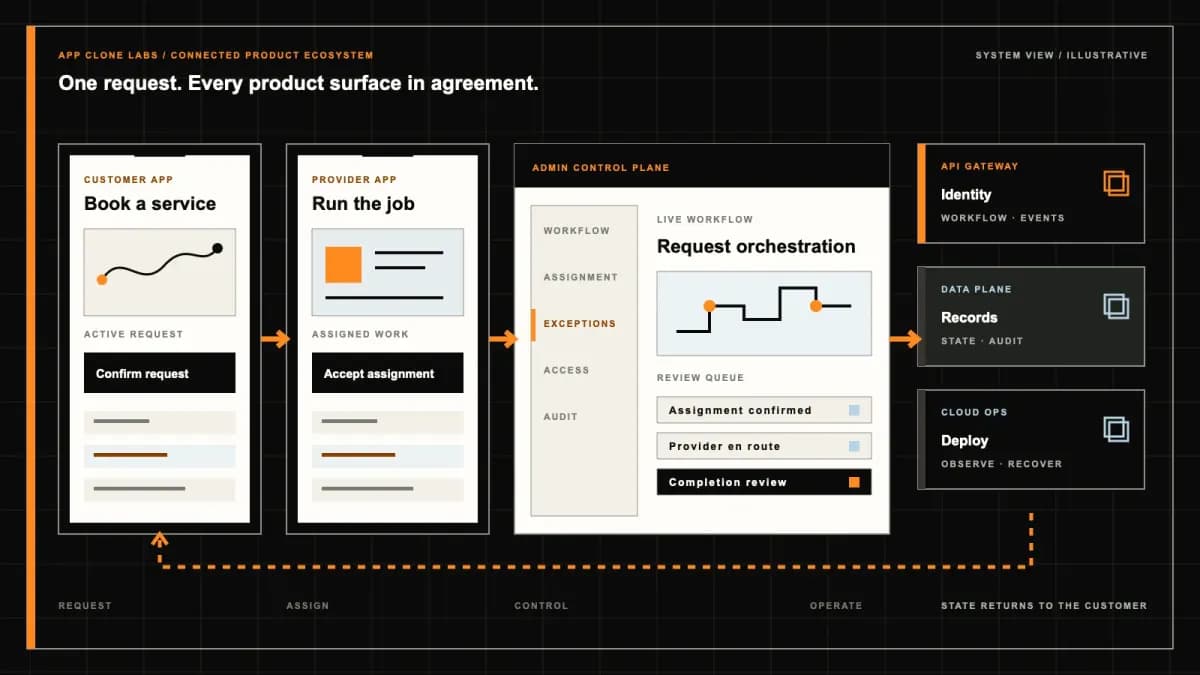
ActiveCampaign-style Customer Automation connected product workflow planning visual
Connected customer, operations, and data workflowEvidence: illustrativeOpen full-size reference
ActiveCampaign-style Customer Automation product engineering ecosystem visual
Product engineering ecosystem and handover boundaryEvidence: illustrativeOpen full-size reference

A journey must stop when the customer says stop

A trial customer requests a product guide, starts onboarding and then unsubscribes before tomorrow’s reminder. The event remains in the queue, but the reminder should no longer be eligible. A useful customer automation product needs to explain why the person entered the journey, which version is running and why the next message was skipped. Drawing an attractive sequence of boxes covers only part of that work.

An ActiveCampaign-style build is an independently branded workspace for consented contact data, event-driven journeys and coordinated sales actions. The reference identifies a product category; it does not include ActiveCampaign affiliation, proprietary software, customer records, provider contracts or its operating infrastructure. Scope the audience and execution responsibilities before choosing the editor’s appearance.

Choose a customer journey before choosing campaign screens

Start with one lifecycle problem, such as helping permissioned trial users complete account setup. Name the entry event, intended audience, message purpose, success event and stopping conditions. A weekly newsletter and a trial onboarding flow may share templates, but the second needs state across multiple events and waiting periods. Record which team owns the next action when the customer purchases, asks for help or withdraws permission.

For a publishing-led email workspace, compare the Mailchimp-style campaign studio. This brief concentrates on event-triggered execution and marketing-to-sales coordination; a larger template library alone does not resolve those requirements.

Keep contact provenance beside the address

An imported address should carry its collection source, collection date, permitted channel, purpose and supporting evidence. Review who can import contacts and whether the proposed use matches the recorded permission. Purchased lists and unexplained spreadsheets should not become eligible audiences through a convenient bulk action. Where confirmation is required by the agreed policy, keep the record pending until the evidence exists.

Match records using an agreed identity model rather than assuming every matching name identifies one person. Record source identifiers and who may merge profiles. When two records disagree about permission, route the conflict for review and preserve withdrawal evidence. Define retention, access and deletion handling for contact attributes, behavioral events and exports with the responsible privacy team.

Give every entry trigger an event contract

For trial_started, define the originating system, event identifier, contact identifier, event time and required fields. Validate authenticated inbound events, reject malformed payloads and keep late or unknown-contact events visible for review. Decide whether entry can happen once, after a cooling period or after each qualifying event. A historical import should not silently replay months of welcome messages.

The ActiveCampaign trigger documentation describes conditions that enroll contacts and notes that triggers are not retroactive. Use that distinction to settle live enrollment versus an explicitly reviewed backfill in your own product. Available vendor triggers do not establish which integrations or execution rules are included in an independent build.

Publish a version that running contacts can explain

Keep draft journeys separate from published definitions. A published version should identify its entry conditions, message revisions, branch rules, waits and exits with approval history. If a marketer changes a three-day delay to one day, decide whether existing runs retain their original wait or migrate through a reviewed action. Moving a box in the editor must not silently change the history of a completed run.

Provide a pause control with an explicit effect on new entry, waiting steps and queued dispatch. Record the operator and reason. Preview representative contacts before publishing, including someone already converted, someone missing an attribute and someone suppressed. Handover should include the published definitions and execution records needed to investigate a customer complaint.

Make branches and waits answer to current customer state

A branch such as completed_setup needs a named source of truth and a defined evaluation time. Explain whether the rule reads the entry snapshot or current contact state. Missing data needs an explicit route; treating an unavailable purchase event as proof of no purchase can send an inappropriate reminder. Retain the values or decision evidence necessary to explain the chosen path without collecting unrelated personal data.

Set time zones, quiet hours, expiry and maximum wait behavior. If a conversion arrives during a delay, define whether it cancels the next step immediately or is checked when the delay ends. Coordinate competing journeys with frequency limits and priority rules, so the same contact does not receive onboarding, renewal and sales nudges merely because each flow looks reasonable alone.

Deduplicate events without blindly retrying messages

Use the source event identifier and a scoped action key to recognize duplicate delivery of the same event. Keep a deliberate re-entry distinct from a transport retry. Record when an action was queued, attempted and acknowledged. A repeated webhook should not enroll the customer twice or create two CRM tasks; a new qualifying purchase should remain a separate business event.

A provider timeout may leave the send outcome unknown. Reconcile using the provider’s message identifier or supported lookup before retrying an ambiguous dispatch. Define bounded retries for eligible failures, a review queue for exhausted attempts and an owner for unresolved outcomes. Apply suppression and expiry again before any retry. Do not claim universal exactly-once delivery across systems whose acknowledgements can be lost.
Enforce unsubscribe and suppression before every send

Store unsubscribe, complaint and bounce suppression with the channel and purpose scope agreed for the product. Make the preference action accessible and connect provider callbacks to the authoritative eligibility record. A contact can remain in a journey for reporting or non-message processing while a marketing send is blocked; the trace should say which rule prevented dispatch.

Recheck eligibility at the last controllable dispatch point, including delayed steps and retries. Show operators the boundary: a message already accepted by a provider may no longer be retractable. Prevent an old import or a later tag update from resubscribing a withdrawn contact. Any renewed permission needs its own evidence and approved route; deleting the suppression record is not a resubscription workflow.

Hand sales a task with an owner and an acknowledgement

A qualified trial account can create a CRM task with relevant product activity, the reason for qualification and permitted contact context. Map the contact and account identifiers, assign an owner and record the CRM acknowledgement. Keep a failed handoff visible rather than showing a lead as assigned merely because an outbound request was attempted.

Agree whether the CRM or automation workspace owns deal stage, task completion and sales disposition. Prevent a repeated event from opening duplicate tasks. Let a sales outcome stop or alter marketing follow-up through a defined event, with review when synchronization fails. A lead score is a rule-based signal for an operator to assess, not proof that the person requested sales contact.

Treat deliverability as an operating discipline

Confirm sending-domain control, provider approval, sender identity and monitored bounce and complaint handling. Distinguish a provider accepting a message from delivery to a recipient server and from inbox placement. Start with an audience whose provenance and purpose are understood, and assign someone to investigate deteriorating delivery signals before increasing volume.

The ActiveCampaign sending-domain guide explains domain authentication using DNS records including DKIM, SPF and DMARC. Your selected provider needs its own verified setup and account access. Authentication is an acceptance prerequisite to verify, not a promise that every recipient will receive a message in their inbox.

Measure segments and prove exceptions in the walkthrough

Give a segment a readable definition, eligible population, exclusions and evaluation time. Report journey entries, suppressed actions, failures, completed steps and observed conversions for a stated window. Define the conversion event and attribution rule; an open or click should not become a sale by implication. Explain missing events and tracking limitations, and use an agreed comparison cohort when assessing incremental results.

Ask for a connected walkthrough with redacted contacts and clearly identified sandbox providers. Illustrative journey artwork does not prove functioning CRM access or live messaging. Buyer acceptance should cover a duplicate event, a late conversion, a missing branch field, a changed published version and an unsubscribe during a wait. Then force an ambiguous provider timeout and a failed CRM handoff. Inspect the trace, recovery decision and restricted export access in each case.

Bring permission evidence and one complete lifecycle brief

Bring a redacted contact import, event examples, consent fields, a proposed journey and the CRM task that should result. Name the audience owner, message approver, domain administrator and operator handling exceptions. Agree configured capabilities, custom work, provider access and exclusions before fixing a delivery date. Review source ownership, third-party licences, deployment access, record recovery and support responsibilities as part of handover.

Use a customer automation scope discussion to turn the lifecycle brief into a bounded release with observable acceptance evidence. Message volume, inbox placement and sales outcomes depend on operating conditions and cannot be guaranteed by the application.

Review the delivery process for checkpoints around data preparation, journey approval, exception testing and operator handover.

Product flow

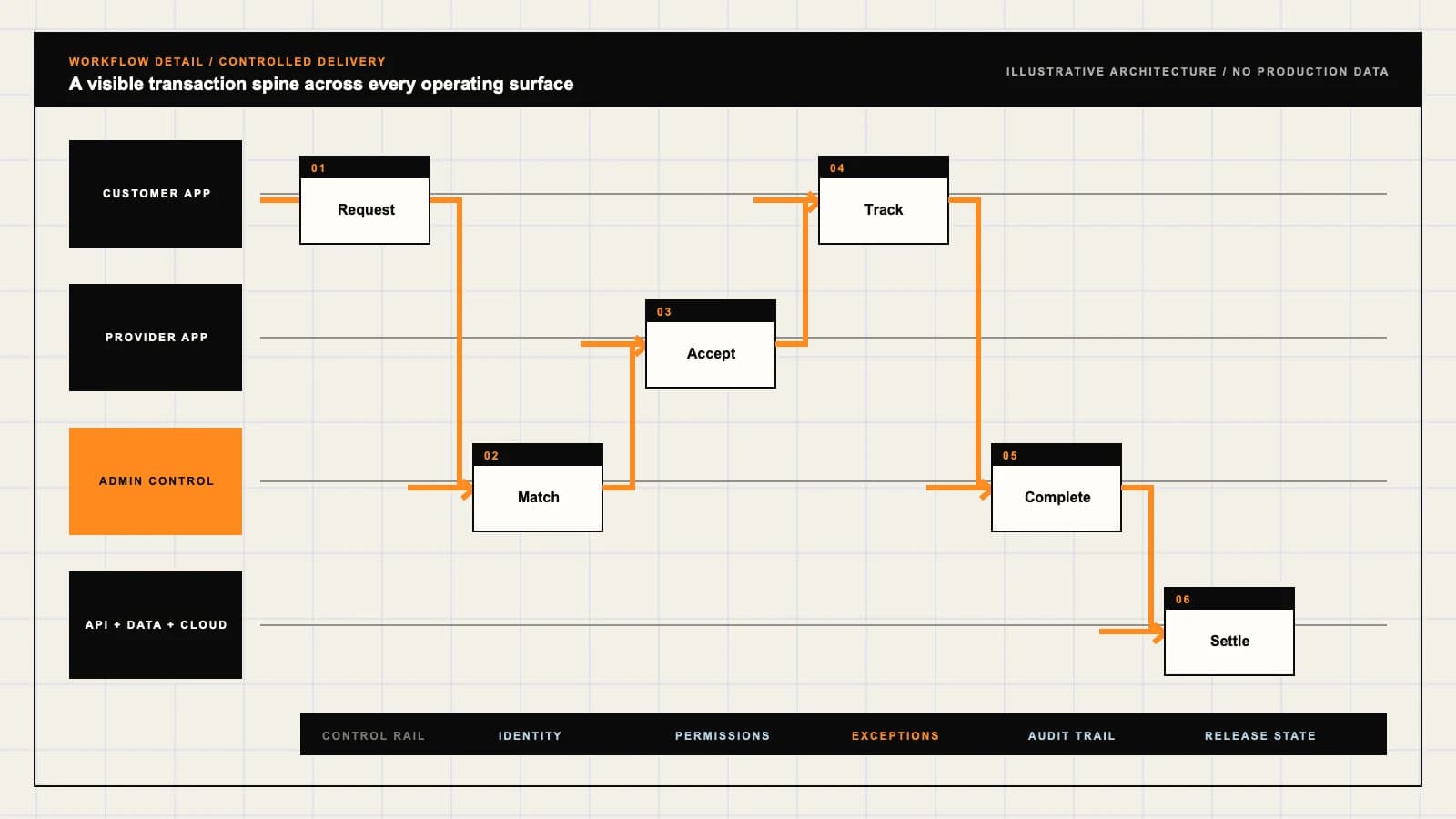
Role-workflow flow diagram.

A visual map of how each role interacts with each workflow stage, with operator controls and integration boundaries.

Deployable Product Architecture

ActiveCampaign-style Customer Automation

MATCH A CONSENTED…RUN BRANCHES, WAI…RESOLVE EXITS, SA…Publish journeys …Accept qualified …Keep identity, pe…INTEGRATIONS: CRM and commerce event APIs with confirmed access, stable contact identifie…OPERATOR CONTROLS: Retain the reason a contact may receive a message · Make live automation ch…
Illustrative validation artifact — role-workflow flow diagram; final surfaces, boundaries, and integration topology are confirmed during discovery.

User roles

ActiveCampaign-style Customer Automation roles and workflows.

Clone-inspired platforms usually need several coordinated interfaces, not just a customer app.

Lifecycle marketer

01

Publish journeys with an approved audience purpose

Define entry events, segments, messages and exit rules. Preview branch behavior, request approval and publish a version whose execution history can be inspected.

Sales owner

02

Accept qualified handoffs and record an outcome

Receive a CRM task with relevant consented context, acknowledge ownership and update disposition. Avoid conflicting sales and marketing follow-ups through explicit coordination.

Data and campaign operations

03

Keep identity, permissions and delivery evidence usable

Review imports, event contracts, suppression and provider failures. Control exports and publish access, and resolve ambiguous sends without blindly replaying messages.

Workflow

ActiveCampaign-style Customer Automation workflow stages.

Each workflow stage is mapped to a role, screen, API, notification, admin control, and measurable launch outcome.

Qualify entry

01

Match a consented event to a published journey

Validate the event source, contact identity, timestamp and allowed purpose. Apply re-entry limits and suppression before enrolling a contact in a specific journey version.

Execute decisions

02

Run branches, waits and messages with a trace

Record which conditions were evaluated and why a path was chosen. Recheck eligibility before dispatch, apply frequency rules and retain provider acknowledgements.

Close the loop

03

Resolve exits, sales handoffs and measured outcomes

Stop on unsubscribe or a defined conversion, reconcile delivery callbacks and assign failed steps. Report eligible cohorts and outcomes with an explicit observation window.

Deployable Product Architecture

Workflow / system register

Revision CPlanning surface

AI delivery loop

ActiveCampaign-style Customer Automation workflow stages.

Useful automation keeps judgment visible

AI delivery loop: ActiveCampaign-style Customer Automation workflow stages.Useful automation keeps judgment visible. Confidence, permissions, fallback behavior, and logs belong in the workflow.
01

Match a consented event to a published journey

02

Run branches, waits and messages with a trace

03

Resolve exits, sales handoffs and measured outcomes

Control note

Confidence, permissions, fallback behavior, and logs belong in the workflow.

Illustrative architecture register; validate against the accepted scope.

Operator controls

ActiveCampaign-style Customer Automation admin and operator controls.

The control center is scoped as a first-class product surface, not an afterthought.

Audience provenance

01

Retain the reason a contact may receive a message

Track collection source, consent evidence, channel, purpose and withdrawal. Restrict audience imports, profile access and exports; a tag alone does not establish permission.

Publish authority

02

Make live automation changes deliberate

Separate draft editing, message approval and publishing. Preserve versioned definitions and decide how waiting contacts move when an approved journey is replaced.

Suppression enforcement

03

Apply withdrawal at the dispatch boundary

Check unsubscribe, bounce and complaint suppression before each marketing send. Prevent stale imports, delayed events and retries from restoring withdrawn eligibility.

Monetization

ActiveCampaign-style Customer Automation monetization models.

We model monetization early so payments, admin controls, and reporting support the business.

Explain the contact allowance and team permissions

Define how active contacts, archived records and suppressed contacts affect billing. State renewal and export terms without encouraging removal of suppression evidence.

Price execution and channel usage visibly

Specify included event volume, journey runs and provider messaging charges. Make limits and overage behavior visible before a campaign queues more messages.

Charge for a bounded data and journey rollout

Scope event mapping, import review, template setup and operator training. Provider accounts, inbox placement and commercial conversion are separate from implementation deliverables.

Integrations

ActiveCampaign-style Customer Automation integration surface.

External systems that determine launch readiness, data flow, and operational continuity.

Integration

01

Integration 1

CRM and commerce event APIs with confirmed access, stable contact identifiers, authenticated events and an assigned reconciliation owner

Integration

02

Integration 2

Email or other approved messaging providers with authenticated sender domains, scoped credentials, delivery callbacks and unsubscribe processing

Integration

03

Integration 3

Consent forms and analytics services with purpose mapping, retention rules, measurement permissions and documented deletion or suppression propagation

Scope drivers

ActiveCampaign-style Customer Automation scope drivers.

The variables that most influence build effort, cost, and launch readiness.

Contact identity

01

Choose how records are matched and permissions retained

Agree source identifiers, merge authority, import provenance and consent purposes. Decide what happens when a shared address or conflicting permission record appears.

Journey execution

02

Bound events, branching and concurrent runs

Set event contracts, re-entry rules, wait behavior and version migration policy. Size peak dispatch and recovery capacity against the chosen providers.

Operating responsibility

03

Name owners for delivery and sales exceptions

Confirm domain access, provider eligibility, approval coverage and CRM handoff ownership. Review audience and tracking obligations for the actual launch markets.

Deployable Product Architecture

Scope drivers / system register

Revision DPlanning surface

AI delivery loop

ActiveCampaign-style Customer Automation scope drivers.

Useful automation keeps judgment visible

AI delivery loop: ActiveCampaign-style Customer Automation scope drivers.Useful automation keeps judgment visible. Confidence, permissions, fallback behavior, and logs belong in the workflow.
01

Choose how records are matched and permissions retained

02

Bound events, branching and concurrent runs

03

Name owners for delivery and sales exceptions

Control note

Confidence, permissions, fallback behavior, and logs belong in the workflow.

Illustrative architecture register; validate against the accepted scope.

V1 scope

ActiveCampaign-style Customer Automation V1 foundation.

Launch the smallest complete operating loop first, then scale the product with confidence.

Permissioned contact workspace

01

Import, segment and inspect eligible audiences

Include provenance fields, reviewable segment rules, restricted exports and persistent suppression. Show why a contact is included or excluded before publication.

Journey authoring and execution

02

Publish a bounded event-to-action flow

Support approved messages, explicit branches, waits, exit rules and versioned runs. Include event deduplication, controlled retries and an operator pause.

Operations and handoff desk

03

Investigate delivery and CRM outcomes

Provide execution traces, provider status reconciliation and accountable sales tasks. Distinguish queued, accepted, failed and unresolved actions in reports.

Later phases

ActiveCampaign-style Customer Automation post-launch expansion.

Capabilities that should usually wait until real usage proves the core loop.

Additional channels

01

Extend only after channel permissions are mapped

Add SMS or other messaging when provider access, channel consent, opt-out handling and frequency coordination are verified for the launch market.

Advanced segmentation

02

Add scoring with inspectable evidence

Introduce scoring or predictive audiences after defining data quality, evaluation windows and reviewable reasons. A score must not imply confirmed purchase intent.

Warehouse reporting

03

Reconcile cohorts across business systems

Add data exports and cross-system outcome reporting after identifier mapping and attribution rules are agreed. Retain permission boundaries and explain missing events.

Deployable Product Architecture

Later phases / system register

Revision CPlanning surface

AI delivery loop

ActiveCampaign-style Customer Automation post-launch expansion.

Useful automation keeps judgment visible

AI delivery loop: ActiveCampaign-style Customer Automation post-launch expansion.Useful automation keeps judgment visible. Confidence, permissions, fallback behavior, and logs belong in the workflow.
01

Extend only after channel permissions are mapped

02

Add scoring with inspectable evidence

03

Reconcile cohorts across business systems

Control note

Confidence, permissions, fallback behavior, and logs belong in the workflow.

Illustrative architecture register; validate against the accepted scope.

Regulatory review

ActiveCampaign-style Customer Automation regulatory and compliance flags.

Each flag must be reviewed by qualified counsel for your target market before build or launch.

Flag 1

Document consent source, purpose, and withdrawal

Flag 2

Apply sender authentication, suppression, and deliverability controls

Flag 3

Review privacy, electronic-message, and data-retention rules by market

Flag 4

Document lawful audience imports and behavioral profiling choices

Reference walkthrough

Request a ActiveCampaign-style Customer Automation reference walkthrough.

Ask us to confirm which reference surfaces are currently available for this product model. Rather than publishing shared demo credentials, we schedule a private guided walkthrough for qualified buyers.

Reference surface

01

Lifecycle marketer: Publish journeys with an approved audience purpose

Request a role-specific demonstration and confirm which capabilities are currently available. Review the proposed responsibility: Define entry events, segments, messages and exit rules. Preview branch behavior, request approval and publish a version whose execution history can be inspected.

Reference surface

02

Sales owner: Accept qualified handoffs and record an outcome

Request a role-specific demonstration and confirm which capabilities are currently available. Review the proposed responsibility: Receive a CRM task with relevant consented context, acknowledge ownership and update disposition. Avoid conflicting sales and marketing follow-ups through explicit coordination.

Reference surface

03

Data and campaign operations: Keep identity, permissions and delivery evidence usable

Request a role-specific demonstration and confirm which capabilities are currently available. Review the proposed responsibility: Review imports, event contracts, suppression and provider failures. Control exports and publish access, and resolve ambiguous sends without blindly replaying messages.

Next step

04

Book a walkthrough

Request a live, private walkthrough of the reference implementation. We will confirm scope and discuss configured deployment versus custom build for your market.

Open register

Deployable Product Architecture

Reference walkthrough / system register

Revision DPlanning surface

AI delivery loop

Request a ActiveCampaign-style Customer Automation reference walkthrough.

Useful automation keeps judgment visible

AI delivery loop: Request a ActiveCampaign-style Customer Automation reference walkthrough.Useful automation keeps judgment visible. Confidence, permissions, fallback behavior, and logs belong in the workflow.
01

Lifecycle marketer: Publish journeys with an approved audience purpose

02

Sales owner: Accept qualified handoffs and record an outcome

03

Data and campaign operations: Keep identity, permissions and delivery evidence usable

04

Book a walkthrough

Control note

Confidence, permissions, fallback behavior, and logs belong in the workflow.

Illustrative architecture register; validate against the accepted scope.

Process

A traceable path from decision to acceptance.

  1. 01

    Model teardown

    We map the reference business model, user roles, monetization path, regulatory needs, and launch constraints.

    Artifact: Product teardown, risk map, role matrix

  2. 02

    Market-fit blueprint

    We reshape the model around your market, operations, pricing, workflows, and first release priorities.

    Artifact: Feature scope, flows, technical plan

  3. 03

    Design and build

    Product, design, engineering, QA, and cloud delivery move in weekly demo cycles with visible progress.

    Artifact: Working releases, QA notes, sprint demos

  4. 04

    Launch and operate

    We support production release, monitoring, handoff, roadmap decisions, and post-launch improvement.

    Artifact: Launch checklist, docs, growth backlog

FAQ

Questions to resolve before the build.

01Does this include ActiveCampaign affiliation or customer data?

No. ActiveCampaign is a reference for an independently branded automation workspace. Its proprietary software, customer records, affiliation and provider arrangements are not included. Confirm the rights to any imported data and third-party assets.

02What belongs in the first customer journey brief?

Name one audience, permitted message purpose, entry event, success event, stopping conditions and action owner. Include a redacted contact record, event examples and the CRM task or customer outcome that the journey should produce.

03How is consent preserved during contact imports?

Retain source, date, channel, purpose and supporting evidence alongside the contact. Review imports and permission conflicts before enrollment. A tag or an address alone does not establish eligibility, and an old import must not override suppression.

04Can a contact enter the same journey more than once?

Scope re-entry explicitly: once, after a cooling period or for each qualifying business event. Deduplicate repeated delivery of one source event separately. Historical backfills need a reviewed route so they do not unexpectedly trigger old messages.

05What happens when a published journey changes?

Keep published versions and approval history. Decide whether existing runs retain their version or move through a reviewed migration, including waits and message revisions. The execution trace should identify the definition used for each action.

06How should branches handle missing or stale data?

Identify the source of truth and evaluation time for each rule, with an explicit route for missing data. Distinguish entry snapshots from current state. Preserve enough decision evidence to explain a path without retaining unrelated personal information.

07Can retries cause duplicate messages?

They can when a provider accepts a message but its acknowledgement is lost. Use scoped action identifiers and reconcile ambiguous outcomes before replaying them. Set bounded retries, recheck suppression and send unresolved cases to an accountable operator.

08Does unsubscribing remove a waiting marketing message?

The agreed workflow should recheck suppression before dispatch and block eligible queued or waiting marketing actions. A message already accepted by a provider may not be retractable. Keep the withdrawal and skipped action visible in the trace.

09How does the CRM handoff avoid duplicate sales tasks?

Map stable identifiers, use a scoped task key and retain CRM acknowledgements. Assign an owner and expose failed synchronization. Define which system owns task completion and sales disposition so two systems do not independently overwrite the outcome.

10Does domain authentication guarantee inbox placement?

No. Verify the selected provider’s domain setup, account eligibility and bounce and complaint processing. Provider acceptance, recipient-server delivery and inbox placement are different outcomes; audience quality and ongoing sending practices still matter.

11How should segmentation and conversion results be reported?

Show segment rules, eligible contacts, exclusions and evaluation times. Define conversion events, observation windows and attribution rules, with missing-event and tracking limitations. Opens and clicks do not prove sales or incremental impact.

12What should buyer acceptance test before launch?

Verify duplicate events, late conversions, missing branch data, version changes and unsubscribe during a wait. Force an ambiguous send and failed CRM handoff, then inspect recovery and access restrictions. Confirm sandbox limits, ownership, support and record recovery.

Primary sources

References behind this page

Dated official documentation, standards, and research that support the factual claims on this page.

  1. 01
  2. 02

Citation readiness

How to interpret this page

Published by App Clone Labs Editorial Team

Commercial claims
Scope, cost, and timeline claims are planning guidance and require validation in a current proposal.
Evidence status
Diagrams, boards, examples, and estimates are illustrative planning artifacts unless explicitly identified with a source and measured evidence status.

Next decision

Turn the brief into an accepted product scope.

Define outcomes, constraints, evidence, rights and handover before delivery begins.

Commercial rights, repositories, environments, documentation, acceptance and handover remain contract-defined.

Scope ActiveCampaign-style Customer Automation

Independent from ActiveCampaign

App Clone Labs is an independent software development studio. We are not affiliated with, connected to, sponsored by, or endorsed by ActiveCampaign.

Why this name appears

ActiveCampaign is referenced descriptively to identify familiar product mechanics and common search terminology. “Clone” describes a planning reference, not a replica.

Original delivery

Any product delivered by App Clone Labs is independently designed and developed for the accepted scope. It does not contain proprietary code, branding, copy, interface assets, or confidential material from ActiveCampaign.

Trademark ownership

ActiveCampaign and associated names, logos, and marks remain the property of their respective owners. Their use identifies a reference category and does not imply authorization or endorsement.