Property technology

AppFolio-style Property Operations — Custom-Built for Your Market

Subscription property management and resident operations suite. Planned for property managers overseeing residential and mixed portfolios with role-specific workflows, operator controls, integrations, and a handover boundary defined for the selected market.

See product screens and demo access

Custom workflows

Brand-safe product strategy

Admin and operations tooling

Reference walkthrough by arrangement

Review the property operations workspace before discussing implementation.

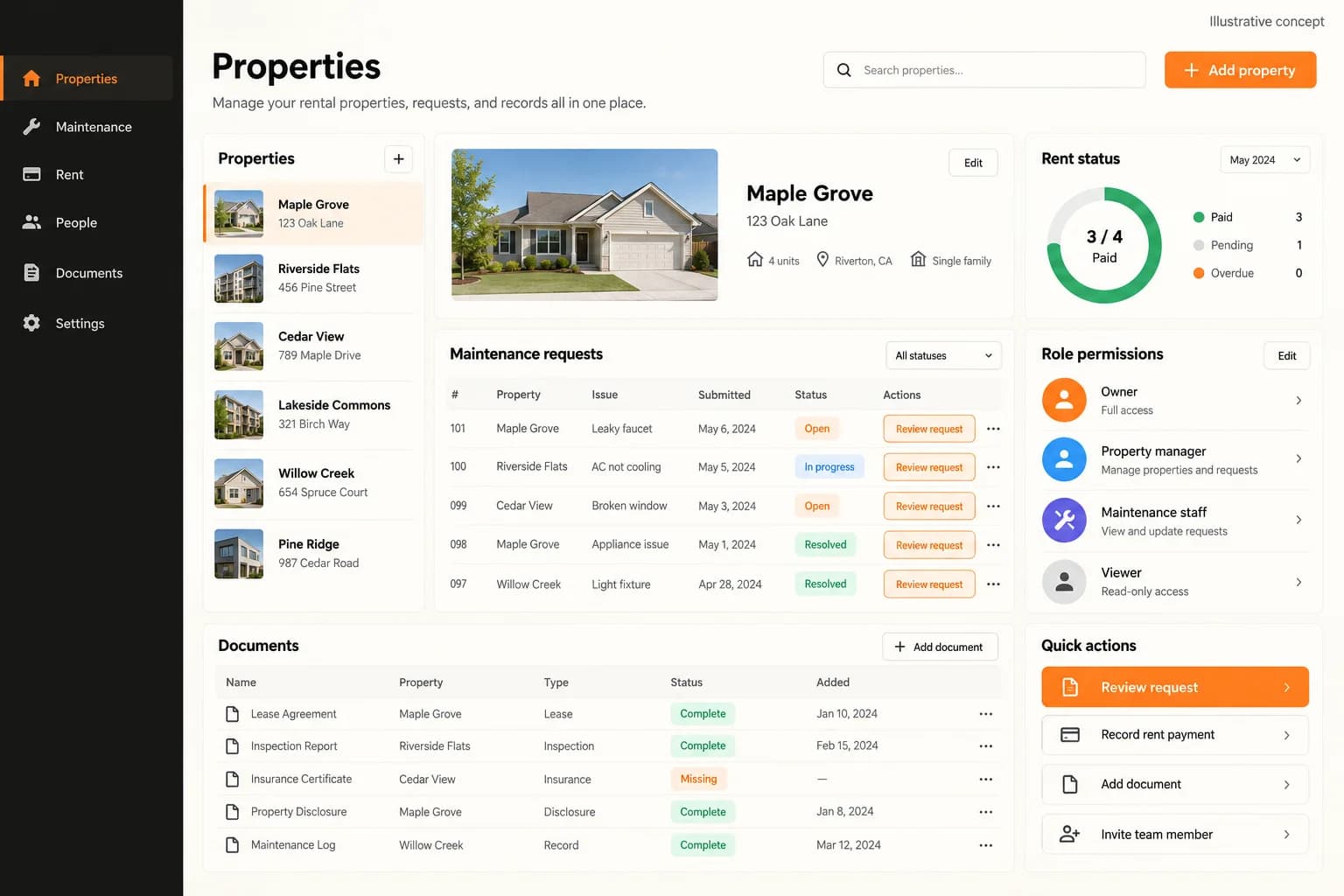
Use this original illustrative concept to discuss how a property manager could connect leases, resident requests, maintenance work and portfolio reporting. It is not AppFolio UI, an affiliation claim or proof of a working property-management deployment. Ask for an authenticated demo using your own roles, records and approval rules.

Original illustrative property workspace showing properties, maintenance requests, rent status, role permissions and document checklists

Original illustrative property workspace showing properties, maintenance requests, rent status, role permissions and document checklists

Original AI-generated property-operations concept. Property labels, maintenance requests and rent-status summaries are sample content. The document checklist does not establish lease execution; this is not AppFolio UI or a live client system. Accounting, screening and maintenance integrations require separate demonstration.

What to check in the walkthrough

  • Which records are authoritative for a unit, lease, resident, owner and work order, and who may create, approve, amend or close each record?
  • Ask to trace an applicant becoming a lease, a payment exception and a maintenance request from intake through assignment, resident updates and final reconciliation.
  • How are staff permissions, screening disclosures, resident privacy, ledger corrections and market-specific housing rules reviewed before a workflow is enabled?
Open full-size reference

Solution reference register

01 / Reference and IP

This page references third-party product names only to describe familiar product models and planning references. App Clone Labs is not affiliated with or endorsed by those brands. Build decisions require independent legal, regulatory, and operational review for your market.

02 / Artifact status

Boards, diagrams, screens and workflow descriptions on this page are illustrative planning artifacts, not evidence of a deployed client product.

03 / Regulatory caveat

Housing and tenant rules vary by market · Payment and screening disclosures require review

04 / Rights and handover

Source access, licensing, repositories, environments, documentation, acceptance and handover are defined by the signed contract and accepted scope.

Scope

Operating model defined

Roles, workflows, dependencies, exclusions, and assumptions are made reviewable.

Evidence: illustrative

System

Applications connected

Experience, operations, services, data, integrations, and release controls are planned together.

Evidence: illustrative

Handover

Rights stated in writing

Access, assignment, licensing, dependencies, documentation, and support follow the signed agreement.

Evidence: illustrative

Artifact register

Product screens and planning references.

Reference screens illustrate workflows, not a contracted feature list. Sample prices, data, and responses are demonstration content; confirm the current scope during a walkthrough.

AppFolio-style Property Operations connected product workflow planning visual
Connected customer, operations, and data workflowEvidence: illustrativeOpen full-size reference
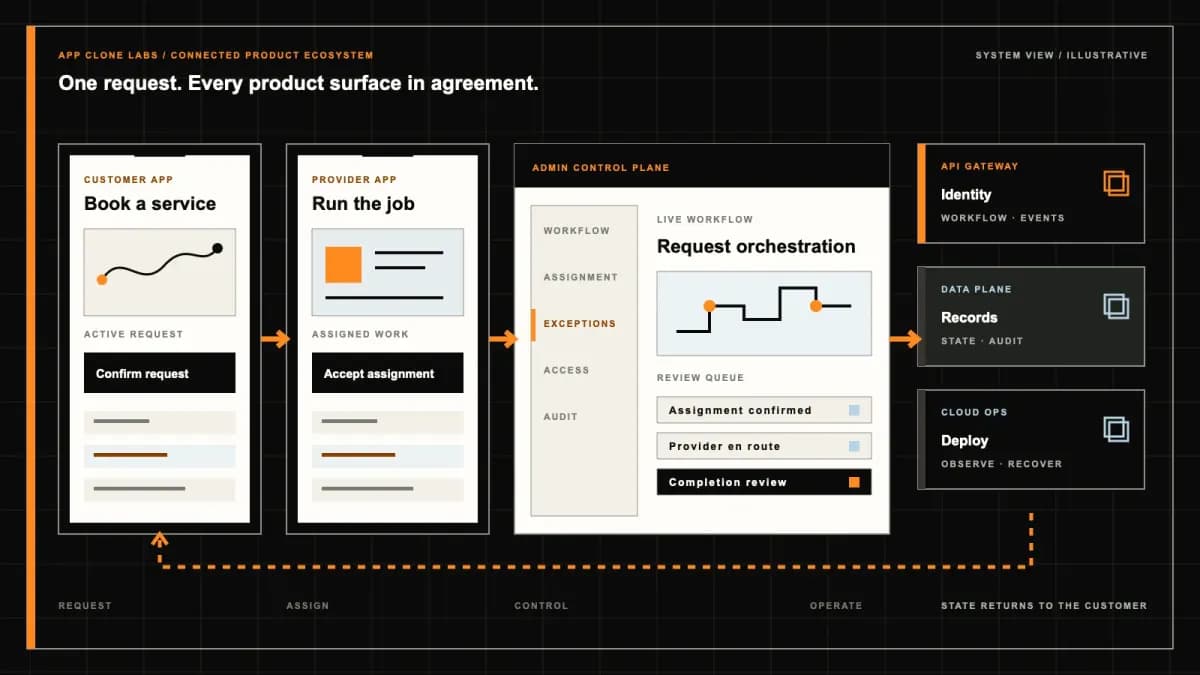
AppFolio-style Property Operations product engineering ecosystem visual
Product engineering ecosystem and handover boundaryEvidence: illustrativeOpen full-size reference

A portfolio total must reconcile to the property ledger

An owner statement shows collected rent while a resident account still carries the same payment as pending. The portfolio dashboard may look convincing, but the records disagree. The buyer needs to see which event posted, which account received it and who can resolve the difference before asking for more charts.

AppFolio-style development here means an independently branded property operations product for leasing, resident accounts, maintenance and owner reporting. AppFolio is a reference name, not an affiliation, licence to its software or access to its customer data. The useful buying question is which operational responsibilities your own platform must carry.

Choose the portfolio and accounting responsibilities first

A manager working for multiple owners needs different reporting and approval boundaries from an operator managing its own buildings. Map the management company, ownership entities, properties, units and households. Specify which team controls lease decisions, vendor spending and financial close, including what happens when a property moves to another manager.

The public AppFolio platform overview groups accounting and reporting, maintenance, marketing and leasing, and portals within its product categories. That provides category context for this brief; it does not establish matching features, provider connections or equivalent performance in a commissioned product.

Compare the Buildium-style rental management brief when evaluating a smaller rental administration scope. Choose the workflow and reporting obligations you need rather than treating the reference names as interchangeable specifications.

Connect applicants, accepted leases and unit occupancy

An applicant record, an accepted lease and an occupied unit represent different facts. Define the review states, accepted agreement version, start and end dates, household membership and authorised changes. An executed agreement should not silently mark a unit physically ready, and a move-out date should not erase outstanding account activity.

Screening and signing connections depend on provider access and an approved operating policy. Document the information collected, who may review it and how corrections reach the decision maker. Housing eligibility, notices and document retention require market-specific qualified review; the product must support the agreed process without claiming to make those determinations lawful by itself.

Show resident balances without hiding payment exceptions

A resident needs to distinguish a charge, an initiated payment, a posted receipt and a returned payment. Identify dates, descriptions and references well enough to explain the account. Keep a disputed item visible while it is reviewed and show who can answer it. A payment confirmation should not imply that settlement or reconciliation has already occurred.

Agree how partial payments, credits, overpayments and reversals affect the ledger or connected accounting system. Provider events can arrive late or more than once; acceptance planning should prove that replaying one event does not post the same receipt twice. Deposit records need their own approved treatment, with applicable holding, deductions and return obligations reviewed separately.

Give accounting a reviewable closing process

Decide whether this workspace holds the authoritative accounting records or receives selected events from another system. In either case, agree property and account mapping, posting dates, source identifiers and the reports needed for reconciliation. A CSV export is useful only when the receiving team can interpret it and trace its totals to the underlying records.

Define who reviews unmatched receipts, bank differences, vendor invoices and adjustments before a period closes. Preserve corrections and the evidence supporting them rather than overwriting the original activity. Owner distributions, trust accounting, tax reporting and accounting certification are separate obligations; they are not established by adding a statement screen or a payment provider.

Route maintenance from intake to verified completion

A resident reporting a leak needs a location, an acknowledgement and an accountable response team. Record the property, unit, issue, permitted evidence and entry instructions. Distinguish routine scheduling from the operator’s urgent escalation policy. The software can route an incident, but emergency availability and onsite response depend on staffed operations.

A vendor marks work complete; the manager may still need an inspection, resident confirmation or invoice review. Keep those decisions separate. Record reassignment, inaccessible premises, repeat faults and disputed completion without losing the original request. A completed repair does not automatically authorise the vendor invoice for payment.

Restrict tenant, owner and vendor access by relationship

The resident portal should expose the household’s permitted records; the owner portal should expose the authorised properties and reporting periods. A vendor generally needs an assigned work instruction, not screening documents or the full rent ledger. Staff access should reflect actual responsibilities, with explicit authority for sensitive exports and adjustments.

The OWASP authorization guidance recommends least privilege and permission validation on every request. Apply that to document downloads, statement exports and work-order attachments as well as screens. Test guessed record identifiers and revoked assignments; hiding a menu does not enforce access to the underlying record.

Reconcile migrated balances before inviting residents

Inventory the export rights and formats available from the current system. Map properties, units, households, active leases, account balances, documents and open work orders. Historical transactions and an opening-balance import are different migration choices: agree what will remain searchable and where the retained source records can be retrieved.

Rehearse with redacted samples and compare record counts, property totals, selected household balances and open maintenance queues. Keep a list of rejected or ambiguous rows and the reviewer responsible for each. Define the cutoff, final change capture, reconciliation sign-off and rollback checkpoint before cutover. Importing a file successfully is not proof that every owner statement or resident balance is correct.

Confirm integrations through evidence and failure handling

Payment, screening, signing and accounting providers need confirmed commercial access, supported interfaces and agreed data responsibilities. Specify which record owns each field and how changes flow back. An integration diagram or vendor logo does not prove that credentials, production eligibility or a bidirectional connection are available.

Inspect a provider outage, a delayed receipt, an interrupted signing session and a rejected accounting import. Each should leave a recoverable queue with a responsible operator and enough evidence to retry safely. Preserve document versions and event references, and agree how credentials and access are revoked during handover or termination.

Use the demo to challenge connected operations

Ask for a walkthrough of one household across leasing, charges, payment exceptions and a maintenance request, followed by the authorised owner statement. Confirm current demonstration availability and which steps are interactive, illustrative or backed by sandbox services. Artwork is not evidence of a working demo, a reconciled bank account or a live provider connection.

Include a returned payment after a statement was prepared, a vendor completing the wrong work order, a household moving units and an owner relationship ending. Inspect denied cross-property document access and a corrected opening balance. The demo should explain the next action and decision owner for each exception; production acceptance also needs the agreed recovery and reconciliation checks.

Bound the first release around a complete operating cycle

Choose a defined portfolio model, market and accounting boundary. Include lease records, resident account visibility, service intake, controlled staff queues and the reporting needed to complete one operating cycle. A manual review can be suitable when the queue, authority and staffing are explicit. Resident mobile applications and an owner web portal should be estimated as distinct surfaces.

Add broader property types, procurement and automation after validating the initial records and exceptions. Delivery estimates depend on export quality, accounting decisions, provider approvals, migration review and acceptance evidence. There is no universal launch window, compliance certification or guaranteed collection improvement in this development brief.

Bring a redacted portfolio pack to discovery

Prepare property and unit examples, an ownership map, a lease and charge schedule, a resident ledger, an owner statement and a maintenance ticket with its invoice path. Include an unresolved payment and a sample export. Name the people who approve housing policy, accounting mappings and migration differences, using redacted records during initial review.

Use a product scope discussion to agree the capabilities to configure, engineer or integrate, the excluded obligations and the evidence required for acceptance. Set ownership, reusable components, licences, deployment access and support in the contract.

Review the delivery process for the discovery, implementation and acceptance checkpoints that turn the portfolio pack into a scoped engagement.
Product flow

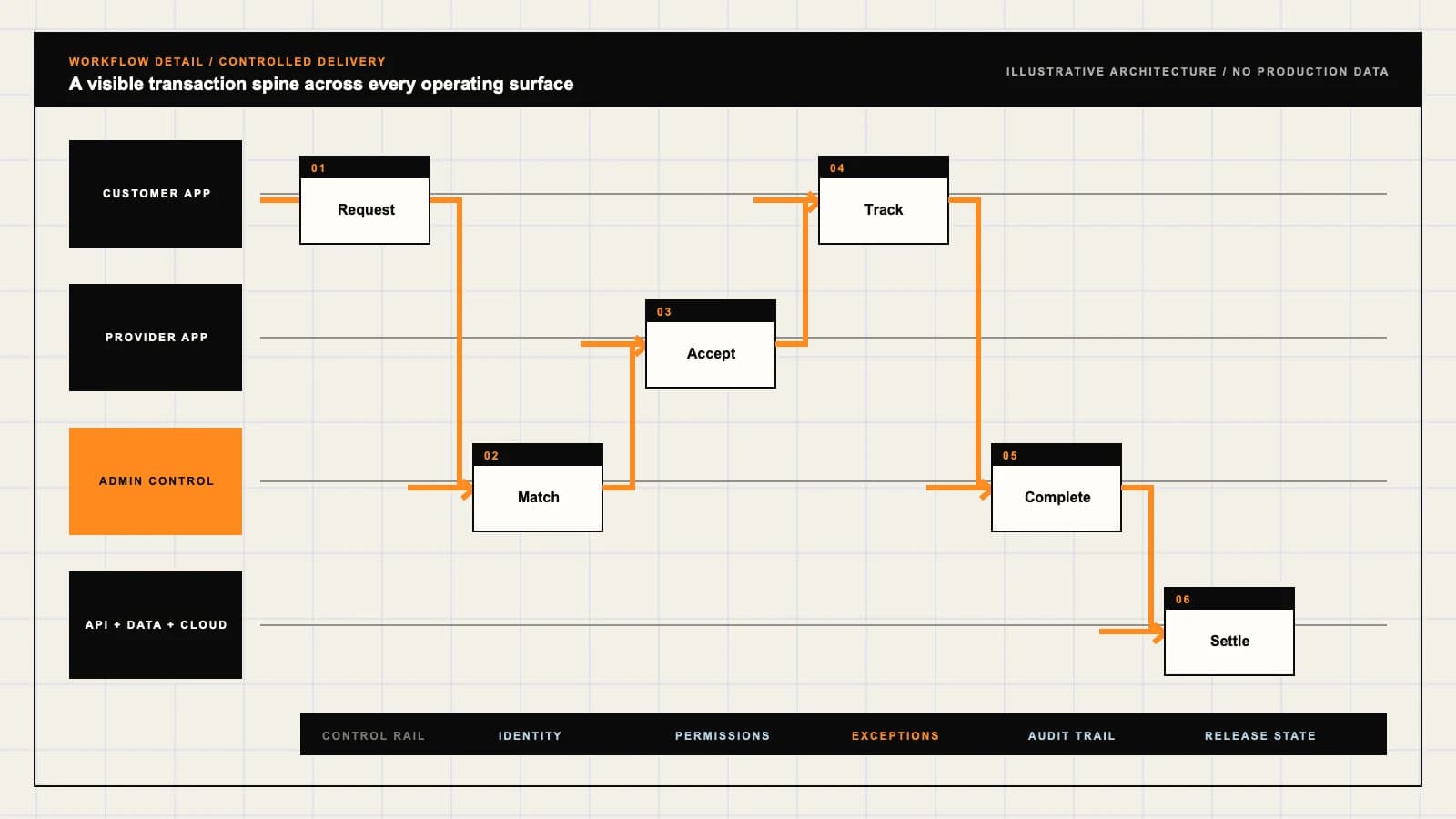
Role-workflow flow diagram.

A visual map of how each role interacts with each workflow stage, with operator controls and integration boundaries.

Deployable Product Architecture

AppFolio-style Property Operations

CONNECT THE HOUSE…TRACK COLLECTIONS…RECONCILE BEFORE …Read the lease ac…Resolve exception…Access the record…INTEGRATIONS: Payment and bank evidence with event identifiers, return handling and a rev…OPERATOR CONTROLS: Retain the reason and authority for a correction · Enforce property, househ…
Illustrative validation artifact — role-workflow flow diagram; final surfaces, boundaries, and integration topology are confirmed during discovery.

User roles

AppFolio-style Property Operations roles and workflows.

Clone-inspired platforms usually need several coordinated interfaces, not just a customer app.

Resident

01

Read the lease account and request service

Retrieve permitted lease documents, inspect charges and payment status, and report a repair against the correct unit. Keep other households and owner financial records outside resident access.

Portfolio operations and accounting

02

Resolve exceptions with property-level evidence

Review leasing decisions, assign maintenance and reconcile approved financial events. Separate operational assignments from authority to change ledgers or release owner statements.

Owner and maintenance vendor

03

Access the records their responsibility requires

Owners view authorised property reports; vendors view assigned work, entry instructions and completion evidence. Neither role inherits unrestricted resident documents or portfolio access.

Workflow

AppFolio-style Property Operations workflow stages.

Each workflow stage is mapped to a role, screen, API, notification, admin control, and measurable launch outcome.

Lease setup

01

Connect the household, unit and accepted terms

Review the applicant, preserve the accepted agreement version and establish charges under the approved policy. An application approval is not a posted payment or a completed move-in.

Monthly operations

02

Track collections and service exceptions

Route outstanding charges, provider failures and maintenance work to accountable queues. Record corrections and vendor evidence without turning operational completion into financial approval.

Portfolio close

03

Reconcile before releasing reports

Match ledger entries to provider and bank evidence, review unresolved differences, and publish statements for authorised owners under the agreed closing process.

Deployable Product Architecture

Workflow / system register

Revision EPlanning surface

Product delivery loop

AppFolio-style Property Operations workflow stages.

A focused release proves one complete workflow

Product delivery loop: AppFolio-style Property Operations workflow stages.A focused release proves one complete workflow. Scope the customer action and the operator response as one system.
01

Connect the household, unit and accepted terms

02

Track collections and service exceptions

03

Reconcile before releasing reports

Control note

Scope the customer action and the operator response as one system.

Illustrative architecture register; validate against the accepted scope.

Operator controls

AppFolio-style Property Operations admin and operator controls.

The control center is scoped as a first-class product surface, not an afterthought.

Ledger integrity

01

Retain the reason and authority for a correction

Define posting, approval, reversal and period-close permissions. Preserve source references and require review of unmatched payments, disputed charges and opening balances.

Record isolation

02

Enforce property, household and assignment boundaries

Apply permissions to documents, exports and individual requests. Revoking an owner relationship or vendor assignment must also remove access to the associated records.

Housing decisions

03

Separate evidence collection from approval

Scope screening providers, permissible criteria, notices and retention with qualified reviewers. Automation should not create unreviewed eligibility or adverse-action decisions.

Monetization

AppFolio-style Property Operations monetization models.

We model monetization early so payments, admin controls, and reporting support the business.

Define what the billable unit means

State whether pricing counts managed, occupied or active units and which staff and owner surfaces are included. Account for property transfers and archived records.

Describe provider costs and responsibilities

Identify processing fees, permitted payer charges, returns and settlement responsibility under the selected provider agreement. Resident rent is not platform subscription revenue.

Price optional operations separately

Quote screening, inspections or additional reporting only when the provider access and operating process are known. Do not assume add-on availability from a reference brand feature list.

Integrations

AppFolio-style Property Operations integration surface.

External systems that determine launch readiness, data flow, and operational continuity.

Integration

01

Integration 1

Payment and bank evidence with event identifiers, return handling and a reviewed reconciliation process

Integration

02

Integration 2

Accounting imports or exports with an agreed chart of accounts, property mapping and opening-balance validation

Integration

03

Integration 3

Screening, signing and vendor systems with approved access, document versions and recovery queues for failed handoffs

Scope drivers

AppFolio-style Property Operations scope drivers.

The variables that most influence build effort, cost, and launch readiness.

Portfolio structure

01

Separate ownership from property management

Map owners, entities, properties, units and households. Define report access and management authority when properties change hands or managers.

Accounting model

02

Choose the system of record before integration

Agree whether the workspace posts authoritative ledgers or exchanges events with an existing accounting system. Define period close, adjustment review and deposit treatment.

Migration evidence

03

Reconcile data before relying on it

Review export availability, historical documents, opening balances, active leases and unresolved work orders. Identify who signs off exceptions and the cutover checkpoint.

Deployable Product Architecture

Scope drivers / system register

Revision DPlanning surface

Product delivery loop

AppFolio-style Property Operations scope drivers.

A focused release proves one complete workflow

Product delivery loop: AppFolio-style Property Operations scope drivers.A focused release proves one complete workflow. Scope the customer action and the operator response as one system.
01

Separate ownership from property management

02

Choose the system of record before integration

03

Reconcile data before relying on it

Control note

Scope the customer action and the operator response as one system.

Illustrative architecture register; validate against the accepted scope.

V1 scope

AppFolio-style Property Operations V1 foundation.

Launch the smallest complete operating loop first, then scale the product with confidence.

Resident workspace

01

Documents, account activity and service requests

Include permitted lease records, understandable charge and payment states, a maintenance entry point and a support route for disputed activity.

Operations console

02

Leasing review and work-order ownership

Provide household and unit records, authorised decisions, maintenance assignment, completion review and queues for failed provider handoffs.

Accounting and owner views

03

Reconciliation and controlled statements

Expose the agreed ledger or accounting integration, unmatched-event review and owner-specific reports with an explicit reporting period.

Later phases

AppFolio-style Property Operations post-launch expansion.

Capabilities that should usually wait until real usage proves the core loop.

Portfolio automation

01

Automate only a reviewed decision path

Add repeatable reminders, task routing and exception summaries after defining authority, escalation and monitoring. Keep financial and housing approvals accountable.

Additional property types

02

Review each operational model separately

Commercial leases, community associations and specialised housing can introduce different charges, documents and reporting. Treat each as a scoped extension.

Vendor procurement

03

Connect purchasing with approval and evidence

Add quote comparison, purchase approvals and invoice matching once vendor responsibility and accounting boundaries are settled.

Deployable Product Architecture

Later phases / system register

Revision APlanning surface

Product delivery loop

AppFolio-style Property Operations post-launch expansion.

A focused release proves one complete workflow

Product delivery loop: AppFolio-style Property Operations post-launch expansion.A focused release proves one complete workflow. Scope the customer action and the operator response as one system.
01

Automate only a reviewed decision path

02

Review each operational model separately

03

Connect purchasing with approval and evidence

Control note

Scope the customer action and the operator response as one system.

Illustrative architecture register; validate against the accepted scope.

Regulatory review

AppFolio-style Property Operations regulatory and compliance flags.

Each flag must be reviewed by qualified counsel for your target market before build or launch.

Flag 1

Housing and tenant rules vary by market

Flag 2

Payment and screening disclosures require review

Reference walkthrough

Request a AppFolio-style Property Operations reference walkthrough.

Ask us to confirm which reference surfaces are currently available for this product model. Rather than publishing shared demo credentials, we schedule a private guided walkthrough for qualified buyers.

Reference surface

01

Resident: Read the lease account and request service

Request a role-specific demonstration and confirm which capabilities are currently available. Review the proposed responsibility: Retrieve permitted lease documents, inspect charges and payment status, and report a repair against the correct unit. Keep other households and owner financial records outside resident access.

Reference surface

02

Portfolio operations and accounting: Resolve exceptions with property-level evidence

Request a role-specific demonstration and confirm which capabilities are currently available. Review the proposed responsibility: Review leasing decisions, assign maintenance and reconcile approved financial events. Separate operational assignments from authority to change ledgers or release owner statements.

Reference surface

03

Owner and maintenance vendor: Access the records their responsibility requires

Request a role-specific demonstration and confirm which capabilities are currently available. Review the proposed responsibility: Owners view authorised property reports; vendors view assigned work, entry instructions and completion evidence. Neither role inherits unrestricted resident documents or portfolio access.

Next step

04

Book a walkthrough

Request a live, private walkthrough of the reference implementation. We will confirm scope and discuss configured deployment versus custom build for your market.

Open register

Deployable Product Architecture

Reference walkthrough / system register

Revision BPlanning surface

Product delivery loop

Request a AppFolio-style Property Operations reference walkthrough.

A focused release proves one complete workflow

Product delivery loop: Request a AppFolio-style Property Operations reference walkthrough.A focused release proves one complete workflow. Scope the customer action and the operator response as one system.
01

Resident: Read the lease account and request service

02

Portfolio operations and accounting: Resolve exceptions with property-level evidence

03

Owner and maintenance vendor: Access the records their responsibility requires

04

Book a walkthrough

Control note

Scope the customer action and the operator response as one system.

Illustrative architecture register; validate against the accepted scope.

Process

A traceable path from decision to acceptance.

  1. 01

    Model teardown

    We map the reference business model, user roles, monetization path, regulatory needs, and launch constraints.

    Artifact: Product teardown, risk map, role matrix

  2. 02

    Market-fit blueprint

    We reshape the model around your market, operations, pricing, workflows, and first release priorities.

    Artifact: Feature scope, flows, technical plan

  3. 03

    Design and build

    Product, design, engineering, QA, and cloud delivery move in weekly demo cycles with visible progress.

    Artifact: Working releases, QA notes, sprint demos

  4. 04

    Launch and operate

    We support production release, monitoring, handoff, roadmap decisions, and post-launch improvement.

    Artifact: Launch checklist, docs, growth backlog

FAQ

Questions to resolve before the build.

01Is this an official AppFolio product or an AppFolio integration?

No. AppFolio is a category reference for independently branded development. The brief does not include affiliation, proprietary code, customer data access or a connection to AppFolio. Any separately requested integration needs confirmed access and scope.

02Which property portfolio should we scope first?

Start with the properties, ownership relationships, unit types and market you actually operate. Different lease, charge and reporting models should be reviewed separately instead of assuming one configuration covers residential, commercial and specialised housing.

03Does the platform replace our accounting system?

That is a discovery decision. The workspace may hold agreed accounting records or integrate operational events with an existing system. Define the authoritative ledger, mappings, reconciliation, closing permissions and retained historical records before implementation.

04How are returned or partial resident payments handled?

The agreed model should distinguish charges, initiated payments, posted receipts, returns and credits. Test partial allocation and repeated provider events, preserve references and give unresolved differences an accounting owner. A checkout success message does not prove settlement.

05Can owners see their statements without seeing other properties?

Owner access can be scoped to authorised relationships and reporting periods. Enforce that boundary on reports, downloads and individual requests, then test relationship removal and guessed identifiers rather than relying on hidden menus.

06What should a maintenance vendor be able to access?

A vendor needs the assigned work, relevant entry instructions and permitted evidence. Resident screening documents and unrelated ledgers should remain restricted. Completion, inspection and invoice approval are separate steps under the operator’s policy.

07Does tenant screening automatically approve an applicant?

No automatic housing decision is assumed. Provider use, permissible criteria, review authority, corrections, notices and retention need a qualified policy review. The product supports that process without claiming legal approval for the decision.

08Can we migrate existing leases, balances and documents?

Migration can be scoped after reviewing export rights, file formats and data quality. Agree historical coverage, map properties and households, reconcile opening balances and review rejected rows before final cutover and resident invitations.

09Does this include trust accounting or compliance certification?

Neither is implied. Funds handling, deposits, owner distributions, housing rules and accounting obligations require appropriate review. Reports and payment integrations do not establish regulatory approval or professional certification.

10What evidence should we request in a demo?

Ask to trace a household from lease setup through a payment exception and maintenance request to an owner statement. Include a returned payment, revoked owner access and a migration correction. Confirm interactive functionality, sample data and sandbox versus production connections.

11What affects price, delivery and handover?

Portfolio models, accounting boundaries, provider access, separate portal surfaces and migration reconciliation affect the estimate. Contract terms must define deliverables, reusable components, licences, deployment access and support; dates follow review of those dependencies.

12What should our team provide before scoping?

Bring redacted property and ownership records, lease terms, charge schedules, ledger and owner statement examples, a work-order and invoice path, and a sample export. Identify the reviewers for accounting, housing policy and migration exceptions.

Primary sources

References behind this page

Dated official documentation, standards, and research that support the factual claims on this page.

  1. 01
  2. 02

Citation readiness

How to interpret this page

Published by App Clone Labs Editorial Team

Commercial claims
Scope, cost, and timeline claims are planning guidance and require validation in a current proposal.
Evidence status
Diagrams, boards, examples, and estimates are illustrative planning artifacts unless explicitly identified with a source and measured evidence status.

Next decision

Turn the brief into an accepted product scope.

Define outcomes, constraints, evidence, rights and handover before delivery begins.

Commercial rights, repositories, environments, documentation, acceptance and handover remain contract-defined.

Scope AppFolio-style Property Operations

Independent from AppFolio

App Clone Labs is an independent software development studio. We are not affiliated with, connected to, sponsored by, or endorsed by AppFolio.

Why this name appears

AppFolio is referenced descriptively to identify familiar product mechanics and common search terminology. “Clone” describes a planning reference, not a replica.

Original delivery

Any product delivered by App Clone Labs is independently designed and developed for the accepted scope. It does not contain proprietary code, branding, copy, interface assets, or confidential material from AppFolio.

Trademark ownership

AppFolio and associated names, logos, and marks remain the property of their respective owners. Their use identifies a reference category and does not imply authorization or endorsement.