Applied artificial intelligence

Google Gemini-style Multimodal Assistant — Custom-Built for Your Market

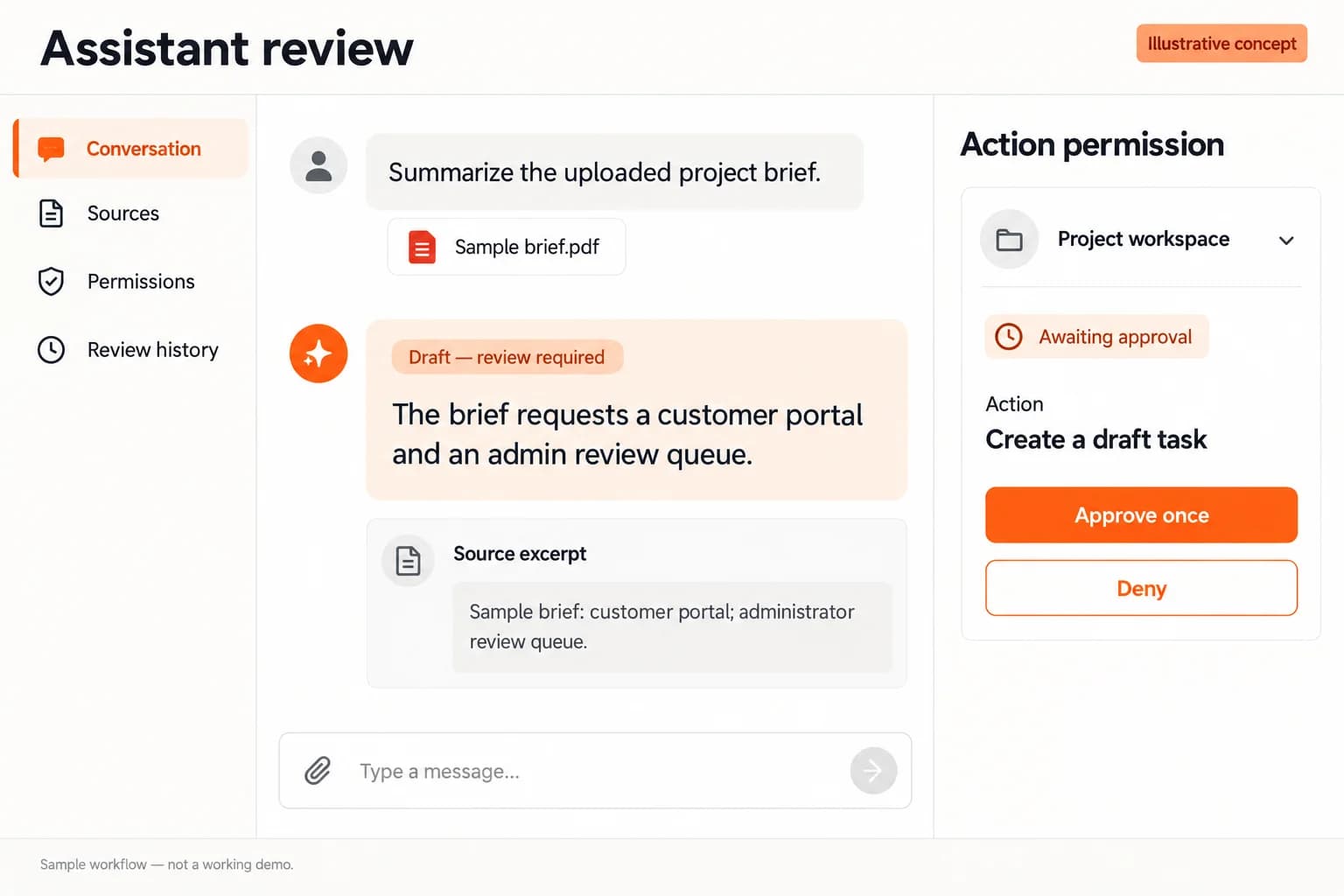
Multimodal assistant for text, image, document, audio, and permissioned productivity tasks. Planned for workspace teams coordinating model assistance across approved business content with role-specific workflows, operator controls, integrations, and a handover boundary defined for the selected market.

Custom workflows

Brand-safe product strategy

Admin and operations tooling

Working reference implementation available

Solution reference register

01 / Reference and IP

This page references third-party product names only to describe familiar product models and planning references. App Clone Labs is not affiliated with or endorsed by those brands. Build decisions require independent legal, regulatory, and operational review for your market.

02 / Artifact status

Boards, diagrams, screens and workflow descriptions on this page are illustrative planning artifacts, not evidence of a deployed client product.

03 / Regulatory caveat

Document data purpose, consent, retention, deletion, residency, and privacy boundaries · Evaluate model quality, safety, bias, drift, and task-specific failure modes before and after release · Require human review for consequential, sensitive, or externally published outputs · Disclose model and provider dependencies, data handling, and service limitations · Identify generated output and communicate uncertainty without presenting it as verified fact · Apply abuse prevention, prompt and file screening, reporting, rate limits, and incident response · Set usage budgets, cost alerts, quotas, and provider fallback controls · Never use connected workspace content beyond the user-authorized purpose and access boundary

04 / Rights and handover

Source access, licensing, repositories, environments, documentation, acceptance and handover are defined by the signed contract and accepted scope.

Scope

Operating model defined

Roles, workflows, dependencies, exclusions, and assumptions are made reviewable.

Evidence: illustrative

System

Applications connected

Experience, operations, services, data, integrations, and release controls are planned together.

Evidence: illustrative

Handover

Rights stated in writing

Access, assignment, licensing, dependencies, documentation, and support follow the signed agreement.

Evidence: illustrative

Artifact register

Content-supplied visual references, framed as planning evidence.

Deployable Product Architecture

Product strategy and launch planning / system register

Revision EPlanning surface

Product delivery loop

Product engineering team planning a software launch roadmap

Product delivery loop: Product engineering team planning a software launch roadmapA focused release proves one complete workflow. Scope the customer action and the operator response as one system.
01

Discover

02

Blueprint

03

Build

04

Operate

Product strategy and launch planning · Evidence status not supplied

Deployable Product Architecture

Operational dashboards and reporting systems / system register

Revision BPlanning surface

Data path

Analytics dashboards for SaaS and marketplace operations

Data path: Analytics dashboards for SaaS and marketplace operationsInformation stays useful when its path is explicit. Retention, observability, and access rules are architectural decisions.
01

Capture

02

Validate

03

Store

04

Interpret

Operational dashboards and reporting systems · Evidence status not supplied

Deployable Product Architecture

Marketplace, checkout, and commerce flows / system register

Revision EPlanning surface

Marketplace loop

Digital commerce checkout workflow on a laptop

Marketplace loop: Digital commerce checkout workflow on a laptopDemand and supply meet through governed transactions. Trust, payments, support, and operator controls close the commercial loop.
01

Discover

02

Match

03

Transact

04

Resolve

Marketplace, checkout, and commerce flows · Evidence status not supplied

Deployable Product Architecture

Mobile app UX and release planning / system register

Revision DPlanning surface

Engineering decision path

Mobile app interface screens on smartphones

Engineering decision path: Mobile app interface screens on smartphonesGood product work turns assumptions into evidence. Each stage should leave a decision, artifact, or test the next stage can use.
01

Frame

02

Design

03

Implement

04

Verify

Mobile app UX and release planning · Evidence status not supplied

Executive summary

Google Gemini-style Multimodal Assistant is for workspace teams coordinating model assistance across approved business content. Plan a multimodal assistant with source grounding, workspace permissions, provider transparency, and review. The point is not to copy a famous product. The point is to use a familiar market pattern as research, then build a product that is legally original, commercially sharp, and operationally useful for your own customers.

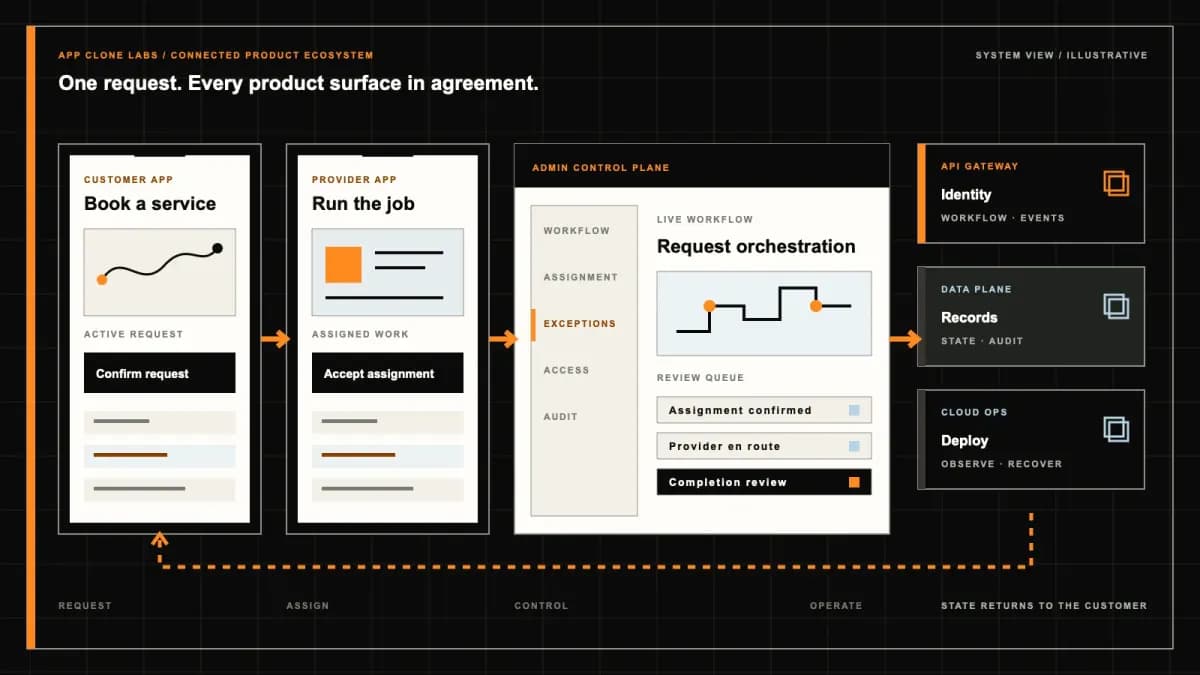
For App Clone Labs, a serious google gemini-style multimodal assistant starts with the operating model. We define who uses it, what each role can do, what data moves between screens, where money is captured or paid out, what support needs to see, which events should be measured, and which admin controls will keep the business manageable after launch.

This multimodal assistant for text, image, document, audio, and permissioned productivity tasks model matters now because the underlying market conditions that made the original category successful are replicating across new geographies and verticals. Cheaper mobile data, maturing payment rails, growing comfort with on-demand services, and underserved local audiences for workspace teams coordinating model assistance across approved business content create a real opening for an operator who can execute the operating loop cleanly. Timing matters: entering too early means fighting infrastructure gaps, while entering too late means competing against entrenched incumbents, so the viable window is the one we plan around.

Product model and audience

The product model is multimodal assistant for text, image, document, audio, and permissioned productivity tasks. The intended audience is workspace teams coordinating model assistance across approved business content. This shapes which features belong in V1, which admin controls are non-negotiable, and which integrations determine launch readiness.

User roles and workflows

The important roles for this solution are End user: People using multimodal prompts, workspace sources, grounded answers, and approved actions; Workspace author: Workspace members, content owners, model providers, and administrators; AI governance operator: Google Gemini-style Multimodal Assistant governance and operations team. Each role needs its own permissions, navigation, state visibility, notification rules, and support context.

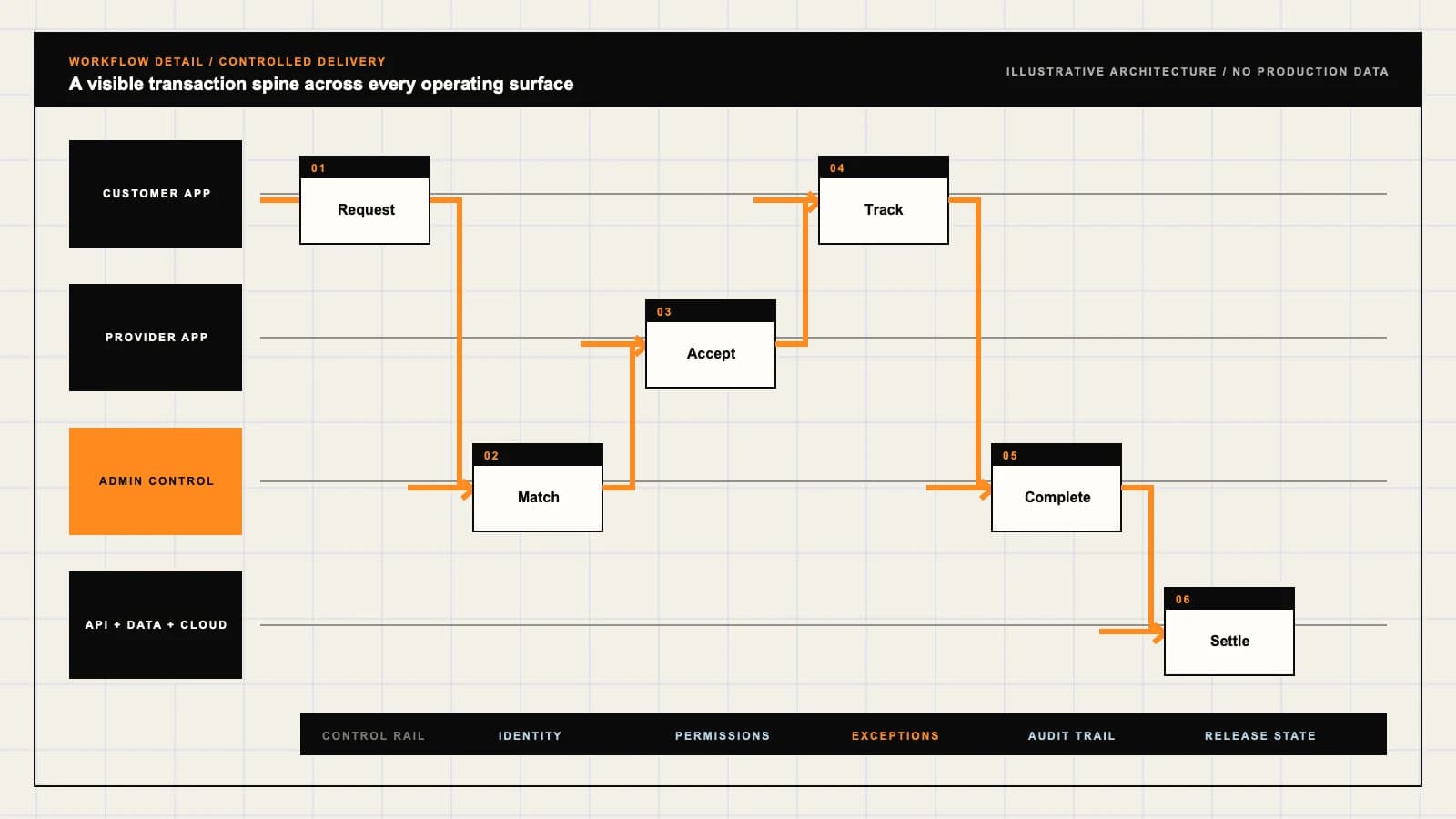
The workflow we plan first moves through configure or discover multimodal prompts, workspace sources, grounded answers, and approved actions, interpret permitted media, retrieve authorized context, and propose an action for confirmation, review outcomes and records for multimodal prompts, workspace sources, grounded answers, and approved actions. That workflow becomes the backbone for screens, APIs, permissions, notifications, admin actions, QA cases, and analytics.

Monetization models

The strongest monetization paths for google gemini-style multimodal assistant include Workspace subscriptions, Enterprise administration plans, Metered multimodal processing. Monetization should be designed before development because it affects database structure, checkout, payout flows, invoices, refunds, plan limits, analytics, and admin reporting.

MVP scope vs full build comparison

For google gemini-style multimodal assistant, the MVP should focus on Text and document assistance, grounded citations, permission checks, feedback, and admin policy and Core workspace for workspace members, content owners, model providers, and administrators and Manual review for source-level access, media safety, citation quality, and action confirmation. The MVP is not a weak product; it is the smallest complete operating loop with enough admin visibility, support readiness, and analytics to learn from real users.

The full build expands into Personalization and accessibility for multimodal prompts, workspace sources, grounded answers, and approved actions and Rules-based handling of interpret permitted media, retrieve authorized context, and propose an action for confirmation and Approved audio, image, and productivity actions with explicit confirmation. This staged approach protects speed and quality at the same time.

Regulatory and compliance review

Document data purpose, consent, retention, deletion, residency, and privacy boundaries Evaluate model quality, safety, bias, drift, and task-specific failure modes before and after release Require human review for consequential, sensitive, or externally published outputs Disclose model and provider dependencies, data handling, and service limitations Identify generated output and communicate uncertainty without presenting it as verified fact Apply abuse prevention, prompt and file screening, reporting, rate limits, and incident response Set usage budgets, cost alerts, quotas, and provider fallback controls Never use connected workspace content beyond the user-authorized purpose and access boundary

Technical architecture and stack considerations

Because google gemini-style multimodal assistant is a multimodal assistant for text, image, document, audio, and permissioned productivity tasks serving workspace teams coordinating model assistance across approved business content, the architecture is shaped by the product model rather than the other way around. The API surface is split into role-scoped endpoints so that End user, Workspace author, AI governance operator each receive only the data their permissions allow, with a gateway layer handling auth, rate limiting, and idempotency for transactional calls. Database choices follow the access pattern: a primary relational store for orders, accounts, payouts, and audit trails, paired with a read-optimized cache for catalog, profile, and status lookups that the customer and provider apps hit on every screen.

Real-time features such as live status updates, location tracking, and in-app messaging run over a persistent transport with a fallback to push notifications when the app is backgrounded. A CDN fronts all static assets and media, while file storage is abstracted behind a signed-URL pattern so uploads and downloads never proxy through the application server. Caching, queueing, and push delivery are designed against the workflow stages of configure or discover multimodal prompts, workspace sources, grounded answers, and approved actions, interpret permitted media, retrieve authorized context, and propose an action for confirmation, review outcomes and records for multimodal prompts, workspace sources, grounded answers, and approved actions so that each state transition is durable, observable, and recoverable even when a downstream provider is temporarily unavailable.

Go-to-market and launch strategy

Launch sequencing for google gemini-style multimodal assistant starts with a single contained market where supply density and demand can be balanced before any expansion. We select the initial market based on workspace teams coordinating model assistance across approved business content concentration, payment and logistics readiness, and the regulatory profile captured above, so that the first cohort can be served end-to-end without stretching operations thin. Supply-side onboarding is sequenced first for End user, Workspace author, AI governance operator, with verification, training, and a soft cap on volume so quality is protected before demand is turned on.

Demand generation combines targeted acquisition for the first cohort with referral mechanics baked into the V1 scope of text and document assistance, grounded citations, permission checks, feedback, and admin policy, core workspace for workspace members, content owners, model providers, and administrators, manual review for source-level access, media safety, citation quality, and action confirmation. Pricing experiments are run against the monetization paths of Workspace subscriptions, Enterprise administration plans, Metered multimodal processing, holding take rate and payout terms constant while testing signup incentives, bundle offers, and surge or peak pricing. The metrics we track from day one are activation rate, time-to-first-transaction, repeat frequency, fulfillment rate, and support ticket volume, each mapped to a workflow stage so we can tell exactly where the operating loop is leaking.

Unit economics and cost framework

The unit economics for google gemini-style multimodal assistant are built around revenue per transaction, customer acquisition cost, contribution margin, and the platform take rate set by the chosen monetization model. Because the monetization paths here are Workspace subscriptions, Enterprise administration plans, Metered multimodal processing, the take rate is not a single knob: it varies by transaction type, tier, and whether the revenue is transactional, subscription, or fee-based. We model each stream separately so that gross margin per transaction is visible to the admin console and to the operator, not buried in an aggregate number.

Customer acquisition cost is tracked by channel and cohort, with payback period as the governing constraint rather than blended CAC, because workspace teams coordinating model assistance across approved business content behavior varies enough that a blended number hides unprofitable segments. Contribution margin accounts for payment processing, payouts to End user, Workspace author, AI governance operator, support cost per transaction, and infrastructure cost that scales with volume. The framework is designed so that scaling the multimodal assistant for text, image, document, audio, and permissioned productivity tasks model either improves unit economics or surfaces the specific cost line that is breaking, rather than masking problems behind top-line growth.

Risk mitigation and failure modes

The most common failure pattern for a multimodal assistant for text, image, document, audio, and permissioned productivity tasks like google gemini-style multimodal assistant is a supply-demand imbalance: either supply is onboarded with no demand and providers churn, or demand is acquired with no supply and customers leave bad reviews. We mitigate this by sequencing onboarding as described above and by building the V1 scope of text and document assistance, grounded citations, permission checks, feedback, and admin policy, core workspace for workspace members, content owners, model providers, and administrators, manual review for source-level access, media safety, citation quality, and action confirmation with explicit density targets per market before any expansion is approved. Trust and safety risks are addressed through verification, rating and review loops, dispute handling, and admin controls that can pause or remove bad actors without a code change.

Regulatory exposure is the second failure mode, and it is why the compliance review above is treated as a build input rather than a launch checklist. The third is operational collapse under edge cases: failed payments, double bookings, offline providers, refund disputes, and support spikes, each of which maps to a workflow stage in configure or discover multimodal prompts, workspace sources, grounded answers, and approved actions, interpret permitted media, retrieve authorized context, and propose an action for confirmation, review outcomes and records for multimodal prompts, workspace sources, grounded answers, and approved actions and needs a defined recovery path. Mitigation strategies include idempotent transactional APIs, admin override controls, automated alerts on anomaly thresholds, and a support console that gives operators enough context to resolve issues without engineering involvement.

Success metrics and KPIs

The key metrics for google gemini-style multimodal assistant are activation, retention, transaction frequency, take rate, fulfillment rate, and support ticket volume, each tied back to the workflow stages of configure or discover multimodal prompts, workspace sources, grounded answers, and approved actions, interpret permitted media, retrieve authorized context, and propose an action for confirmation, review outcomes and records for multimodal prompts, workspace sources, grounded answers, and approved actions. Activation measures how many new workspace teams coordinating model assistance across approved business content complete the first transaction within a target window, which maps to the earliest workflow stages and tells us whether onboarding and discovery are working. Retention and transaction frequency then measure whether the operating loop is sticky enough to build a business on, rather than a one-time acquisition machine.

Take rate and fulfillment rate are the operational health metrics: take rate confirms the monetization model of Workspace subscriptions, Enterprise administration plans, Metered multimodal processing is actually capturing revenue as designed, while fulfillment rate confirms that End user, Workspace author, AI governance operator are completing the loop without leakage. Support ticket volume, mapped to the later workflow stages, is the leading indicator of product or operational pain before it shows up in churn. Every KPI is wired into the admin console from V1 so the operator can read the business without a data team, and so the later phases of personalization and accessibility for multimodal prompts, workspace sources, grounded answers, and approved actions, rules-based handling of interpret permitted media, retrieve authorized context, and propose an action for confirmation, approved audio, image, and productivity actions with explicit confirmation are prioritized by what the metrics actually demand.

Live reference walkthrough

A working reference implementation for google gemini-style multimodal assistant is available for qualified buyers. Rather than publishing shared demo credentials, we schedule a guided walkthrough where you see the customer app, provider or merchant interface, and admin console in action, and ask questions about architecture, operations, and customization for your market.

Book a call to request access. We will confirm the scope of your interest, share the relevant reference surfaces, and discuss whether a configured deployment or a fully custom build is the right path for your market.

Product flow

Role-workflow flow diagram.

A visual map of how each role interacts with each workflow stage, with operator controls and integration boundaries.

Deployable Product Architecture

Google Gemini-style Multimodal Assistant

CONFIGURE OR DISC…INTERPRET PERMITT…REVIEW OUTCOMES A…People using mult…Workspace members…Google Gemini-sty…INTEGRATIONS: Multimodal model and safety providers · Permission-aware document, mail, ca…OPERATOR CONTROLS: Source-level access, media safety, citation quality, and action confirmatio…
Illustrative validation artifact — role-workflow flow diagram; final surfaces, boundaries, and integration topology are confirmed during discovery.

User roles

Google Gemini-style Multimodal Assistant roles and workflows.

Clone-inspired platforms usually need several coordinated interfaces, not just a customer app.

End user

01

People using multimodal prompts, workspace sources, grounded answers, and approved actions

Google Gemini-style Multimodal Assistant scope: People using multimodal prompts, workspace sources, grounded answers, and approved actions.

Workspace author

02

Workspace members, content owners, model providers, and administrators

Google Gemini-style Multimodal Assistant scope: Workspace members, content owners, model providers, and administrators.

AI governance operator

03

Google Gemini-style Multimodal Assistant governance and operations team

Google Gemini-style Multimodal Assistant scope: Google Gemini-style Multimodal Assistant governance and operations team.

Workflow

Google Gemini-style Multimodal Assistant workflow stages.

Each workflow stage is mapped to a role, screen, API, notification, admin control, and measurable launch outcome.

Prepare

01

Configure or discover multimodal prompts, workspace sources, grounded answers, and approved actions

Google Gemini-style Multimodal Assistant scope: Configure or discover multimodal prompts, workspace sources, grounded answers, and approved actions.

Generate

02

Interpret permitted media, retrieve authorized context, and propose an action for confirmation

Google Gemini-style Multimodal Assistant scope: Interpret permitted media, retrieve authorized context, and propose an action for confirmation.

Review

03

Review outcomes and records for multimodal prompts, workspace sources, grounded answers, and approved actions

Google Gemini-style Multimodal Assistant scope: Review outcomes and records for multimodal prompts, workspace sources, grounded answers, and approved actions.

Deployable Product Architecture

Workflow / system register

Revision CPlanning surface

Product delivery loop

Google Gemini-style Multimodal Assistant workflow stages.

A focused release proves one complete workflow

Product delivery loop: Google Gemini-style Multimodal Assistant workflow stages.A focused release proves one complete workflow. Scope the customer action and the operator response as one system.
01

Configure or discover multimodal prompts, workspace sources, grounded answers, and approved actions

02

Interpret permitted media, retrieve authorized context, and propose an action for confirmation

03

Review outcomes and records for multimodal prompts, workspace sources, grounded answers, and approved actions

Control note

Scope the customer action and the operator response as one system.

Illustrative architecture register; validate against the accepted scope.

Operator controls

Google Gemini-style Multimodal Assistant admin and operator controls.

The control center is scoped as a first-class product surface, not an afterthought.

Data boundary

01

Source-level access, media safety, citation quality, and action confirmation

Google Gemini-style Multimodal Assistant scope: Source-level access, media safety, citation quality, and action confirmation.

Model safety

02

Set permissions and operating rules for workspace members, content owners, model providers, and administrators

Google Gemini-style Multimodal Assistant scope: Set permissions and operating rules for workspace members, content owners, model providers, and administrators.

Output governance

03

Investigate exceptions, reports, and audit evidence for multimodal prompts, workspace sources, grounded answers, and approved actions

Google Gemini-style Multimodal Assistant scope: Investigate exceptions, reports, and audit evidence for multimodal prompts, workspace sources, grounded answers, and approved actions.

Monetization

Google Gemini-style Multimodal Assistant monetization models.

We model monetization early so payments, admin controls, and reporting support the business.

Workspace subscriptions

Google Gemini-style Multimodal Assistant scope: Workspace subscriptions.

Enterprise administration plans

Google Gemini-style Multimodal Assistant scope: Enterprise administration plans.

Metered multimodal processing

Google Gemini-style Multimodal Assistant scope: Metered multimodal processing.

Integrations

Google Gemini-style Multimodal Assistant integration surface.

External systems that determine launch readiness, data flow, and operational continuity.

Integration

01

Integration 1

Multimodal model and safety providers

Integration

02

Integration 2

Permission-aware document, mail, calendar, and search connectors

Integration

03

Integration 3

Identity, data-loss prevention, audit, evaluation, and cost controls

Scope drivers

Google Gemini-style Multimodal Assistant scope drivers.

The variables that most influence build effort, cost, and launch readiness.

Use cases

01

Breadth and localization of multimodal prompts, workspace sources, grounded answers, and approved actions

Google Gemini-style Multimodal Assistant scope: Breadth and localization of multimodal prompts, workspace sources, grounded answers, and approved actions.

Inference load

02

Media volume, workspace connectors, context size, and model requests

Google Gemini-style Multimodal Assistant scope: Media volume, workspace connectors, context size, and model requests.

Evaluation complexity

03

Governance depth for source-level access, media safety, citation quality, and action confirmation

Google Gemini-style Multimodal Assistant scope: Governance depth for source-level access, media safety, citation quality, and action confirmation.

Deployable Product Architecture

Scope drivers / system register

Revision BPlanning surface

Product delivery loop

Google Gemini-style Multimodal Assistant scope drivers.

A focused release proves one complete workflow

Product delivery loop: Google Gemini-style Multimodal Assistant scope drivers.A focused release proves one complete workflow. Scope the customer action and the operator response as one system.
01

Breadth and localization of multimodal prompts, workspace sources, grounded answers, and approved actions

02

Media volume, workspace connectors, context size, and model requests

03

Governance depth for source-level access, media safety, citation quality, and action confirmation

Control note

Scope the customer action and the operator response as one system.

Illustrative architecture register; validate against the accepted scope.

V1 scope

Google Gemini-style Multimodal Assistant V1 foundation.

Launch the smallest complete operating loop first, then scale the product with confidence.

User foundation

01

Text and document assistance, grounded citations, permission checks, feedback, and admin policy

Google Gemini-style Multimodal Assistant scope: Text and document assistance, grounded citations, permission checks, feedback, and admin policy.

Participant foundation

02

Core workspace for workspace members, content owners, model providers, and administrators

Google Gemini-style Multimodal Assistant scope: Core workspace for workspace members, content owners, model providers, and administrators.

Operations foundation

03

Manual review for source-level access, media safety, citation quality, and action confirmation

Google Gemini-style Multimodal Assistant scope: Manual review for source-level access, media safety, citation quality, and action confirmation.

Later phases

Google Gemini-style Multimodal Assistant post-launch expansion.

Capabilities that should usually wait until real usage proves the core loop.

Experience growth

01

Personalization and accessibility for multimodal prompts, workspace sources, grounded answers, and approved actions

Google Gemini-style Multimodal Assistant scope: Personalization and accessibility for multimodal prompts, workspace sources, grounded answers, and approved actions.

Operations growth

02

Rules-based handling of interpret permitted media, retrieve authorized context, and propose an action for confirmation

Google Gemini-style Multimodal Assistant scope: Rules-based handling of interpret permitted media, retrieve authorized context, and propose an action for confirmation.

Market growth

03

Approved audio, image, and productivity actions with explicit confirmation

Google Gemini-style Multimodal Assistant scope: Approved audio, image, and productivity actions with explicit confirmation.

Deployable Product Architecture

Later phases / system register

Revision EPlanning surface

Product delivery loop

Google Gemini-style Multimodal Assistant post-launch expansion.

A focused release proves one complete workflow

Product delivery loop: Google Gemini-style Multimodal Assistant post-launch expansion.A focused release proves one complete workflow. Scope the customer action and the operator response as one system.
01

Personalization and accessibility for multimodal prompts, workspace sources, grounded answers, and approved actions

02

Rules-based handling of interpret permitted media, retrieve authorized context, and propose an action for confirmation

03

Approved audio, image, and productivity actions with explicit confirmation

Control note

Scope the customer action and the operator response as one system.

Illustrative architecture register; validate against the accepted scope.

Regulatory review

Google Gemini-style Multimodal Assistant regulatory and compliance flags.

Each flag must be reviewed by qualified counsel for your target market before build or launch.

Flag 1

Document data purpose, consent, retention, deletion, residency, and privacy boundaries

Flag 2

Evaluate model quality, safety, bias, drift, and task-specific failure modes before and after release

Flag 3

Require human review for consequential, sensitive, or externally published outputs

Flag 4

Disclose model and provider dependencies, data handling, and service limitations

Flag 5

Identify generated output and communicate uncertainty without presenting it as verified fact

Flag 6

Apply abuse prevention, prompt and file screening, reporting, rate limits, and incident response

Flag 7

Set usage budgets, cost alerts, quotas, and provider fallback controls

Flag 8

Never use connected workspace content beyond the user-authorized purpose and access boundary

Live walkthrough

See Google Gemini-style Multimodal Assistant in action.

A working reference implementation exists for this product model. Rather than publishing shared demo credentials, we schedule a private guided walkthrough for qualified buyers.

Reference app

01

Customer experience

See the customer-facing app for google gemini-style multimodal assistant — discovery, ordering, tracking, and account flows.

Reference app

02

Provider or merchant interface

See the provider or merchant panel — onboarding, acceptance, status updates, and operational tools.

Reference app

03

Admin and operations console

See the admin console — users, transactions, content, disputes, reporting, and configuration controls.

Next step

04

Book a walkthrough

Request a live, private walkthrough of the reference implementation. We will confirm scope and discuss configured deployment versus custom build for your market.

Open register

Deployable Product Architecture

Live walkthrough / system register

Revision BPlanning surface

Product delivery loop

See Google Gemini-style Multimodal Assistant in action.

A focused release proves one complete workflow

Product delivery loop: See Google Gemini-style Multimodal Assistant in action.A focused release proves one complete workflow. Scope the customer action and the operator response as one system.
01

Customer experience

02

Provider or merchant interface

03

Admin and operations console

04

Book a walkthrough

Control note

Scope the customer action and the operator response as one system.

Illustrative architecture register; validate against the accepted scope.

Process

A traceable path from decision to acceptance.

  1. 01

    Model teardown

    We map the reference business model, user roles, monetization path, regulatory needs, and launch constraints.

    Artifact: Product teardown, risk map, role matrix

  2. 02

    Market-fit blueprint

    We reshape the model around your market, operations, pricing, workflows, and first release priorities.

    Artifact: Feature scope, flows, technical plan

  3. 03

    Design and build

    Product, design, engineering, QA, and cloud delivery move in weekly demo cycles with visible progress.

    Artifact: Working releases, QA notes, sprint demos

  4. 04

    Launch and operate

    We support production release, monitoring, handoff, roadmap decisions, and post-launch improvement.

    Artifact: Launch checklist, docs, growth backlog

FAQ

Questions to resolve before the build.

01What is Google Gemini-style Multimodal Assistant?

Google Gemini-style Multimodal Assistant is a multimodal assistant for text, image, document, audio, and permissioned productivity tasks planned for workspace teams coordinating model assistance across approved business content. Plan a multimodal assistant with source grounding, workspace permissions, provider transparency, and review. Third-party product names are used only to describe familiar product models and planning references.

02Who is Google Gemini-style Multimodal Assistant best suited for?

Google Gemini-style Multimodal Assistant is best suited for workspace teams coordinating model assistance across approved business content. It works well when you need a proven product category adapted to your own market, operations, and brand.

03Is Google Gemini-style Multimodal Assistant legal to build?

A clone-inspired product is acceptable when it uses the business model as inspiration but does not copy protected branding, proprietary UI, private data, content, trademarks, or unique assets. App Clone Labs builds original products around familiar mechanics.

04What roles does Google Gemini-style Multimodal Assistant need?

The primary roles are End user, Workspace author, AI governance operator. Each role needs its own permissions, navigation, state visibility, notification rules, and support context.

05What should be included in Google Gemini-style Multimodal Assistant V1?

V1 should include text and document assistance, grounded citations, permission checks, feedback, and admin policy, core workspace for workspace members, content owners, model providers, and administrators, manual review for source-level access, media safety, citation quality, and action confirmation. The MVP is the smallest complete operating loop with enough admin visibility, support readiness, and analytics to learn from real users.

06What should wait until later?

Advanced capabilities like personalization and accessibility for multimodal prompts, workspace sources, grounded answers, and approved actions, rules-based handling of interpret permitted media, retrieve authorized context, and propose an action for confirmation, approved audio, image, and productivity actions with explicit confirmation should usually wait until real usage proves the core loop.

07What regulatory review does Google Gemini-style Multimodal Assistant need?

Document data purpose, consent, retention, deletion, residency, and privacy boundaries Evaluate model quality, safety, bias, drift, and task-specific failure modes before and after release Require human review for consequential, sensitive, or externally published outputs Disclose model and provider dependencies, data handling, and service limitations Identify generated output and communicate uncertainty without presenting it as verified fact Apply abuse prevention, prompt and file screening, reporting, rate limits, and incident response Set usage budgets, cost alerts, quotas, and provider fallback controls Never use connected workspace content beyond the user-authorized purpose and access boundary

08Can you customize Google Gemini-style Multimodal Assistant for my country or niche?

Yes. We adapt language, currency, payment methods, compliance needs, business rules, roles, workflows, content, and growth mechanics for your specific market.

09Can I see a demo of Google Gemini-style Multimodal Assistant?

A working reference implementation exists for this product model. Rather than publishing shared demo credentials, we schedule a private guided walkthrough where you see the customer app, provider or merchant interface, and admin console, and ask questions about architecture, operations, and customization. Book a call to request access.

10How much does it cost to build Google Gemini-style Multimodal Assistant?

Cost depends on scope, the number of roles involved, third-party integrations, regulatory requirements, and whether you start with an MVP or a full build. The V1 scope — text and document assistance, grounded citations, permission checks, feedback, and admin policy, core workspace for workspace members, content owners, model providers, and administrators, manual review for source-level access, media safety, citation quality, and action confirmation — represents the cost floor, while later phases like personalization and accessibility for multimodal prompts, workspace sources, grounded answers, and approved actions, rules-based handling of interpret permitted media, retrieve authorized context, and propose an action for confirmation, approved audio, image, and productivity actions with explicit confirmation add incremental cost as the product grows. Regulatory complexity and custom integrations can also shift the budget meaningfully. We recommend a scope review call so we can give you a real estimate based on your market, target launch, and operating model.

11How long does it take to build Google Gemini-style Multimodal Assistant?

Timeline depends on scope depth, the number and complexity of integrations, regulatory review cycles, and QA coverage across all roles. V1 typically takes 8 to 16 weeks depending on complexity, which covers the core operating loop for workspace teams coordinating model assistance across approved business content along with admin visibility and analytics. A full build that includes all later phases can extend to 6 to 9 months. We sequence work so that the smallest complete loop ships first, then later capabilities layer on top with real usage informing priorities.

12What tech stack is recommended for Google Gemini-style Multimodal Assistant?

The stack is selected around the product model (multimodal assistant for text, image, document, audio, and permissioned productivity tasks), real-time requirements, expected scale, and your team's expertise. Common choices include React Native or Flutter for mobile, Node or Python for the backend, PostgreSQL or MongoDB for the database, and AWS or GCP for infrastructure. The final selection is driven by the specific workflow — configure or discover multimodal prompts, workspace sources, grounded answers, and approved actions, interpret permitted media, retrieve authorized context, and propose an action for confirmation, review outcomes and records for multimodal prompts, workspace sources, grounded answers, and approved actions — and the integration needs around Multimodal model and safety providers, Permission-aware document, mail, calendar, and search connectors, Identity, data-loss prevention, audit, evaluation, and cost controls. We make the stack call during architecture planning so it fits the operating model rather than forcing the product to fit the stack.

13How does Google Gemini-style Multimodal Assistant handle payments and payouts?

Payment architecture depends on the monetization model, which for this product includes workspace subscriptions, enterprise administration plans, metered multimodal processing. Depending on the model, we design for marketplace commissions, subscription billing, or per-transaction fees, each with different flow requirements. That includes escrow holding, split payments between platform and providers, provider payout scheduling, refund and dispute flows, and reconciliation reporting for the admin console. Because money movement is regulated, we use licensed payment partners and design the payout logic to satisfy compliance review for your target market.

14What are the biggest risks when building Google Gemini-style Multimodal Assistant?

The biggest risks are supply-demand imbalance, regulatory exposure, trust and safety failures, provider quality inconsistency, and the cold-start problem where one side of the marketplace will not join without the other. Regulatory exposure is especially relevant here: Document data purpose, consent, retention, deletion, residency, and privacy boundaries Evaluate model quality, safety, bias, drift, and task-specific failure modes before and after release These risks are exactly why we design the operating model, admin controls, and quality safeguards before writing production code. A platform that launches without those controls tends to break on trust and operations, not on technology.

15How is Google Gemini-style Multimodal Assistant different from a white-label solution?

A white-label product gives you a generic, pre-built platform with someone else's branding swapped in, which means you inherit their UX decisions, their workflow assumptions, and their limitations. A clone-inspired build gives you original UX, custom workflows shaped around your specific market, owned source code, configurable admin tools, and a product designed for your operations rather than a generic operator. You control the roadmap, the data, the integrations, and the user experience. The tradeoff is build time and cost, but the result is a product that fits your market instead of forcing your market to fit a template.

Next decision

Turn the brief into an accepted product scope.

Define outcomes, constraints, evidence, rights and handover before delivery begins.

Commercial rights, repositories, environments, documentation, acceptance and handover remain contract-defined.

Scope Google Gemini-style Multimodal Assistant