Property technology

Greystar-style Rental Communities — Custom-Built for Your Market

Enterprise multifamily discovery, leasing, and resident operations platform. Planned for large residential operators managing communities and leasing teams with role-specific workflows, operator controls, integrations, and a handover boundary defined for the selected market.

See product screens and demo access

Custom workflows

Brand-safe product strategy

Admin and operations tooling

Reference walkthrough by arrangement

Review community records, leasing policy and resident service handoffs.

A Greystar-style rental-community platform connects apartment discovery and applications with community teams, lease records and resident services. Use this original property-operations concept to discuss the staff-side handoff and permissions. It is not Greystar UI, an affiliation claim, current community inventory or evidence of implemented leasing, occupancy reporting or resident accounting.

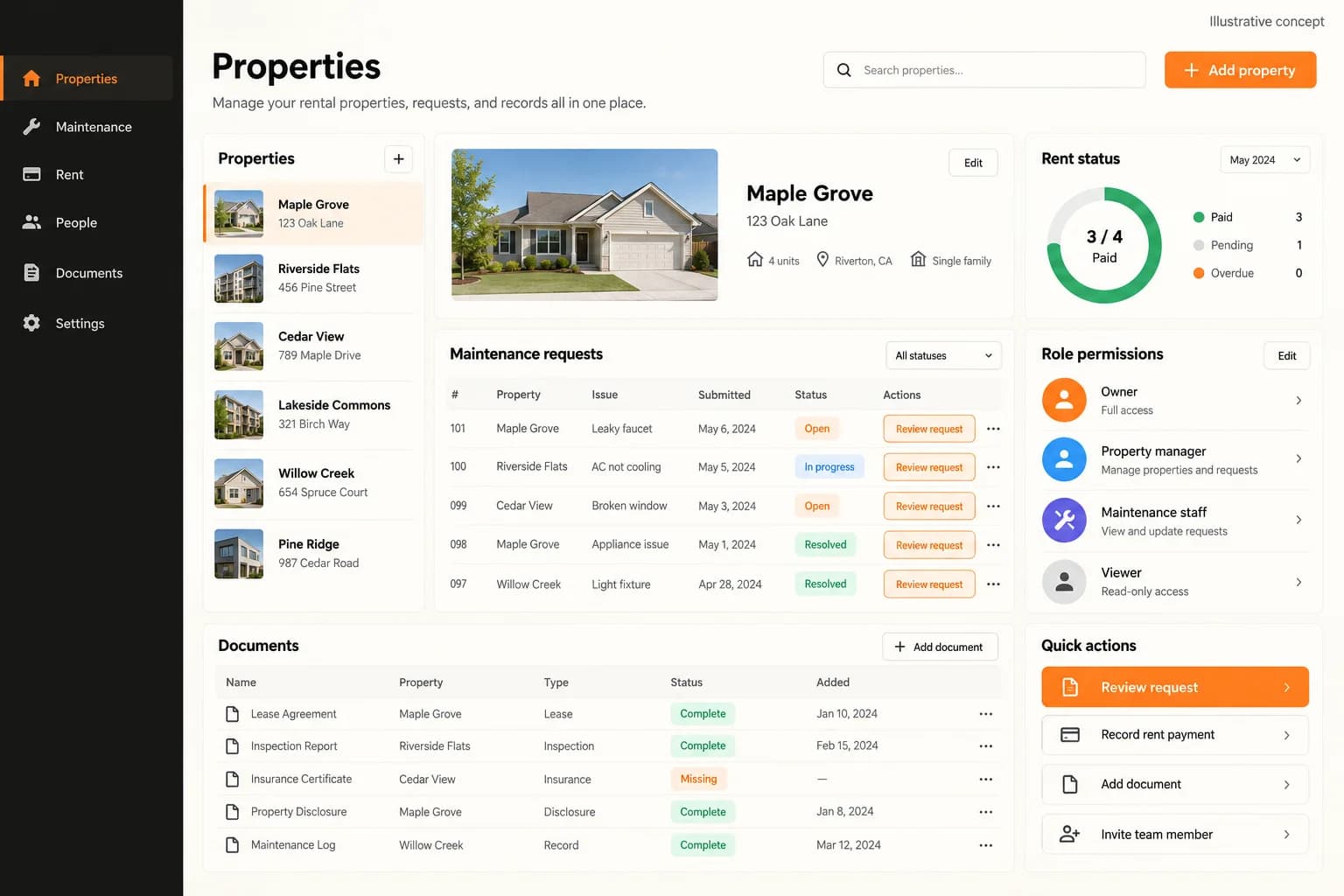
Original illustrative property workspace showing a sample property list, selected property details, maintenance requests, rent-status summary, role permissions and documents

Original illustrative property workspace showing a sample property list, selected property details, maintenance requests, rent-status summary, role permissions and documents

Original App Clone Labs illustrative property-operations concept. Property names, maintenance rows and document statuses are sample content. The rent-status graphic does not prove a resident balance or portfolio occupancy; a document marked complete does not establish an executed lease. Community search, application decisions and resident communications require separate demonstration.

What to check in the walkthrough

  • Which source controls community and unit availability, advertised rent, fees and accessibility details, and how do leasing teams reconcile a prospect’s selected unit with that source?
  • How are application criteria, screening consent, fair-housing consistency and approval permissions applied across communities, and who may change an offer or lease record?
  • Can a guided demo trace an approved application through signing and move-in, then a resident maintenance request through assignment, communications and closure with community-specific access rules?
Open full-size reference

Solution reference register

01 / Reference and IP

This page references third-party product names only to describe familiar product models and planning references. App Clone Labs is not affiliated with or endorsed by those brands. Build decisions require independent legal, regulatory, and operational review for your market.

02 / Artifact status

Boards, diagrams, screens and workflow descriptions on this page are illustrative planning artifacts, not evidence of a deployed client product.

03 / Regulatory caveat

Fair-housing, leasing, and tenant rules vary by market · Screening and accessibility review required

04 / Rights and handover

Source access, licensing, repositories, environments, documentation, acceptance and handover are defined by the signed contract and accepted scope.

Scope

Operating model defined

Roles, workflows, dependencies, exclusions, and assumptions are made reviewable.

Evidence: illustrative

System

Applications connected

Experience, operations, services, data, integrations, and release controls are planned together.

Evidence: illustrative

Handover

Rights stated in writing

Access, assignment, licensing, dependencies, documentation, and support follow the signed agreement.

Evidence: illustrative

Artifact register

Product screens and planning references.

Reference screens illustrate workflows, not a contracted feature list. Sample prices, data, and responses are demonstration content; confirm the current scope during a walkthrough.

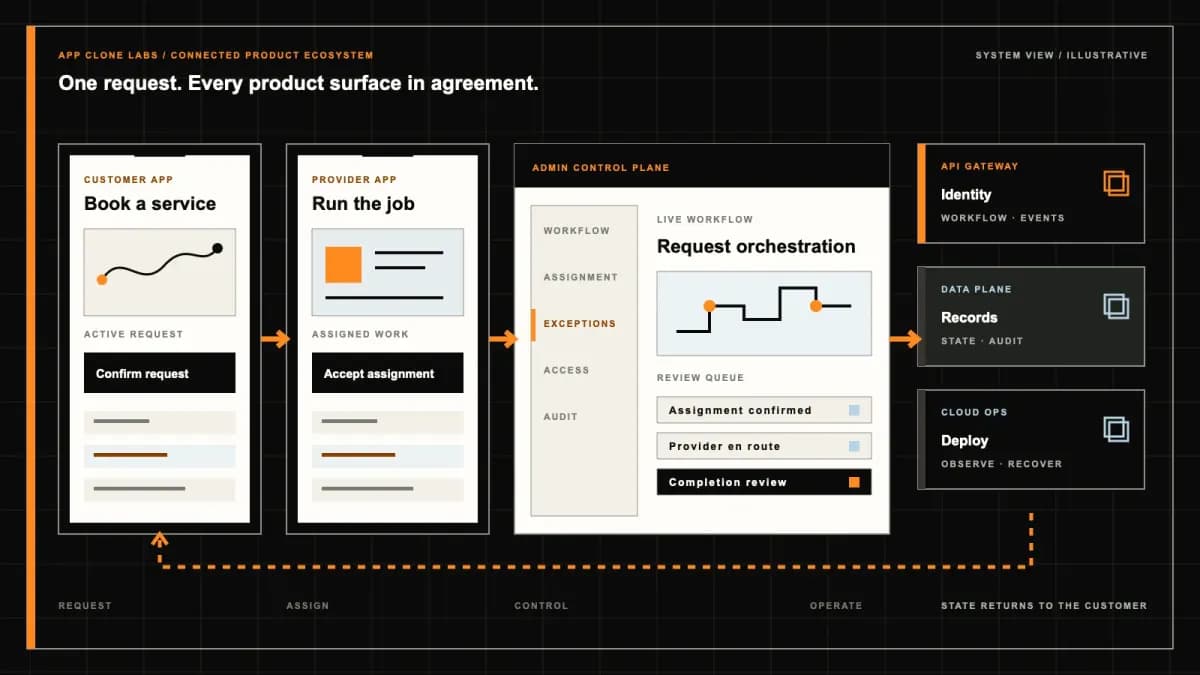
Greystar-style Rental Communities connected product workflow planning visual
Connected customer, operations, and data workflowEvidence: illustrativeOpen full-size reference
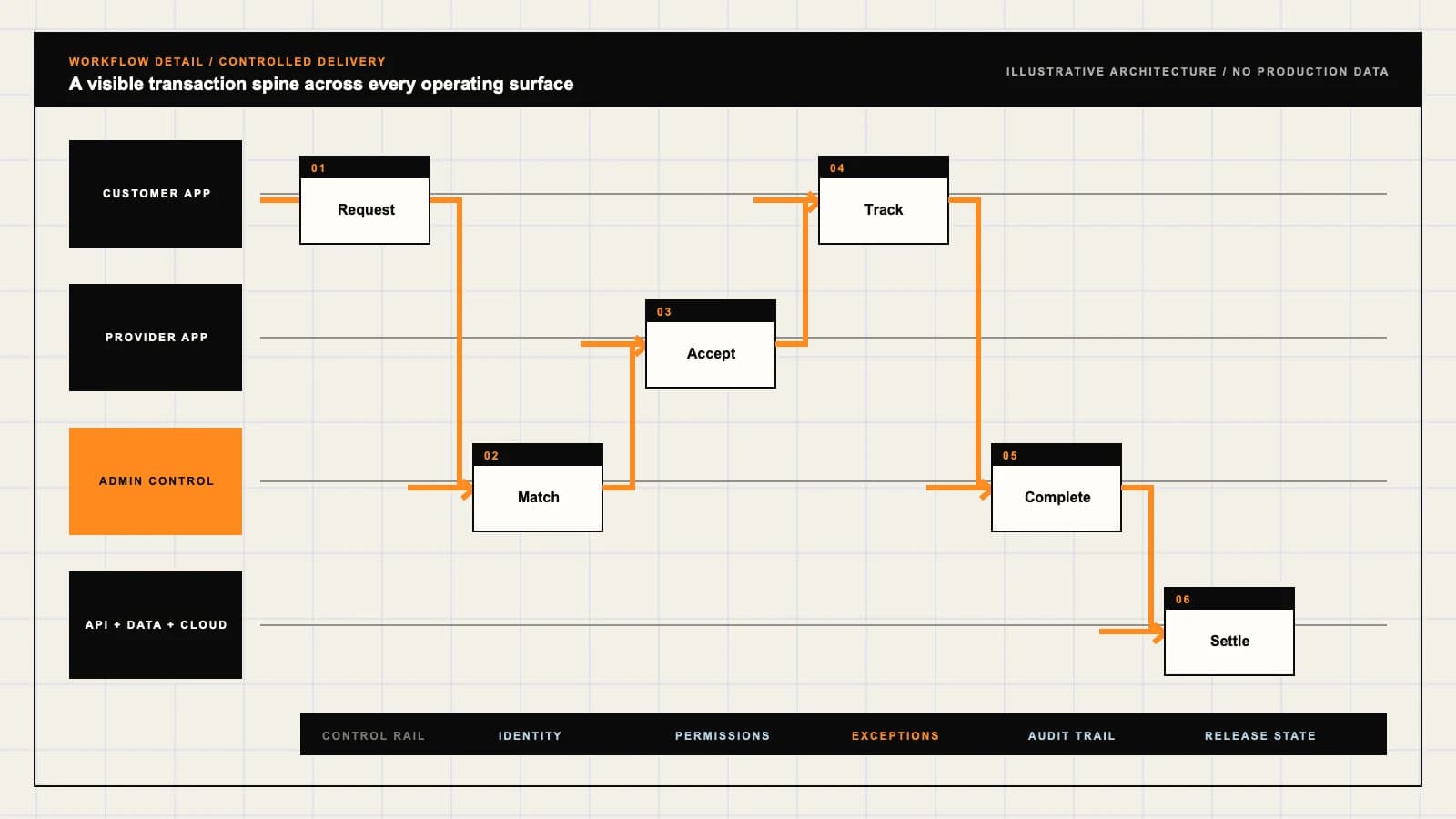
Greystar-style Rental Communities product engineering ecosystem visual
Product engineering ecosystem and handover boundaryEvidence: illustrativeOpen full-size reference

A signed lease still needs a ready apartment

A prospect signs for an apartment and arranges a move, but the unit is still awaiting a repair inspection. Leasing has completed its paperwork while the community team cannot hand over the keys. The useful product connects the promised apartment, accepted terms, readiness evidence and responsible staff before the resident arrives.

Greystar-style development here means independently branded software for professionally operated rental communities: apartment discovery, viewing, applications, leasing and continuing resident service. Greystar is a reference name, not an affiliation, licensed product or connection to its apartments. The brief describes workflows to agree for your portfolio; it does not claim those capabilities are already available in a supplied demo.

Choose the rental-community operating model

A residential operator needs a continuing relationship between a unit, a lease and a resident. That differs from a listing marketplace that passes an inquiry to an independent advertiser, or a co-living product allocating private rooms and shared facilities. Establish who manages the community, who can make an offer and which existing system holds the authoritative records.

Compare the Buildium-style rental management brief when accounting and portfolio administration dominate the requirement. It can inform the integration boundary without making this resident-facing product an accounting-system replacement.

For private-room and shared-space allocation, review the Habyt-style flexible living brief. A room-based stay and a conventional apartment lease should not inherit identical inventory, agreement or support rules by assumption.

Keep community, floor plan and unit information distinct

A community page describes the location and amenities; a floor plan describes a layout; a unit is the apartment offered for particular dates and terms. Label representative images and show which details apply to the actual unit. Include material differences such as floor, furnishing, access and included facilities when relevant to the reviewed offer.

Agree how availability is refreshed and what happens when its source is unavailable. A vacant unit can remain blocked for repair, inspection or another accepted offer. Show the appropriate uncertainty instead of converting stale availability into a commitment. Conflicting allocations need an accountable resolution, not a silent substitution.

Make viewing requests into confirmed appointments

A preferred time entered by a prospect is a request until a community confirms coverage and access. Keep requested, confirmed, rescheduled, cancelled and attended statuses separate. Show the address, meeting instructions and contact route without exposing restricted building or resident access information to everyone searching the portfolio.

Scope staffed tours, remote viewing or self-guided access as separate choices. Connected access requires confirmed provider support and a reviewed credential policy. Test a staff cancellation, unavailable unit and undelivered appointment message. The prospect should be able to discover the changed appointment and the community should know who must follow up.

Explain applications before requesting private evidence

State what the applicant must provide, why it is needed and how to correct an incomplete submission. Identify the particular community and proposed unit or offer attached to the application. A prospect looking at another apartment should not accidentally submit a second packet of private documents or pay an unexplained duplicate charge.

Application criteria, screening use, notices and retention require qualified review for the target market. Record the authorised decision and its supporting evidence under the agreed policy. A screening score alone must not silently determine an offer. Provide clear field labels, understandable error messages and a usable support route, then evaluate accessibility across the real application rather than treating a form template as proof.

Preserve the offer, charges and lease version

Present the lease period, base rent, mandatory charges, optional services, deposit and payment schedule before acceptance. Distinguish recurring amounts from amounts due at application or move-in. Identify relevant inclusions and limits; an attractive headline rent does not explain the total commitment. Repriced or substituted units need a clearly revised offer.

The accepted lease must retain its version and authorised recipients. Updating a template should not rewrite an existing resident agreement. Signing integrations, deposit handling and payment methods require confirmed provider access and reviewed operating arrangements. A completed signature screen is not evidence of legal suitability in every market or an approved funds flow.

Tie move-in readiness to the exact allocated unit

The handoff checklist should identify repairs, cleaning, inspection, the assigned apartment and the staff member permitted to mark it ready. Keep the lease date separate from the readiness result. If the apartment fails inspection, retain the block and record how the resident will be contacted and what resolution the authorised team can offer.

Keys, credentials and arrival instructions need an eligible recipient and an agreed release policy. Include a fallback when a message or access provider fails. Test a unit change after instructions were sent, and confirm that old access is withdrawn where applicable. Replacement housing, compensation and out-of-hours coverage are commitments to agree with the operator; they do not arise from adding an app.
Give resident questions a community and an accountable queue

On Greystar’s public resident support page, the inquiry starts with a community and asks for issue details and contact information. That public example supports a community-specific intake pattern; it does not establish an integration, service response time or access to Greystar’s internal systems.

For your product, separate account questions, lease questions, complaints and maintenance work when different teams are responsible. Preserve assignment and status when a request changes queue. Explain the actual escalation route and staffed hours. Residents should know whether a request was submitted, assigned or resolved without interpreting a generic notification as a promise that the issue has been fixed.

Route maintenance without exposing the resident file

A repair request needs the relevant apartment, issue, permitted contact details and agreed access instructions. A technician may need a work order and arrival arrangement, but usually does not need screening documents or the full rent ledger. Photos and messages can contain private information, so scope their visibility and retention along with the request itself.

The OWASP authorization guidance recommends least privilege and checking permissions on every request. Apply that to work-order attachments, lease downloads and exports as well as screens. Test a contractor opening an unrelated unit and a resident requesting another household’s document; hiding a menu is insufficient.

Keep resident balances and portfolio reports accountable

Decide whether the product displays an existing rent ledger or maintains agreed account records of its own. Assign authority for charges, corrections and reconciliation. A payment receipt, pending authorisation and settled ledger entry describe different events. Preserve enough evidence to investigate failed or duplicate events without presenting an unexplained balance as final.

Portfolio reports should identify the reporting period, source and meaning of each measure. Inquiries, viewing attendance, executed leases, occupancy and repair completion are different outcomes. Restrict resident-level exports, and separate management fees from rental income under the actual operating agreements. A report does not prove entitlement to funds or guarantee an investment result.

Test the demo through a delayed move-in and a failed repair handoff

Request a connected walkthrough across prospect, leasing, community and maintenance roles. Confirm which controls work, which records are samples and which integrations use sandboxes. Concept images are not proof of live inventory, an executed lease, a working access connection or a processed resident payment. Current demo availability and included surfaces need confirmation.

Ask to follow a viewing cancellation, two applications for one unit, an incomplete document, a revised offer and an apartment that fails readiness. Then inspect an undelivered maintenance notification, a wrongly assigned work order and a pending payment reconciliation. Each exception should have an owner and next action. Include denied cross-community access and recovery of agreed records in acceptance checks.

Scope one complete resident lifecycle before expanding the portfolio

Start with defined communities, authoritative unit data, a reviewed leasing policy and the actual service team. Agree discovery, viewing, application, lease acceptance, readiness and resident support as connected stages. Resident web, mobile, leasing tools and maintenance tools are separate delivery surfaces; provider access, data quality and acceptance review affect the estimate.

Renewal campaigns, transfers, centralised leasing and amenity reservations can follow after their operating rules are settled. Bring redacted unit records, an offer and lease example, application steps, a viewing schedule, a readiness checklist and a repair escalation scenario. Do not share real resident documents during initial scoping.

Use a product scope discussion to agree configured capabilities, engineering, integrations and exclusions. The contract should define client deliverables, reusable components, licences, deployment access and support; ownership or launch dates should not be inferred from a category name.

Review the delivery process for discovery and acceptance checkpoints before committing to a portfolio rollout.

Product flow

Role-workflow flow diagram.

A visual map of how each role interacts with each workflow stage, with operator controls and integration boundaries.

Deployable Product Architecture

Greystar-style Rental Communities

COMPARE COMMUNITI…REVIEW EVIDENCE A…HAND OVER A READY…Find an apartment…Connect the offer…Resolve assigned …INTEGRATIONS: Property management records with agreed unit identifiers, authoritative ava…OPERATOR CONTROLS: Vacant does not mean ready · Use reviewed criteria and accountable decision…
Illustrative validation artifact — role-workflow flow diagram; final surfaces, boundaries, and integration topology are confirmed during discovery.

User roles

Greystar-style Rental Communities roles and workflows.

Clone-inspired platforms usually need several coordinated interfaces, not just a customer app.

Prospect and resident

01

Find an apartment and follow the lease lifecycle

Compare unit details and charges, request a viewing, complete the reviewed application and retrieve accepted documents. Residents need a clear route for account questions and maintenance requests.

Leasing and community teams

02

Connect the offer to a ready unit

Maintain community information, viewing capacity, application queues and lease versions. Confirm unit readiness before the move-in handoff and explain changes to the prospect.

Maintenance and portfolio teams

03

Resolve assigned work within property boundaries

Coordinate repairs and turnover inspections with appropriate access instructions. Portfolio staff need governed reports; contractors should not receive unrelated resident financial or application records.

Workflow

Greystar-style Rental Communities workflow stages.

Each workflow stage is mapped to a role, screen, API, notification, admin control, and measurable launch outcome.

Discover and view

01

Compare communities, floor plans and actual units

Show the source and date of availability, clarify representative images and request a viewing with a confirmed appointment status. A floor plan alone does not reserve an apartment.

Apply and lease

02

Review evidence and preserve the accepted offer

Explain required information and charges, route the application to authorised reviewers and record agreement acceptance. Distinguish an inquiry, application, offer and executed lease.

Move in and live

03

Hand over a ready unit and maintain resident support

Connect the agreed move-in date to inspection and access, then route payments, maintenance and renewal questions to the responsible community team.

Deployable Product Architecture

Workflow / system register

Revision EPlanning surface

Product delivery loop

Greystar-style Rental Communities workflow stages.

A focused release proves one complete workflow

Product delivery loop: Greystar-style Rental Communities workflow stages.A focused release proves one complete workflow. Scope the customer action and the operator response as one system.
01

Compare communities, floor plans and actual units

02

Review evidence and preserve the accepted offer

03

Hand over a ready unit and maintain resident support

Control note

Scope the customer action and the operator response as one system.

Illustrative architecture register; validate against the accepted scope.

Operator controls

Greystar-style Rental Communities admin and operator controls.

The control center is scoped as a first-class product surface, not an afterthought.

Unit readiness

01

Vacant does not mean ready

Keep repairs, cleaning, inspection and availability blocks visible at unit level. Record who can release a block and how a delayed handoff is communicated.

Leasing consistency

02

Use reviewed criteria and accountable decisions

Scope application requirements, correction routes and decision authority with qualified advisers. Screening output must not silently become an automatic housing decision.

Community permissions

03

Access follows the property and task

Restrict resident documents, balances and work orders by responsibility. Staff moving between communities must not retain access beyond the approved assignment.

Monetization

Greystar-style Rental Communities monetization models.

We model monetization early so payments, admin controls, and reporting support the business.

Report fees under the actual operating contract

Define the required portfolio reporting and fee basis with the operator. Software does not create a right to management revenue or owner distributions.

Separate optional services from lease obligations

Describe included and paid services, availability and cancellation responsibilities. Any parking, storage or amenity charge needs an explicit basis in the reviewed offer.

Measure inquiries without overstating results

Scope community marketing reports, source attribution and permitted promotion. Inquiry counts are not executed leases or a promise of occupancy.

Integrations

Greystar-style Rental Communities integration surface.

External systems that determine launch readiness, data flow, and operational continuity.

Integration

01

Integration 1

Property management records with agreed unit identifiers, authoritative availability, rent ledger boundaries and reconciliation of conflicting changes

Integration

02

Integration 2

Leasing, screening or signing providers with confirmed access, reviewed use, document versions and recovery for incomplete applications

Integration

03

Integration 3

Maintenance, messaging and optional access systems with task permissions, delivery status and a manual community handoff

Scope drivers

Greystar-style Rental Communities scope drivers.

The variables that most influence build effort, cost, and launch readiness.

Portfolio data

01

Agree the source of truth for every unit

Confirm community and unit identifiers, floor-plan relationships, availability freshness and the handling of stale or conflicting information.

Leasing policy

02

Markets and communities may need different reviewed rules

Identify offer terms, application evidence, fees and staff authority. Do not reuse one community policy everywhere without the required review.

Resident operations

03

The support promise needs a staffed process

Define viewing coverage, unit inspection, work-order escalation and the team responsible for a failed move-in. Software alone cannot promise response times.

Deployable Product Architecture

Scope drivers / system register

Revision FPlanning surface

Product delivery loop

Greystar-style Rental Communities scope drivers.

A focused release proves one complete workflow

Product delivery loop: Greystar-style Rental Communities scope drivers.A focused release proves one complete workflow. Scope the customer action and the operator response as one system.
01

Agree the source of truth for every unit

02

Markets and communities may need different reviewed rules

03

The support promise needs a staffed process

Control note

Scope the customer action and the operator response as one system.

Illustrative architecture register; validate against the accepted scope.

V1 scope

Greystar-style Rental Communities V1 foundation.

Launch the smallest complete operating loop first, then scale the product with confidence.

Apartment discovery

01

Accurate unit information and a viewing request

Include community search, floor-plan context, unit availability, charges and contact instructions. Make requested versus confirmed appointments clear.

Leasing workspace

02

Application review through move-in readiness

Provide document status, accountable decisions, offer and agreement versions, inventory blocks and an inspection checklist for the allocated apartment.

Resident service

03

Account visibility and maintenance follow-through

Show agreed account information and accepted documents, with assigned repair requests and escalation instructions. Keep reconciliation and financial adjustments under authorised control.

Later phases

Greystar-style Rental Communities post-launch expansion.

Capabilities that should usually wait until real usage proves the core loop.

Centralised leasing

01

Route prospects without losing community responsibility

Add shared leasing queues after defining assignments, local viewing capacity, response expectations and access across properties.

Renewals and transfers

02

Preserve agreement and ledger continuity

Add reviewed renewal offers and destination-unit transfers with new terms, readiness checks, access changes and unresolved account items.

Community amenities

03

Introduce reservations under explicit operating rules

Add amenity scheduling or resident events after defining capacity, accessibility, permitted fees, cancellation and moderation responsibilities.

Deployable Product Architecture

Later phases / system register

Revision APlanning surface

Product delivery loop

Greystar-style Rental Communities post-launch expansion.

A focused release proves one complete workflow

Product delivery loop: Greystar-style Rental Communities post-launch expansion.A focused release proves one complete workflow. Scope the customer action and the operator response as one system.
01

Route prospects without losing community responsibility

02

Preserve agreement and ledger continuity

03

Introduce reservations under explicit operating rules

Control note

Scope the customer action and the operator response as one system.

Illustrative architecture register; validate against the accepted scope.

Regulatory review

Greystar-style Rental Communities regulatory and compliance flags.

Each flag must be reviewed by qualified counsel for your target market before build or launch.

Flag 1

Fair-housing, leasing, and tenant rules vary by market

Flag 2

Screening and accessibility review required

Reference walkthrough

Request a Greystar-style Rental Communities reference walkthrough.

Ask us to confirm which reference surfaces are currently available for this product model. Rather than publishing shared demo credentials, we schedule a private guided walkthrough for qualified buyers.

Reference surface

01

Prospect and resident: Find an apartment and follow the lease lifecycle

Request a role-specific demonstration and confirm which capabilities are currently available. Review the proposed responsibility: Compare unit details and charges, request a viewing, complete the reviewed application and retrieve accepted documents. Residents need a clear route for account questions and maintenance requests.

Reference surface

02

Leasing and community teams: Connect the offer to a ready unit

Request a role-specific demonstration and confirm which capabilities are currently available. Review the proposed responsibility: Maintain community information, viewing capacity, application queues and lease versions. Confirm unit readiness before the move-in handoff and explain changes to the prospect.

Reference surface

03

Maintenance and portfolio teams: Resolve assigned work within property boundaries

Request a role-specific demonstration and confirm which capabilities are currently available. Review the proposed responsibility: Coordinate repairs and turnover inspections with appropriate access instructions. Portfolio staff need governed reports; contractors should not receive unrelated resident financial or application records.

Next step

04

Book a walkthrough

Request a live, private walkthrough of the reference implementation. We will confirm scope and discuss configured deployment versus custom build for your market.

Open register

Deployable Product Architecture

Reference walkthrough / system register

Revision DPlanning surface

Product delivery loop

Request a Greystar-style Rental Communities reference walkthrough.

A focused release proves one complete workflow

Product delivery loop: Request a Greystar-style Rental Communities reference walkthrough.A focused release proves one complete workflow. Scope the customer action and the operator response as one system.
01

Prospect and resident: Find an apartment and follow the lease lifecycle

02

Leasing and community teams: Connect the offer to a ready unit

03

Maintenance and portfolio teams: Resolve assigned work within property boundaries

04

Book a walkthrough

Control note

Scope the customer action and the operator response as one system.

Illustrative architecture register; validate against the accepted scope.

Process

A traceable path from decision to acceptance.

  1. 01

    Model teardown

    We map the reference business model, user roles, monetization path, regulatory needs, and launch constraints.

    Artifact: Product teardown, risk map, role matrix

  2. 02

    Market-fit blueprint

    We reshape the model around your market, operations, pricing, workflows, and first release priorities.

    Artifact: Feature scope, flows, technical plan

  3. 03

    Design and build

    Product, design, engineering, QA, and cloud delivery move in weekly demo cycles with visible progress.

    Artifact: Working releases, QA notes, sprint demos

  4. 04

    Launch and operate

    We support production release, monitoring, handoff, roadmap decisions, and post-launch improvement.

    Artifact: Launch checklist, docs, growth backlog

FAQ

Questions to resolve before the build.

01Is this official Greystar software or connected to its apartments?

No. Greystar is a reference for an independently branded rental-community development brief. Affiliation, proprietary systems and Greystar inventory access are not included or implied.

02How does this differ from a property listing marketplace?

The brief connects apartment discovery to viewing, leasing, unit readiness and continuing resident support under an operator’s responsibilities. A marketplace that forwards inquiries to independent advertisers has a different operating model.

03Can one floor plan represent several available apartments?

Yes, if the catalogue preserves each unit’s identity, dates, terms and readiness. Representative layout information cannot substitute for the details or allocation of the apartment offered to a prospect.

04Does requesting a viewing confirm the appointment?

Not by itself. The community needs to confirm staff capacity and access, then expose appointment status and any change. Staffed, remote and self-guided viewing are separate scope choices.

05Will screening automatically approve a rental application?

That should not be assumed. Criteria, provider use, correction routes and decision authority require a reviewed policy. The application should preserve accountable decisions rather than silently treating a score as an accepted offer.

06How are rent, deposits and other charges shown?

The reviewed offer should distinguish recurring rent, mandatory charges, optional services, deposits and due dates. Payment processing, deposit handling and ledger reconciliation require separate provider and operating decisions.

07What happens when an apartment is leased but not ready?

The readiness block should remain visible, with an authorised community team responsible for contacting the resident and resolving the handoff. Alternative accommodation and compensation depend on agreed policy, not a software default.

08Can the platform connect to our existing property management system?

An integration can be scoped after confirming provider access, unit identifiers, authoritative fields and conflict handling. No particular connector, licence or approved provider relationship is promised by this brief.

09What should maintenance contractors be able to see?

Assigned work, relevant issue evidence and agreed access instructions should be available within the task boundary. Unrelated application evidence, leases and financial records should remain restricted unless an approved responsibility requires access.

10Does the software guarantee fair-housing or accessibility compliance?

No. Application policies, leasing requirements and resident processes need qualified review for each market. Accessibility must be assessed in the actual product, including forms, documents, navigation and support paths.

11Which failures should we inspect in the demo?

Review cancelled viewings, conflicting unit allocations, incomplete applications, delayed readiness, failed maintenance handoffs and pending reconciliation. Confirm sample versus working integrations and test access across residents and communities.

12What determines delivery scope and ownership?

Portfolio data, leasing rules, provider access, product surfaces and service responsibilities determine scope. The agreement must define deliverables, reusable components, licences, handover and support; timing and ownership need explicit confirmation.

Primary sources

References behind this page

Dated official documentation, standards, and research that support the factual claims on this page.

  1. 01
  2. 02

Citation readiness

How to interpret this page

Published by App Clone Labs Editorial Team

Commercial claims
Scope, cost, and timeline claims are planning guidance and require validation in a current proposal.
Evidence status
Diagrams, boards, examples, and estimates are illustrative planning artifacts unless explicitly identified with a source and measured evidence status.

Next decision

Turn the brief into an accepted product scope.

Define outcomes, constraints, evidence, rights and handover before delivery begins.

Commercial rights, repositories, environments, documentation, acceptance and handover remain contract-defined.

Scope Greystar-style Rental Communities

Independent from Greystar

App Clone Labs is an independent software development studio. We are not affiliated with, connected to, sponsored by, or endorsed by Greystar.

Why this name appears

Greystar is referenced descriptively to identify familiar product mechanics and common search terminology. “Clone” describes a planning reference, not a replica.

Original delivery

Any product delivered by App Clone Labs is independently designed and developed for the accepted scope. It does not contain proprietary code, branding, copy, interface assets, or confidential material from Greystar.

Trademark ownership

Greystar and associated names, logos, and marks remain the property of their respective owners. Their use identifies a reference category and does not imply authorization or endorsement.