Applied artificial intelligence

HeyGen-style Synthetic Video Studio — Custom-Built for Your Market

Script-to-video studio with synthetic presenters, voices, translation, and approval workflows. Planned for creative teams producing consented business video with controlled likeness and voice use with role-specific workflows, operator controls, integrations, and a handover boundary defined for the selected market.

See product screens and demo access

Custom workflows

Brand-safe product strategy

Admin and operations tooling

Reference walkthrough by arrangement

Review a consented presenter video from script to approved translation.

Bring a business script, the intended presenter and voice permissions, target languages and your brand reviewer to a guided walkthrough. Use this studio reference to discuss how your team would create a synthetic presenter draft, check each translation and approve a specific version for release. Confirm the current demo, provider access and supported scope before choosing the studio.

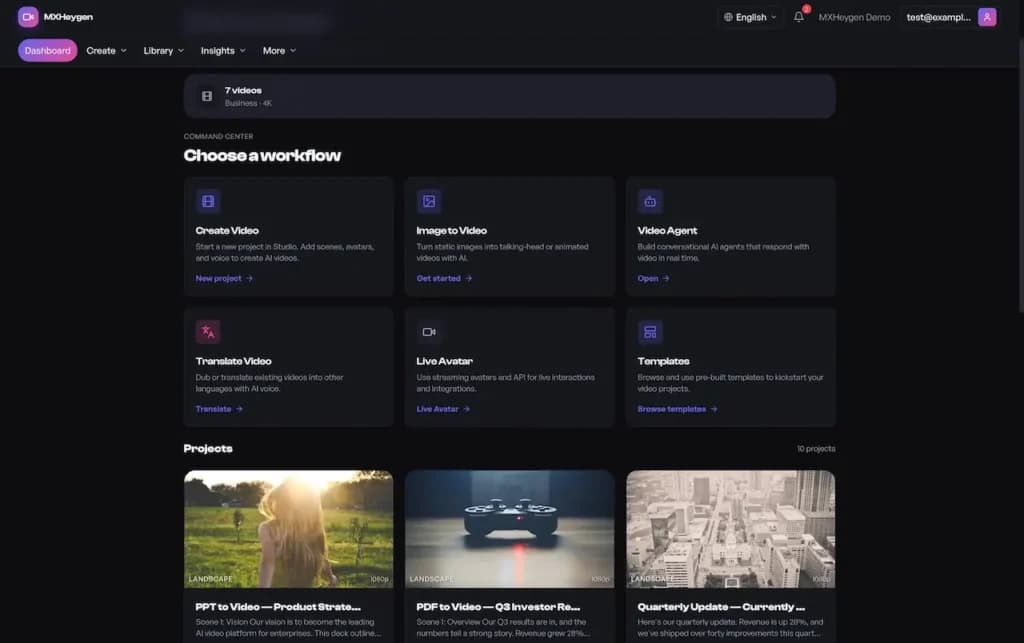
Synthetic video studio reference with Create Video, Translate Video and Live Avatar workflow tiles above sample projects

Synthetic video studio reference with Create Video, Translate Video and Live Avatar workflow tiles above sample projects

Illustrative studio reference with MXHeygen demo branding and sample projects; it does not establish affiliation with HeyGen. The workflow tiles do not prove avatar or voice consent, media rights or licensing, model access, translation accuracy, output quality or approval enforcement. Verify these in the current demo and agreed scope.

What to check in the walkthrough

  • How does the studio authorise this presenter’s likeness and synthetic voice for your script, audience and intended use? Ask to inspect purpose-specific consent and provenance records, attempt an unapproved likeness or voice, and test what happens to new renders and existing drafts when consent is withdrawn.
  • How is a translated presenter video checked before it can be released? Ask to render your script in a target language, compare the meaning, pronunciation, timing and captions with the source, and have a locale reviewer request a correction. Confirm that the voice and likeness permissions cover that language and that an edited translation returns for review.
  • Who can approve and export the exact presenter video version? Ask to attach a synthetic-media disclosure, reject a draft containing an unauthorised endorsement, attempt export before approval, and inspect the approval history after a script or voice change. Confirm which provider, models, output formats and publication controls are included in the agreed scope.
Open full-size reference

Solution reference register

01 / Reference and IP

This page references third-party product names only to describe familiar product models and planning references. App Clone Labs is not affiliated with or endorsed by those brands. Build decisions require independent legal, regulatory, and operational review for your market.

02 / Artifact status

Boards, diagrams, screens and workflow descriptions on this page are illustrative planning artifacts, not evidence of a deployed client product.

03 / Regulatory caveat

Document data purpose, consent, retention, deletion, residency, and privacy boundaries · Evaluate model quality, safety, bias, drift, and task-specific failure modes before and after release · Require human review for consequential, sensitive, or externally published outputs · Disclose model and provider dependencies, data handling, and service limitations · Identify generated output and communicate uncertainty without presenting it as verified fact · Apply abuse prevention, prompt and file screening, reporting, rate limits, and incident response · Set usage budgets, cost alerts, quotas, and provider fallback controls · Prohibit deceptive impersonation, non-consensual intimate media, unauthorized endorsements, and election manipulation

04 / Rights and handover

Source access, licensing, repositories, environments, documentation, acceptance and handover are defined by the signed contract and accepted scope.

Scope

Operating model defined

Roles, workflows, dependencies, exclusions, and assumptions are made reviewable.

Evidence: illustrative

System

Applications connected

Experience, operations, services, data, integrations, and release controls are planned together.

Evidence: illustrative

Handover

Rights stated in writing

Access, assignment, licensing, dependencies, documentation, and support follow the signed agreement.

Evidence: illustrative

Artifact register

Product screens and planning references.

Reference screens illustrate workflows, not a contracted feature list. Sample prices, data, and responses are demonstration content; confirm the current scope during a walkthrough.

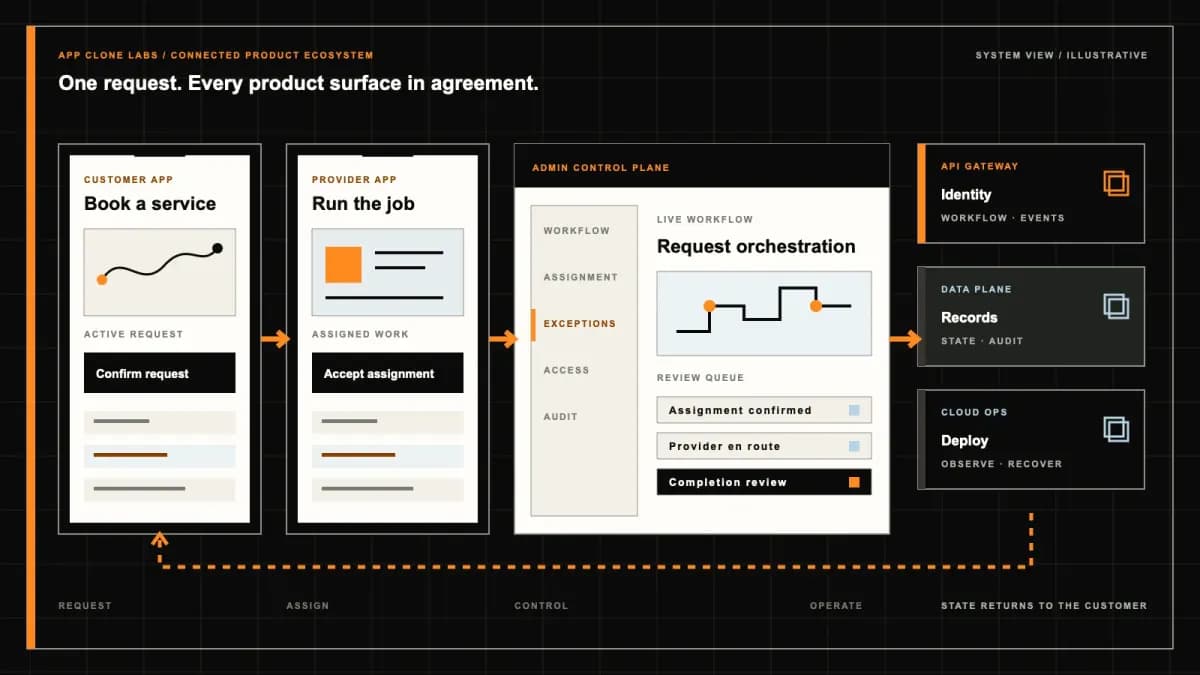
HeyGen-style Synthetic Video Studio connected product workflow planning visual
Connected customer, operations, and data workflowEvidence: illustrativeOpen full-size reference
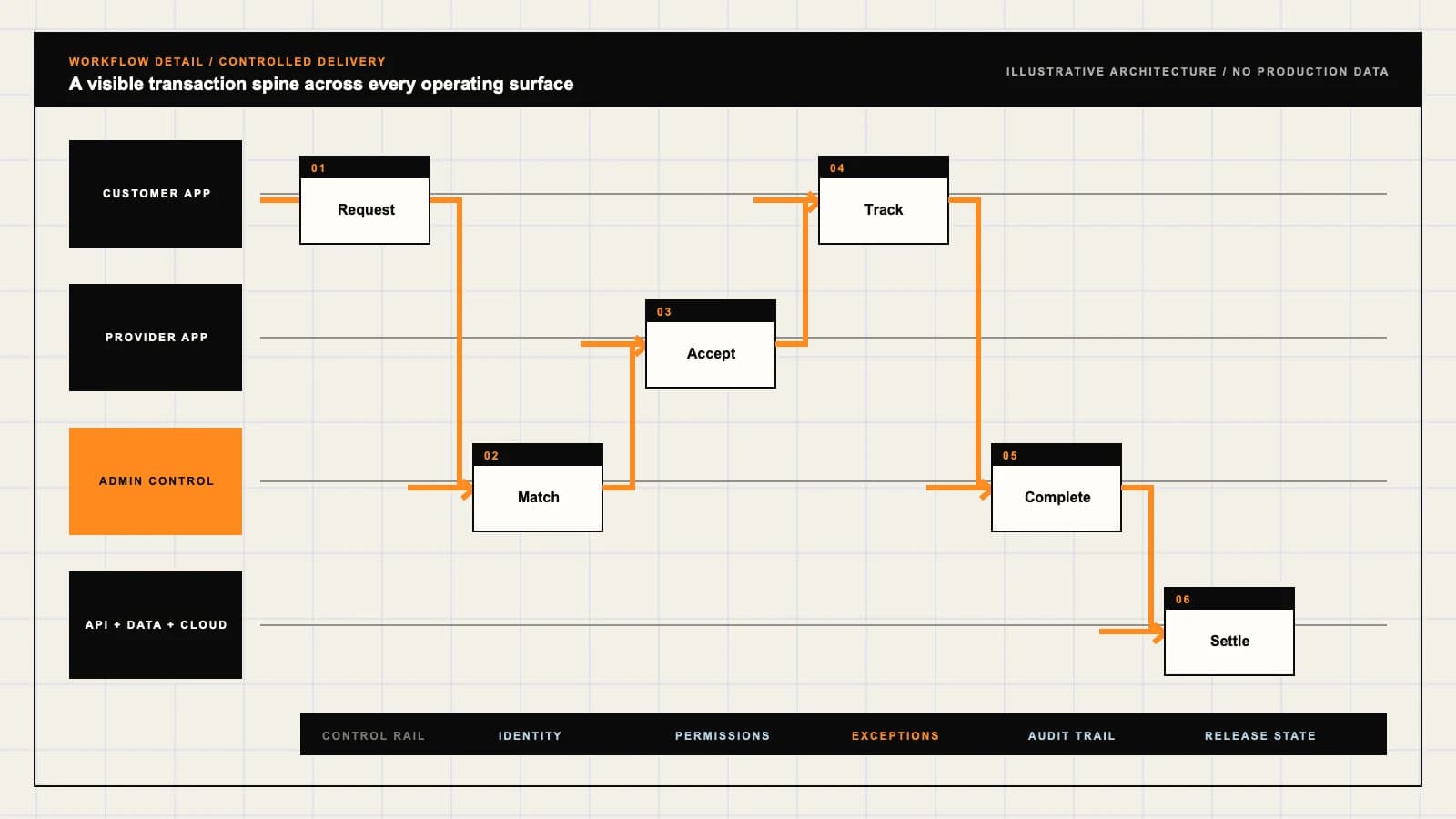
HeyGen-style Synthetic Video Studio product engineering ecosystem visual
Product engineering ecosystem and handover boundaryEvidence: illustrativeOpen full-size reference

A rendered presenter is not permission to publish their words

A creative team uploads a spokesperson’s recording, changes the script and renders a translated product video. The file looks ready, but the spokesperson approved a different campaign and has not reviewed the translated statement. A HeyGen-style synthetic video studio needs to preserve that distinction. Avatar creation, script approval, render completion and export authority answer separate questions. The useful workspace shows which person and assets are authorized, which version was reviewed and what still prevents distribution.

App Clone Labs scopes independently branded software around consented presenters, controlled production and attributable exports. A reference-style studio does not include HeyGen accounts, model access, licensed voices or automatic media rights. Provider terms and operating arrangements need separate establishment. Illustrative video demonstrates intended workflow, not a real endorsement, verified customer deployment or a promise of perfect lip-sync. Define the first release around one permitted production use and an accountable reviewer.

Verify the person before creating a likeness asset

HeyGen’s official consent-video guidance requires a consent recording for video-based Digital Twins and says that someone represented by another creator must record their own consent. This is a specific provider workflow reference, not a universal rule for every avatar type or proof that an independent studio has verified a person. Establish the selected provider’s actual requirements before accepting training footage.

Match the consent evidence to the person depicted, the asset and the proposed use. Restrict access to verification recordings rather than placing them in the general project library. Rehearse a different person in the submitted footage, an unreadable verification recording and a creator attempting to use a public interview as authorization. A recognizable face or an uploaded file is not evidence that the uploader may create a synthetic presenter from it.

Record who authorized avatar creation and what later uses are permitted. Establish the covered workspaces, purposes, languages, channels, expiry and any required presenter review under the applicable agreement. An employee’s recording should not become a permanent license for unrelated advertising. Show a clear restricted state when a project falls outside the agreed authority instead of allowing export because the asset already exists in the library.

HeyGen’s ethics statement describes expressed permission for creating and sharing avatars and action against unauthorized likeness or voice use. It supports separate attention to creation and distribution permissions, without granting rights for this project. Rehearse a new campaign outside the recorded scope and a presenter revoking future use. Route the exception to an accountable rights owner; a creator should not resolve it by clicking a generic acceptance checkbox on someone else’s behalf.

Avatar voice and source media need independent provenance

Keep the avatar identity, visual look, voice and source media separately identifiable. A permitted face does not establish rights to a different person’s voice, music, photographs, logos or background footage. Record the asset source, applicable license or consent reference, version and restrictions. When a stock presenter is selected, verify the actual license scope instead of assuming that a thumbnail means unrestricted commercial endorsement rights.

Limit who can create, replace, share or delete sensitive assets. Rehearse a voice replacement after script approval, a licensed background with a restricted channel and an avatar accidentally shared across client workspaces. The project should expose the relevant rights problem without revealing private source recordings to every reviewer. Keep provider asset identifiers attributable to the selected account and deployment; copying a public identifier does not establish access or permission to generate with that asset.

Scripts and scene choices should remain versioned

Preserve the exact script, scene sequence, presenter, voice and input assets behind each render request. A changed product claim or disclaimer can materially change what the presenter appears to say. Show meaningful differences and require the appropriate renewed approval when consequential inputs change. Keep draft, submitted and approved states legible so a queued old version cannot silently become the campaign’s final video after an editor updates the text.

Compare the general assistant workspace when the starting requirement is drafting or revising text with controlled model access. This studio adds likeness authority, speech and visual review before export. Generated scripts still need factual checking and rights review. Test an unsupported claim, an omitted disclaimer and an edit arriving during render processing. A fluent script should not inherit authority merely because another model produced it or because a previous scene was already approved.

Localization requires a reviewer who understands the statement

Treat each locale as a reviewed script version linked to the source, not a replacement string that automatically inherits approval. Preserve meaning, names, numbers, uncertainty and required disclosures. Choose the languages the operating team can actually inspect and support. A translated phrase may make a stronger promise than the original or change who appears responsible for a service. Resolve that difference before the spokesperson appears to deliver it.

Provide pronunciation guidance for names, technical terms and abbreviations and retain the correction with the relevant voice and locale. Review captions against the spoken output, including reading order and timing. Rehearse unsupported characters, a mistranslated warning and a product name pronounced incorrectly. Lip-sync and speech quality require inspection on the actual rendered artifact; do not promise perfect synchronization across every language, voice and camera angle simply because translation completed without an error.

Render queues must explain cost and uncertain outcomes

Show the selected provider, estimated duration, usage basis and applicable limits before submitting a job. Explain whether draft previews, failed requests or retries may consume paid usage under the established terms. A workspace plan and available credits are different records from the completed deliverable. Bound concurrency and spending so a creator cannot accidentally enqueue many costly versions by repeatedly clicking a button that appears unresponsive.

Give each render request a stable identity and retain provider references. Distinguish accepted, queued, processing, failed and completed states according to the actual integration. Rehearse a response lost after job acceptance, repeated callbacks and a provider outage while projects remain queued. Recover the existing request before resubmitting. If cancellation cannot stop provider processing immediately, explain the supported outcome and cost treatment rather than promising that the local cancel button necessarily prevents every later charge.
Quality review belongs to the completed file

A completed render still needs content and technical review. Inspect the actual video for speech errors, visual artifacts, unintended gestures, missing captions, damaged text and inappropriate combinations of presenter and scene. Use the intended aspect ratio and viewing conditions instead of approving only a small thumbnail. The reviewer should identify a particular artifact and time range when requesting a correction, with an accountable owner for the next production decision.

Tie approval to the output file and its input versions. Re-rendering after a pronunciation fix creates another artifact that may need renewed review. Rehearse a successful job producing a corrupt file, a shortened sentence that removes a qualification and captions covering essential visual content. Approval should not silently migrate to a newer output because both jobs share a project name. Accessible controls, captions and clear labeling are part of acceptance alongside an image that resembles the presenter.

Prevent deceptive endorsements and unauthorized impersonation

Define prohibited uses and review responsibility across prompts, scripts, uploaded assets and exports. Block deceptive impersonation, non-consensual intimate media, unauthorized endorsements and election manipulation under the studio’s established policy. An authentic consent recording does not authorize every statement a creator might later generate. Provide a way to report suspected misuse and preserve restricted evidence while authorized staff investigate the account, asset and affected outputs.

Rehearse a creator trying to present a real person as endorsing an unrelated product and a voice asset reused in a misleading financial message. Distinguish a policy rejection from a technical render failure so the user does not simply retry until the video appears. Give reviewers enough context to assess intended use without granting unrestricted access to other clients’ projects. Moderation tools support accountable decisions; they do not prove that every harmful use will be detected automatically.

Export needs rights disclosure and provenance

Establish which roles may download, share or publish each approved version. Check asset rights and required disclosures at export, because authority may change after rendering. Apply the agreed synthetic-media label, visible watermark or supported provenance record without claiming that any single signal proves a video is truthful. Preserve the relationship between exported file, project version, rights decision and reviewer so a later complaint can identify the exact artifact involved.

Compare the white-label AI video creation workspace for a broader generation and brand-review scope. This presenter studio gives special attention to whose likeness and voice deliver the statement. Rehearse an export missing its required label and a share link accessible to an unauthorized workspace. Test the supported downloaded format and captions. Watermarks or metadata may be removed during editing or redistribution, so explain their limitations rather than promising permanent identification of every copied file.

Revocation stops supported future use without recalling every copy

Define how the presenter or rights owner requests revocation, correction or deletion and who verifies and acts on that request. Identify future generation, managed share links, queued jobs and library access separately. Removing an avatar thumbnail alone may leave an existing job or exported file available. Record what has been disabled, what remains under restricted retention and any external action needed through the selected provider’s process.

Do not promise retrieval of videos already downloaded or copied outside the managed service. Establish the supported response for earlier authorized exports and misuse reports using the actual rights agreement. Rehearse revocation during rendering, a queued export after access removal and deletion while a review remains open. The operator should explain the remaining limitations and next responsible action. Keep verification evidence restricted under the agreed retention policy rather than retaining every sensitive source recording indefinitely for convenience.

Inspect a synthetic studio journey before buyer acceptance

Request a sandbox walkthrough with fictional presenters or assets explicitly authorized for demonstration. Submit a mismatched consent record, correct it and create a versioned script. Translate a line incorrectly, reject its pronunciation and interrupt a render response. Then approve the corrected artifact, inspect its label and revoke access before another export. Buyer acceptance should show consistent rights, input versions, job costs and reviewer decisions across presenter, creator and operator views.

Bring one presenter agreement and a failed render scenario to a synthetic studio scope discussion to define consent boundaries, supported languages and accountable remedies.

Use the delivery process to agree provider access, source-code terms, storage, moderation and export acceptance. An illustrative demo is not automatic rights clearance, flawless output or evidence that a production provider account is already available.

Product flow

Role-workflow flow diagram.

A visual map of how each role interacts with each workflow stage, with operator controls and integration boundaries.

Deployable Product Architecture

HeyGen-style Synthetic Video Studio

ESTABLISH THE PER…TRACK JOBS AND LA…RETAIN EVIDENCE A…Authorize bounded…Prepare attributa…Control export an…INTEGRATIONS: Separately authorized avatar, voice, translation and video providers with d…OPERATOR CONTROLS: Keep creation and usage permissions distinct · Tie approval to the actual r…
Illustrative validation artifact — role-workflow flow diagram; final surfaces, boundaries, and integration topology are confirmed during discovery.

User roles

HeyGen-style Synthetic Video Studio roles and workflows.

Clone-inspired platforms usually need several coordinated interfaces, not just a customer app.

Presenter and rights owner

01

Authorize bounded likeness and voice use

Provide the required identity and consent evidence and inspect approved purposes, languages and access. Permission to create an avatar does not automatically permit every script or campaign.

Creator and localization editor

02

Prepare attributable project versions

Choose permitted assets, version scripts and review translations and pronunciation. Submit a specific rendered draft rather than assume a later edit inherits earlier approval.

Brand reviewer and studio operator

03

Control export and resolve rights exceptions

Review content, output quality and disclosure before releasing an approved artifact. Restrict asset administration, manage render costs and respond to revocation or misuse reports.

Workflow

HeyGen-style Synthetic Video Studio workflow stages.

Each workflow stage is mapped to a role, screen, API, notification, admin control, and measurable launch outcome.

Authorize and prepare

01

Establish the person asset and intended use

Verify likeness and voice authority, source rights and provider permissions. Bind the selected assets and script version to an approved project scope before rendering.

Render and review

02

Track jobs and language-specific decisions

Show queue state, estimated usage and attributable output versions. Review pronunciation, captions, visual artifacts and claims before approving the specific file.

Export and maintain

03

Retain evidence and enforce access changes

Release only permitted versions with required labels and provenance. Revoke managed access and future generation where supported, while explaining the limits for files already downloaded.

Deployable Product Architecture

Workflow / system register

Revision DPlanning surface

Content platform

HeyGen-style Synthetic Video Studio workflow stages.

Publishing is only the start of the system

Content platform: HeyGen-style Synthetic Video Studio workflow stages.Publishing is only the start of the system. Entitlements, discovery, delivery quality, and governance work together.
01

Establish the person asset and intended use

02

Track jobs and language-specific decisions

03

Retain evidence and enforce access changes

Control note

Entitlements, discovery, delivery quality, and governance work together.

Illustrative architecture register; validate against the accepted scope.

Operator controls

HeyGen-style Synthetic Video Studio admin and operator controls.

The control center is scoped as a first-class product surface, not an afterthought.

Consent and asset authority

01

Keep creation and usage permissions distinct

Record the depicted person, voice owner, permitted purpose and relevant expiry. Block reuse outside the approved scope and restrict private verification evidence.

Review and version integrity

02

Tie approval to the actual rendered artifact

Preserve script, locale, avatar, voice and model versions. A corrected line or replacement voice requires the appropriate renewed review rather than a reused approval badge.

Export and misuse response

03

Keep distribution attributable and bounded

Apply reviewed labeling and export rights, retain provenance and route misuse reports to accountable owners. Watermarks cannot guarantee that copied content remains identifiable.

Monetization

HeyGen-style Synthetic Video Studio monetization models.

We model monetization early so payments, admin controls, and reporting support the business.

Price the permitted collaboration scope

Define seats, storage, templates and review roles. Subscription access does not confer rights to a person’s likeness, stock media or third-party provider accounts.

Explain usage before consequential jobs

Disclose the estimate, charging basis and failed-job treatment. Separate provider consumption from successful delivery and avoid describing every retry as a free replacement.

Charge for defined oversight services

Specify rights records, approval workflows and reporting deliverables. Governance features support review but do not automatically clear copyright or certify the truth of a video.

Integrations

HeyGen-style Synthetic Video Studio integration surface.

External systems that determine launch readiness, data flow, and operational continuity.

Integration

01

Integration 1

Separately authorized avatar, voice, translation and video providers with documented asset permissions, supported output formats and data-handling boundaries

Integration

02

Integration 2

Restricted identity, consent and rights records linked to person, asset, usage scope and version, with supported revocation and retention procedures

Integration

03

Integration 3

Render queues, media storage, moderation, review and export services with cost limits, attributable artifacts, disclosure labels and provenance records

Scope drivers

HeyGen-style Synthetic Video Studio scope drivers.

The variables that most influence build effort, cost, and launch readiness.

Likeness and voice library

01

Choose who may appear and for what purpose

Define presenter authority, asset versions, authorized workspaces and expiry. Additional identities introduce verification and revocation responsibilities rather than merely more thumbnails.

Localization and review

02

Support languages the team can inspect

Scope translated scripts, pronunciation, captions and locale reviewers. Language coverage must include meaningful approval and accessible delivery, not only a selectable language code.

Rendering and distribution

03

Bound jobs costs and export rights

Agree concurrency, duration, output formats, provider terms and distribution channels. More render capacity does not establish rights clearance or acceptable finished quality.

Deployable Product Architecture

Scope drivers / system register

Revision EPlanning surface

Content platform

HeyGen-style Synthetic Video Studio scope drivers.

Publishing is only the start of the system

Content platform: HeyGen-style Synthetic Video Studio scope drivers.Publishing is only the start of the system. Entitlements, discovery, delivery quality, and governance work together.
01

Choose who may appear and for what purpose

02

Support languages the team can inspect

03

Bound jobs costs and export rights

Control note

Entitlements, discovery, delivery quality, and governance work together.

Illustrative architecture register; validate against the accepted scope.

V1 scope

HeyGen-style Synthetic Video Studio V1 foundation.

Launch the smallest complete operating loop first, then scale the product with confidence.

Consented presenter and asset library

01

Make authority inspectable

Include reviewed avatar and voice records, restricted verification evidence and project permissions. Test a mismatched person, expired permission and unauthorized asset selection.

Versioned scripts and controlled rendering

02

Preserve the inputs behind each draft

Track script, locale, asset and job identity with usage estimates. Rehearse a timeout, duplicate callback and script changed while an earlier render is queued.

Review and controlled export

03

Release the approved file with context

Require content and quality review, labeling and attributable export records. Test rejected pronunciation, revoked rights and a download requested after access is removed.

Later phases

HeyGen-style Synthetic Video Studio post-launch expansion.

Capabilities that should usually wait until real usage proves the core loop.

Additional consented presenters

01

Expand within verified usage authority

Add likeness and voice assets after permission, access and revocation review. A copied recording must never become evidence of authority to impersonate its subject.

Broader localization

02

Extend reviewed language delivery

Add locales with pronunciation references, caption checks and qualified reviewers. Automated translation alone does not establish an approved statement in the presenter’s voice.

Expanded brand operations

03

Add controlled distribution after review

Introduce more templates, formats and channels with export rights and disclosure acceptance. Keep publication authority separate from permission to create a draft.

Deployable Product Architecture

Later phases / system register

Revision BPlanning surface

Content platform

HeyGen-style Synthetic Video Studio post-launch expansion.

Publishing is only the start of the system

Content platform: HeyGen-style Synthetic Video Studio post-launch expansion.Publishing is only the start of the system. Entitlements, discovery, delivery quality, and governance work together.
01

Expand within verified usage authority

02

Extend reviewed language delivery

03

Add controlled distribution after review

Control note

Entitlements, discovery, delivery quality, and governance work together.

Illustrative architecture register; validate against the accepted scope.

Regulatory review

HeyGen-style Synthetic Video Studio regulatory and compliance flags.

Each flag must be reviewed by qualified counsel for your target market before build or launch.

Flag 1

Document data purpose, consent, retention, deletion, residency, and privacy boundaries

Flag 2

Evaluate model quality, safety, bias, drift, and task-specific failure modes before and after release

Flag 3

Require human review for consequential, sensitive, or externally published outputs

Flag 4

Disclose model and provider dependencies, data handling, and service limitations

Flag 5

Identify generated output and communicate uncertainty without presenting it as verified fact

Flag 6

Apply abuse prevention, prompt and file screening, reporting, rate limits, and incident response

Flag 7

Set usage budgets, cost alerts, quotas, and provider fallback controls

Flag 8

Prohibit deceptive impersonation, non-consensual intimate media, unauthorized endorsements, and election manipulation

Reference walkthrough

Request a HeyGen-style Synthetic Video Studio reference walkthrough.

Ask us to confirm which reference surfaces are currently available for this product model. Rather than publishing shared demo credentials, we schedule a private guided walkthrough for qualified buyers.

Reference surface

01

Presenter and rights owner: Authorize bounded likeness and voice use

Request a role-specific demonstration and confirm which capabilities are currently available. Review the proposed responsibility: Provide the required identity and consent evidence and inspect approved purposes, languages and access. Permission to create an avatar does not automatically permit every script or campaign.

Reference surface

02

Creator and localization editor: Prepare attributable project versions

Request a role-specific demonstration and confirm which capabilities are currently available. Review the proposed responsibility: Choose permitted assets, version scripts and review translations and pronunciation. Submit a specific rendered draft rather than assume a later edit inherits earlier approval.

Reference surface

03

Brand reviewer and studio operator: Control export and resolve rights exceptions

Request a role-specific demonstration and confirm which capabilities are currently available. Review the proposed responsibility: Review content, output quality and disclosure before releasing an approved artifact. Restrict asset administration, manage render costs and respond to revocation or misuse reports.

Next step

04

Book a walkthrough

Request a live, private walkthrough of the reference implementation. We will confirm scope and discuss configured deployment versus custom build for your market.

Open register

Deployable Product Architecture

Reference walkthrough / system register

Revision EPlanning surface

Content platform

Request a HeyGen-style Synthetic Video Studio reference walkthrough.

Publishing is only the start of the system

Content platform: Request a HeyGen-style Synthetic Video Studio reference walkthrough.Publishing is only the start of the system. Entitlements, discovery, delivery quality, and governance work together.
01

Presenter and rights owner: Authorize bounded likeness and voice use

02

Creator and localization editor: Prepare attributable project versions

03

Brand reviewer and studio operator: Control export and resolve rights exceptions

04

Book a walkthrough

Control note

Entitlements, discovery, delivery quality, and governance work together.

Illustrative architecture register; validate against the accepted scope.

Process

A traceable path from decision to acceptance.

  1. 01

    Model teardown

    We map the reference business model, user roles, monetization path, regulatory needs, and launch constraints.

    Artifact: Product teardown, risk map, role matrix

  2. 02

    Market-fit blueprint

    We reshape the model around your market, operations, pricing, workflows, and first release priorities.

    Artifact: Feature scope, flows, technical plan

  3. 03

    Design and build

    Product, design, engineering, QA, and cloud delivery move in weekly demo cycles with visible progress.

    Artifact: Working releases, QA notes, sprint demos

  4. 04

    Launch and operate

    We support production release, monitoring, handoff, roadmap decisions, and post-launch improvement.

    Artifact: Launch checklist, docs, growth backlog

FAQ

Questions to resolve before the build.

01What does a HeyGen-style studio cover?

It combines consented avatars and voices with versioned scripts, localization, render jobs, human review and controlled export. Provider access and rights arrangements must be established separately for the intended use.

02Does this include HeyGen accounts or licensed voices?

No. A reference-style product does not establish provider access, account entitlements or asset licenses. Confirm the selected providers, credentials, supported features and permissions independently.

03Is an uploaded recording enough to authorize an avatar?

No. Verify the depicted person and required consent evidence under the selected workflow. Public footage or an uploader’s possession of a file does not automatically confer likeness authority.

04Does creation consent authorize every campaign?

No. Record the permitted purposes, languages, channels, workspaces and expiry. A new script or campaign may require renewed rights or presenter review even when the avatar already exists.

05Do avatar rights also cover a chosen voice and background?

Not automatically. Maintain separate provenance and usage permissions for voice, music, images, logos and footage, and check whether each asset license covers the intended export and distribution.

06Should a translated script inherit source approval?

Not automatically. Review meaning, names, numbers, disclosures and pronunciation for each locale. Tie approval to the actual localized script and rendered artifact rather than a language selector.

07Is perfect lip-sync guaranteed?

No. Inspect speech, timing, facial movement and visual artifacts on the actual output. Supported language or voice availability does not guarantee perfect synchronization for every scene or presenter.

08How should rendering costs and retries work?

Show the estimate, charging basis, concurrency limits and applicable failure terms. Retain job references and recover uncertain requests before retrying so repeated submissions do not create avoidable paid work.

09Does render completion mean a video is approved?

No. Content, technical quality, rights and disclosure review remain separate. Approval should identify the particular rendered file and its inputs, with renewed review after consequential changes.

10What do watermarks and provenance establish?

They provide supported disclosure and attribution signals. They do not establish truth, automatic rights clearance or permanent identification after a file is edited, downloaded or redistributed.

11Can revocation retrieve every exported copy?

No. Disable supported future generation and managed access, then follow the agreed rights and provider process. Explain limitations for downloaded copies, queued processing and restricted retention.

12What should the buyer test in a demonstration?

Use fictional or explicitly authorized assets to test consent mismatch, script edits, localization errors, render uncertainty, duplicate events, rejected quality, missing labels and revocation before export across all responsible roles.

Primary sources

References behind this page

Dated official documentation, standards, and research that support the factual claims on this page.

  1. 01
  2. 02

Citation readiness

How to interpret this page

Published by App Clone Labs Editorial Team

Commercial claims
Scope, cost, and timeline claims are planning guidance and require validation in a current proposal.
Evidence status
Diagrams, boards, examples, and estimates are illustrative planning artifacts unless explicitly identified with a source and measured evidence status.

Next decision

Turn the brief into an accepted product scope.

Define outcomes, constraints, evidence, rights and handover before delivery begins.

Commercial rights, repositories, environments, documentation, acceptance and handover remain contract-defined.

Scope HeyGen-style Synthetic Video Studio

Independent from HeyGen

App Clone Labs is an independent software development studio. We are not affiliated with, connected to, sponsored by, or endorsed by HeyGen.

Why this name appears

HeyGen is referenced descriptively to identify familiar product mechanics and common search terminology. “Clone” describes a planning reference, not a replica.

Original delivery

Any product delivered by App Clone Labs is independently designed and developed for the accepted scope. It does not contain proprietary code, branding, copy, interface assets, or confidential material from HeyGen.

Trademark ownership

HeyGen and associated names, logos, and marks remain the property of their respective owners. Their use identifies a reference category and does not imply authorization or endorsement.