White-label platforms

White-Label AI Video Generator — Custom-Built for Your Market

Branded prompt-to-video creation and review workspace. Planned for media teams, agencies, and creator platforms with role-specific workflows, operator controls, integrations, and a handover boundary defined for the selected market.

Reviewed · App Clone Labs Editorial Team

Custom workflows

Brand-safe product strategy

Admin and operations tooling

Reference walkthrough by arrangement

Solution reference register

01 / Reference and IP

White-Label AI Video Generator — Custom-Built for Your Market is an independent, original implementation brief. References to third-party products describe familiar product patterns only; no affiliation, endorsement, copied code, branding or protected assets are implied.

02 / Artifact status

Boards, diagrams, screens and workflow descriptions on this page are illustrative planning artifacts, not evidence of a deployed client product.

03 / Regulatory caveat

Consent, copyright, likeness, and retention review required · Generated assets need human review and provenance records · Model provider terms and storage boundaries must be disclosed

04 / Rights and handover

Source access, licensing, repositories, environments, documentation, acceptance and handover are defined by the signed contract and accepted scope.

Scope

Operating model defined

Roles, workflows, dependencies, exclusions, and assumptions are made reviewable.

Evidence: illustrative

System

Applications connected

Experience, operations, services, data, integrations, and release controls are planned together.

Evidence: illustrative

Handover

Rights stated in writing

Access, assignment, licensing, dependencies, documentation, and support follow the signed agreement.

Evidence: illustrative

Artifact register

Product screens and planning references.

Reference screens illustrate workflows, not a contracted feature list. Sample prices, data, and responses are demonstration content; confirm the current scope during a walkthrough.

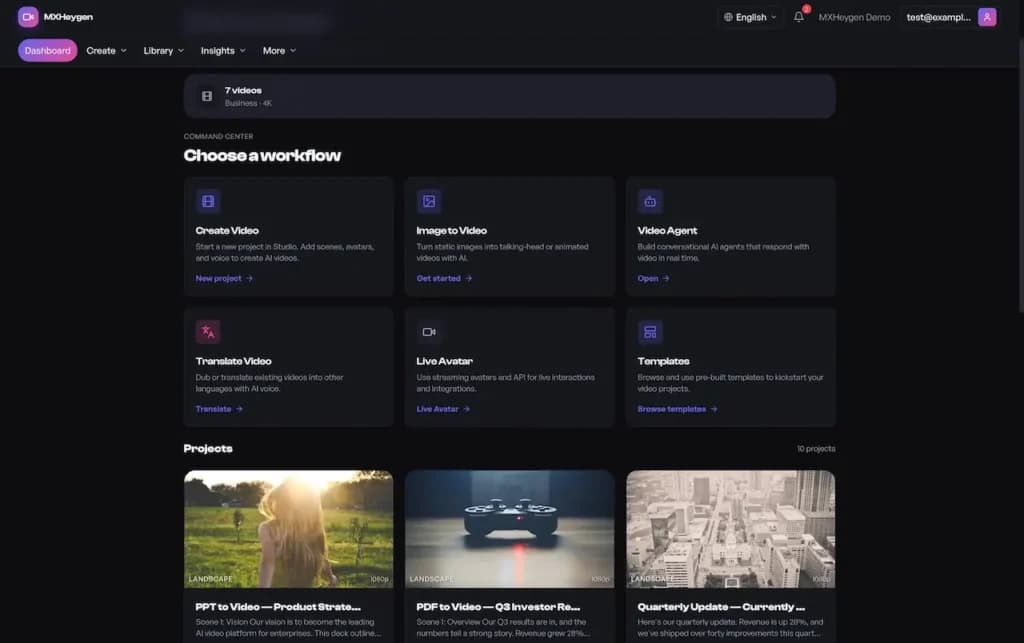
Reference video creation workspace with video, translation, avatar, and template entry points
Creator workspace reference. Demo branding and projects belong to the reference implementation; model access, credits, and supported workflows require scope confirmation.Evidence status not suppliedOpen full-size reference
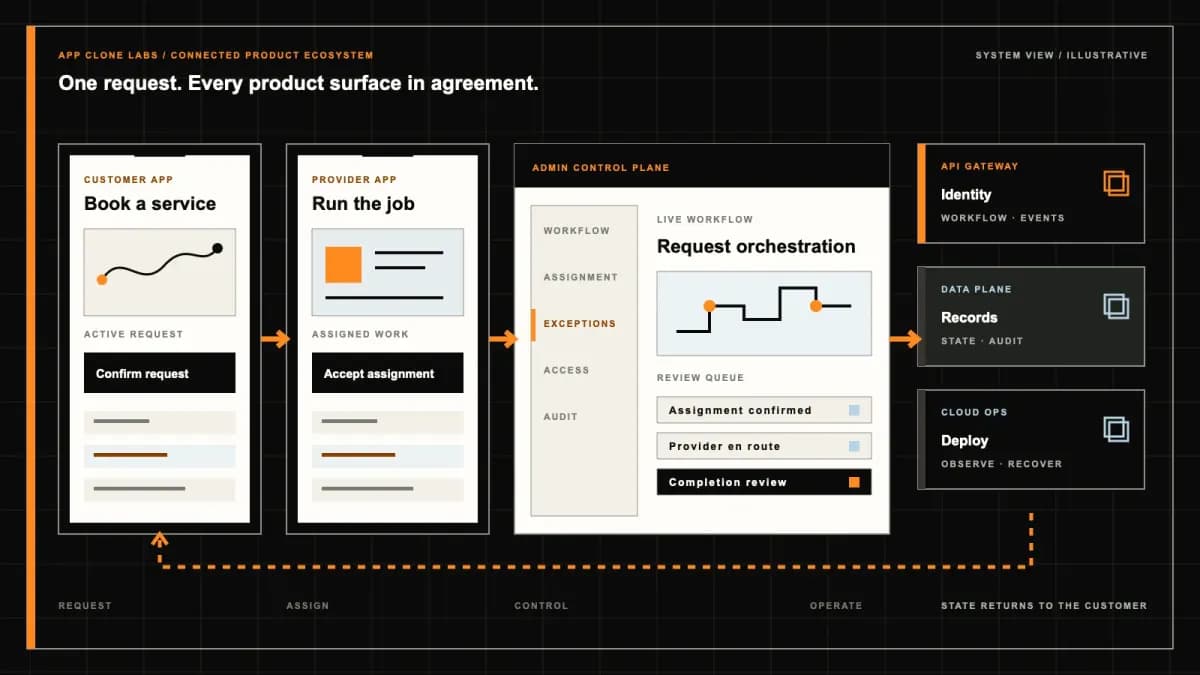
White-Label AI Video Generator connected product workflow planning visual
Connected customer, operations, and data workflowEvidence status not suppliedOpen full-size reference
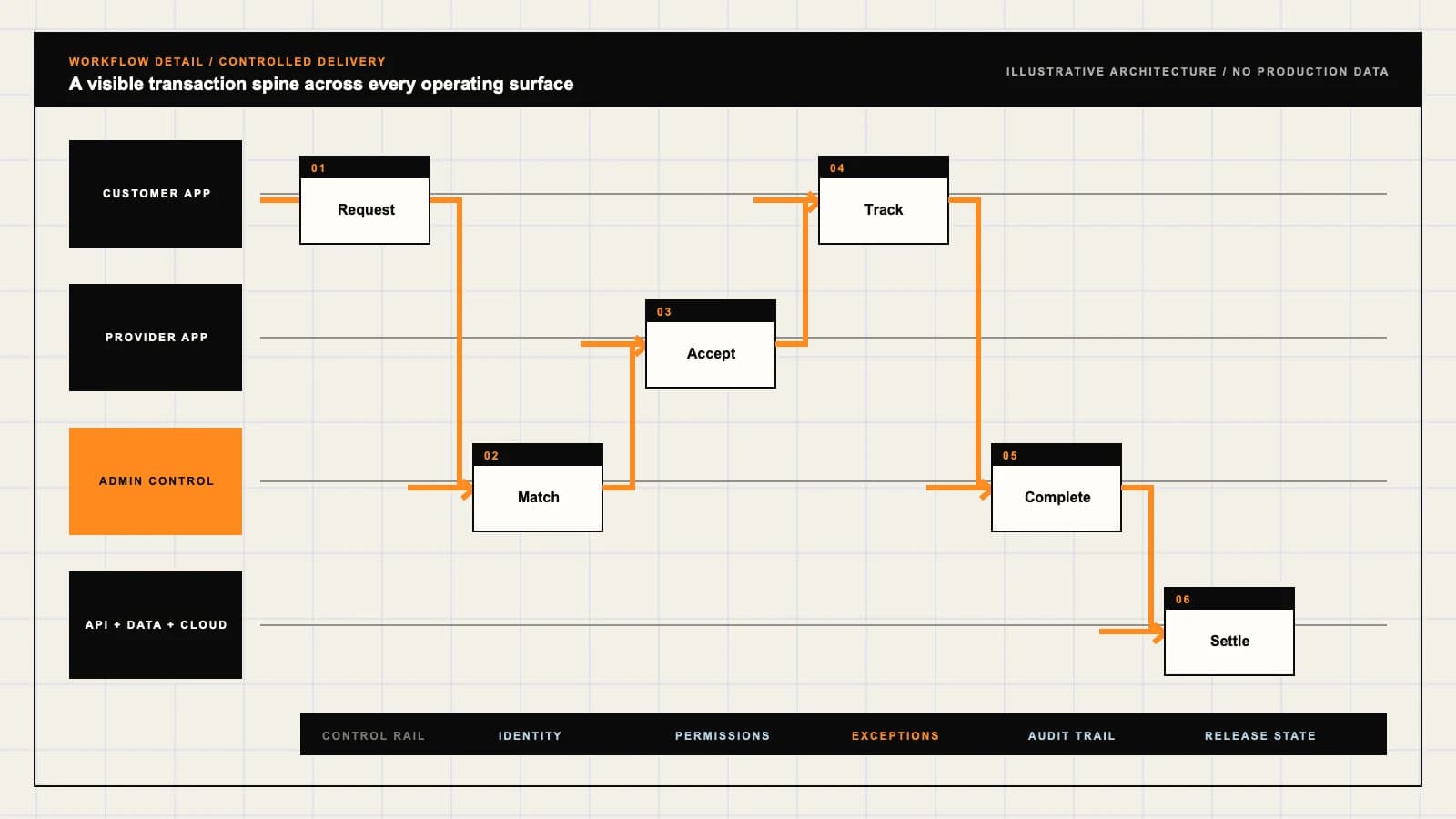
White-Label AI Video Generator product engineering ecosystem visual
Product engineering ecosystem and handover boundaryEvidence status not suppliedOpen full-size reference
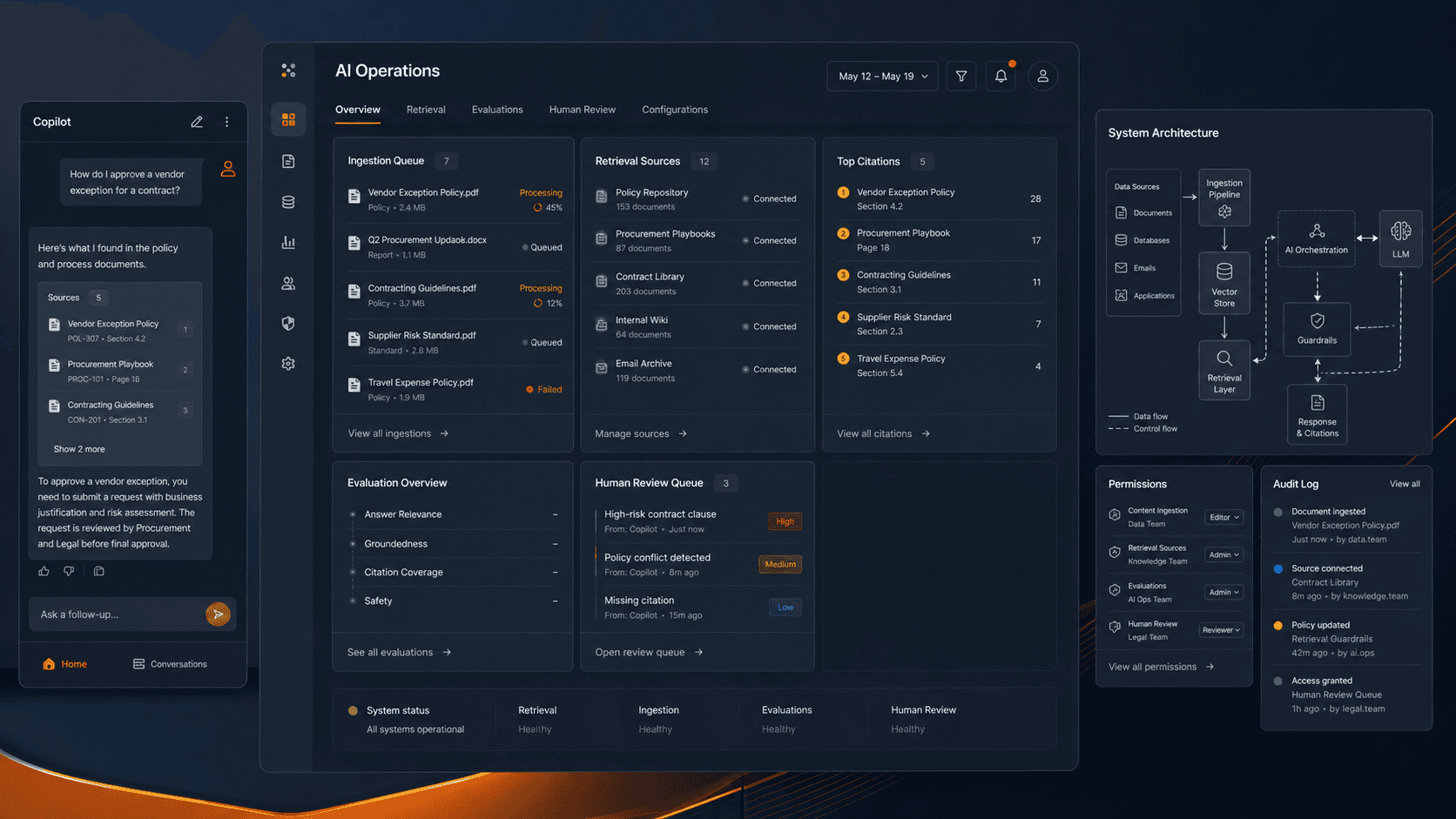
White-Label AI Video Generator AI and data operations planning visual
AI, data, and review controlsEvidence status not suppliedOpen full-size reference

The product is a production queue, not a prompt box

A creator submits a campaign brief and an approved product image. The generation provider accepts the job, but the resulting video arrives later with a distorted product label. The workspace must keep the job traceable, preserve the input version, mark the draft unapproved, and support correction without silently doubling the bill. A branded AI video generator succeeds when these ordinary production problems have clear owners and states.

This buying brief covers the creation workspace around selected model providers: projects, permitted assets, asynchronous jobs, usage accounting, review, and export. It does not imply that App Clone Labs trains a proprietary video model, owns provider infrastructure, or can guarantee a particular visual result. White-label presentation and model capability are different layers. Establish what is already demonstrable and what requires integration or new engineering before selecting the foundation.

Specify the actual generation workflow

Decide whether the first release creates clips from text, animates supplied images, produces approved presenter content, or supports another specific mode. Each choice changes input validation, consent, provider restrictions, editing, and review. Define supported formats, duration choices, output handling, and intended channels against the selected provider’s current capabilities. Do not promise every model, unlimited generation, or a feature merely because a reference interface contains a tile for it.

The OpenAI video generation documentation is one primary example of provider-specific creation and job handling. It is an engineering reference, not evidence that a shown workspace has that provider enabled. Confirm account access, supported inputs, current restrictions, and billing with the actual contracted provider.

Store a project brief containing the purpose, intended audience, supplied assets, prompt, chosen model, settings, and responsible creator. When the brief changes, create a new version. A reviewer should be able to compare what was requested with the specific output, rather than inspect an artifact whose generating prompt has been overwritten. Keep confidential client material out of generic shared templates and demonstration accounts.

Design asynchronous jobs for recovery

Generation can continue beyond a browser session. Persist the local job reference and provider reference before displaying progress. Distinguish queued, running, completed, failed, cancelled, and unresolved states. Progress should come from supported provider events or status checks, not a fictional countdown. A refreshed page should reconnect to the existing job instead of submitting it again. A timeout in your interface does not prove that the provider stopped processing.

Set deliberate limits for concurrent jobs, retries, queue depth, and polling. Duplicate callbacks must not create duplicate assets or credit deductions. If the provider returns a completed job but the download fails, recover the asset where supported rather than automatically paying for another generation. Explain which cancellations are supported and whether processing may already incur charges. Support needs the relevant references and safe actions without seeing another workspace’s private inputs.

Likeness, voice, footage, logos, music, and reference images introduce different rights questions. Require the creator to identify the permitted purpose and keep evidence appropriate to the operating model. A presenter’s consent for one internal training video should not silently authorise unlimited advertising, translation, or unrelated impersonation. Avatar or voice-cloning workflows should remain unavailable until provider policy, consent, revocation, and abuse handling are explicitly addressed.

Copyright, licensing, personal rights, and platform policy are not interchangeable. A provider allowing an output download does not establish ownership of every element or approval for every commercial use. Do not label generated videos copyright guaranteed. Record licensed inputs and relevant human editing where appropriate, and involve qualified reviewers for sensitive or high-value publication decisions. A rights declaration can support accountability but cannot manufacture rights the uploader does not have.

The US Copyright Office AI materials address copyright questions involving AI, including output copyrightability. They provide a primary source for review, not a worldwide clearance certificate. Applicable law, provider terms, supplied assets, and the specific human contribution still need assessment.

Treat quotas as an operational cost control

Generation usage varies by provider and selected settings. Show the applicable unit and estimate before submission where meaningful, then reconcile actual usage. Define whether credits are reserved, consumed, released, or adjusted after failure or cancellation. Keep customer-facing credits distinct from provider billing units. An apparently generous subscription can become unsustainable if retries, exports, storage, and rendering are absent from the cost model.

Workspace owners need budgets, member limits, permitted models, concurrency controls, and usage history. Prevent a user from bypassing a quota through repeated requests or switching projects. Give support a controlled adjustment path with a reason and approval rather than a writable balance field. Decide how provider outages affect customer entitlements and communicate that treatment before selling usage-based plans. No universal rendering cost or margin is promised here.

Review the output before it leaves the workspace

A completed job is a draft. Review product labels, factual claims, likeness, motion defects, audio, subtitles, accessibility, and brand suitability. Record whether the reviewer approved, rejected, or requested changes, and attach the decision to the exact artifact version. Editing an approved output should require the appropriate new review. Do not let a download button bypass a mandatory campaign or client approval gate.

Exports need agreed formats, naming, watermark or disclosure handling where relevant, and destination permissions. Signed asset links should not remain public indefinitely. Publishing integrations introduce account scopes, revocation, and channel rules beyond ordinary downloads. Start with controlled export if automatic publishing is not necessary. Commercial performance, audience engagement, model consistency, and acceptance by a distribution platform cannot responsibly be guaranteed by a generation interface.

Provider retention and your own storage are separate

Map prompts, uploaded images, voice or likeness assets, generated clips, support logs, and billing events through every service that receives them. Establish current provider retention and training-use terms instead of assuming a private-branded interface means private processing. Your application’s deletion action may not delete provider-held data immediately. Explain supported deletion paths, exceptions, and retention boundaries to the workspace owner.

Protect tenant data and service credentials independently. Users should not choose another workspace’s asset identifier, retrieve its job, or export its video. Test revoked members, expired links, administrative impersonation, and support access. Define backup recovery and retention for project evidence without keeping unnecessary sensitive uploads indefinitely. Client-specific confidentiality requirements may exclude some providers or workflows altogether.

Use Generative AI development to assess custom review, provider routing, or business-system integration beyond the foundation. Ask to see a failed job, duplicate notification, quota block, consent rejection, unapproved export, and deletion request in the walkthrough. The reference screenshot demonstrates workspace organisation only; it is not proof of model access, generated quality, or production controls.
Product flow

Role-workflow flow diagram.

A visual map of how each role interacts with each workflow stage, with operator controls and integration boundaries.

Deployable Product Architecture

White-Label AI Video Generator

CAPTURE INPUT AND…RUN A TRACEABLE A…APPROVE A SPECIFI…Submit a rights-a…Decide whether a …Control provider …INTEGRATIONS: Named generation-provider API with supported input types, job status, rate …OPERATOR CONTROLS: Gate sensitive inputs · Limit expensive job creation · Control provider and…
Illustrative validation artifact — role-workflow flow diagram; final surfaces, boundaries, and integration topology are confirmed during discovery.

User roles

White-Label AI Video Generator roles and workflows.

Clone-inspired platforms usually need several coordinated interfaces, not just a customer app.

Creator

01

Submit a rights-aware production brief

Choose an approved model, attach permitted inputs, confirm applicable consent, request generation, and inspect candidate outputs.

Reviewer

02

Decide whether a draft may be used

Review factual claims, likeness, branding, visual defects, accessibility, and channel suitability before approved export.

Workspace owner

03

Control provider use and spend

Manage model access, quotas, retention, member permissions, job exceptions, policy enforcement, and billing reconciliation.

Workflow

White-Label AI Video Generator workflow stages.

Each workflow stage is mapped to a role, screen, API, notification, admin control, and measurable launch outcome.

Brief

01

Capture input and permissions

Version prompts, supplied assets, intended channel, approved model, cost estimate, and recorded consent before submission.

Generate

02

Run a traceable asynchronous job

Track queued, running, complete, failed, and cancelled states with stable provider references and deliberate retry rules.

Review

03

Approve a specific output version

Check the generated artifact, record corrections and reviewer decision, then export only the version covered by approval.

Deployable Product Architecture

Workflow / system register

Revision CPlanning surface

AI delivery loop

White-Label AI Video Generator workflow stages.

Useful automation keeps judgment visible

AI delivery loop: White-Label AI Video Generator workflow stages.Useful automation keeps judgment visible. Confidence, permissions, fallback behavior, and logs belong in the workflow.
01

Capture input and permissions

02

Run a traceable asynchronous job

03

Approve a specific output version

Control note

Confidence, permissions, fallback behavior, and logs belong in the workflow.

Illustrative architecture register; validate against the accepted scope.

Operator controls

White-Label AI Video Generator admin and operator controls.

The control center is scoped as a first-class product surface, not an afterthought.

Consent and rights

01

Gate sensitive inputs

Record the allowed purpose for likeness, voice, uploaded footage, brand assets, and licensed material; reject unsupported uses.

Usage budget

02

Limit expensive job creation

Apply member and tenant quotas, concurrency ceilings, retries, and cost reconciliation without hiding failed-job treatment.

Data boundary

03

Control provider and storage access

Document uploaded input retention, provider processing, deletion paths, export permissions, and service-account isolation.

Monetization

White-Label AI Video Generator monetization models.

We model monetization early so payments, admin controls, and reporting support the business.

Access to agreed creation tools

Define included seats, enabled models, review roles, storage, and support independently of generation usage.

Transparent metering

Explain units, model-dependent charges, reserved credits, failed or cancelled jobs, and reconciliation against provider records.

Optional human services

Separately scope scripting, editing, rights review, subtitles, and channel preparation without guaranteeing engagement or copyright.

Integrations

White-Label AI Video Generator integration surface.

External systems that determine launch readiness, data flow, and operational continuity.

Integration

01

Integration 1

Named generation-provider API with supported input types, job status, rate limits, and policy restrictions

Integration

02

Integration 2

Private object storage, rendering or editing tools, notifications, and approved export destinations

Integration

03

Integration 3

Usage billing, moderation, audit records, and consent evidence with defined retention boundaries

Scope drivers

White-Label AI Video Generator scope drivers.

The variables that most influence build effort, cost, and launch readiness.

Model capability

01

Selected outputs and provider restrictions

Duration, format, resolution, input assets, avatar availability, and supported edits must be checked against current provider capability.

Review model

02

Individual or managed production

Define approval roles, asset versioning, corrections, sensitive-content checks, and publication responsibilities.

Operating cost

03

Job volume and data handling

Concurrency, usage ceilings, provider billing, storage, export costs, retention, and failure recovery affect the deployment budget.

Deployable Product Architecture

Scope drivers / system register

Revision FPlanning surface

AI delivery loop

White-Label AI Video Generator scope drivers.

Useful automation keeps judgment visible

AI delivery loop: White-Label AI Video Generator scope drivers.Useful automation keeps judgment visible. Confidence, permissions, fallback behavior, and logs belong in the workflow.
01

Selected outputs and provider restrictions

02

Individual or managed production

03

Job volume and data handling

Control note

Confidence, permissions, fallback behavior, and logs belong in the workflow.

Illustrative architecture register; validate against the accepted scope.

V1 scope

White-Label AI Video Generator V1 foundation.

Launch the smallest complete operating loop first, then scale the product with confidence.

Creation

01

One supported generation workflow

Provide project briefs, approved asset upload, model selection, consent gates, job submission, and status history.

Control

02

Spend and failure boundaries

Include quotas, retry limits, provider-reference reconciliation, failed-job support, and clear usage statements.

Release

03

Reviewed output and export

Store specific output versions, review decisions, controlled downloads, retention rules, and administrative access tests.

Later phases

White-Label AI Video Generator post-launch expansion.

Capabilities that should usually wait until real usage proves the core loop.

Editing

01

Additional controlled post-production

Introduce timeline editing, caption correction, translation, and brand templates without claiming identical output quality.

Provider routing

02

More models under evaluation

Add providers only after testing input compatibility, policy differences, cost reporting, retention, and failure semantics.

Publishing

03

Approved channel delivery

Connect publishing accounts with least-privilege access, revocation, output approval, and destination-specific checks.

Deployable Product Architecture

Later phases / system register

Revision EPlanning surface

AI delivery loop

White-Label AI Video Generator post-launch expansion.

Useful automation keeps judgment visible

AI delivery loop: White-Label AI Video Generator post-launch expansion.Useful automation keeps judgment visible. Confidence, permissions, fallback behavior, and logs belong in the workflow.
01

Additional controlled post-production

02

More models under evaluation

03

Approved channel delivery

Control note

Confidence, permissions, fallback behavior, and logs belong in the workflow.

Illustrative architecture register; validate against the accepted scope.

Regulatory review

White-Label AI Video Generator regulatory and compliance flags.

Each flag must be reviewed by qualified counsel for your target market before build or launch.

Flag 1

Consent, copyright, likeness, and retention review required

Flag 2

Generated assets need human review and provenance records

Flag 3

Model provider terms and storage boundaries must be disclosed

Reference walkthrough

Request a White-Label AI Video Generator reference walkthrough.

Ask us to confirm which reference surfaces are currently available for this product model. Rather than publishing shared demo credentials, we schedule a private guided walkthrough for qualified buyers.

Reference surface

01

Creator: Submit a rights-aware production brief

Request a role-specific demonstration and confirm which capabilities are currently available. Review the proposed responsibility: Choose an approved model, attach permitted inputs, confirm applicable consent, request generation, and inspect candidate outputs.

Reference surface

02

Reviewer: Decide whether a draft may be used

Request a role-specific demonstration and confirm which capabilities are currently available. Review the proposed responsibility: Review factual claims, likeness, branding, visual defects, accessibility, and channel suitability before approved export.

Reference surface

03

Workspace owner: Control provider use and spend

Request a role-specific demonstration and confirm which capabilities are currently available. Review the proposed responsibility: Manage model access, quotas, retention, member permissions, job exceptions, policy enforcement, and billing reconciliation.

Next step

04

Book a walkthrough

Request a live, private walkthrough of the reference implementation. We will confirm scope and discuss configured deployment versus custom build for your market.

Open register

Deployable Product Architecture

Reference walkthrough / system register

Revision DPlanning surface

AI delivery loop

Request a White-Label AI Video Generator reference walkthrough.

Useful automation keeps judgment visible

AI delivery loop: Request a White-Label AI Video Generator reference walkthrough.Useful automation keeps judgment visible. Confidence, permissions, fallback behavior, and logs belong in the workflow.
01

Creator: Submit a rights-aware production brief

02

Reviewer: Decide whether a draft may be used

03

Workspace owner: Control provider use and spend

04

Book a walkthrough

Control note

Confidence, permissions, fallback behavior, and logs belong in the workflow.

Illustrative architecture register; validate against the accepted scope.

Process

A traceable path from decision to acceptance.

  1. 01

    Model teardown

    We map the reference business model, user roles, monetization path, regulatory needs, and launch constraints.

    Artifact: Product teardown, risk map, role matrix

  2. 02

    Market-fit blueprint

    We reshape the model around your market, operations, pricing, workflows, and first release priorities.

    Artifact: Feature scope, flows, technical plan

  3. 03

    Design and build

    Product, design, engineering, QA, and cloud delivery move in weekly demo cycles with visible progress.

    Artifact: Working releases, QA notes, sprint demos

  4. 04

    Launch and operate

    We support production release, monitoring, handoff, roadmap decisions, and post-launch improvement.

    Artifact: Launch checklist, docs, growth backlog

FAQ

Questions to resolve before the build.

01Does white-label mean the video model is ours?

No. Branding the workspace does not imply ownership of the underlying model. Identify the actual provider, access terms, data processing, and ongoing charges.

02Can every model and video format be included?

Not by default. Verify the selected provider’s current capability, account access, supported inputs, formats, restrictions, and output handling.

03What happens if the browser closes during generation?

A correctly designed workspace retains the job reference and resumes status retrieval. Reopening a page should not create an unnecessary duplicate generation.

04Can customers generate avatars or clone voices?

Only within explicitly supported provider policies and documented consent, permitted-use, revocation, and abuse-handling boundaries. A demo tile does not establish availability.

05Are failed jobs free?

That depends on provider billing and the published workspace policy. Define reserved credits, actual consumption, cancellations, failures, and controlled adjustments before launch.

06Do generated videos come with guaranteed copyright?

No. Input rights, applicable law, provider terms, and human contribution need assessment. Download access alone is not legal clearance.

07Can a team require approval before export?

Yes, when included and tested in scope. Approval should cover a specific output version, with controlled reviewer permissions and re-review after material edits.

08Does deleting a project delete provider-held data?

Not necessarily. Confirm the provider’s retention and deletion capabilities as well as the workspace’s own storage and backup policy.

09What should a purchasing walkthrough include?

Inspect a real or clearly simulated job, failure recovery, usage accounting, quota enforcement, consent checks, version-specific approval, export access, and deletion behaviour.

Primary sources

References behind this page

Dated official documentation, standards, and research that support the factual claims on this page.

  1. 01
    OpenAI video generation guide

    Example generation-provider documentation; supported modes, restrictions, and access are provider-specific and must be rechecked.

  2. 02
    US Copyright Office: copyright and artificial intelligence

    Primary research and guidance on AI-related copyright questions; not a guarantee of rights in a generated video.

Citation readiness

How to interpret this page

Published by App Clone Labs Editorial Team · Updated

Commercial claims
Scope, cost, and timeline claims are planning guidance and require validation in a current proposal.
Evidence status
Diagrams, boards, examples, and estimates are illustrative planning artifacts unless explicitly identified with a source and measured evidence status.