File storage and transfer

TransferNow-style Managed File Delivery — Custom-Built for Your Market

Large-file transfer service with branded portals and administrative tracking. Planned for studios and businesses delivering large assets to external recipients with role-specific workflows, operator controls, integrations, and a handover boundary defined for the selected market.

See product screens and demo access

Custom workflows

Brand-safe product strategy

Admin and operations tooling

Reference walkthrough by arrangement

Inspect a branded transfer workspace and its recipient access lifecycle.

For managed file delivery, define the workspace owner, storage boundary, package policy and access evidence before adding branding. This sender-and-recipient concept supports that discussion; resumable uploads, scanning and administrative tracking must be tested, not inferred from controls.

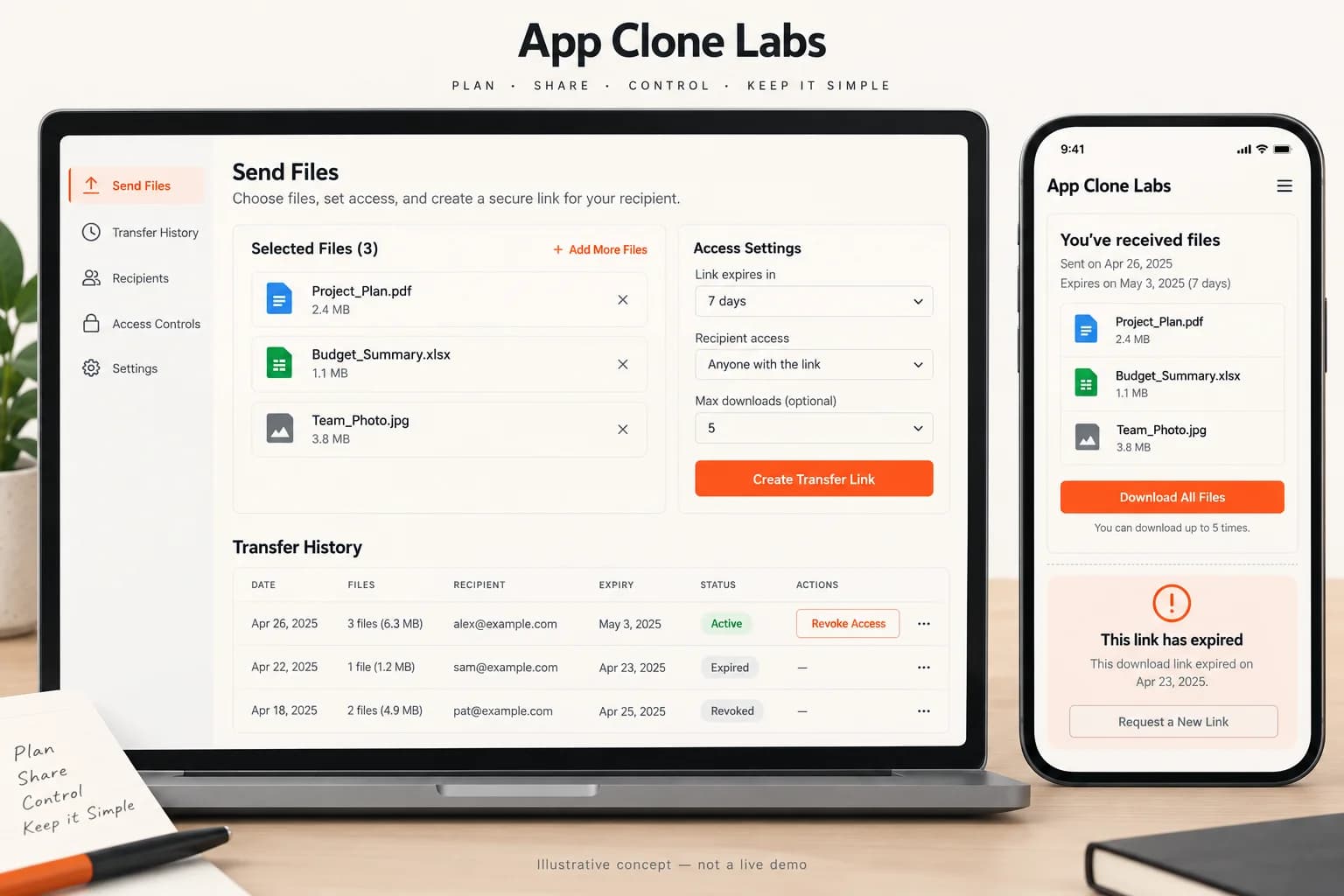
Illustrative sender transfer workspace and recipient download access states

Illustrative sender transfer workspace and recipient download access states

Original file-delivery concept showing sample files and access settings. It does not prove encryption, malware detection, delivery, deletion or a TransferNow integration. Branded domain ownership needs separate verification.

What to check in the walkthrough

  • Workspace policy: Which limits, retention rules, recipient checks and branded-domain permissions can an owner enforce across transfers?
  • Upload recovery: What happens after interruption, a rejected scan, quota exhaustion or a changed file while a package is being assembled?
  • Access evidence: Can reviewers trace notifications, expiry, revoked links and download events without exposing another workspace’s files?
Open full-size reference

Solution reference register

01 / Reference and IP

This page references third-party product names only to describe familiar product models and planning references. App Clone Labs is not affiliated with or endorsed by those brands. Build decisions require independent legal, regulatory, and operational review for your market.

02 / Artifact status

Boards, diagrams, screens and workflow descriptions on this page are illustrative planning artifacts, not evidence of a deployed client product.

03 / Regulatory caveat

Apply encryption, access logging, malware scanning, and recovery controls · Define retention, deletion, residency, export, and legal-hold behavior · Provide abuse, copyright, and unlawful-content reporting and takedown paths · Make link expiry and post-expiry deletion behavior explicit

04 / Rights and handover

Source access, licensing, repositories, environments, documentation, acceptance and handover are defined by the signed contract and accepted scope.

Scope

Operating model defined

Roles, workflows, dependencies, exclusions, and assumptions are made reviewable.

Evidence: illustrative

System

Applications connected

Experience, operations, services, data, integrations, and release controls are planned together.

Evidence: illustrative

Handover

Rights stated in writing

Access, assignment, licensing, dependencies, documentation, and support follow the signed agreement.

Evidence: illustrative

Artifact register

Product screens and planning references.

Reference screens illustrate workflows, not a contracted feature list. Sample prices, data, and responses are demonstration content; confirm the current scope during a walkthrough.

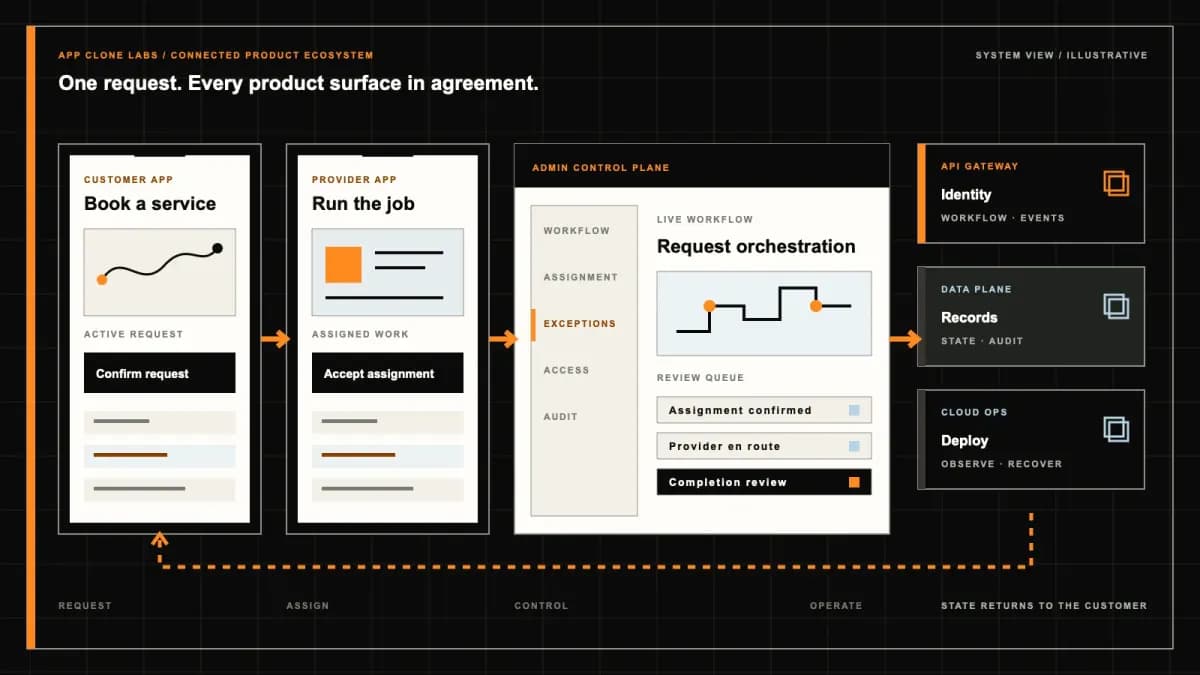
TransferNow-style Managed File Delivery connected product workflow planning visual
Connected customer, operations, and data workflowEvidence: illustrativeOpen full-size reference
TransferNow-style Managed File Delivery product engineering ecosystem visual
Product engineering ecosystem and handover boundaryEvidence: illustrativeOpen full-size reference
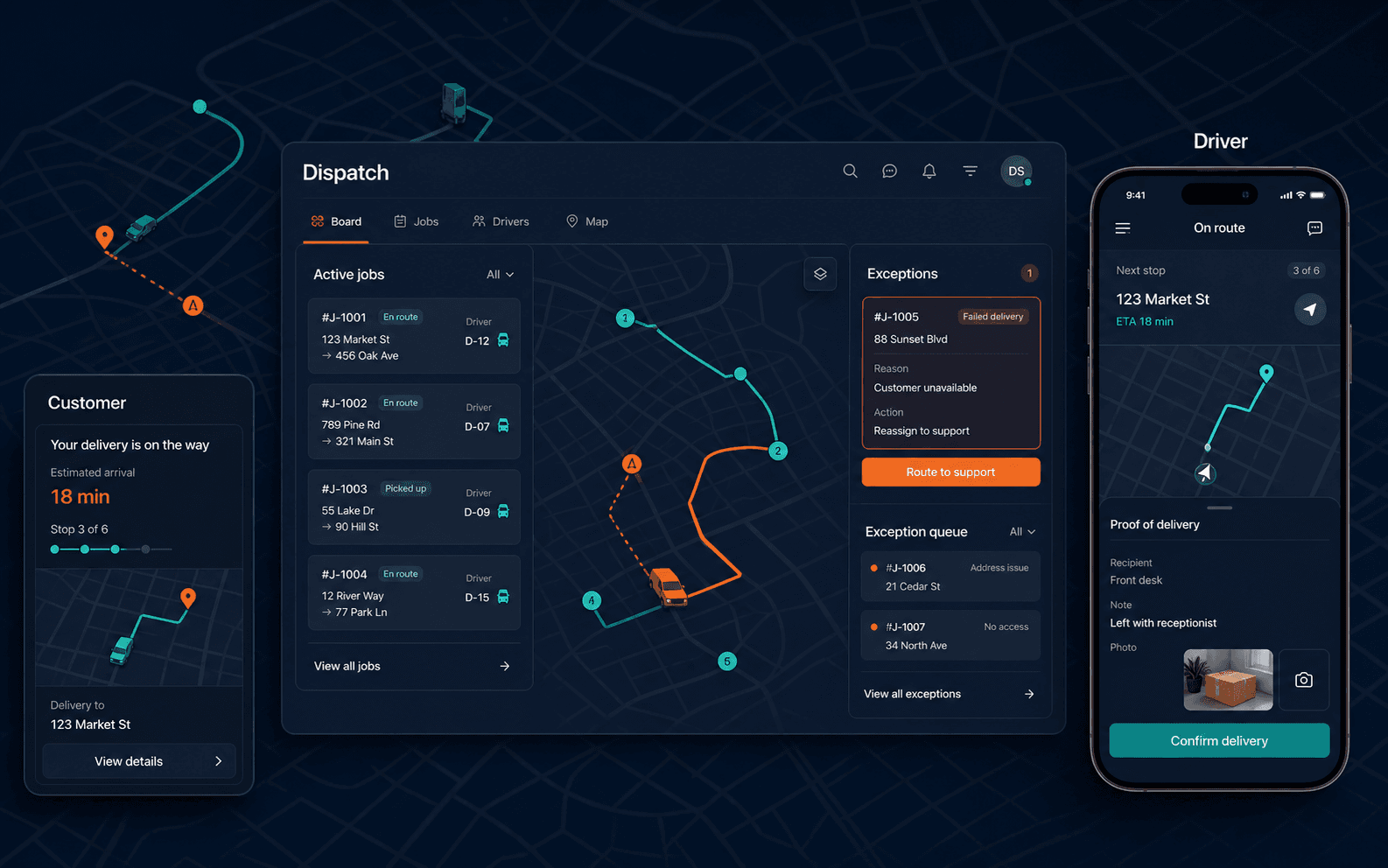
TransferNow-style Managed File Delivery operations and dispatch planning visual
Operations, dispatch, and exception handlingEvidence: illustrativeOpen full-size reference

A studio sends a project package to a client, then discovers that the delivery link reached the wrong person. The sender revokes it, but one download has already completed. The product can deny future access on surfaces it controls; it cannot reach into a recipient’s device and erase that copy. A managed transfer service needs an honest incident view showing authority, timing and completed actions before it needs another decorative upload animation.

TransferNow-style software planning concerns independently branded file delivery for business senders, external recipients and workspace administrators. The reference describes managed transfer mechanics, not TransferNow affiliation, proprietary infrastructure, customer accounts or provider contracts. Define package handling, recipient rules and organization accountability together. Illustrative screens can describe the intended workflow, but they cannot establish measured throughput, malware effectiveness or regulatory certification.

Choose managed delivery when organization authority matters

A business workspace needs to know who may send files, which recipients are allowed and who can change the retention policy. Decide whether transfers belong to an individual sender or the organization, and what happens when that person leaves. A branded portal changes presentation, while administrative authority changes what staff can inspect, revoke or export. Keep those responsibilities separately visible.

Compare WeTransfer-style simple file sending if the central requirement is occasional upload and temporary sharing. Managed delivery earns its additional scope when teams require controlled recipients, organization defaults, audit history and staffed exceptions. The choice should follow the actual operating workflow rather than a preference for a larger feature list. Start with one representative package, a permitted client and an accountable workspace owner.

Recipient collection is different from recipient authorization

A link holder typing an email address may establish a contact field without proving that they control the address or are authorized to receive the files. Choose the access model explicitly: a bearer link, a separately distributed password or an identity-bound recipient grant. Explain forwarding consequences and the recovery process if the original recipient changes. Avoid presenting every downloaded package as delivered to a verified person.

Check current recipient authority when delivery begins, including after policy changes. Public previews, page titles and notification subjects can disclose sensitive filenames even when the main download is protected. Decide which metadata is safe to display before authorization. Test an unauthorized user with a forwarded link and a previously approved recipient whose access has ended. The denial should explain the supported next step without exposing the sender’s contact list or another recipient’s identity.

Expiry and download limits need precise counting rules

The TransferNow transfer customization guide distinguishes per-recipient download limits for email transfers from a global limit for link transfers, alongside expiry and password controls. That difference is useful planning evidence. Define the independent product’s own rules rather than promising the reference provider’s features, plan allowances or current service capacity.

Specify whether a download count represents authorization, a started request or a completed package retrieval. Browser retries, partial range requests and simultaneous sessions make naive request counting confusing. Establish a recovery allowance for interrupted downloads without creating unlimited access. Test two recipients requesting the last allowed download at once and a request crossing the expiry boundary. The service should apply a consistent decision and retain the evidence needed to explain it, instead of decrementing a counter independently on each device or letting cached pages dictate authority.

Separate package size, stored bytes and delivery traffic

A per-file limit answers a different question from the total package size, workspace storage allowance or outbound traffic budget. Define each resource and when it is reserved, finalized and released. Many small files can create substantial request and processing overhead even when their total bytes are modest. Preview generation and quarantined copies may also consume storage that the sender never sees in a simple file list.

Check quota before committing new work and reconcile concurrent uploads against a workspace-wide record. A failed upload should not permanently consume the completed-package allowance, while a pending cleanup should not falsely report that physical storage has already been reclaimed. Explain what happens to active transfers when a subscription changes or storage fills. Test two senders approaching the same remaining quota and inspect their final outcomes. Capacity and speed claims require measurements against an agreed workload and network environment.

Resume uploads without creating duplicate released packages

An upload interrupted near completion needs a stable session and file identity. The sender should learn which parts the service accepted and which need retry, rather than blindly restarting the entire package. Validate file integrity and reconcile the final object before release. A progress indicator reaching completion on the client is not proof that storage finalized or that every declared file arrived.

Keep uploading, validation, quarantine, ready and released distinguishable. Replayed completion events should reconcile an existing transfer, not create another package or send another invitation. Define how abandoned uploads expire and how cleanup releases reservations. Rehearse a browser reconnecting after the server completed an upload but before confirmation reached the sender. The workspace should recover the durable outcome and explain unresolved parts without asking the client to infer state from its last displayed percentage.

Quarantine files before previews and recipient delivery

The OWASP File Upload Cheat Sheet recommends layered controls including authorization, type and size validation, isolated storage and malware scanning where available. It also warns about malicious files and resource exhaustion. Use this guidance to establish a reviewed upload boundary; it does not certify that a scanner or an independent platform detects every threat.

A file extension and client-provided type are insufficient proof of safe contents. Keep pending, failed and suspicious scan outcomes unavailable under the chosen policy. Preview processing has its own parser and isolation risks, so do not generate unrestricted previews as a shortcut around quarantine. Establish who reviews uncertain results and what release authority they have. Test an unavailable scanner and a harmless simulated quarantine event. The interface must preserve an unresolved review state instead of treating provider timeout as successful inspection.
Notification delivery does not prove package receipt

A sender may successfully release a transfer while an invitation email bounces or is delayed. Retain the transfer state independently from notification attempts, and provide bounded retry with an accountable failure queue. A message marked sent should not become proof that the recipient received the files. Download authorization, request completion and any recipient acknowledgment need their own events.

Define what the audit can establish when a browser starts a download but disconnects before completion. If only the service’s byte delivery is observable, describe that limit rather than claiming the recipient opened or understood the files. Limit personal data in notices and avoid embedding reusable credentials in routine logs. Rehearse repeated email callbacks and a failed notification after release. The sender should recover the invitation without duplicating the transfer or weakening the recipient access policy.

Organization permissions must survive staff departure

Sending, revoking, changing policy and inspecting security evidence should be separate permissions. A portal designer may edit presentation without authority to export all recipient records. A support worker may recover an upload without downloading its contents. Decide who can access organization-owned transfers after the original sender leaves and record the authority for that access.

Revocation needs to cover active sessions, automation credentials and delegated actions. Test a removed employee using an older browser session to release a draft or export the audit. The server should apply current organization permissions rather than the role cached in the interface. Keep an identifiable actor, time and reason for privileged changes, with restricted access to the audit itself. Those records support investigation; they do not make every logged event an infallible description of what happened on external devices.

Branding and regional storage have operational boundaries

A custom delivery domain requires ownership, DNS access, certificate responsibility and a recovery owner. Separate domain administrators from ordinary senders and preview the actual recipient page under the final hostname. Restrict custom scripts and branding assets according to the agreed policy. A familiar logo should not suggest that a transfer is affiliated with a reference company or that every uploaded asset has been approved.

Map the regions used for original files, temporary uploads, previews, scanning and backups before offering data-location choices. Review each provider’s actual arrangement and the access needed for support. A selected storage region does not automatically describe every processing path. Test provider failure and certificate expiry with a clear owner and recipient-facing response. Avoid promising immediate global changes or guaranteed availability merely because the portal configuration shows a successful save.

Expiry, deletion and recovery are separate lifecycle decisions

Expired access can deny retrieval while objects remain stored for an agreed recovery window. Deletion can involve originals, temporary parts, previews and replicas at different stages. State the chosen retention policy and its exceptions accurately, including backups and restricted investigation evidence. A sender pressing delete should see an acknowledged action and any unresolved retirement work, rather than an unsupported claim that every byte disappeared instantly.

Recovered packages need renewed review of recipient authority and quarantine eligibility before release. Do not automatically reinstate a revoked link when restoring storage. Test a deletion job that partially fails and a restored transfer whose recipient grant has expired. Assign reconciliation ownership and keep the action history accessible to the permitted operator. Revoking controlled links remains different from recalling downloaded copies, so incident communication and commercial materials must preserve that distinction even when recovery is available.

Inspect interrupted delivery and revoked authority before acceptance

Use synthetic organization accounts, fictional recipients and harmless representative files. Buyer acceptance should interrupt uploads, replay completion events, exhaust a quota and simulate an unavailable scanner. Inspect sender, recipient and restricted operator views together. Then forward a link, revoke a staff member and test concurrent download requests at the limit. Record which outcomes are demonstrated and which require further measurement.

Expire the package, fail one deletion step and restore it without restoring outdated access. Agree source ownership, provider licenses, infrastructure permissions and operational support responsibilities at handover.

Bring one package and its recipient policy to a managed-transfer scope discussion so the first release has an inspectable delivery boundary.

Use the delivery process to agree quota, quarantine, access and deletion checkpoints before public launch.

Product flow

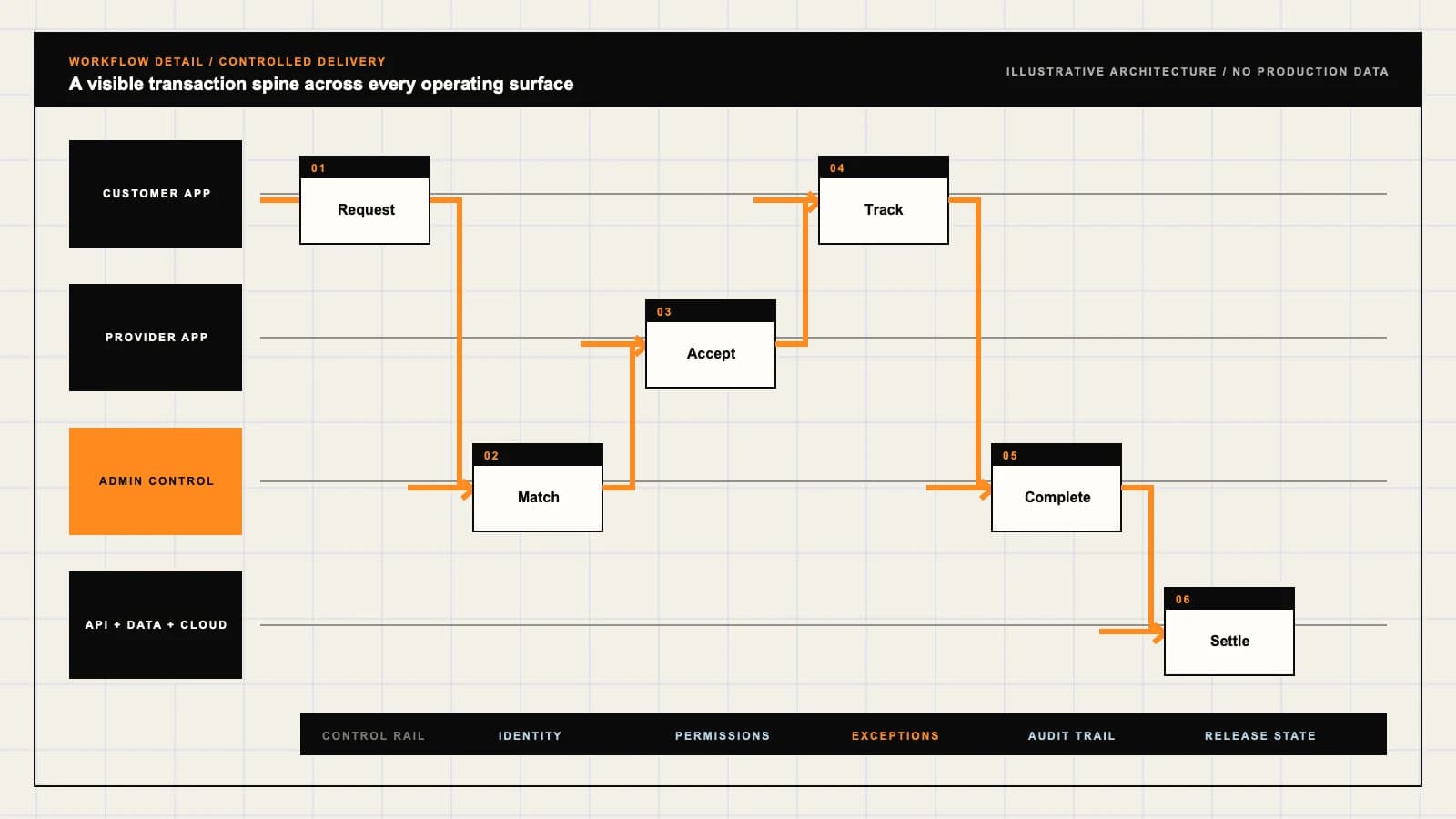
Role-workflow flow diagram.

A visual map of how each role interacts with each workflow stage, with operator controls and integration boundaries.

Deployable Product Architecture

TransferNow-style Managed File Delivery

RESERVE CAPACITY …APPLY QUARANTINE …EXPLAIN ACCESS HI…Deliver an approv…Retrieve the inte…Manage organizati…INTEGRATIONS: Object storage, resumable upload and delivery providers with approved regio…OPERATOR CONTROLS: Choose bearer links or named access deliberately · Separate uploaded bytes …
Illustrative validation artifact — role-workflow flow diagram; final surfaces, boundaries, and integration topology are confirmed during discovery.

User roles

TransferNow-style Managed File Delivery roles and workflows.

Clone-inspired platforms usually need several coordinated interfaces, not just a customer app.

Authorized business sender

01

Deliver an approved package to permitted recipients

Confirm distribution rights, select access rules and inspect upload, scanning and notification outcomes. A completed upload does not prove that the package was released or received.

External recipient

02

Retrieve the intended package under current access rules

Complete the required authorization, inspect available files and recover interrupted downloads. A shared password or collected email address is not necessarily proof of recipient identity.

Workspace and security operator

03

Manage organization authority and exceptions

Set quotas, revoke staff access and investigate quarantined transfers with scoped evidence. Retain audit records without granting every administrator unrestricted file browsing.

Workflow

TransferNow-style Managed File Delivery workflow stages.

Each workflow stage is mapped to a role, screen, API, notification, admin control, and measurable launch outcome.

Prepare and upload

01

Reserve capacity and preserve package identity

Validate sender authority, declared files and allowed sizes, then resume interrupted uploads against stable identifiers. Reconcile final storage before presenting the package as ready.

Review and release

02

Apply quarantine and recipient policies before notification

Keep unreviewed files unavailable, establish expiry and download limits, and release only eligible packages. Track notification delivery separately from recipient download events.

Track and retire

03

Explain access history and lifecycle outcomes

Inspect authorization, download and expiry events, revoke controlled access and reconcile deletion jobs. State clearly that downloaded recipient copies cannot be recalled by revoking a link.

Deployable Product Architecture

Workflow / system register

Revision EPlanning surface

Live operations

TransferNow-style Managed File Delivery workflow stages.

Every request becomes an observable job

Live operations: TransferNow-style Managed File Delivery workflow stages.Every request becomes an observable job. Exceptions and support need the same visibility as the happy path.
01

Reserve capacity and preserve package identity

02

Apply quarantine and recipient policies before notification

03

Explain access history and lifecycle outcomes

Control note

Exceptions and support need the same visibility as the happy path.

Illustrative architecture register; validate against the accepted scope.

Operator controls

TransferNow-style Managed File Delivery admin and operator controls.

The control center is scoped as a first-class product surface, not an afterthought.

Recipient authority

01

Choose bearer links or named access deliberately

Define password distribution, identity checks and forwarding limits. Recheck current authority at delivery and avoid exposing sensitive file names in public previews or alerts.

Quarantine and release

02

Separate uploaded bytes from eligible delivery

Validate files and inspect scan outcomes under an agreed policy. Failed, unavailable or uncertain scanning must have an explicit state and reviewer rather than silently passing.

Expiry and deletion

03

Distinguish access denial from storage removal

Track link expiry, revocation, deletion and retained evidence separately. Describe backups and retention exceptions accurately, without promising to remove copies already downloaded externally.

Monetization

TransferNow-style Managed File Delivery monetization models.

We model monetization early so payments, admin controls, and reporting support the business.

State seats and administrative scope

Define sender roles, transfer allowances and access to audit exports. Explain renewal, suspension and retained records without implying a subscription proves compliance.

Specify the resource being purchased

Distinguish package size, stored bytes, download traffic and retention windows. Preserve active-transfer contracts through plan changes and reconcile reserved versus finalized capacity.

Price presentation and domain operation explicitly

Identify domain ownership, certificate responsibilities and allowed customization. Branding does not establish file rights, recipient identity or a safety guarantee.

Integrations

TransferNow-style Managed File Delivery integration surface.

External systems that determine launch readiness, data flow, and operational continuity.

Integration

01

Integration 1

Object storage, resumable upload and delivery providers with approved regions, scoped credentials, stable object references and reconciled deletion outcomes

Integration

02

Integration 2

File validation, malware scanning and preview services with isolated processing, restricted evidence, explicit quarantine states and documented detection limits

Integration

03

Integration 3

Organization identity, email delivery and audit export systems with recipient-policy enforcement, revoked-session handling and bounded metadata retention

Scope drivers

TransferNow-style Managed File Delivery scope drivers.

The variables that most influence build effort, cost, and launch readiness.

Package and capacity model

01

Agree file types and resource ceilings

Specify per-file size, package limits, storage quota, traffic and interrupted-upload cleanup. Validate representative workloads before making throughput commitments.

Recipient and lifecycle policy

02

Define authority and expiry semantics

Choose named recipients or shared links, passwords, download counting and retention. Distinguish future access revocation from storage deletion and external copies.

Organization operating model

03

Assign review and administrative responsibilities

Map sender roles, security review, domain ownership and restricted audits. Select staffing and provider arrangements for failures instead of promising automatic safe delivery.

Deployable Product Architecture

Scope drivers / system register

Revision BPlanning surface

Live operations

TransferNow-style Managed File Delivery scope drivers.

Every request becomes an observable job

Live operations: TransferNow-style Managed File Delivery scope drivers.Every request becomes an observable job. Exceptions and support need the same visibility as the happy path.
01

Agree file types and resource ceilings

02

Define authority and expiry semantics

03

Assign review and administrative responsibilities

Control note

Exceptions and support need the same visibility as the happy path.

Illustrative architecture register; validate against the accepted scope.

V1 scope

TransferNow-style Managed File Delivery V1 foundation.

Launch the smallest complete operating loop first, then scale the product with confidence.

Recoverable package upload

01

Show durable file and capacity outcomes

Include validation, stable upload identifiers, progress, retry and quota reconciliation. Use harmless synthetic packages and make incomplete uploads visibly distinct.

Controlled recipient delivery

02

Release eligible files under explicit rules

Support selected access policies, expiry, download limits and separate notifications. Test forwarded links, denied authorization and interrupted recipient downloads.

Workspace exception desk

03

Inspect quarantine, audit and retirement

Provide scoped roles, scan outcomes, revoked transfers and deletion tracking. Preserve unresolved provider states and demonstrate removal of an employee’s access.

Later phases

TransferNow-style Managed File Delivery post-launch expansion.

Capabilities that should usually wait until real usage proves the core loop.

Branded organization portals

01

Add verified domain and publishing authority

Review DNS ownership, certificates, preview privacy and template licenses. Separate portal editors from people authorized to alter recipient or retention policy.

Additional storage regions

02

Review residency and operational boundaries

Map uploads, replicas, previews, scans and backups before offering regional placement. A region selector alone cannot establish where every provider processes data.

Policy templates and automation

03

Extend controls with inspectable exceptions

Add organization defaults, event integrations and audit workflows after identity and reconciliation are stable. Preserve human ownership for uncertain scans and failed retirement actions.

Deployable Product Architecture

Later phases / system register

Revision APlanning surface

Live operations

TransferNow-style Managed File Delivery post-launch expansion.

Every request becomes an observable job

Live operations: TransferNow-style Managed File Delivery post-launch expansion.Every request becomes an observable job. Exceptions and support need the same visibility as the happy path.
01

Add verified domain and publishing authority

02

Review residency and operational boundaries

03

Extend controls with inspectable exceptions

Control note

Exceptions and support need the same visibility as the happy path.

Illustrative architecture register; validate against the accepted scope.

Regulatory review

TransferNow-style Managed File Delivery regulatory and compliance flags.

Each flag must be reviewed by qualified counsel for your target market before build or launch.

Flag 1

Apply encryption, access logging, malware scanning, and recovery controls

Flag 2

Define retention, deletion, residency, export, and legal-hold behavior

Flag 3

Provide abuse, copyright, and unlawful-content reporting and takedown paths

Flag 4

Make link expiry and post-expiry deletion behavior explicit

Reference walkthrough

Request a TransferNow-style Managed File Delivery reference walkthrough.

Ask us to confirm which reference surfaces are currently available for this product model. Rather than publishing shared demo credentials, we schedule a private guided walkthrough for qualified buyers.

Reference surface

01

Authorized business sender: Deliver an approved package to permitted recipients

Request a role-specific demonstration and confirm which capabilities are currently available. Review the proposed responsibility: Confirm distribution rights, select access rules and inspect upload, scanning and notification outcomes. A completed upload does not prove that the package was released or received.

Reference surface

02

External recipient: Retrieve the intended package under current access rules

Request a role-specific demonstration and confirm which capabilities are currently available. Review the proposed responsibility: Complete the required authorization, inspect available files and recover interrupted downloads. A shared password or collected email address is not necessarily proof of recipient identity.

Reference surface

03

Workspace and security operator: Manage organization authority and exceptions

Request a role-specific demonstration and confirm which capabilities are currently available. Review the proposed responsibility: Set quotas, revoke staff access and investigate quarantined transfers with scoped evidence. Retain audit records without granting every administrator unrestricted file browsing.

Next step

04

Book a walkthrough

Request a live, private walkthrough of the reference implementation. We will confirm scope and discuss configured deployment versus custom build for your market.

Open register

Deployable Product Architecture

Reference walkthrough / system register

Revision DPlanning surface

Live operations

Request a TransferNow-style Managed File Delivery reference walkthrough.

Every request becomes an observable job

Live operations: Request a TransferNow-style Managed File Delivery reference walkthrough.Every request becomes an observable job. Exceptions and support need the same visibility as the happy path.
01

Authorized business sender: Deliver an approved package to permitted recipients

02

External recipient: Retrieve the intended package under current access rules

03

Workspace and security operator: Manage organization authority and exceptions

04

Book a walkthrough

Control note

Exceptions and support need the same visibility as the happy path.

Illustrative architecture register; validate against the accepted scope.

Process

A traceable path from decision to acceptance.

  1. 01

    Model teardown

    We map the reference business model, user roles, monetization path, regulatory needs, and launch constraints.

    Artifact: Product teardown, risk map, role matrix

  2. 02

    Market-fit blueprint

    We reshape the model around your market, operations, pricing, workflows, and first release priorities.

    Artifact: Feature scope, flows, technical plan

  3. 03

    Design and build

    Product, design, engineering, QA, and cloud delivery move in weekly demo cycles with visible progress.

    Artifact: Working releases, QA notes, sprint demos

  4. 04

    Launch and operate

    We support production release, monitoring, handoff, roadmap decisions, and post-launch improvement.

    Artifact: Launch checklist, docs, growth backlog

FAQ

Questions to resolve before the build.

01Does this include TransferNow affiliation or provider accounts?

No. This is independently branded software planning. Proprietary infrastructure, reference accounts, provider contracts and measured performance are not included or implied.

02When is managed delivery preferable to simple temporary sharing?

Choose it when organization permissions, named recipients, policy defaults, audit history and exception review are required. Occasional sending may need a smaller workflow.

03Does collecting an email address verify recipient authority?

Not necessarily. Define bearer links, passwords or identity-bound grants explicitly, and explain what proof each access model provides.

04Can revoking a link delete files already downloaded?

No. It can deny future access on controlled delivery surfaces. It cannot erase copies held on external recipient devices.

05Are download limits global or per recipient?

Define the chosen rule and what counts as a download. Concurrent requests, interrupted retrieval and retry need consistent treatment under that rule.

06Is a package-size limit the same as a storage quota?

No. Distinguish per-file size, package size, stored bytes, processing copies and outbound traffic. Reconcile reservations and finalized usage.

07What should happen after upload confirmation is lost?

Recover the durable outcome using stable upload and package identifiers. Reconcile retries without duplicating files, invitations or quota charges.

08Can pending scan results be treated as safe delivery?

No. Establish explicit quarantine and review states for unavailable, failed or uncertain scans. Detection limits must remain clear.

09Does a sent email prove the files were received?

No. Notification delivery, download authorization, completed byte delivery and recipient acknowledgment are separate observable events with different limits.

10Can every workspace administrator browse file contents?

Only where the approved role requires it. Separate sender, policy, support and security authority, with restricted audit access and current session enforcement.

11Does expiry mean all stored copies were immediately deleted?

Not automatically. Explain access expiry, retention windows, deletion stages, backup exceptions and recovery authority separately.

12What should a buyer inspect in the demonstration?

Use synthetic packages to test interrupted uploads, quota races, quarantine, forwarded links, revoked roles, concurrent limits and failed deletion. Inspect unresolved outcomes across permitted roles.

Primary sources

References behind this page

Dated official documentation, standards, and research that support the factual claims on this page.

  1. 01
  2. 02

Citation readiness

How to interpret this page

Published by App Clone Labs Editorial Team

Commercial claims
Scope, cost, and timeline claims are planning guidance and require validation in a current proposal.
Evidence status
Diagrams, boards, examples, and estimates are illustrative planning artifacts unless explicitly identified with a source and measured evidence status.

Next decision

Turn the brief into an accepted product scope.

Define outcomes, constraints, evidence, rights and handover before delivery begins.

Commercial rights, repositories, environments, documentation, acceptance and handover remain contract-defined.

Scope TransferNow-style Managed File Delivery

Independent from TransferNow

App Clone Labs is an independent software development studio. We are not affiliated with, connected to, sponsored by, or endorsed by TransferNow.

Why this name appears

TransferNow is referenced descriptively to identify familiar product mechanics and common search terminology. “Clone” describes a planning reference, not a replica.

Original delivery

Any product delivered by App Clone Labs is independently designed and developed for the accepted scope. It does not contain proprietary code, branding, copy, interface assets, or confidential material from TransferNow.

Trademark ownership

TransferNow and associated names, logos, and marks remain the property of their respective owners. Their use identifies a reference category and does not imply authorization or endorsement.