Property technology

Trulia-style Home Search — Custom-Built for Your Market

Residential listing discovery with neighborhood and agent connections. Planned for property portals serving buyers, renters, agents, and advertisers with role-specific workflows, operator controls, integrations, and a handover boundary defined for the selected market.

See product screens and demo access

Custom workflows

Brand-safe product strategy

Admin and operations tooling

Reference walkthrough by arrangement

Review home discovery alongside the source and limits of neighborhood information.

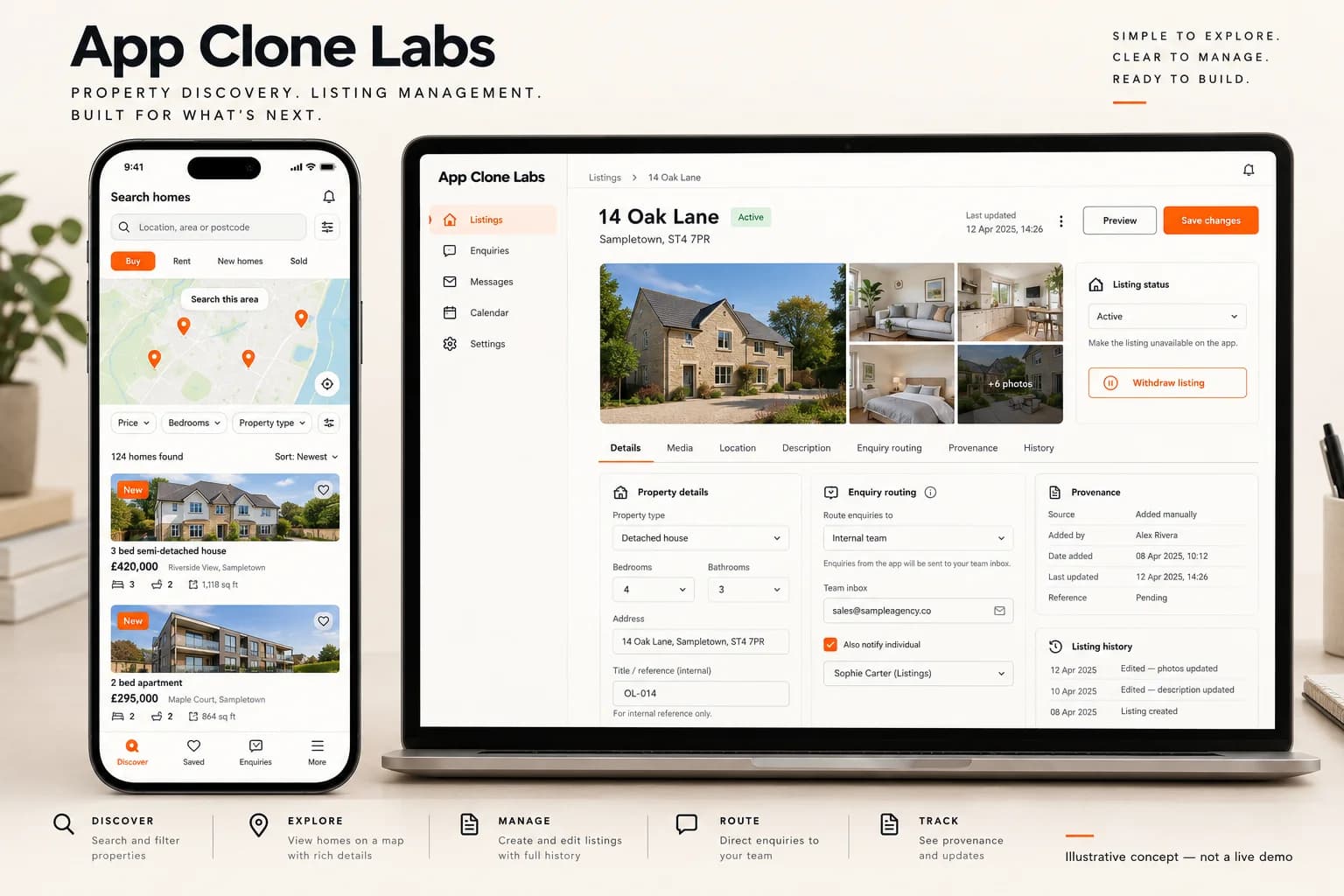
Use this original listing concept to plan map-led search, saved homes and contact routing. Neighborhood descriptions require sourced, dated and bias-reviewed data; the image does not establish that information, live inventory, agent eligibility or any Trulia relationship.

Illustrative home search app and listing provenance review workspace

Illustrative home search app and listing provenance review workspace

Original property-discovery concept with sample homes and a map placeholder. Listing data, local information and enquiries are illustrative; no property availability, neighborhood safety claim or broker authority is established.

What to check in the walkthrough

  • Neighborhood context: Which sources, update dates and limitations accompany area information, and how are discriminatory descriptions reviewed?
  • Listing freshness: How are duplicate feeds, withdrawn homes, price changes and unavailable agents reflected in search and saved alerts?
  • Contact choice: Can a buyer distinguish the listing representative from an advertiser and control consent for enquiry routing and follow-up?
Open full-size reference

Solution reference register

01 / Reference and IP

This page references third-party product names only to describe familiar product models and planning references. App Clone Labs is not affiliated with or endorsed by those brands. Build decisions require independent legal, regulatory, and operational review for your market.

02 / Artifact status

Boards, diagrams, screens and workflow descriptions on this page are illustrative planning artifacts, not evidence of a deployed client product.

03 / Regulatory caveat

Fair-housing and real-estate advertising rules apply · Neighborhood data requires sourcing and bias review

04 / Rights and handover

Source access, licensing, repositories, environments, documentation, acceptance and handover are defined by the signed contract and accepted scope.

Scope

Operating model defined

Roles, workflows, dependencies, exclusions, and assumptions are made reviewable.

Evidence: illustrative

System

Applications connected

Experience, operations, services, data, integrations, and release controls are planned together.

Evidence: illustrative

Handover

Rights stated in writing

Access, assignment, licensing, dependencies, documentation, and support follow the signed agreement.

Evidence: illustrative

Artifact register

Product screens and planning references.

Reference screens illustrate workflows, not a contracted feature list. Sample prices, data, and responses are demonstration content; confirm the current scope during a walkthrough.

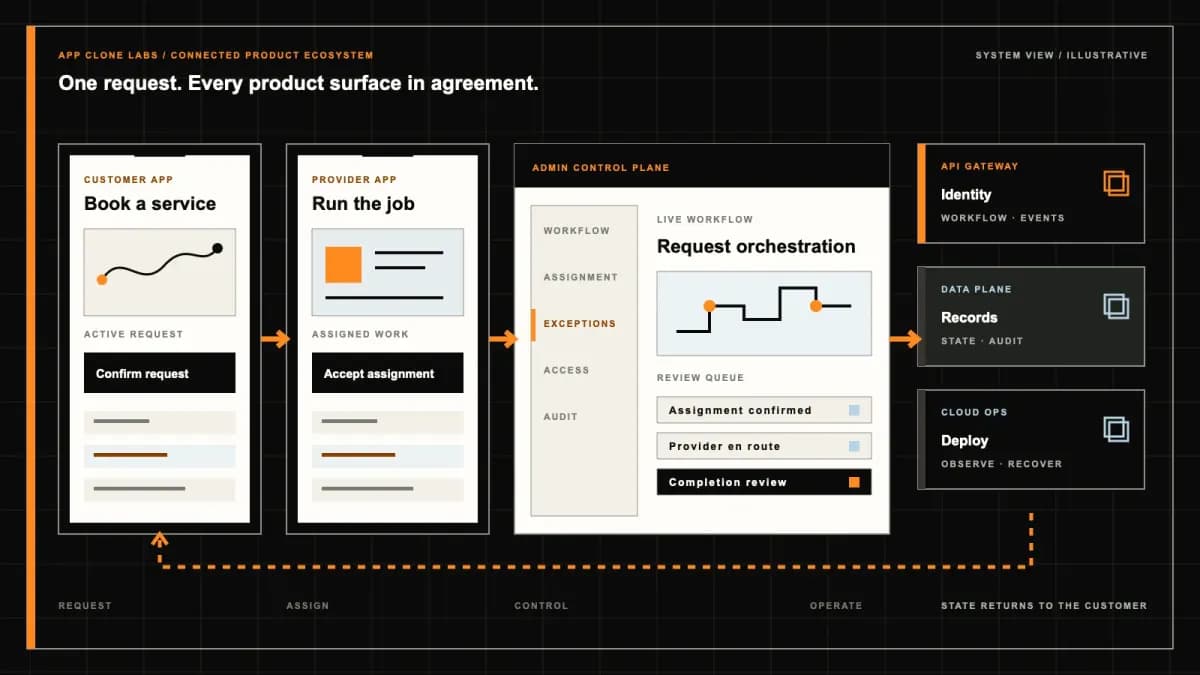
Trulia-style Home Search connected product workflow planning visual
Connected customer, operations, and data workflowEvidence: illustrativeOpen full-size reference
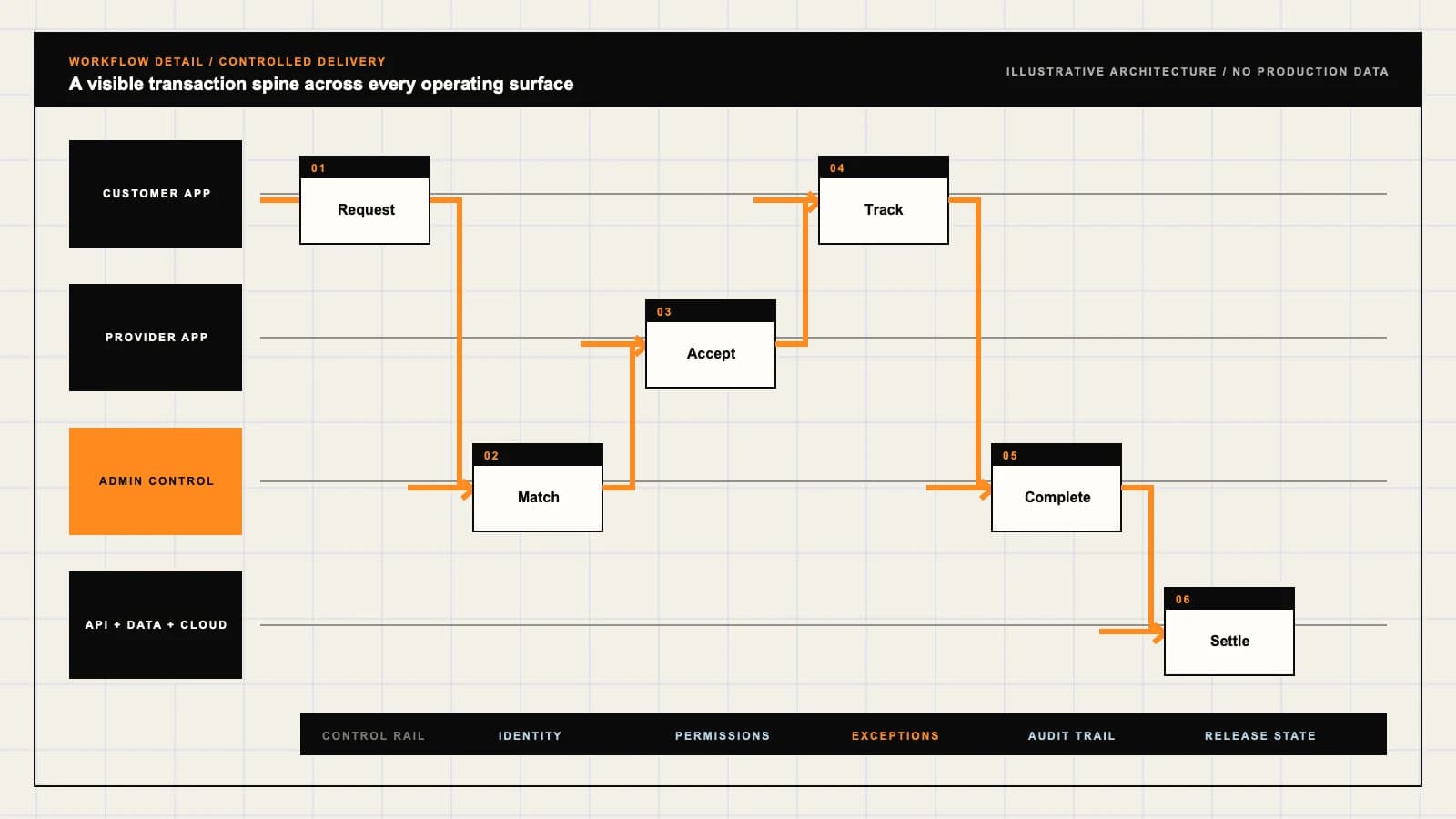
Trulia-style Home Search product engineering ecosystem visual
Product engineering ecosystem and handover boundaryEvidence: illustrativeOpen full-size reference

A promising home still needs a credible neighborhood picture

A buyer saves a home that fits the price and bedroom filters, then asks whether the surrounding area works for a daily journey and ordinary errands. The listing photographs cannot answer that question. A useful discovery portal connects the home to permitted local information, explains where that information comes from and gives the buyer a clear next step when the listing has changed.

Trulia-style home search here means independently branded software for buyers and renters comparing residential listings with neighborhood context. Trulia is a reference name, not an affiliation, licensed product or source of included inventory. The brief identifies capabilities to agree for your market; it does not claim that every workflow or data connection is already present in a supplied demo.

Define discovery before adding a valuation platform

Start with the user comparing homes and areas, then contacting an authorised representative. Decide whether the first release serves buyers, renters or both, and who supplies each listing. Property purchase, rental applications, mortgage decisions and transaction closing require separate responsibilities and should not be implied by a search or inquiry screen.

Review the Zillow-style real estate marketplace brief if sourced valuations, off-market property records and professional lead programs are central to the requirement. This brief instead prioritises home and neighborhood comparison; it does not need an estimate engine to make a shortlist useful.

Secure listing rights before designing the map

Bring an authorised sample feed and its display terms to discovery. Identify the source for addresses, photos, descriptions, prices, status and representative details. Record permitted territories, attribution, caching and removal requirements. Neither visible competitor listings nor publicly accessible photographs establish permission to copy or republish them.

Preserve source identifiers when importing updates, and agree how duplicate homes from several sources are resolved. An operator may correct presentation under an agreed policy, but should not invent availability or overwrite an authoritative withdrawal. Keep the origin and reason for an edit available to authorised reviewers so a disputed property can be investigated.

Keep map results and listing status in agreement

A map pin, result card and home page should describe the same listing and filter state. Provide sale and rental distinctions, visible search bounds and a usable list alternative. Test keyboard operation, readable filters and focus when a result opens. A working map widget alone does not demonstrate that the home-search journey is accessible.

Show source update times under the agreed freshness policy. If a feed fails, retain a visible stale state or remove affected offers as the policy requires. When a home is withdrawn after being saved, preserve the user’s list with the changed status and contact options. Do not send an availability alert or imply a tour can proceed on outdated evidence.

Give every neighborhood layer a source and a boundary

The public Trulia neighborhood discovery page combines local stories and resident observations with map context such as schools and commutes. That example supports the product category, not a promise of access to Trulia content, equivalent coverage or a licensed integration.

For your portal, choose a small set of permitted sources and define their geography, dates and limitations. Neighborhood boundaries may differ between providers. Explain whether a figure describes an area or an individual address, and show missing coverage honestly. A school location does not confirm attendance eligibility; a journey estimate depends on inputs and conditions. Avoid blanket claims that a neighborhood is safe or ideal.

Let the buyer choose without discriminatory steering

The HUD fair housing overview states that housing discrimination based on protected characteristics is prohibited. It establishes a need for qualified market review; it does not certify a particular search product, ranking model or moderation policy.

For the product brief, keep search preferences explicit and avoid inferring race, religion, family status or other protected characteristics to direct people toward or away from areas. Review ranking, housing advertisements and inquiry allocation as well as visible text. Sourced area facts need consistent presentation and clear limits. Local legal obligations and current guidance require qualified review; these design choices do not guarantee compliance.

Separate local observations from verified property facts

A resident comment describes that contributor’s experience; it does not verify a listing, school assignment or future living conditions. Label user contributions separately from provider records and editorial descriptions. Set rules for identifying details, discriminatory language, promotional submissions and disputed statements before enabling neighborhood reviews or photo uploads.

Give reports an accountable moderator and preserve the decision needed to resolve an appeal. Do not publish a resident’s exact home address or private contact details by default. If the operator cannot maintain a contribution queue, start with approved sourced content and add contributions later. A quiet moderation inbox is not proof that the material is accurate or suitable.
Explain who receives an inquiry before it leaves the page

A buyer clicking contact may expect the listing representative, while a portal may route an inquiry to a paid advertiser. Show the recipient’s identity and relationship to the listing before submission. Verify who can represent the property and who merely offers professional services. Operator support should be able to correct a wrong assignment without granting an advertiser authority over the listing.

Collect only the information needed for the selected request and explain its use. Saved homes, search locations and messages can reveal private intentions; they should not become unrestricted advertiser exports. Define staff permissions, retention, deletion and marketing choices. Test that one representative cannot retrieve another recipient’s inquiries or a user’s full search history.

Turn a tour preference into an accountable appointment request

Entering a preferred visit time creates a request until an authorised representative confirms availability and access. Distinguish requested, confirmed, rescheduled and cancelled states. The portal cannot promise keys, access or negotiation authority simply because a listing is visible. Explain who will reply and how the searcher can follow up if the request remains unanswered.

Connect inquiry delivery to a visible status and operator escalation. A successful form submission is not proof that the representative received the message. Test an invalid recipient, a withdrawn listing, an undelivered notification and a cancellation after confirmation. The searcher needs the revised status, and the responsible team needs the failed handoff and next action.

Make paid visibility and contact billing inspectable

Featured listings and agent advertising need visible labels and an agreed eligibility policy. Paid placement should not obscure freshness, provenance or the identity of a contact recipient. Keep commercial placement separate from unsupported claims about which professional or neighborhood is best for a particular household.

For inquiry programs, define qualification, duplication, attribution windows and dispute evidence with participating businesses. Measure delivered inquiries, replies and confirmed tours as separate events. A contact count cannot establish a sale or rental, and software does not guarantee conversion or entitlement to a commission. Pricing and referral arrangements need review for the actual operating model.

Inspect the demo with a withdrawn home and a missing data layer

Ask for a connected walkthrough from search and area comparison through a saved home, inquiry and tour response. Identify sample records, working controls and sandbox providers. Concept images are not evidence of licensed live listings, neighborhood coverage or a delivered representative message. Confirm current demo availability and the included web, mobile and operator surfaces.

Acceptance should include a listing withdrawn during inquiry, a failed feed refresh, duplicate property records and a missing neighborhood layer. Follow a reported discriminatory comment, a wrongly routed inquiry and a cancelled tour. Inspect denied access to another user’s shortlist and another representative’s contact records. Each exception needs an owner, recoverable evidence and a next action the buyer can understand.

Scope one market and one complete discovery handoff

Bring redacted listing samples, provider terms, approved neighborhood sources, representative assignments and an inquiry escalation example. Agree the first geography, sale or rental scope, data coverage, review team and product surfaces. Listing licences, provider access, mobile delivery and moderation capacity affect the estimate; a category name cannot settle cost or launch timing.

Add local contributions, shared shortlists and planning estimates after the core data and handoff rules work. The agreement should specify client deliverables, reusable components, third-party licences, deployment access and support. No ownership claim, inventory right or ongoing provider subscription should be inferred from the word clone.

Use a home-discovery scope discussion to confirm configured capabilities, engineering, integrations and exclusions for the first market.

Review the delivery process to agree discovery evidence and acceptance checkpoints before scheduling the launch.

Product flow

Role-workflow flow diagram.

A visual map of how each role interacts with each workflow stage, with operator controls and integration boundaries.

Deployable Product Architecture

Trulia-style Home Search

CONNECT THE MAP T…SHOW CONTEXT WITH…ROUTE THE REQUEST…Compare homes and…Answer an inquiry…Keep discovery ev…INTEGRATIONS: Licensed listing feeds with confirmed display rights, stable identifiers, r…OPERATOR CONTROLS: Publish only under the agreed data rights · Prevent discriminatory steering…
Illustrative validation artifact — role-workflow flow diagram; final surfaces, boundaries, and integration topology are confirmed during discovery.

User roles

Trulia-style Home Search roles and workflows.

Clone-inspired platforms usually need several coordinated interfaces, not just a customer app.

Buyer or renter

01

Compare homes and investigate the surrounding area

Choose search criteria, inspect sourced neighborhood information, save a shortlist and contact the named representative. Keep discovery separate from an application, offer or confirmed tour.

Listing representative

02

Answer an inquiry within verified authority

Maintain permitted listing information, explain availability and confirm tour arrangements. Distinguish the listing representative from an advertiser receiving a separate contact request.

Portal operations

03

Keep discovery evidence and inquiry routing accountable

Review listing provenance, stale feeds, area-content reports and advertiser disclosures. Assign corrections and restrict staff access to saved searches and private inquiries.

Workflow

Trulia-style Home Search workflow stages.

Each workflow stage is mapped to a role, screen, API, notification, admin control, and measurable launch outcome.

Search and inspect

01

Connect the map to available home records

Filter by user-selected location, price and property attributes. Preserve listing identifiers and update times so map pins, results and details describe the same record.

Compare the area

02

Show context with source and limitations

Present approved neighborhood content and permitted map layers without implying that observations guarantee safety, school admission or commute time. Let users choose their own priorities.

Inquire and follow up

03

Route the request to the disclosed recipient

Explain who receives contact details, record inquiry delivery and confirm tours separately. Give failed or unanswered requests an operator-owned next action.

Deployable Product Architecture

Workflow / system register

Revision CPlanning surface

Product delivery loop

Trulia-style Home Search workflow stages.

A focused release proves one complete workflow

Product delivery loop: Trulia-style Home Search workflow stages.A focused release proves one complete workflow. Scope the customer action and the operator response as one system.
01

Connect the map to available home records

02

Show context with source and limitations

03

Route the request to the disclosed recipient

Control note

Scope the customer action and the operator response as one system.

Illustrative architecture register; validate against the accepted scope.

Operator controls

Trulia-style Home Search admin and operator controls.

The control center is scoped as a first-class product surface, not an afterthought.

Listing provenance

01

Publish only under the agreed data rights

Record source, permitted use, freshness and withdrawal handling. Resolve duplicate records and disputed edits under documented authority rather than silently replacing a feed record.

Neighborhood review

02

Prevent discriminatory steering and unsupported claims

Review content, filters, promotion and inquiry allocation for the target market. Do not infer protected characteristics or recommend housing based on them; keep a correction and escalation route.

Inquiry privacy

03

Share the information needed for the chosen request

Disclose recipient and purpose before submission. Restrict search history, exact location and inquiry exports; define retention, deletion and advertiser access with the operator.

Monetization

Trulia-style Home Search monetization models.

We model monetization early so payments, admin controls, and reporting support the business.

Identify paid agent and broker placements

State the advertiser identity and placement basis. A sponsored contact must not appear to be the listing representative or earn an unsupported endorsement.

Agree attribution and qualified-contact rules

Define eligible recipients, duplicate handling, billing disputes and contact permission. An inquiry is not a completed tour, accepted offer or guaranteed transaction.

Make paid visibility legible to searchers

Label promoted inventory and retain relevance and eligibility controls. Payment should not hide stale status or bypass listing and housing-content review.

Integrations

Trulia-style Home Search integration surface.

External systems that determine launch readiness, data flow, and operational continuity.

Integration

01

Integration 1

Licensed listing feeds with confirmed display rights, stable identifiers, required attribution, refresh status and withdrawal handling

Integration

02

Integration 2

Maps and neighborhood content providers with documented coverage, permitted reuse, source dates and limitations for each displayed layer

Integration

03

Integration 3

Representative directories, CRM and messaging providers with verified recipient authority, consent boundaries, delivery status and manual follow-up

Scope drivers

Trulia-style Home Search scope drivers.

The variables that most influence build effort, cost, and launch readiness.

Data rights and geography

01

Confirm what can be shown in the first market

Agree listing coverage, photos, attribution, refresh obligations and neighborhood-source permissions. A public website does not grant reuse rights or access to its feeds.

Context and moderation

02

Choose information the operator can maintain

Identify approved map layers, contribution rules, correction owners and review capacity. Avoid launching neighborhood scores that lack an explainable source and limitation statement.

Inquiry operations

03

Define who can answer and confirm a visit

Set representative verification, routing rules, staffed escalation and provider access. Separate portal support from the party authorised to negotiate or arrange property access.

Deployable Product Architecture

Scope drivers / system register

Revision DPlanning surface

Product delivery loop

Trulia-style Home Search scope drivers.

A focused release proves one complete workflow

Product delivery loop: Trulia-style Home Search scope drivers.A focused release proves one complete workflow. Scope the customer action and the operator response as one system.
01

Confirm what can be shown in the first market

02

Choose information the operator can maintain

03

Define who can answer and confirm a visit

Control note

Scope the customer action and the operator response as one system.

Illustrative architecture register; validate against the accepted scope.

V1 scope

Trulia-style Home Search V1 foundation.

Launch the smallest complete operating loop first, then scale the product with confidence.

Home discovery

01

Map and list search over permitted inventory

Include sale or rental mode, explicit filters, listing details, freshness indicators and accessible alternatives to map interaction.

Neighborhood context

02

A bounded set of sourced area information

Use approved area pages or layers with dates, coverage and correction routes. Preserve uncertainty when a source is missing instead of generating plausible facts.

Shortlist and inquiry

03

Saved homes with a disclosed contact handoff

Support private saved lists, selected recipients, inquiry status and requested-versus-confirmed tour states. Give withdrawn listings and delivery failures a clear recovery path.

Later phases

Trulia-style Home Search post-launch expansion.

Capabilities that should usually wait until real usage proves the core loop.

Local contributions

01

Add resident observations with moderation

Introduce reviews or photos only after defining contributor permission, privacy, prohibited content, reporting and dispute handling. Anecdotes should remain distinguishable from measured data.

Shared shortlists

02

Let invited people compare homes together

Define invitation, edit and revocation permissions before exposing private lists or notes. Shared discovery should not automatically share contact details with advertisers.

Planning tools

03

Add estimates under an explicit methodology

Scope affordability or commute scenarios after confirming inputs, provider coverage and assumptions. Estimates must not imply lending approval, a property valuation or a guaranteed journey.

Deployable Product Architecture

Later phases / system register

Revision APlanning surface

Product delivery loop

Trulia-style Home Search post-launch expansion.

A focused release proves one complete workflow

Product delivery loop: Trulia-style Home Search post-launch expansion.A focused release proves one complete workflow. Scope the customer action and the operator response as one system.
01

Add resident observations with moderation

02

Let invited people compare homes together

03

Add estimates under an explicit methodology

Control note

Scope the customer action and the operator response as one system.

Illustrative architecture register; validate against the accepted scope.

Regulatory review

Trulia-style Home Search regulatory and compliance flags.

Each flag must be reviewed by qualified counsel for your target market before build or launch.

Flag 1

Fair-housing and real-estate advertising rules apply

Flag 2

Neighborhood data requires sourcing and bias review

Reference walkthrough

Request a Trulia-style Home Search reference walkthrough.

Ask us to confirm which reference surfaces are currently available for this product model. Rather than publishing shared demo credentials, we schedule a private guided walkthrough for qualified buyers.

Reference surface

01

Buyer or renter: Compare homes and investigate the surrounding area

Request a role-specific demonstration and confirm which capabilities are currently available. Review the proposed responsibility: Choose search criteria, inspect sourced neighborhood information, save a shortlist and contact the named representative. Keep discovery separate from an application, offer or confirmed tour.

Reference surface

02

Listing representative: Answer an inquiry within verified authority

Request a role-specific demonstration and confirm which capabilities are currently available. Review the proposed responsibility: Maintain permitted listing information, explain availability and confirm tour arrangements. Distinguish the listing representative from an advertiser receiving a separate contact request.

Reference surface

03

Portal operations: Keep discovery evidence and inquiry routing accountable

Request a role-specific demonstration and confirm which capabilities are currently available. Review the proposed responsibility: Review listing provenance, stale feeds, area-content reports and advertiser disclosures. Assign corrections and restrict staff access to saved searches and private inquiries.

Next step

04

Book a walkthrough

Request a live, private walkthrough of the reference implementation. We will confirm scope and discuss configured deployment versus custom build for your market.

Open register

Deployable Product Architecture

Reference walkthrough / system register

Revision BPlanning surface

Product delivery loop

Request a Trulia-style Home Search reference walkthrough.

A focused release proves one complete workflow

Product delivery loop: Request a Trulia-style Home Search reference walkthrough.A focused release proves one complete workflow. Scope the customer action and the operator response as one system.
01

Buyer or renter: Compare homes and investigate the surrounding area

02

Listing representative: Answer an inquiry within verified authority

03

Portal operations: Keep discovery evidence and inquiry routing accountable

04

Book a walkthrough

Control note

Scope the customer action and the operator response as one system.

Illustrative architecture register; validate against the accepted scope.

Process

A traceable path from decision to acceptance.

  1. 01

    Model teardown

    We map the reference business model, user roles, monetization path, regulatory needs, and launch constraints.

    Artifact: Product teardown, risk map, role matrix

  2. 02

    Market-fit blueprint

    We reshape the model around your market, operations, pricing, workflows, and first release priorities.

    Artifact: Feature scope, flows, technical plan

  3. 03

    Design and build

    Product, design, engineering, QA, and cloud delivery move in weekly demo cycles with visible progress.

    Artifact: Working releases, QA notes, sprint demos

  4. 04

    Launch and operate

    We support production release, monitoring, handoff, roadmap decisions, and post-launch improvement.

    Artifact: Launch checklist, docs, growth backlog

FAQ

Questions to resolve before the build.

01Is this official Trulia software or connected to its listings?

No. Trulia is a reference name for independently branded home and neighborhood discovery software. Affiliation, proprietary content and access to Trulia inventory or systems are not included or implied.

02How does this differ from the Zillow-style marketplace brief?

This scope focuses on comparing homes and sourced neighborhood context before an inquiry. The Zillow-style brief also considers valuation content, off-market records and professional lead programs. Those capabilities require separate sources and scope decisions.

03Where do listings and property photographs come from?

They need authorised feeds or other sources with confirmed display and reuse rights. Agree attribution, identifiers, refresh and withdrawal rules before integration; public visibility does not establish permission to copy content.

04What happens when a saved listing becomes unavailable?

The shortlist should show the changed status under the agreed refresh policy. Remove unsupported availability claims and explain contact options. Stale feed handling and alerts need an accountable operator rather than an assumption that a saved home remains available.

05Can the portal include schools, commute information and local amenities?

Yes, when permitted providers cover the market and their sources, dates and limitations are shown. School proximity does not confirm attendance eligibility, and commute estimates do not guarantee journey times. Missing coverage should remain visible.

06Will neighborhood recommendations guarantee fair-housing compliance?

No. Search, ranking, advertising, moderation and inquiry allocation need qualified review for the target market. Avoid discriminatory steering based on protected characteristics and keep preferences under user control; software features do not certify compliance.

07Are resident reviews necessary for the first release?

No. Approved sourced area content can support the first release. Reviews require contributor permissions, privacy rules, reporting, moderation and dispute handling, and must remain distinguishable from measured or verified records.

08Does contacting a property always reach its listing representative?

That must be explicit. Show whether the recipient represents the property or is a separate advertiser, and verify routing authority. Explain contact-data use before submission and retain delivery evidence for failed or disputed handoffs.

09Does submitting a tour request confirm property access?

No. An authorised representative must confirm the appointment and access. Requested, confirmed, rescheduled and cancelled states should be visible, with an escalation route for undelivered messages or unanswered requests.

10Can agents pay for placement or qualified inquiries?

Those are possible commercial models after reviewing the market and operating arrangements. Disclose paid placement, identify recipients and agree qualification, duplication and billing disputes. Inquiry volume is not a guarantee of transactions or commission revenue.

11What should we ask to see in the demo?

Inspect home search, neighborhood-source limitations, saved-list status, recipient disclosure and a tour response. Then test withdrawn listings, feed failures, missing layers, reported content, undelivered inquiries and denied access to other users’ records. Confirm samples versus working integrations.

12What determines price, delivery timing and ownership?

Geography, listing rights, neighborhood providers, product surfaces, moderation and inquiry operations shape scope. Confirm demo availability and integration access. The agreement must define deliverables, reusable components, licences, deployment access and support rather than inferring them from the category.

Primary sources

References behind this page

Dated official documentation, standards, and research that support the factual claims on this page.

  1. 01
  2. 02

Citation readiness

How to interpret this page

Published by App Clone Labs Editorial Team

Commercial claims
Scope, cost, and timeline claims are planning guidance and require validation in a current proposal.
Evidence status
Diagrams, boards, examples, and estimates are illustrative planning artifacts unless explicitly identified with a source and measured evidence status.

Next decision

Turn the brief into an accepted product scope.

Define outcomes, constraints, evidence, rights and handover before delivery begins.

Commercial rights, repositories, environments, documentation, acceptance and handover remain contract-defined.

Scope Trulia-style Home Search

Independent from Trulia

App Clone Labs is an independent software development studio. We are not affiliated with, connected to, sponsored by, or endorsed by Trulia.

Why this name appears

Trulia is referenced descriptively to identify familiar product mechanics and common search terminology. “Clone” describes a planning reference, not a replica.

Original delivery

Any product delivered by App Clone Labs is independently designed and developed for the accepted scope. It does not contain proprietary code, branding, copy, interface assets, or confidential material from Trulia.

Trademark ownership

Trulia and associated names, logos, and marks remain the property of their respective owners. Their use identifies a reference category and does not imply authorization or endorsement.