On-demand services

Urban Company-style Home Services — Custom-Built for Your Market

Managed marketplace for home maintenance and personal services. Planned for service operators standardizing provider supply and household bookings with role-specific workflows, operator controls, integrations, and a handover boundary defined for the selected market.

See product screens and demo access

Custom workflows

Brand-safe product strategy

Admin and operations tooling

Reference walkthrough by arrangement

Review service packages, provider acceptance and changes to a home visit.

Use this proposed Urban Company-style Home Services workflow to discuss a managed catalog and household booking. Bring a sample service package, home-access instructions and support policy, then ask to demonstrate quoting, provider acceptance and rescheduling in the agreed demo scope.

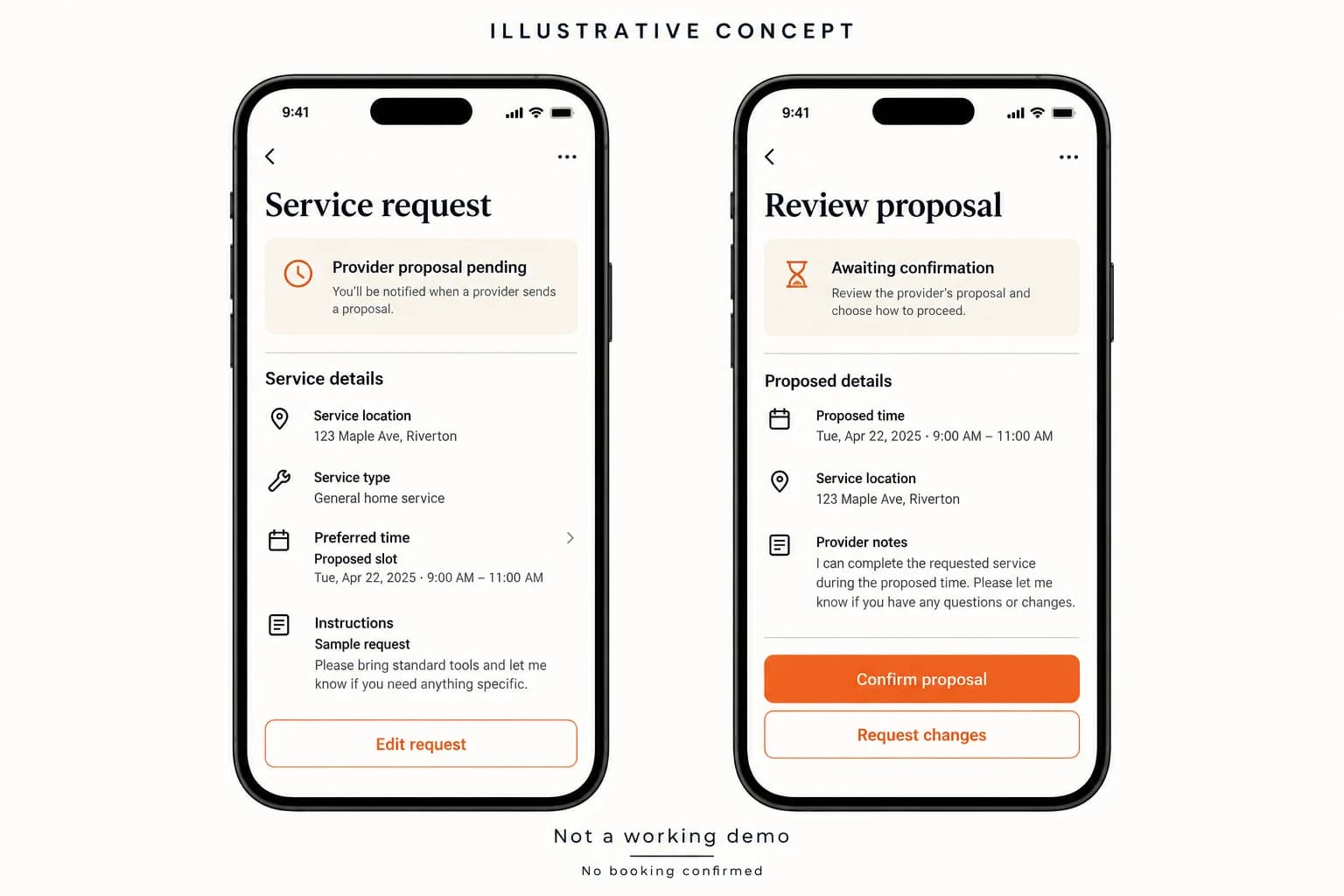
Proposed home-service request with preferred time, instructions, pending provider proposal and change request

Proposed home-service request with preferred time, instructions, pending provider proposal and change request

Original concept artwork showing a proposed local-service request, preferred time, instructions, pending provider proposal and request-change control. Sample details illustrate review before acceptance; no booking is confirmed. This is not brand UI or evidence of current provider availability, payment or verification.

What to check in the walkthrough

  • When is a service a fixed package and when does it need a quote? Ask to demonstrate inclusions, materials, add-ons and customer approval of a revised scope before work begins.
  • What makes a preferred slot an accepted visit? Ask to demonstrate provider acceptance, an unavailable provider, customer rescheduling and cancellation, including who approves changes and how any fees are disclosed.
  • How does support handle a missed visit or incomplete checklist? Ask to demonstrate evidence capture, restricted access to home instructions, reassignment and a follow-up visit or refund decision with a case history.
Open full-size reference

Solution reference register

01 / Reference and IP

This page references third-party product names only to describe familiar product models and planning references. App Clone Labs is not affiliated with or endorsed by those brands. Build decisions require independent legal, regulatory, and operational review for your market.

02 / Artifact status

Boards, diagrams, screens and workflow descriptions on this page are illustrative planning artifacts, not evidence of a deployed client product.

03 / Regulatory caveat

Trade, beauty, labor, and home-access rules vary by category · Background-check consent and safety review required

04 / Rights and handover

Source access, licensing, repositories, environments, documentation, acceptance and handover are defined by the signed contract and accepted scope.

Scope

Operating model defined

Roles, workflows, dependencies, exclusions, and assumptions are made reviewable.

Evidence: illustrative

System

Applications connected

Experience, operations, services, data, integrations, and release controls are planned together.

Evidence: illustrative

Handover

Rights stated in writing

Access, assignment, licensing, dependencies, documentation, and support follow the signed agreement.

Evidence: illustrative

Artifact register

Product screens and planning references.

Reference screens illustrate workflows, not a contracted feature list. Sample prices, data, and responses are demonstration content; confirm the current scope during a walkthrough.

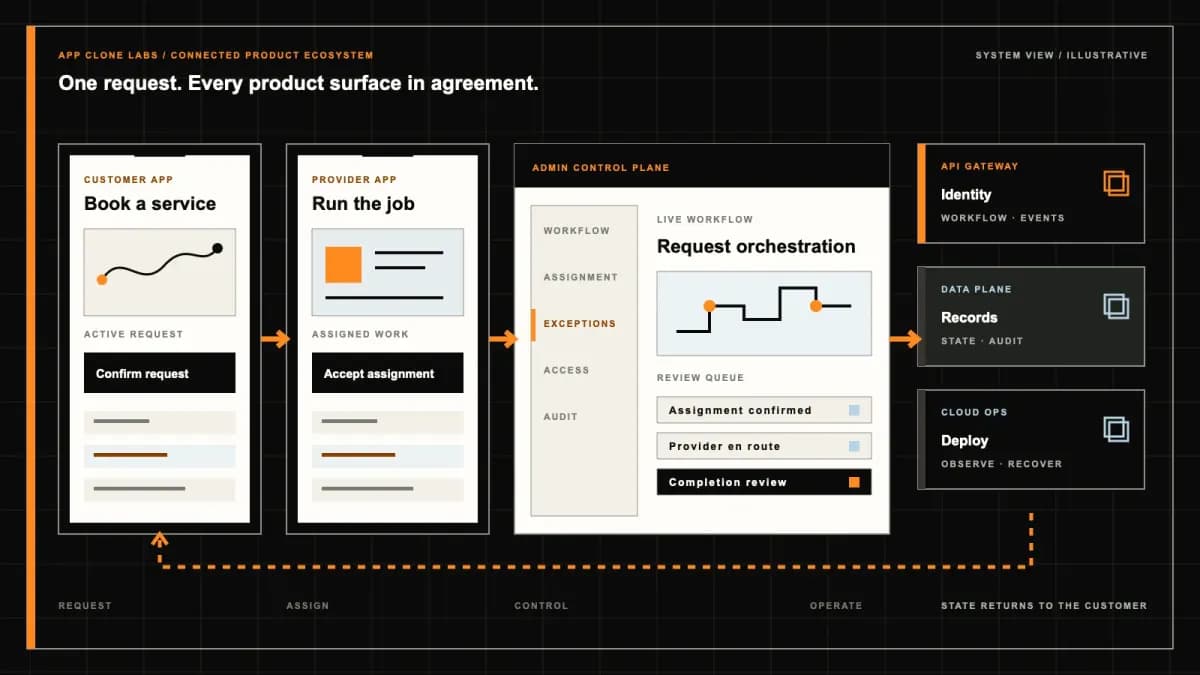
Urban Company-style Home Services connected product workflow planning visual
Connected customer, operations, and data workflowEvidence: illustrativeOpen full-size reference
Urban Company-style Home Services product engineering ecosystem visual
Product engineering ecosystem and handover boundaryEvidence: illustrativeOpen full-size reference

A booked service package is not permission for an unapproved repair

A customer books an appliance assessment. At the home, the technician finds a damaged component and adds a replacement to the invoice. The customer thought the booking covered a completed repair; the technician understood it as inspection only. A managed home-services app must make that difference visible before the visit, then preserve the customer’s approval for any additional work. Otherwise, a convenient booking screen simply moves an unresolved price dispute into the household.

An Urban Company-style product organizes a curated service catalog, professional assignment and household service recovery. Its value comes from understandable packages and accountable operations, not from copying another brand’s layout. This independent implementation does not include Urban Company’s workforce, training network, protection programs or proprietary systems. Buyers should evaluate what their own operator will define, supervise and support for each launch category.

Choose managed packages rather than silently borrowing a lead-marketplace promise

The official Urban Company service catalog presents home-service categories and a pricing-led customer proposition. It helps explain the reference model; its claims, personnel and remedies are not evidence for an independent business or included software capability.

Contrast this with a Thumbtack-style project marketplace where the starting transaction can be an introduction and a negotiated proposal. A managed catalog needs the operator to define service boundaries, assignment rules and support responsibility. Combining both models requires explicit labels rather than one generic book button.

Write the service package before designing its booking card

A package should identify the task, expected service boundaries, exclusions and relevant property assumptions. State whether materials, equipment movement or follow-up visits are included. For cleaning, room count and access conditions may change scope; for repair, diagnosis and completed work may be separate purchases. Avoid a single attractive price that only becomes understandable after the professional arrives. Keep the version accepted by the customer with the booking.

Use intake questions that affect the service decision, not an oversized questionnaire for every household. Let customers mark equipment condition or dimensions as unknown when that is honest. Explain whether uncertainty means assessment first or a possible quote revision. Test a package update after booking: existing customers should retain their accepted terms or receive an explicit change proposal, rather than inheriting a new exclusion without notice.

Offer appointment capacity that includes skills, equipment and travel

An available calendar slot is not sufficient if the assigned professional lacks the category permission or necessary equipment. Capacity should consider service duration assumptions, travel buffers and approved working areas. Distinguish a requested window from a confirmed appointment. If assignment happens after checkout, explain that state and the recovery path when no suitable professional can accept. Do not imply that every catalog item is instantly fulfillable everywhere.

Recheck capacity when the customer changes category, location or package size. A replacement worker may need different eligibility, equipment and travel time. Operations should see why an assignment failed without exposing sensitive screening information. Rehearse two customers selecting the last slot, a worker withdrawing and a delayed prior visit. The customer needs a credible reschedule or cancellation decision, not a status that remains confirmed while the operator has no delivery plan.

Arrival also needs a clear household decision. A professional may reach the building but be unable to enter, or the named customer may be unavailable to approve an assessment. Keep arrival, permitted entry and work commencement as separate events. Disclose any relevant waiting or unsuccessful-visit charges under the reviewed service terms instead of inventing them at the door. Support should be able to inspect the appointment window, contact attempts and customer instructions without demanding continuous location surveillance. Test a concierge denying entry and a customer requesting a different worker: neither situation should create a false completed service or expose access details to an unassigned replacement.

Professional eligibility must match the category and assigned person

Training attendance, assessed competence, occupational credentials and identity review answer different questions. Record the subject, source, relevant category, review date and any expiry or restriction. A company account can send a different person from the registered owner; establish the requirements for the person entering the home. Do not turn a general verified badge into an unsupported statement that every worker can perform every trade safely.

Keep eligibility changes actionable. An expired credential or suspended category should prevent new incompatible assignments and flag affected future visits for review. Provide a controlled correction process when records are disputed or attached to the wrong person. The software can record training and review decisions, but the operator must establish qualified assessment and supervision. A rating average cannot replace that responsibility or guarantee professional conduct.

Inspection findings become a quote, not an automatic charge

The assessment result should separate observed facts from the proposed remedy. Show labor, replacement items, relevant exclusions and the effect on scheduling. Identify who may accept the quote when a tenant books for a landlord or a family member pays. Preserve the original booking charge and the revised work proposal independently. A customer declining repair may still owe a disclosed assessment fee, but the app must explain that arrangement before booking.

When a quote changes, request approval for the new version rather than editing an accepted total in place. Handle partial acceptance, customer disconnection and a quote that expires before a part arrives. Work awaiting approval should remain identifiable as pending. Test a technician trying to close the visit while a change is unresolved; the system should not manufacture consent from an opened message or a generic completion code.
Parts approval needs availability and provenance, not just a price line

A replacement proposal should describe the item sufficiently for a customer decision, with applicable supply assumptions and warranty terms. State whether the professional supplies it or the customer purchases it independently. Do not imply manufacturer authorization merely because a compatible part is listed. If exact identification requires inspection, keep the earlier catalog suggestion provisional rather than representing it as confirmed stock.

Track approved substitutions and unavailable items without rewriting the initial assessment. A delayed part can require another appointment with separate access and scheduling confirmation. Establish who authorizes a material reimbursement and what receipt evidence is necessary. Rehearse a professional proposing a different part after acceptance: both the customer-facing quote and settlement record should explain the change, and unsupported additions should not become payable through a free-text note.

Home access is a temporary permission attached to an assignment

The OWASP object-level authorization guidance recommends checking permission to act on each requested record. For this product, that means enforcing access to the particular booking, household instructions and evidence, rather than trusting possession of a booking identifier.

Separate exact addresses, entry codes and sensitive interior photos from ordinary scheduling details. Limit access by role and current assignment; do not place household instructions in public reviews or unnecessary notification previews. Reassignment should remove the previous worker’s live access while preserving restricted evidence for legitimate incident review. Test a former professional account opening a saved visit link and an unrelated customer changing the booking identifier.

Checklists support quality review without proving every outcome

A useful checklist follows the package and category, with exceptions that the professional can record honestly. A required photograph should have a defined purpose and appropriate consent or other reviewed basis. Collect only evidence needed for the service record and issue review. A ticked checklist is an account of steps claimed, not proof of flawless workmanship, sanitation or compliance with every technical requirement.

Distinguish work reported complete, customer acknowledgement and unresolved quality concerns. Customers may notice a problem after the professional leaves, so a completion action should not erase access to the agreed support process. Reviewers need the accepted scope, approved changes and relevant evidence together. Test an incomplete checklist with a legitimate exception and a disputed completion photo; neither should be resolved automatically by a rating or by payment success.

Redo visits and warranty claims need different decision records

A request to repeat an incomplete task differs from a new fault or a claim about a supplied part. Establish eligibility, reporting windows, exclusions and who decides the remedy under the operator’s terms. Do not copy the reference brand’s coverage promises. A scheduled return visit should point to the original service and explain whether it is a redo, further assessment or separately approved new work.

Keep workmanship complaints, property-damage reports and safety incidents separately accountable. A refund should not silently close an incident, and a redo should not require the customer to publish private household evidence. The application can route review and preserve facts; it is not an emergency service or a substitute for qualified technical judgment. Rehearse a disputed warranty request where support declines coverage but must still preserve the customer’s evidence and reason for the decision.

Settle the professional against approved work and explainable adjustments

The settlement record should distinguish booked labor, accepted additions, material reimbursement, platform deductions and reviewed adjustments. Reconcile uncertain payment outcomes before representing money as collected or paid. A duplicated callback must not create another customer charge or professional credit. When a quality complaint remains open, use the disclosed commercial process rather than letting any support user silently rewrite a completed payout.

Define permission and evidence for adjustments, including the relationship to a redo visit. A return appointment does not automatically justify withholding all unrelated earnings. Keep invoices and financial events recoverable even when a visit is cancelled or reassigned. Buyer review should include a declined parts proposal, an uncertain customer payment and a settlement adjustment, with a clear explanation of the balance each participant sees.

Accept the managed-service product through a failed visit rehearsal

Illustrative screens communicate intended journeys; they do not establish a live professional network, connected registry or operational warranty program. Request a sandbox using fictional household data. Reject a quote, remove worker eligibility, run out of a proposed part and raise a redo request after completion. Inspect customer, professional and operations views to confirm that every state has an accountable owner and understandable next action.

Use the delivery process to agree scope, dependencies and acceptance evidence. Confirm package ownership, service terms, provider permissions and integration access before expanding the initial category set. A successful checkout alone is not buyer acceptance for a managed home-service operation.

Bring the launch categories and sample service packages to a product-scoping conversation. The useful next step is a reviewed operating brief covering assignment, inspection, approved work, support and settlement—not an unconditional price, completion timeline or guarantee borrowed from another company.

Product flow

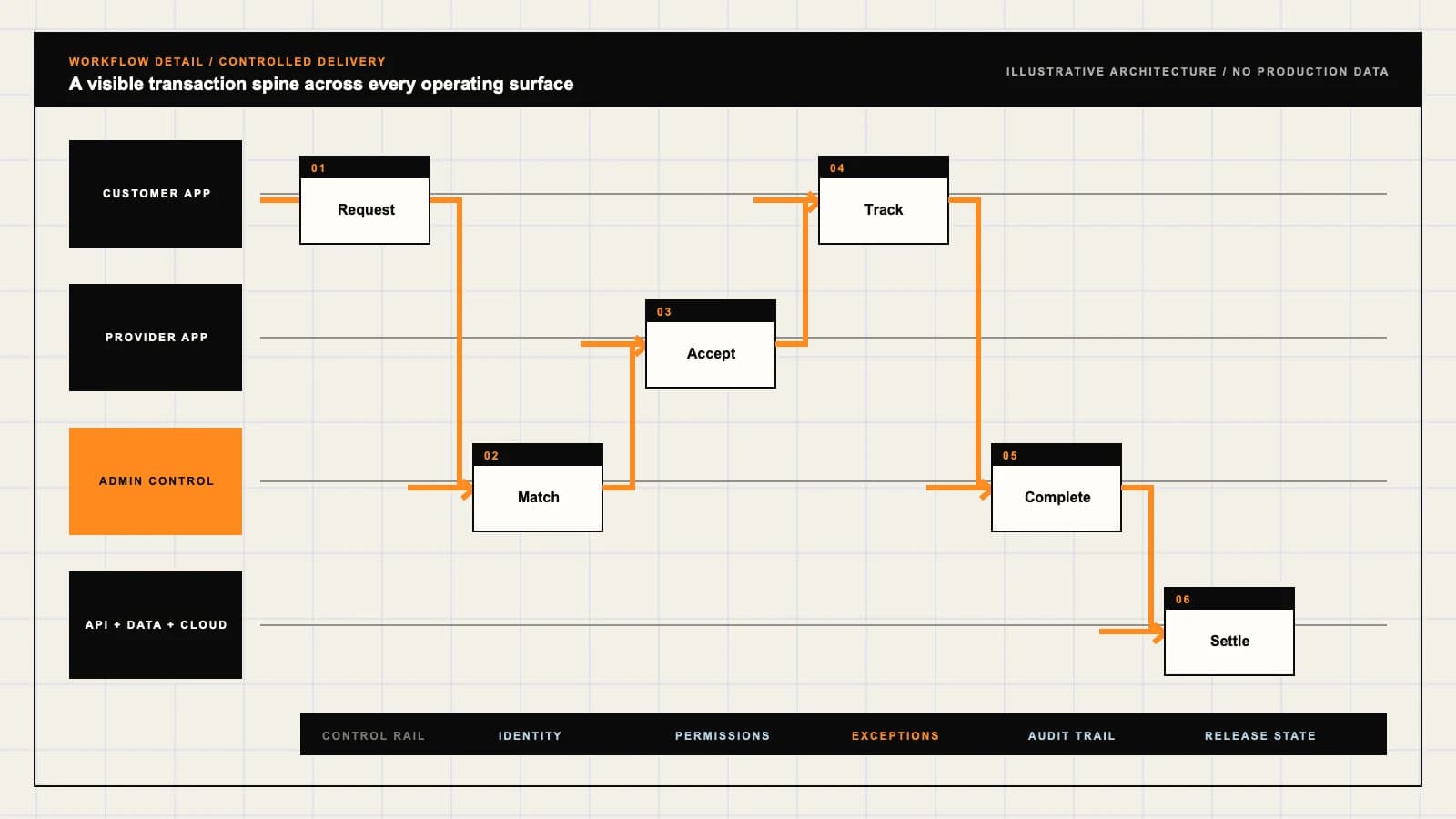
Role-workflow flow diagram.

A visual map of how each role interacts with each workflow stage, with operator controls and integration boundaries.

Deployable Product Architecture

Urban Company-style Home Services

SEPARATE A STANDA…TURN FINDINGS INT…CLOSE THE VISIT W…Book a defined se…Work within categ…Own the service p…INTEGRATIONS: Scheduling and field-service tools with category eligibility, equipment con…OPERATOR CONTROLS: Review the person assigned to the service · Limit property details to legit…
Illustrative validation artifact — role-workflow flow diagram; final surfaces, boundaries, and integration topology are confirmed during discovery.

User roles

Urban Company-style Home Services roles and workflows.

Clone-inspired platforms usually need several coordinated interfaces, not just a customer app.

Household customer

01

Book a defined service with clear limits

Select a package, disclose relevant conditions and confirm the visit. Review inspection findings and approve additional work or parts separately from the original booking.

Service professional

02

Work within category eligibility and approved scope

Receive an authorized assignment, follow the agreed checklist and explain findings. Request approval before chargeable changes and preserve completion evidence without unnecessary household data.

Managed-service operations

03

Own the service promise and its exceptions

Maintain package versions, professional eligibility, capacity and issue review. Separate scheduling recovery, workmanship complaints and safety incidents under disclosed responsibilities.

Workflow

Urban Company-style Home Services workflow stages.

Each workflow stage is mapped to a role, screen, API, notification, admin control, and measurable launch outcome.

Choose the package

01

Separate a standard task from a diagnostic visit

Show inclusions, exclusions, material assumptions and relevant preparation. Check location and category capacity before offering a confirmable appointment.

Inspect and approve

02

Turn findings into an explicit work authorization

Record the assessment, itemize proposed parts and labor, and preserve the customer decision. Declined changes must not become an automatic final-invoice charge.

Complete and support

03

Close the visit without erasing outstanding issues

Capture appropriate checklist evidence, issue the service record and reconcile payment. Keep redo eligibility, disputed workmanship and provider settlement separately reviewable.

Deployable Product Architecture

Workflow / system register

Revision DPlanning surface

Product delivery loop

Urban Company-style Home Services workflow stages.

A focused release proves one complete workflow

Product delivery loop: Urban Company-style Home Services workflow stages.A focused release proves one complete workflow. Scope the customer action and the operator response as one system.
01

Separate a standard task from a diagnostic visit

02

Turn findings into an explicit work authorization

03

Close the visit without erasing outstanding issues

Control note

Scope the customer action and the operator response as one system.

Illustrative architecture register; validate against the accepted scope.

Operator controls

Urban Company-style Home Services admin and operator controls.

The control center is scoped as a first-class product surface, not an afterthought.

Category eligibility

01

Review the person assigned to the service

Record training, relevant credentials, equipment readiness and review dates. A general account badge is not evidence of competence for every trade or personal-care category.

Household access

02

Limit property details to legitimate participants

Gate exact addresses, access instructions and private photos by assignment and role. Remove live access after reassignment while preserving restricted incident evidence.

Scope and quality

03

Keep package promises tied to inspectable records

Version inclusions, checklist completion and accepted changes. Route quality concerns to an accountable reviewer without treating a ticked box as guaranteed workmanship.

Monetization

Urban Company-style Home Services monetization models.

We model monetization early so payments, admin controls, and reporting support the business.

Explain the booked package and any approved additions

Separate the standard service, diagnostic fee, parts and additional labor. Establish cancellation and refund treatment before collecting payment.

Disclose deductions and settlement events

Distinguish platform fees, approved material reimbursements and reviewed adjustments. Participation payments must not purchase eligibility or conceal a suspended category.

Define repeat coverage rather than unlimited repair

Set the covered property, categories, visit entitlements and exclusions. Recurring billing does not authorize unrequested work or establish a blanket warranty.

Integrations

Urban Company-style Home Services integration surface.

External systems that determine launch readiness, data flow, and operational continuity.

Integration

01

Integration 1

Scheduling and field-service tools with category eligibility, equipment constraints, travel buffers, assignment identity and recoverable notification failures

Integration

02

Integration 2

Payment, invoicing and accounting services with approved quote versions, itemized parts, uncertain-payment reconciliation and traceable settlement adjustments

Integration

03

Integration 3

Authorized identity, credential and training systems with provenance, consent requirements, expiry review and restricted underlying records

Scope drivers

Urban Company-style Home Services scope drivers.

The variables that most influence build effort, cost, and launch readiness.

Managed service or lead referral

01

Choose the operator responsibility before the interface

A curated package catalog needs service definitions, capacity and support ownership. A lead directory instead introduces professionals who negotiate their own project scope.

Category and property conditions

02

Start with services the operator can supervise

Cleaning, appliance repair and beauty require different intake, equipment, eligibility and issue evidence. Define category-specific boundaries rather than one universal checklist.

Inspection and remedy policy

03

Specify the difficult commercial decisions

Agree how assessment charges, rejected quotes, parts availability, redo visits and warranty claims affect invoices and professional settlement.

Deployable Product Architecture

Scope drivers / system register

Revision APlanning surface

Product delivery loop

Urban Company-style Home Services scope drivers.

A focused release proves one complete workflow

Product delivery loop: Urban Company-style Home Services scope drivers.A focused release proves one complete workflow. Scope the customer action and the operator response as one system.
01

Choose the operator responsibility before the interface

02

Start with services the operator can supervise

03

Specify the difficult commercial decisions

Control note

Scope the customer action and the operator response as one system.

Illustrative architecture register; validate against the accepted scope.

V1 scope

Urban Company-style Home Services V1 foundation.

Launch the smallest complete operating loop first, then scale the product with confidence.

Reviewed service catalog

01

Publish a limited set of explainable packages

Use explicit inclusions, exclusions and diagnostic options in supported zones. Assign eligible professionals against capacity rather than showing unsupported instant availability.

Visit and quote control

02

Prove extra work requires an accepted version

Support professional assignment, findings, parts proposals and customer decisions. Preserve declined work and scheduling failures without inventing a successful completion.

Operational recovery

03

Resolve a return visit and disputed invoice

Provide category-aware support records, access control and settlement review. Rehearse an unavailable part, a rejected addition and a customer requesting a redo.

Later phases

Urban Company-style Home Services post-launch expansion.

Capabilities that should usually wait until real usage proves the core loop.

Recurring household care

01

Add renewal and visit rights deliberately

Define plan entitlements, appointment confirmation and treatment of unused visits. Recheck professional eligibility and household access at each assignment.

Business maintenance

02

Extend authority beyond one household payer

Support facility access, purchase approval and service records with organizational permissions. A staff booking must not imply authority to approve every repair.

Broader categories and zones

03

Expand only with service and support capacity

Review local category requirements, training, equipment supply and remedy processes. Additional listings alone do not establish a supported managed-service operation.

Deployable Product Architecture

Later phases / system register

Revision FPlanning surface

Product delivery loop

Urban Company-style Home Services post-launch expansion.

A focused release proves one complete workflow

Product delivery loop: Urban Company-style Home Services post-launch expansion.A focused release proves one complete workflow. Scope the customer action and the operator response as one system.
01

Add renewal and visit rights deliberately

02

Extend authority beyond one household payer

03

Expand only with service and support capacity

Control note

Scope the customer action and the operator response as one system.

Illustrative architecture register; validate against the accepted scope.

Regulatory review

Urban Company-style Home Services regulatory and compliance flags.

Each flag must be reviewed by qualified counsel for your target market before build or launch.

Flag 1

Trade, beauty, labor, and home-access rules vary by category

Flag 2

Background-check consent and safety review required

Reference walkthrough

Request a Urban Company-style Home Services reference walkthrough.

Ask us to confirm which reference surfaces are currently available for this product model. Rather than publishing shared demo credentials, we schedule a private guided walkthrough for qualified buyers.

Reference surface

01

Household customer: Book a defined service with clear limits

Request a role-specific demonstration and confirm which capabilities are currently available. Review the proposed responsibility: Select a package, disclose relevant conditions and confirm the visit. Review inspection findings and approve additional work or parts separately from the original booking.

Reference surface

02

Service professional: Work within category eligibility and approved scope

Request a role-specific demonstration and confirm which capabilities are currently available. Review the proposed responsibility: Receive an authorized assignment, follow the agreed checklist and explain findings. Request approval before chargeable changes and preserve completion evidence without unnecessary household data.

Reference surface

03

Managed-service operations: Own the service promise and its exceptions

Request a role-specific demonstration and confirm which capabilities are currently available. Review the proposed responsibility: Maintain package versions, professional eligibility, capacity and issue review. Separate scheduling recovery, workmanship complaints and safety incidents under disclosed responsibilities.

Next step

04

Book a walkthrough

Request a live, private walkthrough of the reference implementation. We will confirm scope and discuss configured deployment versus custom build for your market.

Open register

Deployable Product Architecture

Reference walkthrough / system register

Revision CPlanning surface

Product delivery loop

Request a Urban Company-style Home Services reference walkthrough.

A focused release proves one complete workflow

Product delivery loop: Request a Urban Company-style Home Services reference walkthrough.A focused release proves one complete workflow. Scope the customer action and the operator response as one system.
01

Household customer: Book a defined service with clear limits

02

Service professional: Work within category eligibility and approved scope

03

Managed-service operations: Own the service promise and its exceptions

04

Book a walkthrough

Control note

Scope the customer action and the operator response as one system.

Illustrative architecture register; validate against the accepted scope.

Process

A traceable path from decision to acceptance.

  1. 01

    Model teardown

    We map the reference business model, user roles, monetization path, regulatory needs, and launch constraints.

    Artifact: Product teardown, risk map, role matrix

  2. 02

    Market-fit blueprint

    We reshape the model around your market, operations, pricing, workflows, and first release priorities.

    Artifact: Feature scope, flows, technical plan

  3. 03

    Design and build

    Product, design, engineering, QA, and cloud delivery move in weekly demo cycles with visible progress.

    Artifact: Working releases, QA notes, sprint demos

  4. 04

    Launch and operate

    We support production release, monitoring, handoff, roadmap decisions, and post-launch improvement.

    Artifact: Launch checklist, docs, growth backlog

FAQ

Questions to resolve before the build.

01What makes this a managed home-services product rather than a lead directory?

The operator defines packages, assignment rules and service recovery. A lead directory introduces professionals who may negotiate their own scope; the two responsibilities should not be hidden behind the same booking label.

02Does an UrbanClap clone include Urban Company professionals or warranties?

No. It is independently branded software. Workforce recruitment, training, service terms, integrations and any protection program must be established separately by the operator.

03Can one catalog cover cleaning, repairs and beauty?

Yes, within reviewed scope, but each category needs suitable intake, eligibility, equipment, checklists and issue handling. One generic service form is not sufficient operational preparation.

04How should an inspection-only booking be presented?

Disclose the assessment purpose, charge and exclusions before booking. Additional work should follow an itemized proposal and an explicit customer decision, not an automatic invoice addition.

05Can a technician change an accepted quote?

A revised proposal can be submitted, with its price and scheduling effect. Preserve the accepted version and require appropriate approval before representing additional work as authorized.

06What happens when a replacement part is unavailable?

Keep the assessment and accepted proposal intact, explain the delay or alternative, and obtain any necessary substitution approval. Confirm a return appointment separately instead of assuming continuing household access.

07Does a verified badge guarantee technician quality?

No. Describe the specific identity, credential or training review behind the badge. Eligibility must match the assigned person and category; software records do not guarantee competence or conduct.

08Who can see household entry instructions?

Only appropriately authorized participants for the relevant assignment and period. Reassignment and role removal should revoke live access while preserving restricted evidence where legitimately required.

09Are checklist photos proof that the service was successful?

They can support review of specified steps but do not prove every outcome. Preserve exceptions and customer concerns, with appropriate privacy limits and an accountable quality-review process.

10How are redo visits distinguished from warranty claims?

Link the request to the original service and record the applicable terms, reason and decision. Incomplete work, a new fault and a supplied-part claim may need different review and charging arrangements.

11Can care plans and recurring household visits be added?

They can be scoped after defining covered categories, entitlements, renewal terms and appointment authority. A subscription does not authorize unrequested work or replace category-specific eligibility checks.

12What should a buyer validate before accepting the system?

Use a sandbox to reject a quote, expire eligibility, delay a part, request a redo and reconcile an uncertain payment. Review all participant views, access boundaries and financial records, not only a successful booking.

Primary sources

References behind this page

Dated official documentation, standards, and research that support the factual claims on this page.

  1. 01
  2. 02

Citation readiness

How to interpret this page

Published by App Clone Labs Editorial Team

Commercial claims
Scope, cost, and timeline claims are planning guidance and require validation in a current proposal.
Evidence status
Diagrams, boards, examples, and estimates are illustrative planning artifacts unless explicitly identified with a source and measured evidence status.

Next decision

Turn the brief into an accepted product scope.

Define outcomes, constraints, evidence, rights and handover before delivery begins.

Commercial rights, repositories, environments, documentation, acceptance and handover remain contract-defined.

Scope Urban Company-style Home Services

Independent from Urban Company

App Clone Labs is an independent software development studio. We are not affiliated with, connected to, sponsored by, or endorsed by Urban Company.

Why this name appears

Urban Company is referenced descriptively to identify familiar product mechanics and common search terminology. “Clone” describes a planning reference, not a replica.

Original delivery

Any product delivered by App Clone Labs is independently designed and developed for the accepted scope. It does not contain proprietary code, branding, copy, interface assets, or confidential material from Urban Company.

Trademark ownership

Urban Company and associated names, logos, and marks remain the property of their respective owners. Their use identifies a reference category and does not imply authorization or endorsement.