Website and commerce builder

Wix-style Extensible Website Builder — Custom-Built for Your Market

Drag-and-drop hosted site builder with applications and business modules. Planned for entrepreneurs and agencies assembling configurable sites without managing hosting with role-specific workflows, operator controls, integrations, and a handover boundary defined for the selected market.

See product screens and demo access

Custom workflows

Brand-safe product strategy

Admin and operations tooling

Reference walkthrough by arrangement

Review the visual editor and publishing handoff for a site builder.

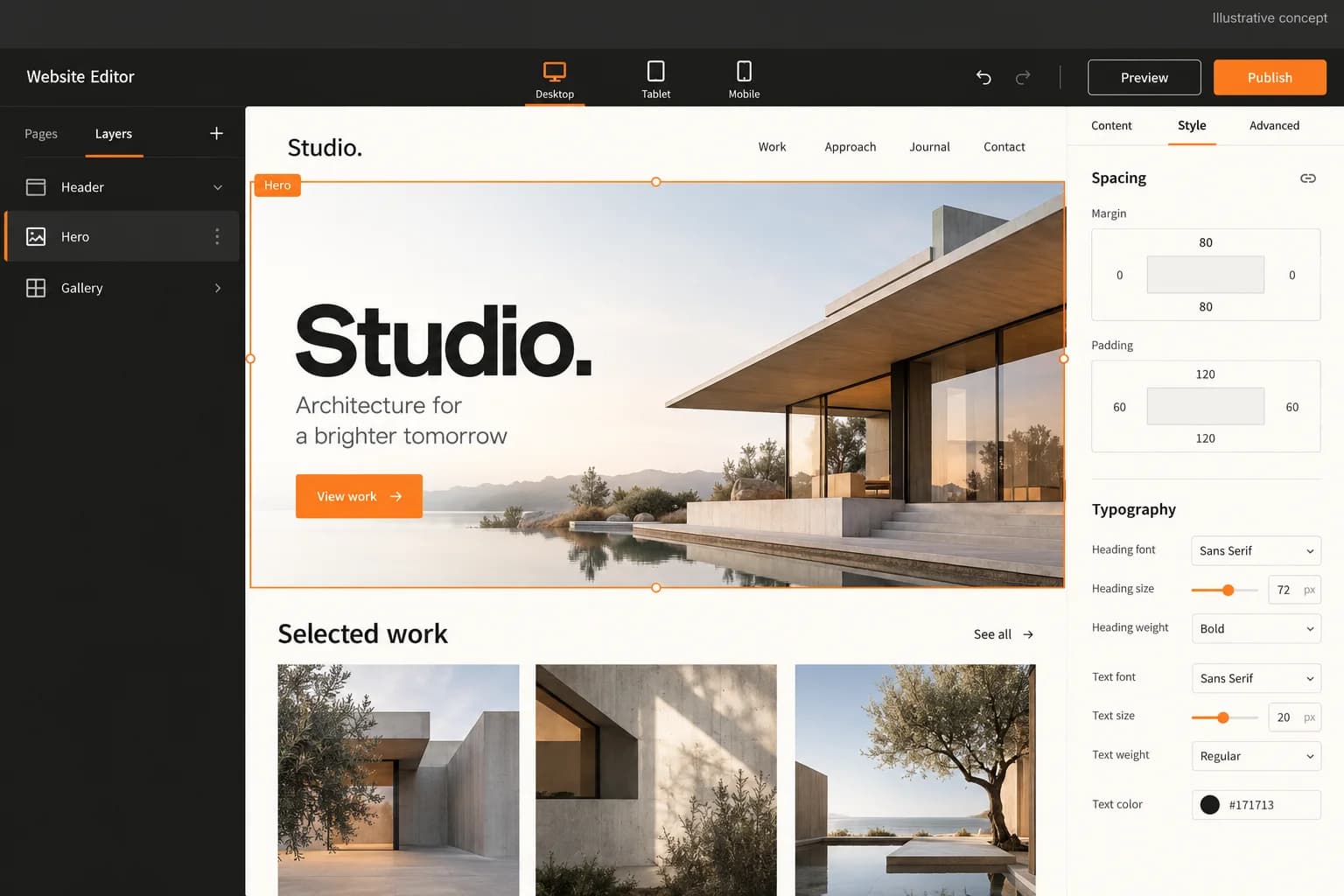
Bring a representative site brief, page roles and the integrations you need to a guided walkthrough. This original illustrative concept frames a Wix-style builder conversation; it is not a working Wix interface or proof of a live editor. Ask to see the current demo for the agreed editing, responsive preview and publishing flows.

Original illustrative concept of a website editor with page canvas, component inspector and publishing controls

Original illustrative concept of a website editor with page canvas, component inspector and publishing controls

Original AI-generated illustrative concept for a site-builder workflow, not a Wix interface, product screenshot or working demo. It visualises a page canvas and publishing discussion only; request the live editor, responsive preview, permissions, integrations and domain handoff in the agreed demo scope.

What to check in the walkthrough

  • Can an owner and designer compose your pages without breaking the published site? Ask to create a section, change its narrow-screen layout, preview it, restore a revision and identify the approval boundary. Confirm which editor, template and accessibility behaviors are included.
  • Which integrations and custom blocks are actually in scope? Ask to inspect permissions, submit a form, review webhook delivery, revoke access and verify data deletion. The concept image does not prove an application marketplace or any specific integration.
  • Who may connect a domain and publish an approved version? Ask to prove domain control, test a denied publish action, check certificate renewal and recover a prior release. Confirm hosting, backups, export and support responsibilities before launch.
Open full-size reference

Solution reference register

01 / Reference and IP

This page references third-party product names only to describe familiar product models and planning references. App Clone Labs is not affiliated with or endorsed by those brands. Build decisions require independent legal, regulatory, and operational review for your market.

02 / Artifact status

Boards, diagrams, screens and workflow descriptions on this page are illustrative planning artifacts, not evidence of a deployed client product.

03 / Regulatory caveat

Provide site-abuse, phishing, IP-reporting, and takedown processes · Support privacy, cookie, accessibility, and data-export configuration · Review commerce, payment, tax, and consumer controls when enabled · Review third-party application permissions and developer data access

04 / Rights and handover

Source access, licensing, repositories, environments, documentation, acceptance and handover are defined by the signed contract and accepted scope.

Scope

Operating model defined

Roles, workflows, dependencies, exclusions, and assumptions are made reviewable.

Evidence: illustrative

System

Applications connected

Experience, operations, services, data, integrations, and release controls are planned together.

Evidence: illustrative

Handover

Rights stated in writing

Access, assignment, licensing, dependencies, documentation, and support follow the signed agreement.

Evidence: illustrative

Artifact register

Product screens and planning references.

Reference screens illustrate workflows, not a contracted feature list. Sample prices, data, and responses are demonstration content; confirm the current scope during a walkthrough.

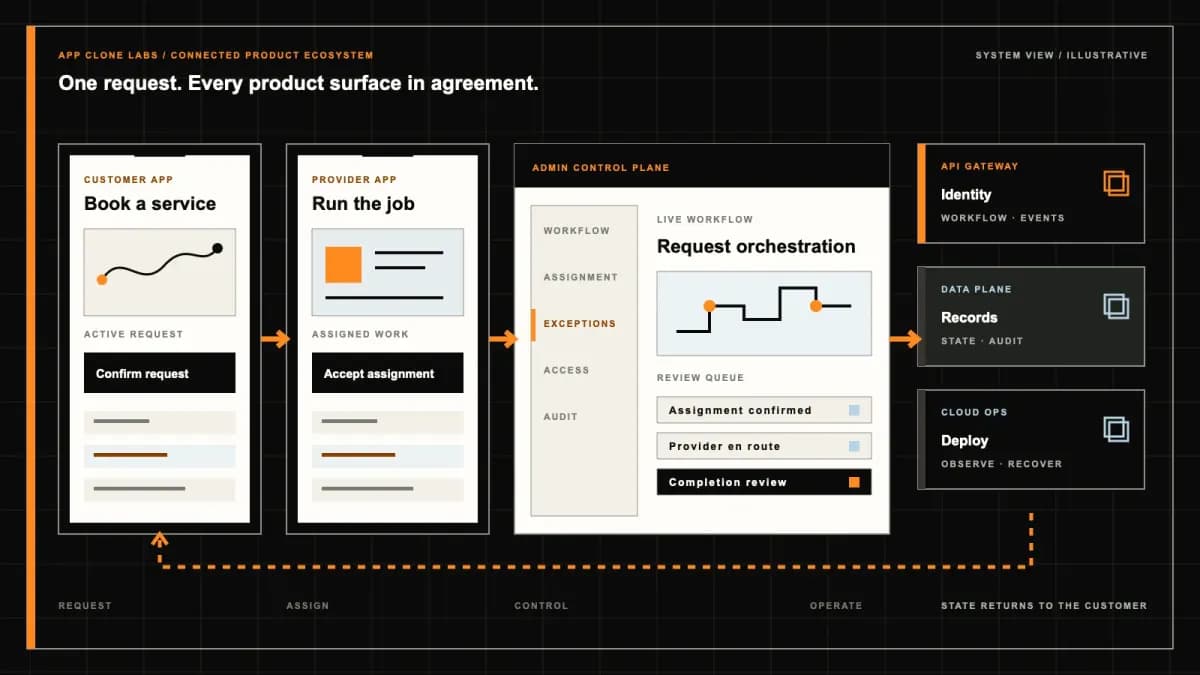
Wix-style Extensible Website Builder connected product workflow planning visual
Connected customer, operations, and data workflowEvidence: illustrativeOpen full-size reference
Wix-style Extensible Website Builder product engineering ecosystem visual
Product engineering ecosystem and handover boundaryEvidence: illustrativeOpen full-size reference

An installed app should not inherit the whole business

An agency adds a booking widget to a salon’s draft site. The page looks ready, but the extension asks for customer access, its preview sends real notifications and the designer can publish without the owner’s review. A flexible editor has crossed three operating boundaries in one click. A Wix-style builder needs explicit authority for applications, production changes and business records before a visitor trusts the finished site.

This is independently branded software for entrepreneurs and agencies composing hosted websites with selected extensions. Wix affiliation, proprietary templates, existing customer accounts and access to Wix integrations are excluded. Define the initial page types, licensed assets and business module that can be demonstrated end to end. An application ecosystem is a separate operating responsibility, with data permissions, developer review and support costs.

Choose extensibility because the site needs a connected workflow

Start with the action a visitor should complete: submit an inquiry, buy a product or reserve an appointment. Identify the system that owns its final record. A widget count does not show whether the action survives a lost connection or an unavailable provider. Choose the smallest module set that completes the required journey, then name the owner of each failed action.

Compare the Squarespace-style design-led builder when the main need is coherent templates and routine content publication. This brief emphasizes extension permissions and business data composition. Reusing a page section is sensible; treating every module as interchangeable is not. Booking capacity, order status and customer exports require rules beyond layout. Decide whether a closed set of reviewed applications covers the launch before budgeting for an open marketplace and independent developers.

Separate editor documents from production configuration

Saving a page should preserve an editor document with identifiable content, sections and media references. Preview shows a candidate revision; production serves an approved release. Show those states separately, including unsaved edits and publication failures. A draft booking screen should not write to a live calendar merely because the preview resembles the public page. Use synthetic records and sandbox provider accounts when testing business actions.

Keep production credentials outside browser documents and exports. An authenticated preview needs its own access boundary and intentional search behavior. Define whether applications use separate preview configuration and which ones cannot safely run there. Test a designer opening an old preview after losing permission. Reviewers should know the version they are approving and the connected services it exercises, rather than relying on a screenshot taken before the latest extension was installed.

Review app permissions before installation and upgrades

Wix’s official app permissions guidance describes permission scopes for APIs and webhooks and requests limited to necessary functionality. Use that as a category reference for authorization design, not evidence that this independent builder connects to Wix or inherits its app market.

Show the installer which site data and actions an extension requests, who receives them and why they are needed. An upgrade requesting customer export access needs renewed review rather than silently expanding an earlier grant. Record app version, authorized scopes and approving actor. Give owners a way to disable the integration and inspect pending work. Uninstalling a widget should explain what happens to its webhook subscriptions, credentials and data already retained by the provider.

Isolate extensions and custom code by site

One site’s extension must not read another site’s customers or obtain an agency’s unrestricted account credentials. Enforce site isolation at the data boundary and on background work, not only through hidden editor controls. Authentication must bind every request to its authorized site and action. A guessed record identifier or altered callback should not select another tenant’s appointment. Test this explicitly with two fictional sites.

Separate custom code running in the visitor’s browser from privileged server actions. Review input validation, allowed outbound destinations, secrets and dependencies before enabling execution. An embedded script can also collect visitor data or disrupt accessibility, so define approval and disable authority. Limit failures so a broken extension has an understandable recovery path rather than taking the entire editor offline. Document the actual execution boundary; a visual sandbox label alone is not security evidence.

Authenticate webhook deliveries and reject events whose site or granted scope no longer matches. A callback queued before uninstall must not regain authority afterward. Record a stable event identifier so repeated deliveries update the existing outcome instead of creating another order or appointment. Give support a bounded retry route that preserves the provider evidence and current authorization decision.

Treat publish and rollback as reviewed releases

A release should identify the page revision, app configuration and production settings being approved. Offer a staging or review candidate with appropriate access controls, then report queued, failed and completed publication separately. Inspect the public domain after deployment and account for caches that may serve an earlier revision. Publishing permission must be checked when the release executes, including scheduled work accepted before a collaborator’s role was revoked.

Retain a known recovery version and preview it before rollback. Explain whether application configuration, database schema and media assets are included in that version. Restoring a homepage cannot refund a customer, remove an external appointment or safely reverse every app migration. Keep business records outside accidental page-history deletion and reconcile their current state separately. Acceptance should include a failed deployment and a rollback with live-like synthetic transactions still present.

A release record should retain the reviewer, approval time and observed public version. If a cache still serves old content, expose that uncertainty and assign investigation ownership. Recovery is complete only when the agreed visitor path works again, including its module dependencies and restricted operating records.

Connect a custom domain with DNS and TLS evidence

Identify the registrant, registrar account owner and authorized DNS administrator. Domain connection and registration transfer are different actions. Preserve email and other existing records when planning routing changes, and show ownership verification before serving a hostname. An editor should not receive registrar credentials merely to change a heading. Assign renewal and certificate responsibilities so the site owner can recover an expired domain or failed certificate.

Verify DNS resolution, TLS, the primary hostname and alternate-domain redirects from the visitor’s perspective. Pending propagation must not appear as completed setup. Check mixed content and provider callbacks under the final hostname, not only the preview address. Confirm canonicals, metadata, published sitemap entries and intentional preview exclusions. These checks support consistent publication; they do not guarantee search rankings or an immediate replacement of old search results.

Test mobile layouts with the installed modules

Drag-and-drop composition needs defined behavior when columns stack, long labels wrap and images crop. Preserve a logical reading order at narrower widths. Check keyboard focus, zoom, contrast, image alternatives and form errors with actual content. A module that looks fine in a blank template may obscure navigation or capture focus when customer names and translated text become longer.

Review the published revision on agreed browsers and devices after extensions load. Inspect a blocked embed, missing image and slow widget rather than accepting only an ideal editor preview. Reserve sensible space for delayed content and give the visitor a usable alternative where appropriate. The owner needs to understand which accessibility responsibilities belong to the builder, supplied templates and third-party modules, with a route to disable a module that prevents essential navigation.

Keep commerce and booking state outside page appearance

A product card does not establish successful checkout. Define price, inventory ownership, payment acknowledgement, order creation, tax, shipping and refund responsibility. Use sandbox payment evidence and deduplicate provider callbacks. Explain a pending charge without encouraging another payment. A booking widget similarly needs staff capacity, duration, buffers, time zones and a final availability check before confirming a slot.

Rehearse competing reservations, a canceled appointment and a failed order notification. Store a durable business record before displaying the agreed success state, with notification recovery handled separately. Limit staff to assigned records and keep customer exports restricted. If a provider is temporarily unavailable, explain what is pending and who will resolve it. Changing a page design or removing an app must not silently delete the evidence of an accepted order or booking.

Make billing and audit roles understandable to the owner

State the site plan’s published-site count, editor seats, storage and module allowances. Separate extension subscriptions, domain renewals, email and transaction charges, naming the provider and cancellation route for each. Removing an app from a page does not prove its independently billed plan stopped. Explain the effect of suspension on publication, retained data, exports and recovery access before the owner purchases a plan.

Define distinct roles for content editing, installation, publication, billing and business operations. Recheck authority on scheduled jobs and active sessions after revocation. Audit roles need readable records of who installed an app, changed scopes, published a version or exported customers. Avoid storing private form content unnecessarily in general logs. Test a former agency editor attempting publication and an operations employee trying to access unrelated sites or payment settings.

Demonstrate export limits before promising portability

Wix’s exporting and embedding explanation states that its hosted site depends on Wix infrastructure and proprietary services. It distinguishes owning content from running the complete site on another host. That reference illustrates why migration promises need a concrete boundary; it does not set the independent product’s export capabilities.

Agree supported page content, media retrieval, structured records and configuration formats, then inspect a representative export. Identify which layouts, extensions, custom code and business records require rebuilding or a separate provider migration. Exclude secrets and restrict customer exports. A backup is not automatically a deployable site package. Test the destination with one real-shaped page and an unsupported module, documenting the omission before the owner depends on a complete transfer.

Accept one connected site and its failure paths

Buyer acceptance should use fictional businesses, synthetic inquiries, test domains and labeled sandbox providers. Illustrative screens show proposed interfaces, not a functioning Wix connection or approved application marketplace. Build a page, request an extension permission, preview it, publish an approved version and submit the intended business action. Then revoke a role, fail a callback, block a widget and roll back the page. Inspect site isolation and retained business records alongside the successful visual journey.

Bring the page map, domain authority and selected module to an extensible-builder scope discussion to agree configured capabilities, custom work, provider rights and exclusions.

Use the delivery process to agree source ownership, licensed assets, deployment access, extension review and support responsibilities. Handover should identify who can publish, recover and revoke access without relying on shared private credentials.
Product flow

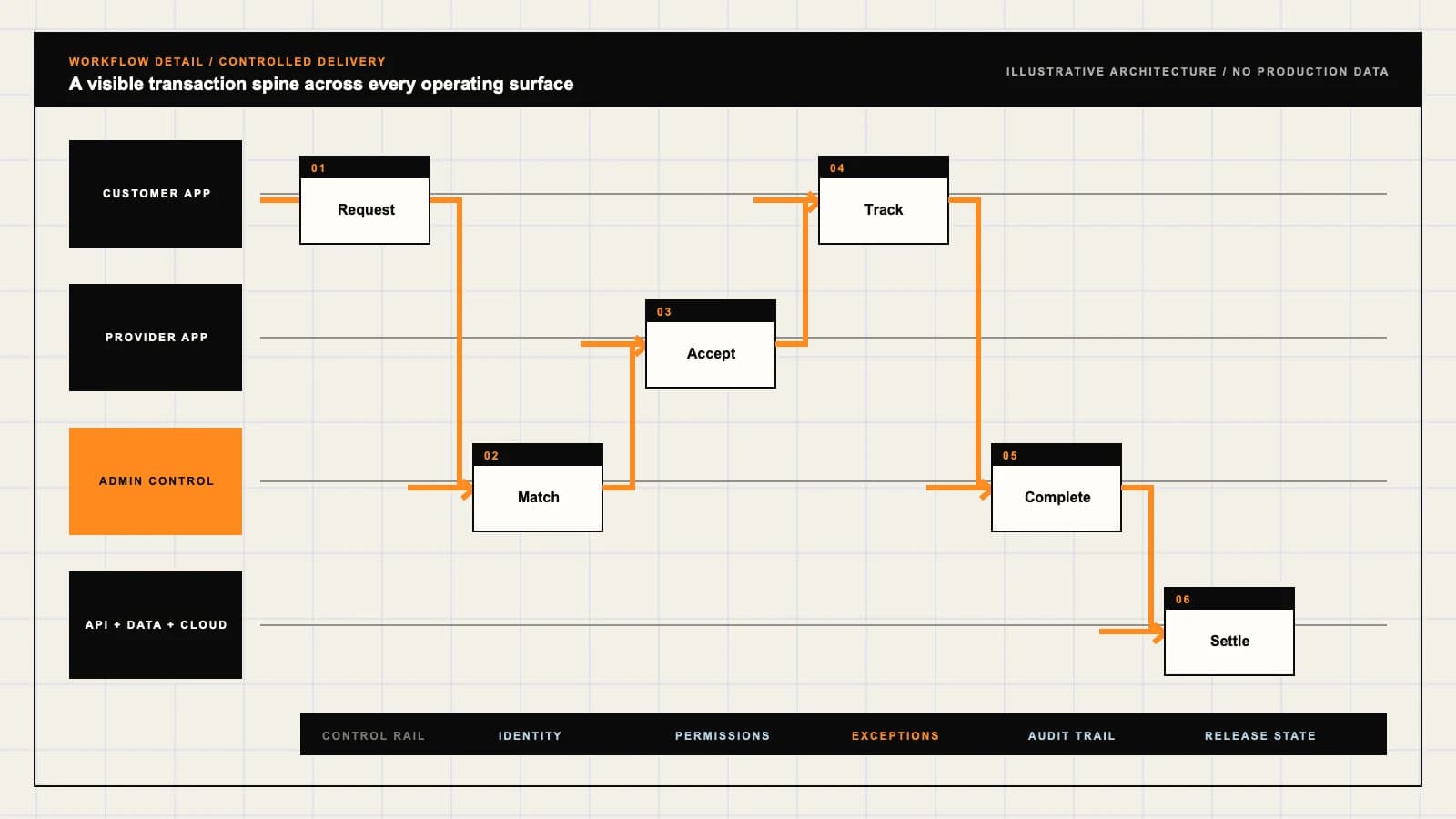
Role-workflow flow diagram.

A visual map of how each role interacts with each workflow stage, with operator controls and integration boundaries.

Deployable Product Architecture

Wix-style Extensible Website Builder

SAVE AN INSPECTAB…RELEASE THE REVIE…RECOVER BUSINESS …Authorize publish…Compose pages wit…Maintain authoriz…INTEGRATIONS: Domain, DNS, TLS and hosting services with verified authority, scoped acces…OPERATOR CONTROLS: Grant only the data and actions an app needs · Keep editing separate from p…
Illustrative validation artifact — role-workflow flow diagram; final surfaces, boundaries, and integration topology are confirmed during discovery.

User roles

Wix-style Extensible Website Builder roles and workflows.

Clone-inspired platforms usually need several coordinated interfaces, not just a customer app.

Site owner

01

Authorize publishing and business access

Approve domains, app permissions, billing and release versions. Keep an inventory of provider accounts and recovery limits rather than assuming the editor owns every connected service.

Agency designer and editor

02

Compose pages with bounded authority

Edit responsive layouts, content and licensed assets in a draft workspace. Review preview behavior without unrestricted access to customer exports, production secrets or subscription changes.

Extension and operations team

03

Maintain authorized modules and recover failures

Review app scopes, custom code and site isolation. Reconcile forms, orders and appointments with their owning systems, and retain attributable permission and release decisions.

Workflow

Wix-style Extensible Website Builder workflow stages.

Each workflow stage is mapped to a role, screen, API, notification, admin control, and measurable launch outcome.

Compose

01

Save an inspectable editor revision

Build pages and reusable sections with actual content. Preview mobile behavior and module boundaries while keeping unpublished content outside public indexing.

Authorize and publish

02

Release the reviewed site and app configuration

Approve extension scopes, domain authority and production configuration. Publish a named version with visible deployment outcomes and a defined rollback candidate.

Operate

03

Recover business actions without erasing records

Inspect inquiries, bookings and commerce states independently of page revisions. Revoke app or staff access, reconcile provider exceptions and verify the live result after recovery.

Deployable Product Architecture

Workflow / system register

Revision EPlanning surface

Product delivery loop

Wix-style Extensible Website Builder workflow stages.

A focused release proves one complete workflow

Product delivery loop: Wix-style Extensible Website Builder workflow stages.A focused release proves one complete workflow. Scope the customer action and the operator response as one system.
01

Save an inspectable editor revision

02

Release the reviewed site and app configuration

03

Recover business actions without erasing records

Control note

Scope the customer action and the operator response as one system.

Illustrative architecture register; validate against the accepted scope.

Operator controls

Wix-style Extensible Website Builder admin and operator controls.

The control center is scoped as a first-class product surface, not an afterthought.

Extension permissions

01

Grant only the data and actions an app needs

Review installation scopes, version changes, webhook access and revocation. Separate site workspaces and explain retained external copies after uninstall.

Publication authority

02

Keep editing separate from production changes

Restrict publishing, domain settings, billing and customer exports. Recheck permissions at execution and retain a versioned action history for support.

Custom code

03

Review execution and secret boundaries

Separate browser code, server actions and editor previews. Validate visitor input, restrict network and data access, and provide a controlled disable path for failing extensions.

Monetization

Wix-style Extensible Website Builder monetization models.

We model monetization early so payments, admin controls, and reporting support the business.

Describe the actual workspace allowance

State published sites, editor seats, storage and included hosting, renewal and suspension terms. Explain export access and recovery retention after plan changes.

Separate app charges from site billing

Identify each provider, trial, renewal and cancellation route. Removing an app from a page must not imply that an independent subscription was canceled.

Price commerce, booking and domain scope honestly

Disclose module allowances, transaction and provider charges, and domain or email renewals. Provider eligibility and customer demand are separate from software availability.

Integrations

Wix-style Extensible Website Builder integration surface.

External systems that determine launch readiness, data flow, and operational continuity.

Integration

01

Integration 1

Domain, DNS, TLS and hosting services with verified authority, scoped access, renewal ownership and observable publication status

Integration

02

Integration 2

Extension, webhook and custom-code services with reviewed permission scopes, site isolation, authenticated events and controlled revocation

Integration

03

Integration 3

Forms, commerce, payment, scheduling and analytics providers with confirmed account rights, durable business records and assigned reconciliation responsibilities

Scope drivers

Wix-style Extensible Website Builder scope drivers.

The variables that most influence build effort, cost, and launch readiness.

Editor flexibility

01

Bound layout controls and supported page types

Choose reusable sections, responsive behavior, media treatment and accessibility checks. Define which changes require review and how unsupported layouts are handled.

Extension boundary

02

Choose a small authorized app set

Map requested scopes, custom code, tenant isolation and data retention. An open app marketplace adds developer review, billing and incident ownership beyond installing a widget.

Publishing and business state

03

Agree domains and recovery limits

Define production configuration, version rollback, booking or commerce ownership and export formats. Set launch acceptance around connected outcomes on a verified domain.

Deployable Product Architecture

Scope drivers / system register

Revision BPlanning surface

Product delivery loop

Wix-style Extensible Website Builder scope drivers.

A focused release proves one complete workflow

Product delivery loop: Wix-style Extensible Website Builder scope drivers.A focused release proves one complete workflow. Scope the customer action and the operator response as one system.
01

Bound layout controls and supported page types

02

Choose a small authorized app set

03

Agree domains and recovery limits

Control note

Scope the customer action and the operator response as one system.

Illustrative architecture register; validate against the accepted scope.

V1 scope

Wix-style Extensible Website Builder V1 foundation.

Launch the smallest complete operating loop first, then scale the product with confidence.

Visual workspace

01

Compose a bounded business site

Provide page editing, reusable sections, media, navigation and accessible forms. Keep editor saves, previews and published versions distinguishable.

Controlled extension and release

02

Authorize one module and publish safely

Include scoped roles, app permissions, domain readiness, release history and reviewed rollback. Demonstrate an unauthorized install and a failed publication.

Owner operations

03

Inspect business records and plan boundaries

Provide restricted inquiry access, billing ownership and a representative export. Verify revocation, failed notifications and recovery without deleting live orders or appointments.

Later phases

Wix-style Extensible Website Builder post-launch expansion.

Capabilities that should usually wait until real usage proves the core loop.

Application marketplace

01

Add developer participation after isolation is proven

Establish app review, version approval, support ownership and permission-change consent. Marketplace revenue shares need their own commercial agreements.

Deeper business workflows

02

Extend commerce and scheduling with tested ownership

Add inventory, calendars or richer customer data after provider access and exception policies are agreed. More editor widgets do not establish operational readiness.

Agency collaboration

03

Delegate multiple sites without sharing every credential

Add client approvals, scoped team access and site-level reporting. Retain audit history and verify that revocation removes scheduled and active authority.

Deployable Product Architecture

Later phases / system register

Revision CPlanning surface

Product delivery loop

Wix-style Extensible Website Builder post-launch expansion.

A focused release proves one complete workflow

Product delivery loop: Wix-style Extensible Website Builder post-launch expansion.A focused release proves one complete workflow. Scope the customer action and the operator response as one system.
01

Add developer participation after isolation is proven

02

Extend commerce and scheduling with tested ownership

03

Delegate multiple sites without sharing every credential

Control note

Scope the customer action and the operator response as one system.

Illustrative architecture register; validate against the accepted scope.

Regulatory review

Wix-style Extensible Website Builder regulatory and compliance flags.

Each flag must be reviewed by qualified counsel for your target market before build or launch.

Flag 1

Provide site-abuse, phishing, IP-reporting, and takedown processes

Flag 2

Support privacy, cookie, accessibility, and data-export configuration

Flag 3

Review commerce, payment, tax, and consumer controls when enabled

Flag 4

Review third-party application permissions and developer data access

Reference walkthrough

Request a Wix-style Extensible Website Builder reference walkthrough.

Ask us to confirm which reference surfaces are currently available for this product model. Rather than publishing shared demo credentials, we schedule a private guided walkthrough for qualified buyers.

Reference surface

01

Site owner: Authorize publishing and business access

Request a role-specific demonstration and confirm which capabilities are currently available. Review the proposed responsibility: Approve domains, app permissions, billing and release versions. Keep an inventory of provider accounts and recovery limits rather than assuming the editor owns every connected service.

Reference surface

02

Agency designer and editor: Compose pages with bounded authority

Request a role-specific demonstration and confirm which capabilities are currently available. Review the proposed responsibility: Edit responsive layouts, content and licensed assets in a draft workspace. Review preview behavior without unrestricted access to customer exports, production secrets or subscription changes.

Reference surface

03

Extension and operations team: Maintain authorized modules and recover failures

Request a role-specific demonstration and confirm which capabilities are currently available. Review the proposed responsibility: Review app scopes, custom code and site isolation. Reconcile forms, orders and appointments with their owning systems, and retain attributable permission and release decisions.

Next step

04

Book a walkthrough

Request a live, private walkthrough of the reference implementation. We will confirm scope and discuss configured deployment versus custom build for your market.

Open register

Deployable Product Architecture

Reference walkthrough / system register

Revision DPlanning surface

Product delivery loop

Request a Wix-style Extensible Website Builder reference walkthrough.

A focused release proves one complete workflow

Product delivery loop: Request a Wix-style Extensible Website Builder reference walkthrough.A focused release proves one complete workflow. Scope the customer action and the operator response as one system.
01

Site owner: Authorize publishing and business access

02

Agency designer and editor: Compose pages with bounded authority

03

Extension and operations team: Maintain authorized modules and recover failures

04

Book a walkthrough

Control note

Scope the customer action and the operator response as one system.

Illustrative architecture register; validate against the accepted scope.

Process

A traceable path from decision to acceptance.

  1. 01

    Model teardown

    We map the reference business model, user roles, monetization path, regulatory needs, and launch constraints.

    Artifact: Product teardown, risk map, role matrix

  2. 02

    Market-fit blueprint

    We reshape the model around your market, operations, pricing, workflows, and first release priorities.

    Artifact: Feature scope, flows, technical plan

  3. 03

    Design and build

    Product, design, engineering, QA, and cloud delivery move in weekly demo cycles with visible progress.

    Artifact: Working releases, QA notes, sprint demos

  4. 04

    Launch and operate

    We support production release, monitoring, handoff, roadmap decisions, and post-launch improvement.

    Artifact: Launch checklist, docs, growth backlog

FAQ

Questions to resolve before the build.

01Does this include Wix affiliation, templates or integrations?

No. This is independently branded builder software. Wix affiliation, proprietary templates, customer accounts and access to Wix integrations are excluded. Establish your own licensed assets, provider permissions and operating arrangements.

02How does this differ from a Squarespace-style brief?

This scope emphasizes selected applications, custom code and business data composition. A design-led template workspace may cover simpler publishing needs. Start with the visitor action and module permissions rather than a target widget count.

03Can editor previews use production business accounts?

Define that boundary explicitly. Prefer synthetic records and sandbox providers for acceptance, keep production secrets outside browser documents and explain which modules cannot run safely in preview.

04What should app installation disclose?

Show requested data and actions, the recipient provider and purpose. Record version, scopes and approving actor. Review expanded permissions on upgrades and explain revocation, pending work and retained external data.

05How should custom code and applications be isolated?

Bind requests and background work to the authorized site and action. Separate browser execution from privileged server work, validate input, protect secrets and test that one site cannot access another site’s records.

06Does rollback undo payments or appointments?

No. Define the page, configuration and media recovery boundary. Preserve business records and reconcile external orders, bookings and app migrations separately from restoring a reviewed site version.

07Who should control a custom domain?

Name the registrant, registrar owner and authorized DNS administrator. Verify ownership, routing and TLS while preserving other services. Domain connection and registration transfer require distinct decisions and renewal responsibility.

08Does the mobile editor preview establish accessibility?

No. Test actual content and installed modules on the published revision. Check reading order, keyboard focus, zoom, contrast, form errors and blocked embeds, with clear responsibility for builder and extension behavior.

09What makes a booking or order complete?

Agree the durable business record and provider acknowledgement needed for confirmation. Check final availability or inventory, deduplicate callbacks and keep notification recovery and uncertain payment outcomes separate.

10Does removing an app cancel its subscription?

Not necessarily. Identify each independent provider’s billing and cancellation route. Disclose site allowances, module charges, domain and email renewals, and the effect of suspension on data and recovery.

11Can an export reproduce the complete site elsewhere?

Only where the agreed format and destination support it. Inspect content, media and structured records, then identify layouts, modules and business data needing separate migration. A backup alone does not prove deployability.

12What should the buyer walkthrough verify?

Use synthetic records to test module authorization, site isolation, role revocation, domain publication, failed callbacks, inaccessible widgets and rollback. Inspect retained business records, export omissions and named recovery owners.

Primary sources

References behind this page

Dated official documentation, standards, and research that support the factual claims on this page.

  1. 01
  2. 02

Citation readiness

How to interpret this page

Published by App Clone Labs Editorial Team

Commercial claims
Scope, cost, and timeline claims are planning guidance and require validation in a current proposal.
Evidence status
Diagrams, boards, examples, and estimates are illustrative planning artifacts unless explicitly identified with a source and measured evidence status.

Next decision

Turn the brief into an accepted product scope.

Define outcomes, constraints, evidence, rights and handover before delivery begins.

Commercial rights, repositories, environments, documentation, acceptance and handover remain contract-defined.

Scope Wix-style Extensible Website Builder

Independent from Wix

App Clone Labs is an independent software development studio. We are not affiliated with, connected to, sponsored by, or endorsed by Wix.

Why this name appears

Wix is referenced descriptively to identify familiar product mechanics and common search terminology. “Clone” describes a planning reference, not a replica.

Original delivery

Any product delivered by App Clone Labs is independently designed and developed for the accepted scope. It does not contain proprietary code, branding, copy, interface assets, or confidential material from Wix.

Trademark ownership

Wix and associated names, logos, and marks remain the property of their respective owners. Their use identifies a reference category and does not imply authorization or endorsement.