
01V1
Admin panel
Setup, students, staff, timetables, attendance, exams, fees, expenses and announcements.
Solutions · School administration
A school management system replaces the registers, spreadsheets and notice boards that schools run on. Teachers take attendance and set homework on their phones, the office tracks fees and staff, and parents see marks and announcements without waiting for a printed report. Our version handles one school, or many schools sold as a service, with web panels for the office and teachers and an app for students and parents. Read on for how a school year runs through the system, what goes wrong when schools adopt software, and where to begin.
Try the live demo See product screens and demo accessAdmin, teacher, student and parent access
Many schools on one platform
Attendance, exams and fees in one place
V1
Setup, students, staff, timetables, attendance, exams, fees, expenses and announcements.
Attendance, lessons, homework, marks and messages on web and mobile.
Timetable, homework, attendance, results, notices and fee payments on Android.
School registration, plans and billing for selling the system as a service.
Operating loop
The office adds the session year, classes, sections, subjects, teachers and students, and builds the timetable and holiday calendar.
Attendance, lessons, homework and announcements are recorded from the teacher’s phone or laptop, class by class.
Exam timetables are published, marks are entered by subject, and report cards are generated for each student.
Parents see attendance, homework, marks and notices in the app, and pay fees online with receipts issued automatically.
Roles
Runs the setup, staff, fees, expenses and reports, and wants fewer phone calls from parents asking for information.
Wants attendance, homework and marks to take minutes, not an evening of data entry.
Want to see the timetable, homework, marks and notices in one place and pay fees without a trip to the office.
If you sell the software to many schools, you manage plans, school sign-ups, billing and support.
Hard parts
Most users are minors. Collect only what the school needs, control which staff can see which records, get parental consent where the law requires it, and follow rules such as COPPA and FERPA in the US or India’s DPDP Act.
If entering attendance or marks is slower than paper, teachers will not do it. Keep the daily tasks to a few taps and train staff before the term starts.
Grading scales, fee structures, terms and report card layouts vary. Make them settings rather than code changes, especially if you sell to many schools.
Fee plans, discounts, late fines and instalments get complicated quickly. Reconcile online payments against fee records automatically so the office is not matching receipts by hand.
Student lists, previous results and fee balances have to be moved in before day one. Plan the import well before term starts.
Operator controls
Sessions, classes, sections, subjects, timetables and holidays.
Teachers, staff, roles, leave requests and payroll records.
Fee plans, discounts, fines, online payments and school expenses.
For a multi-school platform: school sign-ups, subscription plans and usage billing.
Revenue
If you sell to many schools, charge a monthly or yearly fee based on students and staff.
A single school or school group buys and hosts the system itself.
A small, disclosed fee on online fee payments, where your payment provider allows it.
Later
Bus routes, stops and tracking, and hostel rooms and fees.
Live classes and recorded lessons linked to the timetable.
Book issues and returns, and school equipment records.
Next decision
See how school software sits next to course marketplaces, learning platforms and tutoring apps.
Open registerIf the main need is teaching courses online rather than running a school, a learning management system fits better.
Open registerFor a consumer app with lessons, practice and tests, start from the BYJU’S-style model.
Open registerHow we approach software for schools, colleges and education companies.
Open registerLive demo
Open each app or panel in a new tab and sign in with the demo login shown. The demos run on shared sample data, carry our demo product names, and show the ready-made product before any customization.
School Platform
Student and Parent App
Use this original lesson-planning concept to scope the teacher side of a school system. It is a course-editing screen, not the school admin, attendance or fee screens, and shows no real students or schools.
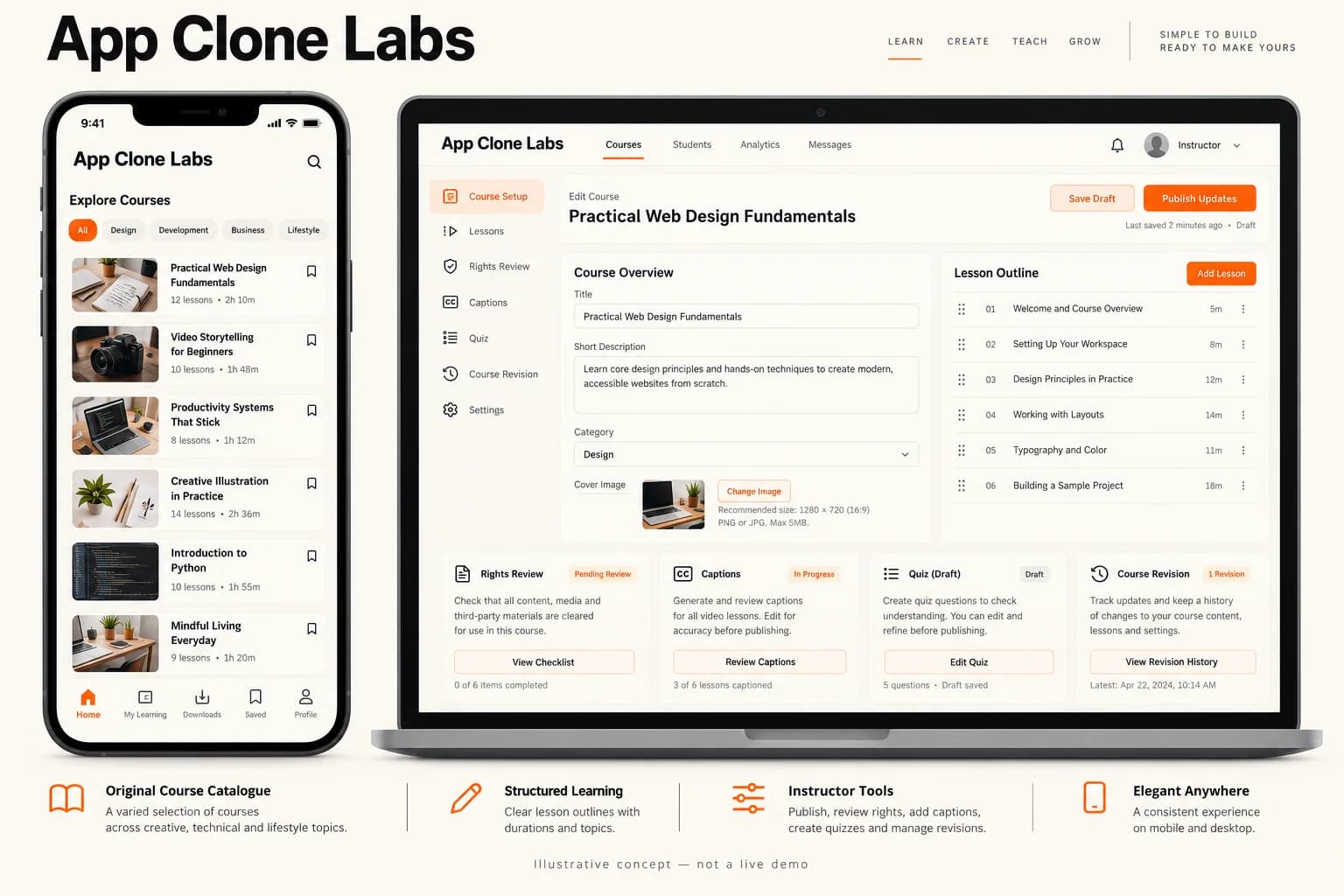
Original teaching-workspace concept. Lessons and labels are illustrative and do not show real students, teachers, marks or school records.
What to check in the walkthrough
A school system succeeds or fails in the classroom. If attendance takes longer than calling names from a register, it will be filled in late or not at all, and every report built on it will be wrong.
Design the teacher’s daily tasks first, test them with real teachers, and only then build the reports the office wants.
The base product already runs the admin panel, teacher tools, student and parent app and the multi-school platform, and you can explore the demo before deciding. We brand it for you and hand over the unencrypted source code.
Payment gateways, SMS providers and any transport or online class features depend on your market. We plan and build them with you on the same codebase.
Switching systems mid-year means two sets of records. Import students and fee balances before term begins, train staff in the last week of the holidays, and give parents the app on the first day.
FAQ
Software that runs a school’s administration and communication: students, staff, classes, timetables, attendance, exams, homework, fees and announcements, with access for admins, teachers, students and parents.
Yes. The platform supports many schools, each with its own data, and includes school sign-up, plans and billing so you can run it as a service.
Yes. Students and parents use the Android app to see the timetable, homework, attendance, results and notices, and to pay fees.
Each role sees only what it needs, data is stored securely, and the school controls who has access. Your hosting and policies must also meet the child data protection laws where you operate.
The admin panel, teacher tools and app as unencrypted source code, ready for your developers to host, brand and extend.
Primary sources
Dated official documentation, standards, and research that support the factual claims on this page.
US rules for collecting personal data from children under 13.
US rules on the privacy of student education records.
India’s data protection law, including consent requirements for children’s data.
How to read this page
Scope, cost and timeline figures are planning guidance until confirmed in a written proposal. Diagrams and screens are illustrations, not client deliverables, and source-code rights and handover follow the signed agreement. See the delivery process and the full disclaimer.
Next decision
Define outcomes, constraints, evidence, rights and handover before delivery begins.
Commercial rights, repositories, environments, documentation, acceptance and handover remain contract-defined.
