Messaging

WhatsApp Clone App Development — Custom-Built for Your Market

Real-time chats, groups, media, notifications, account controls, and admin moderation. Planned for communities, field-service teams, customer-support networks, and organizations building consent-based private messaging products, with role-specific workflows, operator controls, integrations, QA, and a handover boundary defined for the selected market.

Reviewed · App Clone Labs Editorial Team

See product screens and demo access

Custom workflows

Brand-safe product strategy

Admin and operations tooling

Review conversations and member settings for a WhatsApp-style messaging product.

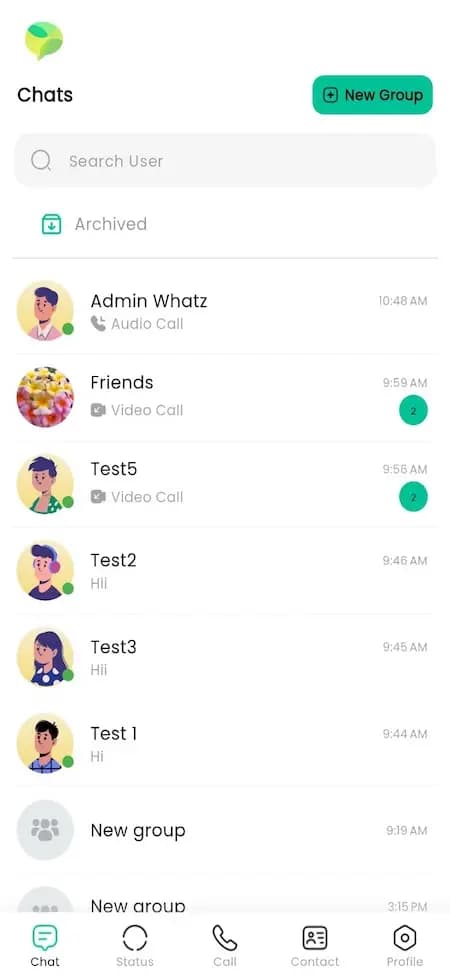
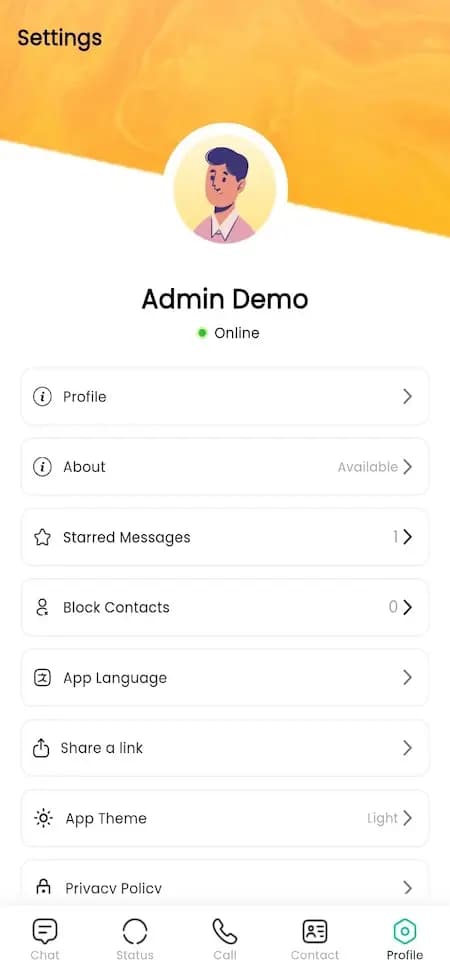
Use these two reference screens to discuss direct chats, groups, calls and member preferences. Bring your tenant, moderation, retention and notification requirements to a guided walkthrough, and confirm which workflows are currently demonstrable before choosing the build.

Conversation-list reference showing archived chats, groups and call previews

Conversation-list reference showing archived chats, groups and call previews

Conversation-list reference with source demo branding, sample accounts and avatars. It is illustrative media and does not establish WhatsApp affiliation, message delivery, encryption, moderation, or functioning calls.

What to check in the walkthrough

  • Who may create groups, invite members or remove participants? Ask to test each role, including a removed member attempting to reopen the conversation.
  • How should reports, blocking and moderator review work in direct chats and groups? Ask to follow a sample report through scoped evidence access and an appeal path.
  • What prevents one tenant member from finding another tenant’s conversations or attachments? Ask to test denied access with separate sample tenants; the reference does not prove isolation or delivery.
Open full-size reference
Member-settings reference showing profile, starred messages, blocked contacts, language and theme

Member-settings reference showing profile, starred messages, blocked contacts, language and theme

Member-settings reference with a sample profile labelled Admin Demo. The visible settings and privacy-policy link are illustrative and do not establish WhatsApp affiliation, an administrator console, privacy controls, or security outcomes.

What to check in the walkthrough

  • Which profile, language, theme and notification choices belong to each member? Ask to change a preference and check its persistence across an agreed second-device or sign-in flow.
  • What should blocking change in direct chats and shared groups? Ask to test a blocked contact, group interactions and report handling against your policy.
  • How should retention, deletion and exports cover messages, media, moderation records and backups? Ask to test an expired record and an authorised tenant export, including cross-tenant denial.
Open full-size reference

Solution reference register

01 / Reference and IP

WhatsApp Clone App Development — Custom-Built for Your Market is an independent, original implementation brief. References to third-party products describe familiar product patterns only; no affiliation, endorsement, copied code, branding or protected assets are implied.

02 / Artifact status

Boards, diagrams, screens and workflow descriptions on this page are illustrative planning artifacts, not evidence of a deployed client product.

03 / Regulatory caveat

Applicable licensing, privacy, safety, payments and sector rules depend on jurisdiction and operating model; specialist review may be required before launch.

04 / Rights and handover

Source access, licensing, repositories, environments, documentation, acceptance and handover are defined by the signed contract and accepted scope.

Scope

Operating model defined

Roles, workflows, dependencies, exclusions, and assumptions are made reviewable.

Evidence: illustrative

System

Applications connected

Experience, operations, services, data, integrations, and release controls are planned together.

Evidence: illustrative

Handover

Rights stated in writing

Access, assignment, licensing, dependencies, documentation, and support follow the signed agreement.

Evidence: illustrative

Feature breakdown

WhatsApp Clone features we plan before build.

Each feature is mapped to a role, workflow, admin control, and measurable launch outcome.

Realtime

01

Chat and presence engine

Message delivery states, typing, online presence, read receipts, retries, and offline sync.

Groups

02

Group and broadcast workflows

Members, roles, invite links, pinned content, mentions, announcements, and moderation settings.

Media

03

Media and document sharing

Image/video compression, voice notes, documents, storage rules, previews, and CDN delivery.

Trust

04

Privacy and report controls

Blocks, reports, encryption strategy, device sessions, data controls, and policy review.

Deployable Product Architecture

Feature breakdown / system register

Revision DPlanning surface

Product delivery loop

WhatsApp Clone features we plan before build.

A focused release proves one complete workflow

Product delivery loop: WhatsApp Clone features we plan before build.A focused release proves one complete workflow. Scope the customer action and the operator response as one system.
01

Chat and presence engine

02

Group and broadcast workflows

03

Media and document sharing

04

Privacy and report controls

Control note

Scope the customer action and the operator response as one system.

Illustrative architecture register; validate against the accepted scope.

Architecture

Architecture and tech stack diagram.

The stack is selected around speed, ownership, scale, admin needs, integrations, and maintainability.

Layer 1

01

React Native or Flutter apps

React Native or Flutter apps is planned as a distinct layer in WhatsApp Clone, with ownership over profiles, feeds, media upload, discovery, messaging, moderation, subscriptions, notifications, analytics, and trust controls. It connects to user needs, chat and presence engine, admin visibility, QA scenarios, and the first launch scope instead of sitting as a generic technology choice.

Layer 2

02

Next.js web app

The web layer gives group admin users a focused interface for control community spaces. In WhatsApp Clone, it carries the highest-density screens: search, dashboards, configuration, reporting, and review workflows that need fast navigation and clear permission boundaries.

Layer 3

03

Node.js APIs

The API layer encodes the product rules behind media and document sharing: Image/video compression, voice notes, documents, storage rules, previews, and CDN delivery. For WhatsApp Clone, these services coordinate authentication, permissions, workflow state, third-party integrations, notifications, and admin actions.

Layer 4

04

PostgreSQL

The data model stores the records that make WhatsApp Clone operable: users, roles, states, transactions, content, support events, audit trails, and reports. It is designed around what stays lean first, with enough structure for the full-build roadmap.

Layer 5

05

Object storage/CDN

Media infrastructure manages uploads, optimization, access rules, playback or delivery, moderation queues, and regional performance. For WhatsApp Clone, this layer affects both user trust and ongoing operating cost.

Layer 6

06

Realtime messaging

Realtime messaging is planned as a distinct layer in WhatsApp Clone, with ownership over profiles, feeds, media upload, discovery, messaging, moderation, subscriptions, notifications, analytics, and trust controls. It connects to group admin needs, group and broadcast workflows, admin visibility, QA scenarios, and the first launch scope instead of sitting as a generic technology choice.

Layer 7

07

AI moderation

The intelligence layer is used where it improves operations: recommendations, moderation queues, fraud review, search quality, support summaries, and workflow automation. For WhatsApp Clone, AI is paired with review states and audit trails rather than left as a black box.

Layer 8

08

Analytics pipeline

Analytics tracks the operating loop behind WhatsApp Clone: acquisition, activation, supply quality, transaction state, support load, revenue, retention, and feature adoption. The event plan is tied to decisions operators will actually make after launch.

User roles

User roles and workflows.

Clone-inspired platforms usually need several coordinated interfaces, not just a customer app.

User

01

Send messages and media

One-to-one chats, groups, media, voice notes, reactions, search, profile settings, and notification preferences.

Group admin

02

Control community spaces

Invite links, member approvals, role controls, moderation, pinned messages, and group settings.

Business account

03

Handle customer communication

Templates, quick replies, labels, broadcast lists, support handoff, and conversation history.

Platform admin

04

Manage safety and compliance

Reports, abuse review, blocked accounts, data exports, policy controls, and analytics.

Admin panel

Admin panel capabilities.

The control center is scoped as a first-class product surface, not an afterthought.

Users

01

User, provider, and role management

Control access, verification, status, permissions, segments, and support context for every whatsapp clone actor.

Operations

02

Live operations dashboard

Monitor transactions, requests, bookings, orders, issues, cancellations, disputes, exceptions, and SLA signals.

Finance

03

Payments, payouts, refunds, and commissions

Track gateway state, wallet/ledger entries, invoices, settlement, refunds, credits, and revenue reports.

Growth

04

Promotions, campaigns, and lifecycle tools

Manage coupons, featured placements, referrals, notifications, content blocks, and retention experiments.

Trust

05

Moderation, reviews, reports, and audit trails

Review flagged users, listings, content, transactions, documents, conversations, ratings, and policy actions.

Analytics

06

Business intelligence and exportable reports

See funnel, supply, demand, revenue, retention, quality, support load, cohort, and marketplace health metrics.

Deployable Product Architecture

Admin panel / system register

Revision APlanning surface

Product delivery loop

Admin panel capabilities.

A focused release proves one complete workflow

Product delivery loop: Admin panel capabilities.A focused release proves one complete workflow. Scope the customer action and the operator response as one system.
01

User, provider, and role management

02

Live operations dashboard

03

Payments, payouts, refunds, and commissions

04

Promotions, campaigns, and lifecycle tools

Control note

Scope the customer action and the operator response as one system.

Illustrative architecture register; validate against the accepted scope.

Monetization

Monetization models.

We model monetization early so payments, admin controls, and reporting support the business.

Paid business inbox

Charge for team inboxes, templates, automation, CRM sync, and analytics.

Premium group features

Offer paid groups, larger limits, moderation tools, and private community features.

Messaging API plans

Sell verified sender access, webhooks, broadcast limits, and automation usage.

Cost

Cost estimation framework.

Estimate the build by scope, workflow depth, integrations, QA, cloud, and launch readiness.

Scope

01

Number of apps and interfaces

WhatsApp Clone cost changes based on whether you need customer app, provider app, web portal, admin console, and partner dashboards.

Logic

02

Workflow and marketplace complexity

Pricing rules, matching, calendars, inventory, real-time state, refunds, disputes, and ledger logic increase planning and QA effort.

Integrations

03

Maps, payments, AI, CRM, and third-party tools

Each integration adds setup, testing, edge cases, fallback states, security concerns, and long-term maintenance needs.

Launch

04

QA, cloud, app stores, and handoff

Production readiness includes environments, monitoring, analytics, app-store assets, release notes, and operator training.

MVP vs full build

MVP scope vs full build comparison.

Launch the smallest complete operating loop first, then scale the product with confidence.

MVP

01

V1 launch scope

WhatsApp Clone V1 should prove one complete commercial loop: onboarding, core action, transaction, notification, support, and admin visibility.

MVP

02

What stays lean

Advanced automation, complex loyalty, multi-region rules, deep AI, enterprise dashboards, and unusual integrations can wait until the core loop is proven.

Full build

03

Scale-ready product system

The full build adds deeper segmentation, advanced analytics, automation, provider tooling, subscription logic, integrations, and growth experiments.

Full build

04

Operational maturity

Mature platforms need monitoring, audit trails, self-serve admin controls, automated workflows, stronger QA, and post-launch improvement cycles.

Deployable Product Architecture

MVP vs full build / system register

Revision BPlanning surface

Product delivery loop

MVP scope vs full build comparison.

A focused release proves one complete workflow

Product delivery loop: MVP scope vs full build comparison.A focused release proves one complete workflow. Scope the customer action and the operator response as one system.
01

V1 launch scope

02

What stays lean

03

Scale-ready product system

04

Operational maturity

Control note

Scope the customer action and the operator response as one system.

Illustrative architecture register; validate against the accepted scope.

Related articles

Deeper planning guides for this build.

These supporting articles help founders understand scope, operations, QA, monetization, and launch risk before starting.

01

Netflix Clone Tech Stack for OTT Products

A technical overview of catalog management, subscriptions, profiles, playback history, CDN choices, and analytics. Learn how App Clone Labs scopes, designs, builds, and links this work to netflix clone outcomes.

02

YouTube Clone Feature Planning for Creator Platforms

A feature guide for uploads, channels, feeds, moderation, monetization, creator analytics, and subscriptions. Learn how App Clone Labs scopes, designs, builds, and links this work to youtube clone outcomes.

03

TikTok Clone Moderation Features to Plan Early

A guide to short-video feeds, creator tools, reporting, AI moderation, human review, and safety workflows. Learn how App Clone Labs scopes, designs, builds, and links this work to tiktok clone outcomes.

04

WhatsApp Clone Real-Time Architecture Basics

A technical planning guide for real-time chat, groups, media, notifications, account controls, and moderation. Learn how App Clone Labs scopes, designs, builds, and links this work to whatsapp clone outcomes.

05

Creator Platform Monetization Models

A monetization guide for subscriptions, tips, creator storefronts, ads, commissions, analytics, and premium features. Learn how App Clone Labs scopes, designs, builds, and links this work to youtube clone outcomes.

Related services

Service capabilities behind this solution.

Use these service pages to connect the solution strategy with the right product, mobile, platform, cloud, and QA capabilities.

01

Mobile App Development

Native and cross-platform apps connected to reliable APIs, analytics, notifications, and release systems.

02

SaaS Development

Build subscription products with tenant logic, billing, permissions, analytics, and support tooling.

03

AI Development

AI copilots, RAG search, workflow automation, document intelligence, and operational dashboards.

Hire specialists

Dedicated experts for the build path.

If you need embedded specialists or an extended team, these hiring paths map to the skills usually required for this solution.

01

Mobile App Developers

Dedicated mobile app developers for product strategy, build velocity, QA, and launch support.

02

React Native Developers

Dedicated react native developers for product strategy, build velocity, QA, and launch support.

Related solutions and build paths

Services and adjacent clone solutions.

Use these pages to combine the right platform, mobile, cloud, and marketplace capabilities.

01

Mobile App Development

Native and cross-platform apps connected to reliable APIs, analytics, notifications, and release systems.

02

Web App Development

High-performance web apps, dashboards, portals, admin systems, and customer-facing workflows.

03

AI Development

AI copilots, RAG search, workflow automation, document intelligence, and operational dashboards.

04

QA Testing

Manual QA, test automation, regression planning, release readiness, and product quality systems.

05

Cloud Engineering

Infrastructure, CI/CD, monitoring, access control, and production operations for serious platforms.

06

Netflix Clone

OTT catalog, subscriptions, multi-profile viewing, content operations, and streaming analytics.

07

YouTube Clone

Channels, uploads, feeds, subscriptions, moderation, monetization, and creator analytics.

08

TikTok Clone

Short video feeds, creator tools, social graph, moderation, and engagement loops.

FAQ

The questions founders ask before they build.

01What is WhatsApp Clone app development?

WhatsApp Clone app development means building a custom content, community, messaging, or creator platform inspired by proven product mechanics, with original branding, workflows, code, admin tools, integrations, and launch support for your market.

02Who is WhatsApp Clone best suited for?

WhatsApp Clone is best suited for communities, field-service teams, customer-support networks, and organizations building consent-based private messaging products. It works well when you want a proven product category but need original execution, local market fit, and operational ownership.

03Is a WhatsApp Clone legal to build?

A clone-inspired product is acceptable when it uses the business model as inspiration but does not copy protected branding, proprietary UI, private data, content, trademarks, or unique assets. App Clone Labs builds original products around familiar mechanics.

04How is the WhatsApp Clone MVP schedule determined?

The schedule follows the agreed roles, release boundary, integration depth, content readiness, review cadence, testing requirements, and third-party approvals. Multi-role and enterprise builds require broader validation and delivery plans.

05What should be included in WhatsApp Clone V1?

V1 should include the smallest complete operating loop for members, creators, moderators, advertisers, community managers, support teams, and admins: onboarding, core workflow, transaction or request state, notifications, admin visibility, support, and analytics.

06What should wait until V2?

Advanced personalization, complex loyalty, deep automation, multi-region rules, uncommon integrations, and enterprise analytics should usually wait until real usage proves the core loop.

07What source-code access and rights are available for WhatsApp Clone?

The applicable agreement defines repository access, bespoke-code assignment or licensing, reusable framework rights, third-party dependencies, deployment context, documentation, and the handover boundary.

08Can you customize WhatsApp Clone for my country or niche?

Yes. We adapt language, currency, payment methods, compliance needs, business rules, roles, workflows, content, and growth mechanics for your specific market.

09Does WhatsApp Clone include an admin panel?

Yes. Serious clone-inspired platforms need admin controls for users, transactions, payments, reports, support, moderation, content, settings, and operational exceptions.

10Which tech stack do you use for WhatsApp Clone?

The stack depends on scope, but common choices include React Native or Flutter apps, Next.js web app, Node.js APIs, PostgreSQL, Object storage/CDN, cloud hosting, analytics, payment gateways, and role-based admin tooling.

11How much does WhatsApp Clone cost?

Cost depends on apps required, number of roles, workflow depth, integrations, admin complexity, QA, cloud setup, and launch support. We estimate after mapping the MVP scope and full-build roadmap.

12Can you add AI features to WhatsApp Clone?

Yes. AI can support search, recommendations, moderation, support copilots, fraud review, document intake, analytics, and workflow automation where it creates real operational value.

Details

WhatsApp Clone App Development — Custom-Built for Your Market

Executive summary

WhatsApp Clone is for secure messaging startups, community platforms, internal collaboration products, support-led businesses, and niche communication networks. Teams choose this route because messaging products need realtime reliability, privacy controls, media handling, notifications, groups, moderation, and trust workflows. The point is not to copy a famous product. The point is to use a familiar market pattern as research, then build a product that is legally original, commercially sharp, and operationally useful for your own customers.

For App Clone Labs, a serious whatsapp clone starts with the operating model. We define who uses it, what each role can do, what data moves between screens, where money is captured or paid out, what support needs to see, which events should be measured, and which admin controls will keep the business manageable after launch.

This page gives you the planning depth we use before a build: the executive case, feature breakdown, screen and mockup direction, architecture, role workflows, admin panel, monetization, cost drivers, MVP scope, full build roadmap, FAQs, and related solution paths.

Feature breakdown with screenshots and mockups

Show chat list, conversation screen, group admin tools, business inbox, and safety/admin moderation dashboard.

The feature breakdown for whatsapp clone is organized around the core workflow: user signs up, starts a chat or group, messages sync in realtime, media is processed, notifications are sent, group admins moderate activity, and platform admins handle abuse reports. During discovery, these features become annotated wireframes, clickable mockups, acceptance criteria, empty states, error states, permission rules, event tracking, and QA cases.

Core features include Chat and presence engine, Group and broadcast workflows, Media and document sharing, Privacy and report controls. These are not decorative cards. Each feature affects the database, APIs, roles, notifications, admin views, support policies, analytics, and future roadmap. That is why we scope feature behavior before writing production code.

Architecture and tech stack diagram

The architecture diagram for whatsapp clone should show six layers: experience layer, API layer, workflow layer, data layer, integration layer, and operations layer. The experience layer includes role-specific apps and portals. The API layer controls authentication, permissions, business rules, and third-party communication. The workflow layer handles profiles, feeds, media upload, discovery, messaging, moderation, subscriptions, notifications, analytics, and trust controls. The data layer stores users, records, transactions, states, events, and audit history.

A practical stack for this solution can include React Native or Flutter apps, Next.js web app, Node.js APIs, PostgreSQL, Object storage/CDN, Realtime messaging, AI moderation, Analytics pipeline. We usually recommend a modular backend for MVPs instead of premature microservices. The system should still isolate identity, permissions, transactions, notifications, admin actions, media, analytics, and payments so scale work does not require a rewrite.

User roles and workflows

The important roles for this solution are User: Send messages and media; Group admin: Control community spaces; Business account: Handle customer communication; Platform admin: Manage safety and compliance. Each role needs its own permissions, navigation, state visibility, notification rules, and support context. A buyer, rider, seller, host, courier, creator, provider, or admin should never see the same product from a generic template lens.

The workflow we plan first is user signs up, starts a chat or group, messages sync in realtime, media is processed, notifications are sent, group admins moderate activity, and platform admins handle abuse reports. That workflow becomes the backbone for screens, APIs, permissions, notifications, admin actions, QA cases, and analytics. If the workflow is unclear, the interface can look polished while failing under real usage.
Admin panel capabilities

The admin panel is where whatsapp clone becomes operable. For this product, admin capability should cover User, provider, and role management, Live operations dashboard, Payments, payouts, refunds, and commissions, Promotions, campaigns, and lifecycle tools, Moderation, reviews, reports, and audit trails, Business intelligence and exportable reports. A weak admin panel creates manual work, slow support, low trust, and poor visibility after launch.

We scope admin screens as first-class product surfaces: dashboard metrics, filters, detail views, approval queues, bulk actions, audit trails, exports, configuration controls, and role-based access. The admin panel should answer what happened, why it happened, who is responsible, and what action the business can take next.

Monetization models

The strongest monetization paths for whatsapp clone include Paid business inbox, Premium group features, Messaging API plans. Monetization should be designed before development because it affects database structure, checkout, payout flows, invoices, refunds, plan limits, analytics, and admin reporting.

For many clone-inspired platforms, the first version should support one primary revenue stream and one optional growth lever. Adding every possible revenue model in V1 slows launch and makes finance QA harder. The full build can expand into subscriptions, featured placement, enterprise plans, advertising, or partner revenue once real usage validates demand.

Cost estimation framework

The cost of whatsapp clone depends on Number of apps and interfaces, Workflow and marketplace complexity, Maps, payments, AI, CRM, and third-party tools, QA, cloud, app stores, and handoff. The biggest mistake is estimating from a feature checklist without mapping roles, states, admin controls, integrations, and support scenarios.

For App Clone Labs, the first conversation usually maps product model, market, roles, integration needs, risk areas, and a first sprint plan. That creates a grounded estimate rather than a generic package price. Focused clone-inspired MVPs can often follow a a schedule confirmed after scope and dependency review path, while full commercial builds require a broader plan.

MVP scope vs full build comparison

For whatsapp clone, the MVP should focus on V1 launch scope and What stays lean. The MVP is not a weak product; it is the smallest complete operating loop with enough admin visibility, support readiness, and analytics to learn from real users.

The full build expands into Scale-ready product system and Operational maturity. This staged approach protects speed and quality at the same time. It gives founders something real to launch, measure, and sell without locking the product into a shallow template that cannot support the next version.

Citation readiness

How to interpret this page

Published by App Clone Labs Editorial Team · Updated

Commercial claims
Scope, cost, and timeline claims are planning guidance and require validation in a current proposal.
Evidence status
Diagrams, boards, examples, and estimates are illustrative planning artifacts unless explicitly identified with a source and measured evidence status.

Build with clarity

Turn a proven product idea into an owned software platform.

Share the model you want to build, your market, timeline, and budget range. We will map the fastest credible launch path.

Commercial rights, repositories, environments, documentation, acceptance and handover remain contract-defined.

Build WhatsApp Clone