
01V1
User app
Sign-up, verification, wallet, add money, send, request, QR pay, cash-out and history on Android.
Solutions · Everyday digital payments
PhonePe made paying by phone ordinary in India: scan a shop’s QR code, send money to a friend, pay the electricity bill. A PhonePe clone gives you an everyday payments app under your brand. Ours starts as a wallet: users add money, send and request it, pay by QR code, and cash out through local agents, with biometric login and an admin panel. Connecting to a national real-time system such as UPI, or to card networks, is done through a licensed bank or payment partner. Below we cover how payments flow, the licensing questions that come first, and what to launch.
Try the live demo See product screens and demo accessSend, request and pay by QR
Agent cash-in and cash-out
Biometric and OTP login
V1
Sign-up, verification, wallet, add money, send, request, QR pay, cash-out and history on Android.
Agent cash-in and cash-out, merchant QR codes and collection reports.
Double-entry ledger with limits, reversals and daily reconciliation.
Users, agents, merchants, limits, transactions, disputes and reports.
Operating loop
They verify their phone number, complete identity checks required for their limits, and secure the app with a PIN, fingerprint or face.
From a bank account, a card, or in cash at a nearby agent who credits their wallet.
Scan a merchant’s QR code, send money to a contact, request money with a note, or pay a bill. Each payment is confirmed instantly with a receipt.
Users cash out at an agent or withdraw to a bank account. Merchants see their collections and settle them to their bank.
Roles
Wants payments that go through first time, instant confirmation, a clear history and help fast when something fails.
A shop or service that wants a QR code, instant notification of each payment and quick settlement to the bank.
A local shop that takes cash in and pays cash out for users, earning a commission on each transaction.
Manage limits, identity checks, disputes, fraud alerts, agent float and reconciliation with partner banks.
Hard parts
Holding customer money needs a licence, such as an RBI prepaid payment instrument licence in India or an e-money licence elsewhere, or a licensed partner. UPI access needs a sponsor bank and NPCI approval. Settle the licence route before building features.
Every rupee or dollar in a wallet must match money held at the partner bank. Use a double-entry ledger, reconcile daily and investigate any difference immediately.
Payment apps attract scams: fake payment requests, SIM swaps and social engineering. Use device binding, limits for new accounts, transaction monitoring and clear warnings on request-money screens.
Agents need enough wallet balance and cash on hand. Track each agent’s float, set limits and watch for unusual patterns.
Network failures leave money “stuck”. Show the status clearly, reverse automatically within a set time, and give support the tools to trace every transaction.
Operator controls
Balance and transaction limits by verification level.
Onboarding, documents, approval, QR codes and commission rates.
Balances, partner bank statements, daily matching and exceptions.
Fraud alerts, blocked accounts, dispute cases and reversals.
Revenue
A percentage on merchant payments where regulation allows it.
Fees on cash withdrawals, shared with agents.
Commission from billers, recharges, insurance and other services sold in the app.
Later
Through a sponsor bank once licences and approvals are in place.
Electricity, phone and other bills through an aggregator.
Insurance, savings and credit from licensed partners.
Next decision
See how a payments app compares with neobanks, wallets and banking software.
Open registerFor the licence, ledger and limits behind a stored-value wallet, see the fintech wallet app page.
Open registerIf paying credit card bills and earning rewards is the focus, the CRED-style app is closer.
Open registerOur payment gateway development service covers bank, card and real-time payment connections.
Open registerLive demo
Open each app or panel in a new tab and sign in with the demo login shown. The demos run on shared sample data, carry our demo product names, and show the ready-made product before any customization.
Payments Website
User App
Use this original dispute-review concept to scope the operations side of a payments app. It is not PhonePe UI and does not show real users, balances, UPI access or licences.
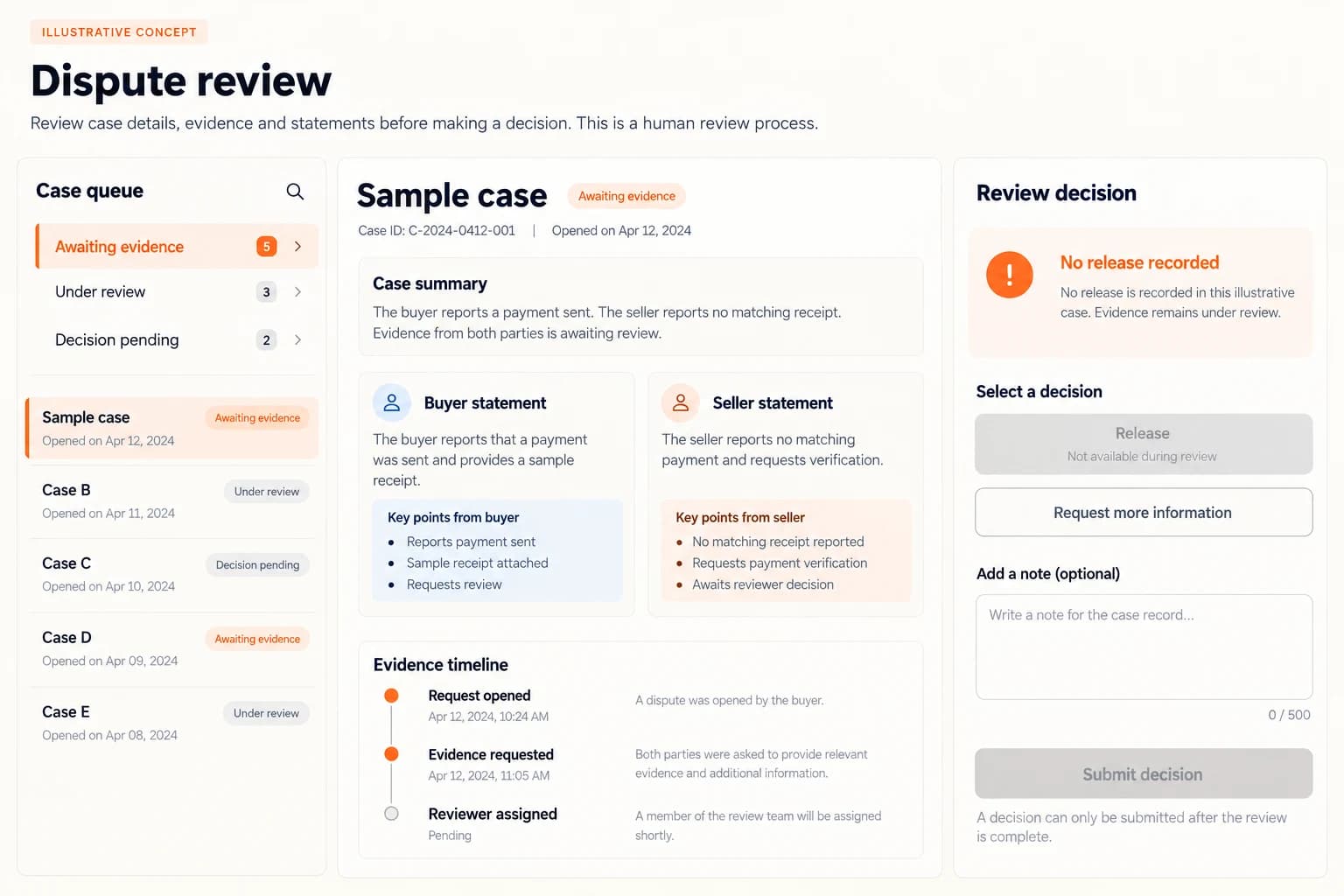
Original dispute-review concept. Cases, amounts and statuses are illustrative and do not establish real transactions, partner banks, UPI connectivity or regulatory status.
What to check in the walkthrough
People switch payment apps after one embarrassing failure at a shop counter. The app that wins is the one whose payments go through first time and whose support fixes the rare failure quickly.
Invest in transaction status, automatic reversals and support tools before adding new services to the home screen.
You start with a wallet product whose user app, agent and merchant tools and admin panel already work, and the demo lets you try sending money and paying by QR. It is rebranded and handed over with the unencrypted source.
Partner bank, UPI or card connections and bill aggregators depend on your licence and country. We plan them with you and connect them once the approvals are in place.
Agent networks let people turn cash into digital money and back. In markets where many still use cash, a wallet with good agent coverage can grow faster than one that only links to bank accounts.
FAQ
An everyday payments app in the style of PhonePe, letting users add money, send and request it, pay shops by QR code and cash out, with merchant and agent tools and an admin panel, under your brand.
The base product is a wallet. UPI needs a sponsor bank, an approved payment service provider arrangement and NPCI certification, so it is added once those are in place.
Almost certainly, or a licensed partner. Holding customer money is regulated as a prepaid instrument or e-money in most countries. Take legal advice before launch.
Login with biometrics and one-time codes, device binding, limits by verification level and monitoring of unusual transactions, with tools for your team to block accounts and reverse payments.
The user app, agent and merchant tools, ledger and admin panel, all unencrypted, so your engineers and auditors can review and run them.
Primary sources
Dated official documentation, standards, and research that support the factual claims on this page.
India’s rules for wallets that hold customer money.
How UPI works and who can connect to it.
International standards on anti-money laundering for payment providers.
How to read this page
Scope, cost and timeline figures are planning guidance until confirmed in a written proposal. Diagrams and screens are illustrations, not client deliverables, and source-code rights and handover follow the signed agreement. See the delivery process and the full disclaimer.
Next decision
Define outcomes, constraints, evidence, rights and handover before delivery begins.
Commercial rights, repositories, environments, documentation, acceptance and handover remain contract-defined.
